Zentyal End of Life (EOL) Dates and End of Support (EOS) Dates
Zentyal end of life (EOL) and end of support (EOS) dates: 7 Zentyal versions have reached EOL, including Zentyal 7 (EOL date: Feb 01, 2024) — no longer receiving security updates or patches. Zentyal 8 is the current supported release. Also see CentOS Stream EOSL dates for related end-of-life information.
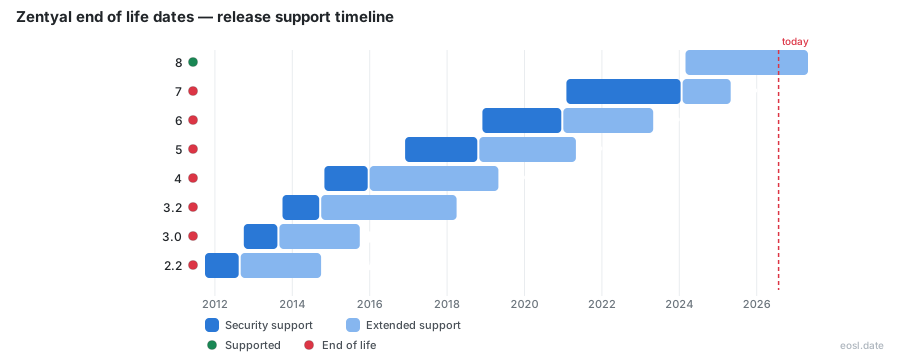
Currently Supported Zentyal Releases - Active EOS/EOSL Support (1)
| Release | Ubuntu Version | Released | Development Edition Support | Commercial Support |
|---|---|---|---|---|
| 8 | 24.04 | (2 years and 8 months ago) | Active | (in 5 months) |
Zentyal End of Life (EOL) Releases - No Longer Supported (7)
| Release | Ubuntu Version | Released | Development Edition Support | Commercial Support |
|---|---|---|---|---|
| 7 | 20.04 | (5 years and 9 months ago) | (2 years and 9 months ago) | (1 year and 6 months ago) |
| 6 | 18.04 | (7 years and 11 months ago) | (5 years and 10 months ago) | (3 years and 6 months ago) |
| 5 | 16.04 | (9 years and 11 months ago) | (8 years ago) | (5 years and 6 months ago) |
| 4 | 14.04 | (12 years ago) | (10 years and 10 months ago) | (7 years and 6 months ago) |
| 3.2 | 12.04 | (13 years and 1 month ago) | (12 years and 1 month ago) | (8 years and 7 months ago) |
| 3.0 | 12.04 | (14 years and 1 month ago) | (13 years and 2 months ago) | (11 years and 1 month ago) |
| 2.2 | 10.04 | (15 years and 1 month ago) | (14 years and 2 months ago) | (12 years and 1 month ago) |
If you run a Linux alternative to Windows Server, you need to know the Zentyal end of life schedule before a version quietly leaves its support window. Every release follows a fixed life cycle tied to Ubuntu, so you can plan your move months ahead instead of reacting to a security gap. This guide lays out the dates, the rules behind them and your options for each Zentyal Server edition.
Zentyal End of Life Dates by Version
Each major release of Zentyal Server is built on one Ubuntu Server LTS base and published with a fixed release date. Microsoft Active Directory interoperability is the main reason businesses choose it, and the table below shows how long every Windows Server replacement release stayed in service.
| Zentyal Server | Base Ubuntu | Release Date | Supported Until |
|---|---|---|---|
| 8.x | Ubuntu LTS 24.04 | 02/2024 | 04/2027 |
| 7.x | Ubuntu LTS 20.04 | 01/2021 | 04/2025 |
| 6.x | Ubuntu LTS 18.04 | 11/2018 | 04/2023 |
| 5.x | Ubuntu LTS 16.04 | 11/2016 | 04/2021 |
| 4.x | Ubuntu LTS 14.04 | 10/2014 | 04/2019 |
| 3.2 | Ubuntu LTS 12.04 | 09/2013 | 03/2018 |
Which Zentyal Server Versions Are Unsupported
Every row except 8.x is already unsupported for commercial customers, because the newest date passed in April 2025 when Zentyal 7 closed out its window. Anything older than that has been without security updates for even longer, so a server still running 6.x or 5.x is exposed today.
When Zentyal 8 Reaches the End
Zentyal 8 is the latest version and is covered until April 2027. With less than six months left as of October 2026, you should already be testing the successor rather than waiting for the final month.
Understanding the Zentyal Release Policy
The release policy is short but strict: Zentyal is always based on the newest Ubuntu Server LTS, so a major release arrives about every two years when a new Ubuntu LTS ships. Because the commercial branch is solely based on that stable base, the calendar of Ubuntu decides your calendar too.
Major Versions and Minor Versions
Major versions, such as 7.0 or 8.0, bring large changes to the code base. Minor versions, such as 7.1 or 8.1, appear between them and mostly add new features. Both sit inside the same support window as their major release, so a minor update never restarts the clock, and no extra support or new software licence comes with it.
How the Ubuntu LTS Cycle Sets the Pace
Because each new major release is released on top of a newer Ubuntu base, two generations overlap for a couple of years. That overlap is your migration window: the older line is still maintained while the newer one matures.
Official Support Until the End-of-Life Date
Zentyal gives each Commercial Edition 4.5 years of official support, counted from its release, and this commercial support is what separates a maintained server from one at the end of supported life. Editions published before Zentyal 3.2 received three years. After that period the version passes the end of its life cycle and the vendor stops maintaining it.
Technical Support and Security Updates
During the window, technical support covers all security issues, commercial help from engineers and the subscription services that come with your plan. Customers also receive service packs that collect stable features, fixes and security updates, so every support request reaches engineers who still maintain that Zentyal Server release and its software modules. Support entitlement depends on the version staying within its supported lifecycle, so an expired date ends the support, whatever you paid.
Best Effort After Expiration
When a subscription expires, the server drops its registered features and reverts to a basic Development Edition, and open tickets are closed as unsupported. Outside the product itself, Zentyal Support normally refers you to the relevant vendor and aims to help on a best effort basis only where reasonable efforts can solve a problem.
Development Edition Support Once a Version Is Unsupported
Only commercial editions receive vendor technical help, so the Development Edition lives by a different rule: only the latest version is maintained. When Zentyal 8 arrived, the Zentyal 7 development branch stopped receiving updates in February 2024, long before its commercial sibling.
That is why anyone on the Community Edition depends on community support through forums and the documentation, plus the bug management policy that governs how defects get triaged. The project is open source, so the code stays available even after the vendor stops caring for a branch.
Why the Development Edition Differs From the Commercial Edition
The two editions have different code bases, and Zentyal offers long-term support only on the commercial side. You cannot upgrade directly from the Development Edition to the Commercial Edition; you reinstall and restore your configuration backup.
Upgrade Path When a Version Reaches the End
New major releases change so much that in-place upgrades tend to cause trouble, so they are not automatic. Zentyal strongly recommends that you evaluate a fresh installation whenever you move between major versions, although it makes reasonable efforts to provide an upgrade path when a customer truly needs one.
- Export a configuration backup from the old server.
- Install the new release on a clean Ubuntu base and restore the backup.
- Check DNS, the firewall, Samba and Exchange-compatible mail before switching users.
- Retire the old machine once the network runs cleanly for a week.
Why a Fresh Installation Beats In-Place Upgrades
When a version is retiring, moving to a supported release is the best moment for a clean install: with fresh installations you avoid stale modules, leftover settings and half-migrated services, including your groupware and mail setup. It also lets an administrator review the configuration, including every software setting and Microsoft client rule, instead of carrying every old mistake into the next release. If you plan ahead, a fresh installation takes an afternoon, not a crisis weekend.
Perpetual Licence Rules for an Unsupported Version
A Lifetime or Perpetual Licence is one license model under two names, and it does not mean perpetual software maintenance. The perpetual licence keeps your usage rights, but routine software and security maintenance ends once the version it covers reaches the end of its life.
Does a Lifetime Licence Include Future Versions
No. Unless the purchase order says otherwise, the license applies to the purchased major version only, and later major version upgrades can be bought separately. A perpetual licence never extends a version past its end-of-support date. Technical help can also be purchased for a valid, supported Commercial Edition. For a business that planned around one purchase, this is the detail that most often surprises finance teams during a migration.
Support Levels While a Zentyal Version Is Supported Until Its Cutoff
These tiers only apply until a version reaches its support cutoff. Initial response is measured, not resolution: Standard means two business days, Priority means the next business day and Express means within four business hours. These service levels apply after you open a ticket in the support portal, where each request starts with a severity level, and severity decides which ticket is handled first.
Support Through a Local Partner
Zentyal works through an international network of partners and distributors, and many customers get support from one of them instead of the vendor. A partner can also plan a migration off a retiring release and handle configuration and infrastructure work, under separate terms, and may know your Microsoft environment better than the vendor does.
Whichever route you choose, check the table above first: the cheapest support plan buys nothing once your version is past its date, and moving to a supported release with active support is the only complete answer to Zentyal end of life.