MX Linux End of Life (EOL) Dates and End of Support (EOS) Dates
MX Linux end of life (EOL) and end of support (EOS) dates: 7 MX Linux versions have reached EOL, including MX Linux 21 (Wildflower) (EOL date: Jun 30, 2026) — no longer receiving security updates or patches. MX Linux 25.3 is the current supported release, with support through Jun 30, 2030 — 2 versions in active support. Also see Alpine Linux end of support life for related end-of-life information.
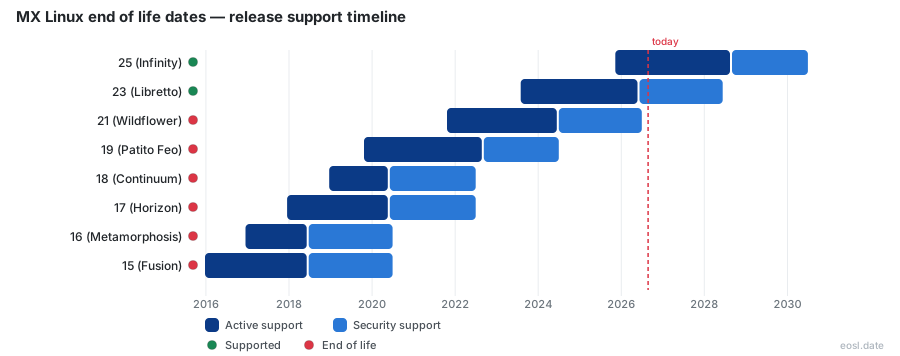
Currently Supported MX Linux Releases - Active EOS/EOSL Support (2)
MX Linux End of Life (EOL) Releases - No Longer Supported (7)
| Release | Released | Security Support | Active Support | Latest |
|---|---|---|---|---|
| 21 (Wildflower) | (5 years ago) | (4 months ago) | (2 years and 4 months ago) | 21.3 (3 years and 10 months ago) |
| 19 (Patito Feo) | (7 years ago) | (2 years and 4 months ago) | (4 years and 2 months ago) | 19.4 (5 years and 7 months ago) |
| 18 (Continuum) | (7 years and 10 months ago) | (4 years and 4 months ago) | (6 years and 5 months ago) | 18.3 (7 years and 5 months ago) |
| 17 (Horizon) | (8 years and 11 months ago) | (4 years and 4 months ago) | (6 years and 5 months ago) | 17.1 (8 years and 8 months ago) |
| 16 (Metamorphosis) | (9 years and 11 months ago) | (6 years and 4 months ago) | (8 years and 4 months ago) | 16.1 (9 years and 5 months ago) |
| 15 (Fusion) | (10 years and 10 months ago) | (6 years and 4 months ago) | (8 years and 4 months ago) | 15 (10 years and 10 months ago) |
| 14 (Symbiosis) | (12 years and 7 months ago) | (8 years and 5 months ago) | (10 years and 5 months ago) | 14.4 (11 years and 7 months ago) |
Your MX Linux end of life date depends on one thing: which version is installed. This Linux distribution follows Debian, so version 25 Infinity is supported into 2030, version 23 Libretto into 2028, and version 21 Wildflower is already finished. Here is each date, what it means for your operating system, and how to move on safely.
MX Linux End of Life Dates: Wildflower, Libretto and Infinity
Every MX Linux version inherits its lifespan from the Debian base underneath it. The table pulls dates from endoflife.date, the MX Linux project and Wikipedia, so you can see which MX Linux build still gets fixes.
| Version | Codename | Debian base | Released | Final fixes |
|---|---|---|---|---|
| 25 | Infinity | 13 "trixie" | 9 November 2025 | 30 June 2030 |
| 23 | Libretto | 12 "bookworm" | 31 July 2023 | 10 June 2028 |
| 21 | Wildflower | 11 "bullseye" | 21 October 2021 | Ended 30 June 2026 |
| 19 | Patito Feo | 10 "buster" | 22 October 2019 | Ended 30 June 2024 |
The latest release, 25.3, arrived on 20 September 2026 on top of Debian 13. Debian main support runs to 9 August 2028, and Debian long term support reaches 30 June 2030, which is the outer limit for any MX 25 machine running MX Linux.
The MX Linux team closed the book on the old Debian 11 line on 31 August 2026. Builds have stopped for it, and the archives may vanish at any time. Systems still on MX 19 or older have been past their final date for years, so treat every one of them as unmaintained.
How the MX Linux Release Cycle Works
MX Linux began in December 2013 as a joint effort between the antiX and MEPIS communities, and MX Linux still blends several moving parts. The MX Linux team admits the release cycle is hard to pin down because four sources change at different speeds: MX itself, antiX, Debian Stable and Xfce, which often waits two to three years between versions.
The result is a modified fixed-release model. You stay on one MX Linux line for years, while packagers continually backport newer applications into the repositories. Between big jumps you simply upgrade through normal updates, with no reinstallation.
As a Linux distribution built on Debian Stable, MX Linux inherits Debian's conservative rhythm. Each MX Linux image ships a long-term Linux kernel, and antiX supplies the live tools used on every MX Linux image. Owners of brand-new laptops can pick the AHS builds of MX Linux, which add a newer kernel and better performance on recent chips. That shared Debian base is also why a single date governs the whole line.
Major Release and Point Release Timing
A major release appears when Debian Stable changes, about every two years. A point release arrives in between as a refreshed ISO with bug fixes, a newer Linux kernel and updated firmware. The Libretto series got six of them, from 23.1 in October 2023 to 23.6 in April 2025. If you already run the older ISO, regular updates bring you to the same state, so a new ISO only matters for fresh installations of MX Linux.
Debian Stable Base and Snapshots
The distribution takes its ISO build system and live USB technology from antiX, then adds Debian packages managed through apt. Monthly snapshots bundle every upgrade and bug fix so a new installation does not start with a huge download. Because your software comes from the Debian and MX Linux repositories, a Debian date controls your MX Linux date.
EOL Status of MX 23 and MX 21
The MX 23 line of MX Linux, built on Debian 12, is the version people ask about most. Sources look contradictory at first: endoflife.date shows the active phase ended on 10 June 2026, with fixes running to 10 June 2028, while InvGate's database lists June 2026 as the anticipated end. Both fit together. June 2026 marks the end of active work by the MX Linux team, and June 2028 is when the Debian base stops patching.
The MX Linux team confirms this: 32-bit users can stay on Libretto, which keeps Debian long-term updates until June 2028, and the team is still building packages for it. InvGate also pairs its dates with specs, performance benchmarks, user reviews and a security rating, and it checks compatibility, which helps IT teams that track hardware in asset management software.
The MX 21 line is different. Its patch date passed on 30 June 2026, and the builds stopped two months later. MX Linux users are encouraged to migrate to the current MX Linux version.
What End of Support Means for Security Updates
When a line hits end of support, your machine keeps running but stops receiving patches. New vulnerabilities in the kernel, browser and system libraries stay open, and nobody fixes them. Encryption such as LUKS protects your files at rest, and UEFI Secure Boot works with signed Debian kernels, yet neither closes a hole in outdated software.
InvGate scores the MX Linux Libretto line well because it depends on Debian Stable and on regular fixes from both sources. That rating only holds while those fixes keep flowing, so do not rely on it after the final date.
An unpatched MX Linux machine is the real risk. A Linux system on a shared network with known holes is an easy target, and MX Linux gives you no warning when the Debian base stops patching. Run lsb_release -a in a terminal to see which Debian codename your MX Linux install sits on, then compare it with the table above.
Active Support Versus Security Support
Active support means the MX developers still build packages, ship fixes and refresh the ISO. Security support means only the Debian security team patches the base. That line sits in the second stage today. You get critical fixes, but few new features, and MX Linux specific tools may lag behind.
Planning Your Support Lifecycle and Move to MX 25
Treat the support lifecycle as a calendar entry rather than a surprise: add the final date for your system, then plan the move at least six months ahead. A jump to Infinity is best done as a clean installation, because the base changes from Debian 12 to Debian 13. Back up your MX Linux home folder, download the ISO, write it to a USB stick and test the live session first, then install. MX Tools such as MX Package Installer and MX Boot Repair help afterwards, and the package installer also handles Flatpak apps. MX Tools also include MX Boot Options, which edits kernel boot parameters from a menu. Version 25.1 even brought back dual init, with systemd and sysVinit on one ISO.
Check Your Hardware First
The system requirements are modest, and MX Linux stays lightweight on older hardware, so performance is good even on modest machines. Plan for 512 MB of RAM as the floor (1 GB for 64-bit, 2 GB or more for comfortable multitasking), 5 GB of disk space, a 1024x768 display and a USB port. The MX 23 line runs on x86 hardware in 32-bit and 64-bit form, but the newest version targets 64-bit only, so an older machine should stay on Libretto until 2028. Both UEFI and legacy boot work, and the UEFI Manager tool added in 23.6 helps you manage firmware settings. Stability is the main selling point, with the Linux kernel and the desktop kept deliberately conservative. These limits decide which line a machine can reach before its final date.
Pick a Desktop Edition and Derivative
This desktop-oriented system ships with Xfce by default, plus KDE and Fluxbox editions. Xfce keeps memory use low, KDE gives you the richest desktop, and Fluxbox suits the very oldest hardware. The Advanced Hardware Support builds, known as AHS, use a newer Liquorix kernel and fresher Mesa for recent hardware, so pick AHS if a new laptop misbehaves with the standard kernel. You can try any edition from a live USB with persistence before you commit. All of them share one date, because it comes from the Debian base.
Xfce is the default desktop in MX Linux and the slowest-moving part of the stack. The KDE edition of MX Linux uses Plasma, and the Fluxbox edition keeps MX Linux usable on the oldest machines. Every Xfce, KDE and Fluxbox edition, AHS builds included, receives the same fixes, so your desktop choice never changes the Xfce, KDE or Fluxbox date you plan around.
Derivatives include a Raspberry Pi respin and several community respins, though those follow their own schedules, so check each respin's dates before relying on it. If you get stuck, the documentation, the forum and the wider community are active, and the developers publish weekly news. MX Linux is a free and open-source operating system and an open source community effort, so the MX Linux documentation and user manual cover every edition, and every Xfce, KDE or Fluxbox desktop gets the same help, and every Raspberry Pi owner can ask the same forum for advice.