Microsoft Windows Server Core End of Life (EOL) Dates and End of Support (EOS) Dates
Microsoft Windows Server Core end of life (EOL) and end of support (EOS) dates: 12 Microsoft Windows Server Core versions have reached EOL, including Microsoft Windows Server Core 20H2 (EOL date: Aug 09, 2022) — no longer receiving security updates or patches. Microsoft Windows Server Core 10.0.26100 LTS is the current supported release, with support through Oct 10, 2034 — 4 versions in active support. Also see Microsoft .NET Framework end of life dates for related end-of-life information.
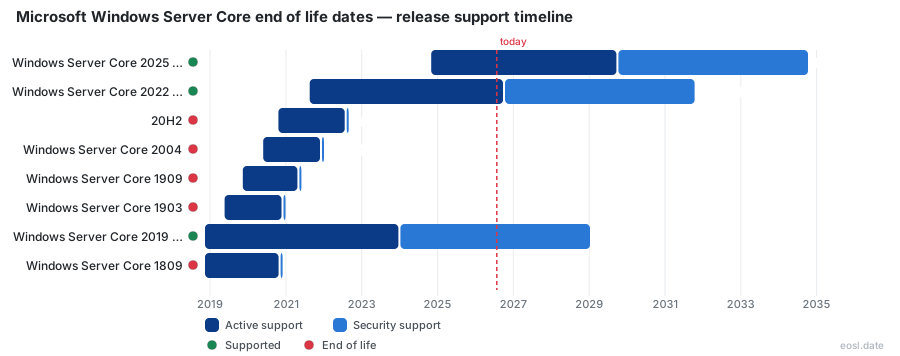
Currently Supported Microsoft Windows Server Core Releases - Active EOS/EOSL Support (4)
| Release | Released | Security Support | Active Support | Latest | LTS |
|---|---|---|---|---|---|
| Windows Server Core 2025 (LTSC) | (2 years ago) | (in 7 years and 10 months) | (in 2 years and 10 months) | 10.0.26100 | LTS |
| Windows Server Core 2022 (LTSC) | (5 years and 2 months ago) | (in 4 years and 11 months) | (4 weeks and 2 days ago) | 10.0.20348 | LTS |
| Windows Server Core 2019 (LTSC) | (7 years and 11 months ago) | (in 2 years and 1 month) | (2 years and 10 months ago) | 10.0.17763 | LTS |
| Windows Server Core 2016 (LTSC) | (10 years ago) | (in 2 months) | (4 years and 10 months ago) | 10.0.14393 | LTS |
Microsoft Windows Server Core End of Life (EOL) Releases - No Longer Supported (12)
| Release | Released | Security Support | Active Support | Latest | LTS |
|---|---|---|---|---|---|
| 20H2 | (6 years ago) | (4 years and 3 months ago) | (4 years and 3 months ago) | 10.0.19042 | - |
| Windows Server Core 2004 | (6 years and 5 months ago) | (4 years and 10 months ago) | (4 years and 10 months ago) | 10.0.19041 | - |
| Windows Server Core 1909 | (7 years ago) | (5 years and 6 months ago) | (5 years and 6 months ago) | 10.0.18363 | - |
| Windows Server Core 1903 | (7 years and 5 months ago) | (5 years and 11 months ago) | (5 years and 11 months ago) | 10.0.18362 | - |
| Windows Server Core 1809 | (7 years and 11 months ago) | (6 years ago) | (6 years ago) | 10.0.17763 | - |
| Windows Server Core 1803 | (8 years and 6 months ago) | (7 years ago) | (7 years ago) | 10.0.17134 | - |
| Windows Server Core 1709 | (9 years ago) | (7 years and 7 months ago) | (7 years and 7 months ago) | 10.0.16299 | - |
| Windows Server Core 1607 | (10 years ago) | (4 years and 10 months ago) | (4 years and 10 months ago) | 10.0.14393 | - |
| 2012-R2 (LTSC) | (12 years and 11 months ago) | (3 years and 1 month ago) | (8 years and 1 month ago) | 6.3.9600 | LTS |
| Windows Server Core 2012 (LTSC) | (14 years ago) | (3 years and 1 month ago) | (8 years and 1 month ago) | 6.2.9200 | LTS |
| 2008-R2-SP1 (LTSC) | (15 years and 8 months ago) | (6 years and 9 months ago) | (11 years and 9 months ago) | 6.1.7601 | LTS |
| 2008-SP2 (LTSC) | (17 years and 6 months ago) | (6 years and 9 months ago) | (11 years and 9 months ago) | 6.0.6003 | LTS |
Your Microsoft Windows Server Core End of Life date depends on the release you run, and the next deadline is closer than many teams assume. Server Core is the minimal way to install this Microsoft operating system, so it follows the same support clock as its parent release. Below you will find each end date and what changes when support stops.
Microsoft Windows Server Core End of Life Dates by Version
Each Server Core release inherits the dates of the Windows Server version it ships with. This release information shows the availability date, mainstream end date and extended end date for every release still on the calendar, so you can see which ones are supported today.
| Release | Availability date | Mainstream end date | Extended end date |
|---|---|---|---|
| 2025 | 2024-11-01 | 2029-11-13 | 2034-11-14 |
| 2022 | 2021-08-18 | 2026-10-13 | 2031-10-14 |
| 2019 | 2018-11-13 | 2024-01-09 | 2029-01-09 |
| 2016 | 2016-08-02 | 2022-01-11 | 2027-01-12 |
Anything older than these four releases is already out of support, which is why Windows Server end of life planning mostly concerns the oldest rows first. Microsoft keeps the update history for each build on its public pages.
Windows Server 2025, Windows Server 2022 and Windows Server 2019 Support Dates
Windows Server 2025 is the current long-term release, and its latest build is 10.0.26100. Windows Server 2022 left active support on 13 October 2026, so it now receives security support only until 2031. Windows Server 2019, also known as version 1809, has been in that same limited phase since January 2024 and stays supported for security fixes until January 2029.
Windows Server 2016 and Windows Server 2012 R2 End of Life
Windows Server 2016 (version 1607, build 14393) reaches the end of its extended window on 12 January 2027, which leaves only weeks to move workloads. Windows Server 2012 and Windows Server 2012 R2 reached their original deadline in October 2023, and their paid extension also closed in October 2026. Older releases such as Windows Server 2008, Windows Server 2003 and Windows Server 2000 have no supported release left to patch.
Mainstream Support and Extended Support Before Windows Server EOL
The word EOL confuses people because Microsoft lists two dates. Mainstream support covers regular security updates, non-security updates and new features. Extended support keeps only critical security updates flowing, with no new features and no design changes requested by customers, so your technical support options narrow. Both phases last 5 years for a long-term release.
The practical answer is simple: the end of support for a product is the extended end date. The mainstream date only marks the move into the second phase. Without a paid support plan you cannot open cases once the final date passes, and no further security updates ship from that point.
Fixed Lifecycle Policy for Windows Server Support Ending
Long-term releases follow the fixed lifecycle policy. Each one gets 5 years of mainstream support plus 5 years of extended support, 10 years in total, and a new version arrives every two to three years. That stable cadence is why the support ending dates are known long in advance, and it is the lifecycle most server teams rely on. The policy treats the extended end date as end-of-life for the product.
Modern Lifecycle Policy for the Annual Channel
The modern lifecycle policy applies to the Annual Channel (AC). Releases appear every 12 months and receive 18 months of mainstream support plus 6 months of extended support, 24 months overall. Each AC release delivers a feature sooner than the long-term track does. Version 23H2 was the first release, and no newer AC release has followed it, and 23H2 stopped receiving fixes in October 2025.
Servicing Channels in the Windows Server Lifecycle
Microsoft historically offered three servicing channels, also called release channels, and each one ends on its own schedule. The Semi-Annual Channel (SAC) ended with version 20H2 in August 2022, and every SAC release had received 18 months of support. Server Core, the minimal installation with a smaller attack surface and lower disc footprint, shares its parent release's end dates. So does the Windows container base image it provides for virtualization hosts on Azure, which stays secure only while that release still receives updates.
Long-Term Servicing Channel
The Long-Term Servicing Channel brings security and quality fixes but no new features, and it runs for the full decade of support shown in the table above.
Extended Security Updates and the Windows Server 2008 EOL
When a release passes its extended end date, you can still buy Extended Security Updates (ESU) for up to three years. This is a last resort for legacy systems: ESU delivers only critical and important fixes. The Windows Server 2008 ESU program followed that path and stopped in January 2024, while the 2012 family ESU ended in October 2026. After that final date a release is fully end of life and unpatched.
Upgrade Plan Before Windows Server End of Support
Start with an audit of your environment so you know which devices still run an old release, then plan your upgrade path using Microsoft's Windows Server upgrades overview. Every IT administrator should move the 2016 workloads before 12 January 2027, use the lifecycle calendar and the API Microsoft publishes to track dates, and apply any out-of-band fixes in the meantime. Moving to Windows Server 2025 gives you the longest remaining support window.