Microsoft Visual Studio End of Life (EOL) Dates and End of Support (EOS) Dates
Microsoft Visual Studio end of life (EOL) and end of support (EOS) dates: 49 Microsoft Visual Studio versions have reached EOL, including Microsoft Visual Studio 2026 - 18.10 (EOL date: Oct 13, 2026) — no longer receiving security updates or patches. Microsoft Visual Studio 2017 - 15.9 reaches its End of Support date on Apr 13, 2027 — plan your upgrade path now. Microsoft Visual Studio 18.12.0 is the current supported release — 4 versions in active support. Also see Microsoft .NET lifecycle dates for related end-of-life information.
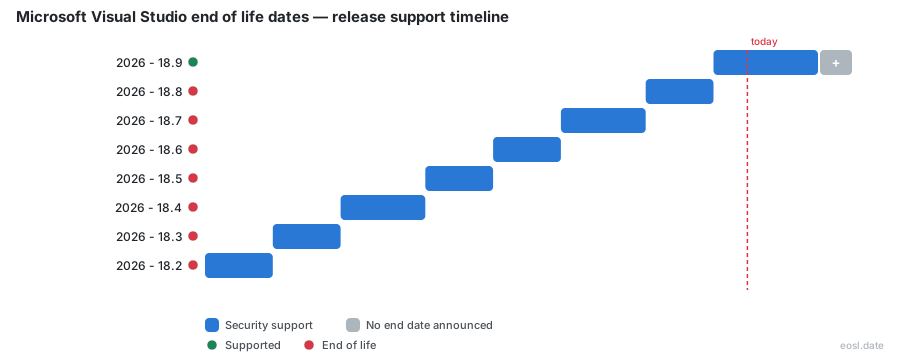
Currently Supported Microsoft Visual Studio Releases - Active EOS/EOSL Support (4)
| Release | Released | Active Support | Latest | LTS |
|---|---|---|---|---|
| 2026 - 18.12 | (1 week ago) | Active | 18.12.0 (1 week ago) | - |
| 2026 - 18.11 (LTSC) | (1 month and 4 days ago) | (in 1 year and 11 months) | 18.11.4 (1 week ago) | LTS |
| 2022 - 17.14 (LTSC) | (1 year and 6 months ago) | (in 5 years and 1 month) | 17.14.45 (1 week ago) | LTS |
| 2019 - 16.11 | (5 years and 3 months ago) | (in 2 years and 4 months) | 16.11.63 (1 week ago) | - |
Microsoft Visual Studio Releases Nearing End of Life - Support Ending Soon (1)
| Release | Released | Active Support | Latest | LTS |
|---|---|---|---|---|
| 2017 - 15.9 | (8 years ago) | (in 4 months) | 15.9.85 (1 week ago) | - |
Microsoft Visual Studio End of Life (EOL) Releases - No Longer Supported (49)
| Release | Released | Active Support | Latest | LTS |
|---|---|---|---|---|
| 2026 - 18.10 | (2 months ago) | (1 month and 4 days ago) | 18.10.4 (1 month and 4 days ago) | - |
| 2026 - 18.9 | (3 months ago) | (2 months ago) | 18.9.3 (2 months ago) | - |
| 2026 - 18.8 | (4 months ago) | (3 months ago) | 18.8.3 (3 months ago) | - |
| 2026 - 18.7 | (5 months ago) | (4 months ago) | 18.7.4 (4 months ago) | - |
| 2026 - 18.6 | (6 months ago) | (5 months ago) | 18.6.3 (5 months ago) | - |
| 2026 - 18.5 | (7 months ago) | (6 months ago) | 18.5.3 (6 months ago) | - |
| 2026 - 18.4 | (8 months ago) | (7 months ago) | 18.4.4 (7 months ago) | - |
| 2026 - 18.3 | (9 months ago) | (8 months ago) | 18.3.3 (8 months ago) | - |
| 2026 - 18.2 | (10 months ago) | (9 months ago) | 18.2.2 (9 months ago) | - |
| 2026 - 18.1 | (11 months ago) | (10 months ago) | 18.1.1 (11 months ago) | - |
| 2026 - 18.0 | (1 year ago) | (11 months ago) | 18.0.2 (11 months ago) | - |
| 2022 - 17.13 | (1 year and 9 months ago) | (1 year and 6 months ago) | 17.13.7 (1 year and 6 months ago) | - |
| 2022 - 17.12 (LTSC) | (2 years ago) | (4 months ago) | 17.12.22 (4 months ago) | LTS |
| 2022 - 17.11 | (2 years and 3 months ago) | (2 years ago) | 17.11.6 (2 years ago) | - |
| 2022 - 17.10 (LTSC) | (2 years and 5 months ago) | (10 months ago) | 17.10.21 (1 year ago) | LTS |
| 2022 - 17.9 | (2 years and 9 months ago) | (2 years and 5 months ago) | 17.9.7 (2 years and 6 months ago) | - |
| 2022 - 17.8 (LTSC) | (3 years ago) | (1 year and 4 months ago) | 17.8.23 (1 year and 4 months ago) | LTS |
| 2022 - 17.7 | (3 years and 3 months ago) | (3 years ago) | 17.7.7 (3 years ago) | - |
| 2022 - 17.6 (LTSC) | (3 years and 6 months ago) | (1 year and 10 months ago) | 17.6.22 (1 year and 10 months ago) | LTS |
| 2022 - 17.5 | (3 years and 8 months ago) | (3 years and 6 months ago) | 17.5.5 (3 years and 6 months ago) | - |
| 2022 - 17.4 (LTSC) | (4 years ago) | (2 years and 4 months ago) | 17.4.21 (2 years and 4 months ago) | LTS |
| 2022 - 17.3 | (4 years and 3 months ago) | (4 years ago) | 17.3.7 (4 years ago) | - |
| 2022 - 17.2 (LTSC) | (4 years and 6 months ago) | (2 years and 10 months ago) | 17.2.23 (2 years and 10 months ago) | LTS |
| 2022 - 17.1 | (4 years and 9 months ago) | (4 years and 6 months ago) | 17.1.7 (4 years and 6 months ago) | - |
| 2022 - 17.0 (LTSC) | (5 years ago) | (3 years and 4 months ago) | 17.0.23 (3 years and 4 months ago) | LTS |
| 2019 - 16.10 | (5 years and 5 months ago) | (5 years and 3 months ago) | 16.10.4 (5 years and 3 months ago) | - |
| 2019 - 16.9 | (5 years and 8 months ago) | (4 years and 1 month ago) | 16.9.26 (4 years and 1 month ago) | - |
| 2019 - 16.8 | (6 years ago) | (5 years and 8 months ago) | 16.8.7 (5 years and 8 months ago) | - |
| 2019 - 16.7 | (6 years and 3 months ago) | (4 years and 7 months ago) | 16.7.28 (4 years and 6 months ago) | - |
| 2019 - 16.6 | (6 years and 5 months ago) | (6 years and 3 months ago) | 16.6.5 (6 years and 3 months ago) | - |
| 2019 - 16.5 | (6 years and 8 months ago) | (6 years and 5 months ago) | 16.5.5 (6 years and 6 months ago) | - |
| 2019 - 16.4 | (6 years and 11 months ago) | (5 years and 1 month ago) | 16.4.27 (5 years and 1 month ago) | - |
| 2019 - 16.3 | (7 years and 1 month ago) | (6 years and 11 months ago) | 16.3.10 (6 years and 11 months ago) | - |
| 2019 - 16.2 | (7 years and 3 months ago) | (7 years and 1 month ago) | 16.2.5 (7 years and 2 months ago) | - |
| 2019 - 16.1 | (7 years and 5 months ago) | (7 years and 3 months ago) | 16.1.6 (7 years and 4 months ago) | - |
| 2019 - 16.0 | (7 years and 7 months ago) | (5 years and 10 months ago) | 16.0.22 (5 years and 10 months ago) | - |
| 2017 - 15.8 | (8 years and 3 months ago) | (8 years ago) | 15.8.9 (8 years ago) | - |
| 2017 - 15.7 | (8 years and 6 months ago) | (8 years and 3 months ago) | 15.7.6 (8 years and 3 months ago) | - |
| 2017 - 15.6 | (8 years and 8 months ago) | (8 years and 6 months ago) | 15.6.7 (8 years and 6 months ago) | - |
| 2017 - 15.5 | (8 years and 11 months ago) | (8 years and 8 months ago) | 15.5.7 (8 years and 8 months ago) | - |
| 2017 - 15.4 | (9 years and 1 month ago) | (8 years and 11 months ago) | 15.4.5 (8 years and 11 months ago) | - |
| 2017 - 15.3 | (9 years and 3 months ago) | (9 years and 1 month ago) | 15.3.5 (9 years and 1 month ago) | - |
| 2017 - 15.2 | (9 years and 6 months ago) | (9 years and 3 months ago) | 15.2.6 (9 years and 4 months ago) | - |
| 2017 - 15.1 | (9 years and 7 months ago) | (9 years and 6 months ago) | 15.1.2 (9 years and 7 months ago) | - |
| 2017 - 15.0 | (9 years and 8 months ago) | (6 years and 10 months ago) | 15.0.28 (6 years and 11 months ago) | - |
| 2015 - 14.0 | (11 years and 3 months ago) | (1 year and 1 month ago) | Update 3 + KB3165756 (10 years and 2 months ago) | - |
| 2013 - 12.0 | (12 years and 10 months ago) | (2 years and 7 months ago) | Update 5 (11 years and 3 months ago) | - |
| 2012 - 11.0 | (14 years ago) | (3 years and 10 months ago) | Update 4 (13 years ago) | - |
| 2010 - 10.0 | (16 years and 4 months ago) | (6 years and 4 months ago) | Service Pack 1 (15 years and 2 months ago) | - |
Your Microsoft Visual Studio end of life date decides when your IDE stops receiving security fixes, so developers who track the Visual Studio lifecycle can upgrade before end of support arrives. This guide gives the cutoff for each release and shows how every channel is covered.
Microsoft Visual Studio End of Life Dates by Version
Microsoft publishes a separate end of life schedule for each major release, and the support dates below are the ones that matter for planning. Every version moves through mainstream support and then an extended phase, and the copy you installed years ago may already sit past its cutoff on Windows.
| Release | Policy | Feature phase ends | Final cutoff |
|---|---|---|---|
| Visual Studio 2017 (version 15.9) | Fixed | April 2022 | April 2027 |
| Visual Studio 2019 (version 16.11) | Fixed | April 2024 | April 2029 |
| Visual Studio 2022 (version 17.14) | Fixed | January 2027 | January 2032 |
| Visual Studio 2026 (version 18.x) | Modern | One year after each release | Second year, security fixes only |
Check the release history for your exact build, because the version you run, not just the year, sets your date, and the same release history shows which monthly build is newest.
Visual Studio 2017 and 2019 End of Life Dates
Both older releases are out of support for new features. That 2017 release remains covered by security-only fixes until April 2027, and Visual Studio 2019 version 16.11 reaches its final cutoff in April 2029. After those dates no fixes ship at all, and the product is out of support for good.
Visual Studio 2022 End of Life Dates
Visual Studio 2022 version 17.14 on the Current Channel is supported until January 2032, which makes it the long-lived choice. Earlier minor builds of Visual Studio 2022 ended sooner, and administrators should install the latest build of 17.14. The visual studio 2022 feature phase closes in January 2027, after which only extended support applies.
Team Foundation Server and Azure DevOps Server End of Life
The server products follow their own clocks. Team Foundation Server was rebranded as Azure DevOps Server in 2019, and old Team Foundation Server 2013 and Visual Studio 2012 installations are long past their end-of-life dates, so retire them first.
Visual Studio Product Lifecycle and the Fixed Lifecycle Policy
The Visual Studio product lifecycle is the schedule that says how long Microsoft ships fixes for a version. Releases through 2022 follow the fixed lifecycle policy of 10 years, and the newest release follows a shorter model. Reading the support lifecycle tells you how much runway your current version has, and the Support Lifecycle Database on the Microsoft site holds the exact calendar for every product lifecycle entry.
Mainstream Support and Extended Support Phases
In the first 5 years, a version receives feature updates, platform updates, security updates, functionality fixes and quality improvements. The following 5 years deliver only patches, so schedule your move well before that second phase closes.
Modern Lifecycle Policy for Visual Studio 2026
This release is the first on a modern model that gives 2 years of coverage per annual release. Year one delivers features and fixes, while year two is limited to security on the long-term channel. A new annual release lands each November as an in-place update, a faster release rhythm than before. Under it, every 2 years you should expect to be moving to a newer version, and Microsoft recommends the latest build at all times.
Visual Studio Support by Update Channel
Your channel, as much as your version, determines how long you stay covered. The Current Channel (called the Stable Channel from the 2026 release) backs only the newest minor version, while the Preview Channel, named the Insiders Channel in the latest version, ships early builds as-is. Updates reach you through the Visual Studio Installer, and each update channel notifies you only when a component you installed is affected.
- Stable and Current channels: technical support from Microsoft for the newest build.
- Preview and Insiders channels: feedback through the Developer Community, with no guaranteed servicing.
- Cumulative servicing updates: tied to the last monthly feature updates, so patching every version stays predictable.
Long-Term Servicing Channel (LTSC) Cutoff Dates
The Long-Term Servicing Channel lets an organization stay put while administrators test the next release. Each LTSC for Visual Studio 2022 was kept secure for 18 months: the 17.12 LTSC ended in July 2026 and the 17.10 LTSC closed in January 2026. The 2026 LTSC baseline began in November 2025 and is covered until November 2027, so an LTSC version gives a full year of overlap. Pick an LTSC only if your network cannot absorb frequent change, because LTSC builds never require a minor version jump. Every LTSC entry in the table is a separate version with its own date, and each LTSC end date is the one to put on your calendar.
Community Edition and Build Tools Support
The Community edition is supported only on the newest build, and you must install the latest release within 180 days to keep using it. The Enterprise edition, Professional edition and Build Tools add LTSC options, which suits larger shops and Visual Studio subscribers who manage many machines. Any enterprise team can pick the channel that matches its pace.
What Happens After Visual Studio Reaches End of Support
Nothing breaks on the day support ends, but your risk grows each month. Without security updates you accept known security risks in the debugger, compilers and code editor, and Microsoft no longer offers technical support for the old build. Bug fixes stop too, so the only path forward is to upgrade. Report problems on the newest build through the Developer Community instead, because an out of support version gets no triage there.
Components Outside Visual Studio Servicing
Not everything bundled with the product shares its schedule. The Visual C++ Redistributable, the MSVC toolset, the .NET Framework and Tools for Office Runtime each have their own policy, so a supported version of the IDE can still run an out of support C++ runtime. Check .NET separately, review the C++ toolset used by your builds, and confirm the Azure tooling you rely on. The Visual C++ Redistributable ships on a per-version basis for Windows, while .NET follows its own .NET servicing calendar. A component that is out of support stays out of support, whatever the host does, and the same is true of C++ libraries.
Check Your Installs Against the Visual Studio Lifecycle
Start with Help, then About, to read your version, then open the Visual Studio Installer for pending updates. For a network of machines running this software, list your Visual Studio 2022 installations and flag every outdated build. The Administrator Guide explains deployment, the Microsoft Catalog hosts downloads, and the release notes and system requirements pages help you confirm the latest version fits your hardware. Bookmark the download page for the newest Microsoft build, and re-check the version of each machine after every monthly update.