Azure Database for MySQL End of Life (EOL) Dates and End of Support (EOS) Dates
Azure Database for MySQL end of life (EOL) and end of support (EOS) dates: 5.7 has reached EOL — EOL date: Sep 30, 2026. This version no longer receives security updates, patches, or support. Azure Database for MySQL 8.0 reaches its End of Support date on Jan 31, 2027 — plan your upgrade path now. Azure Database for MySQL 8.4 is the current supported release. Also see Microsoft .NET Framework lifecycle dates for related end-of-life information.
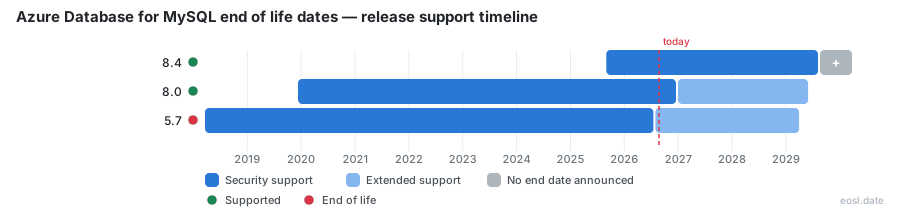
Currently Supported Azure Database for MySQL Releases - Active EOS/EOSL Support (1)
| Release | Released | Standard Support | Extended Support |
|---|---|---|---|
| 8.4 | (1 year and 2 months ago) | Active | Active |
Azure Database for MySQL Releases Nearing End of Life - Support Ending Soon (1)
| Release | Released | Standard Support | Extended Support |
|---|---|---|---|
| 8.0 | (6 years and 11 months ago) | (in 2 months) | (in 2 years and 6 months) |
Azure Database for MySQL End of Life (EOL) Releases - No Longer Supported (1)
| Release | Released | Standard Support | Extended Support |
|---|---|---|---|
| 5.7 | (8 years and 8 months ago) | (1 month and 3 weeks ago) | (in 2 years and 4 months) |
Running a Azure Database for MySQL end of life check now saves you from surprise bills later: MySQL 5.7 has already left standard support, and MySQL 8.0 follows on January 31, 2027. This guide covers the end of support dates Microsoft publishes for Azure, what happens to your database afterward, why extended support exists, and how to upgrade without losing security updates.
Azure Database for MySQL End of Life Dates by Version
Microsoft follows the version support policy set by the MySQL community for every managed MySQL database. A major version stays supported on Azure until its standard support ends, and the community retirement date decides when the clock starts. Oracle sets that date, so the lifecycle of every Azure database server trails it by months. The Azure Database for MySQL version support policy publishes each date in one table, and Azure MySQL customers should treat that page as the source of truth.
| Version | Community retirement date | Azure standard support ends | Extended Support runs |
|---|---|---|---|
| MySQL 5.7 | October 31, 2023 | September 30, 2026 | October 1, 2026 to March 31, 2029 |
| MySQL 8.0 | April 30, 2026 | January 31, 2027 | February 1, 2027 to May 31, 2029 |
MySQL 5.7 and MySQL 8.0 Standard Support Dates
Azure began supporting MySQL 5.7 on March 20, 2018 and MySQL 8.0 on December 11, 2019. The end of standard support for 5.7 passed on September 30, 2026, so servers on that release are now in the paid timeline. Servers on 8.0 have until the end of January 2027, so every MySQL database still on 5.7 is the priority. Your portal banner may quote a different cutoff, so confirm against the official policy page before you plan.
MySQL 8.4 and Innovation Release Versions
MySQL 8.4 is generally available and is the safest target today. The Innovation Release track, currently at 9.5 in public preview, never goes GA, deletes each server after 30 days and gets no monthly minor version updates, so keep production off it.
What Happens After End of Standard Support
Once the end of standard support date arrives, servers on that version are automatically enrolled in Extended Support. Billing is per vCore per hour, and a one-month grace period applies before the first charge. Charges apply to servers in a succeeded state only; a stopped state server isn't billed. Check the pricing page for current rates, and treat it as a recurring cost line until you leave legacy MySQL versions behind. Extended Support is a bridge, not a destination: it keeps your Azure MySQL database patched for critical issues while you schedule the upgrade, and every month spent on it is a month of paying for a version you intend to leave.
Why Microsoft Offers a Paid Safety Net
Oracle's end of life for a release leaves large production fleets stranded, and a major upgrade takes months of testing. Extended Support buys that MySQL database team the time and limits security risk while teams plan, rather than forcing a rushed cutover. For an Azure MySQL database server holding customer data, the extra months also let you rehearse the upgrade twice instead of once.
What Extended Support Includes
- Extended Support delivers critical security updates and essential maintenance for up to three years.
- Extended Support starts automatically the day after standard support ends, with no sign-up step.
- Priority on service availability, reliability and vulnerability fixes for the managed MySQL database.
- No guarantee of new features or minor version upgrades.
- Exit by upgrading to a version still in standard support, which stops extended support charges.
Retired Version Limits After the Deprecation Date
When the extended period ends, the version is retired and the retirement rules bite. Azure can no longer patch the MySQL database engine for bugs or vulnerabilities, and the uptime SLA covers only service issues, not engine defects. You can't create new servers on a retired version, though point-in-time recovery and a read replica for existing servers still work. If a serious engine flaw threatens the service, Azure may stop your compute node until you upgrade; automatic backup protects your data meanwhile. Azure keeps performing minor version patching on the host and OS.
Older Azure Database for MySQL Single Server instances were an earlier deployment model, and the Single Server deprecation ended it in September 2024. Migrate those to Flexible Server first, since only Flexible Server supports a built-in major version upgrade. Check authentication before you move to 8.4, because caching_sha2_password is the default authentication plugin there, while mysql_native_password stays enabled on every version. A MariaDB source follows the same migration route off its own retired platform.
Major Version Upgrade Options Before the End of Support
Plan the upgrade path in order: 5.7 to 8.0, then 8.0 to 8.4. A major version upgrade cannot skip a release, and every upgrade carries some downtime, so schedule each upgrade as its own change. Start every major version upgrade from the Azure portal, which runs validation checks first. Newer MySQL releases bring a transactional data dictionary, window functions and common table expressions, but they also bring compatibility issues such as removed features and changed defaults. Azure Database Migration Service can handle side-by-side moves. Whichever route you pick, finish the upgrade well before the standard support deadline so the Extended Support meter never starts for your MySQL database.
In-Place Upgrade on Flexible Server
- Upgrade rehearsal: restore a copy to a test server in a nonproduction environment and run your application against the new MySQL version.
- Take an on-demand backup of the database, because a rollback means restoring that backup to a new server.
- Run the in-place upgrade on production during a quiet window and expect brief downtime.
- Verify the server reports the new MySQL version, then confirm Extended Support billing stops for that Azure server.
Minimal Downtime with a Read Replica
Create a read replica of the database on the newer MySQL version, let replication catch up, then fail your application over during a planned cutover. This gives minimal downtime and an easy way to validate before switching.
Dump and Restore Migration
Export with mysqldump, then import into a new database server on the target version. It is slower than the other MySQL routes, but it works across any source, including servers outside Azure, and the old MySQL database stays untouched until you cut over.