Microsoft .NET Framework End of Life (EOL) Dates and End of Support (EOS) Dates
Microsoft .NET Framework end of life (EOL) and end of support (EOS) dates: 6 Microsoft .NET Framework versions have reached EOL, including Microsoft .NET Framework 4.6.1 (EOL date: Apr 26, 2022) — no longer receiving security updates or patches. Microsoft .NET Framework 4.8.1 is the current supported release — 7 versions in active support. Also see Microsoft Windows Server end of support life for related end-of-life information.
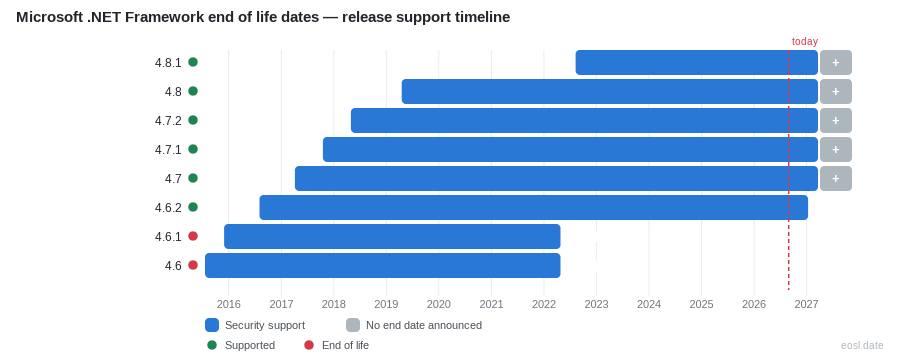
Currently Supported Microsoft .NET Framework Releases - Active EOS/EOSL Support (7)
| Release | Released | Support Status |
|---|---|---|
| 4.8.1 | (4 years and 3 months ago) | Active |
| 4.8 | (7 years and 7 months ago) | Active |
| 4.7.2 | (8 years and 6 months ago) | Active |
| 4.7.1 | (9 years and 1 month ago) | Active |
| 4.7 | (9 years and 7 months ago) | Active |
| 4.6.2 | (10 years and 3 months ago) | (in 1 month and 3 weeks) |
| 3.5 SP1 | (18 years and 11 months ago) | (in 2 years and 1 month) |
Microsoft .NET Framework End of Life (EOL) Releases - No Longer Supported (6)
| Release | Released | Support Status |
|---|---|---|
| 4.6.1 | (10 years and 11 months ago) | (4 years and 6 months ago) |
| 4.6 | (11 years and 3 months ago) | (4 years and 6 months ago) |
| 4.5.2 | (12 years and 6 months ago) | (4 years and 6 months ago) |
| 4.5.1 | (13 years and 1 month ago) | (10 years and 10 months ago) |
| 4.5 | (14 years and 3 months ago) | (10 years and 10 months ago) |
| 4.0 | (16 years and 7 months ago) | (10 years and 10 months ago) |
If you run Windows software, you need to know when Microsoft .NET Framework end of life arrives for the version your applications depend on. Microsoft retires each release on its own date, and the table below shows which end of life dates have passed and which are coming. Nothing about the framework itself is going away overnight: it ships inside Windows, so the real question is whether your version still gets security fixes.
Support Dates by .NET Framework Version
Microsoft publishes support dates for every .NET Framework release. Treat the table as a quick reference and a timeline for planning. Each version has a start date and, for retired versions, an end date. The newest releases carry no end date because they follow the lifecycle of the Windows version they are installed on.
| Framework release | Start date | End date |
|---|---|---|
| .NET Framework 4.8.1 | Aug 9, 2022 | Follows Windows |
| .NET Framework 4.8 | Apr 18, 2019 | Follows Windows |
| .NET Framework 4.6.2 | Aug 2, 2016 | Jan 12, 2027 |
| .NET Framework 4.6.1 | Nov 30, 2015 | Apr 26, 2022 |
| .NET Framework 4.5.2 | May 5, 2014 | Apr 26, 2022 |
| .NET Framework 4.5.1 and 4.0 | 2013 and 2010 | Jan 12, 2016 |
| .NET Framework 3.5 SP1 | Nov 19, 2007 | Jan 9, 2029 |
.NET Framework 4.8 and 4.6.2 Dates
The .NET Framework 4.8 line is the last major release and is supported as long as the host Windows version is. .NET Framework 4.6.2 is the urgent one: its support ends on January 12, 2027, only a few weeks after today.
.NET Framework 3.5 SP1 Dates
The service pack release of 3.5 is a standalone product from Windows 10 version 1809 and Windows Server 2019 onward, so it keeps support until January 2029. On older systems it shares the operating system's schedule.
How the .NET Framework Lifecycle Policy Works
Microsoft applies its component lifecycle policy to the framework, which in practice behaves like a fixed policy: a version keeps support until Microsoft announces a fixed retirement date. Because the framework class library is a component of Windows, the operating system usually decides what you get, whether that is Windows 10 or Windows Server.
Component vs Fixed Rules for Each Release
Under a fixed lifecycle policy, the retirement date is set once and can be checked in advance. Under the component rule, a release is covered for as long as the Windows edition it ships with. Check which rule covers your release before you plan.
Why .NET Framework End of Support Hit Versions 4.5.2 to 4.6.1
Versions 4.5.2, 4.6 and 4.6.1 were retired on April 26, 2022, a clear case of end of support (also written EOS) driven by security. Microsoft chose to retire them because they were signed with outdated certificates, and the change means you no longer receive technical assistance for them.
SHA-1 Signing and .NET Framework 4.5.2
Those releases used SHA-1 certificates, an algorithm no longer considered secure. Microsoft urges customers to move to SHA-2, which newer releases already use. If you still retire machines slowly, treat any 4.5.2 install as a priority.
What Happens After EOL: Security Risks of Unsupported Software
After EOL, a version receives no patches. Microsoft stops shipping fixes for new vulnerabilities, and any vulnerability found later stays open. Unsupported versions therefore carry growing security exposure, which matters for enterprise compliance and for any developers shipping on top of the platform.
Missing Security Updates
Recent examples show what an expired release costs you: the flaws below were closed on versions still covered by Microsoft and left open on the rest. CVE-2025-55315 was an HTTP request smuggling flaw in ASP.NET Core with a 9.9 severity score, and CVE-2026-32178 was an SMTP header injection bug, a remote code execution class issue also fixed for the framework. CVE-2026-26171 was a denial-of-service flaw, and CVE-2025-24070 allowed an identity session refresh as another user. Each CVE in a runtime dependency is fixed only on versions that still receive security updates.
.NET 8 and .NET 9 End of Life on the Same Day
Modern .NET 8 and .NET 9 both reach end on November 10, 2026, a Patch Tuesday, so teams on either track face one deadline. This is separate from the framework dates above, but it affects the same people.
Checking Your Microsoft .NET Framework End of Life Status
You can find which version a machine runs in seconds, then compare it to the table above. A quick check beats guessing when you have many devices.
Registry Scanning for Your Installed Version
The registry is the most reliable source. Read the Release value under the registry key HKEY_LOCAL_MACHINE\SOFTWARE\Microsoft\NET Framework Setup\NDP\v4\Full, then map that number to a version. Asset tools use this same scanning approach to build an audit report showing every installed version and which ones need action.
Support Policy Options: Upgrade, Migrate or Isolate
Your support policy options depend on how much time you have. The simplest path is to upgrade to the latest version of the framework, 4.8.1, which keeps your code unchanged. A larger migration to modern .NET (formerly .NET Core) is worthwhile when you want to migrate to a cross-platform, open source runtime. The .NET runtime in .NET 8 is supported until November 2026, so aim at a newer supported release such as .NET 10 and keep the runtime current.
Modern .NET alternates long-term support and standard-term support releases, and extended support from third parties exists for versions past their date. Pick a supported path that fits your risk tolerance, and write down the cutoff in your software inventory.