SteamOS End of Life (EOL) Dates and End of Support (EOS) Dates
SteamOS end of life (EOL) and end of support (EOS) dates: 2 SteamOS versions have reached EOL, including SteamOS 2 (EOL date: Jun 30, 2019) — no longer receiving security updates or patches. SteamOS 3 is the current supported release. Also see antiX Linux lifecycle dates for related end-of-life information.
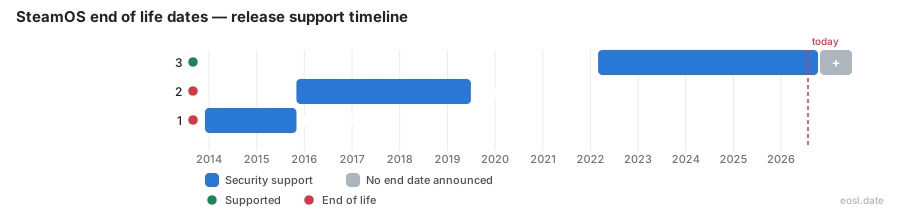
Currently Supported SteamOS Releases - Active EOS/EOSL Support (1)
| Release | Released | Support |
|---|---|---|
| 3 | (4 years and 8 months ago) | Active |
SteamOS End of Life (EOL) Releases - No Longer Supported (2)
| Release | Released | Support |
|---|---|---|
| 2 | (11 years ago) | (7 years and 4 months ago) |
| 1 | (12 years and 11 months ago) | (11 years ago) |
Looking for SteamOS end of life dates? Valve's Linux operating system for gaming has already retired its first two releases, while the current Arch-based line has no announced cutoff. SteamOS 3 still gets regular update builds for the Steam Deck, the Steam Machine and licensed handhelds, so support on current machines continues. This guide lays out each version's lifecycle, the devices Valve covers on the desktop and in the living room, and what to do if your PC falls outside that support.
SteamOS End of Life: Support Status for Every Version
Valve treats SteamOS as a rolling Linux gaming product instead of a boxed software release with a fixed retirement date, so "end of life" means something different for each generation. The first two versions are finished products that no longer receive fixes. The newest line is the one Valve actively maintains, and as of this writing the company has named no date for its end of life. The table summarizes each series, and the sections below explain the details.
| Version | Base system | First release | Support status |
|---|---|---|---|
| 1.0 | Debian | December 2013 | Ended November 2015 |
| 2.0 | Debian | November 2015 | Ended June 2019 |
| 3.0 and newer | Arch Linux | March 2022 | Active, with a new build in October 2026 |
SteamOS 1.0: Debian-Based Beta Retired in 2015
Valve unveiled SteamOS in September 2013 to bring Steam into the living room. The first beta, SteamOS 1.0, arrived that December on top of Debian, and Valve, which hoped to grow Linux gaming, told customers unfamiliar with Linux to wait for the next version. It worked mainly as a client for streaming games from a Windows PC across your home network, because the Steam client and its storefront offered few native titles. Support for SteamOS 1 ended on November 2, 2015, the week Valve moved on to a newer build. Nobody should run it today: it gets no patches and cannot launch current games.
SteamOS 2.0: Last Steam Machine Release, Support Ended 2019
The follow-up, SteamOS 2.0, kept the Debian foundation and shipped alongside the first Steam Machine consoles and the Steam Controller. It recommended a 64-bit Intel or AMD processor, 4 GB of RAM, a 200 GB drive, a Radeon 8500 or newer card or an Nvidia Fermi card, a USB port and UEFI boot. An October 2015 update let its built-in browser play Netflix and other DRM protected video, and Valve's repositories offered a custom setup path for smaller disks. Game engines kept leaning on proprietary Windows APIs, though, and Steam Machine sales faded. Valve ended support for SteamOS 2 on June 30, 2019, and no maintained system has replaced it on that hardware since.
SteamOS 3.0 and Newer: Still Receiving Updates
Valve announced the Steam Deck in July 2021 and, with it, a rebuilt SteamOS 3.0 on Arch Linux with the KDE Plasma desktop. This generation is the only line still maintained, and developers and owners alike get fresh builds every few weeks. The change made Linux gaming practical for a mainstream audience, because Proton ran many Windows games out of the box. The most recent latest release is version 3.9.5, published on October 23, 2026 with a matching beta. Because SteamOS 3 adds software features in place instead of waiting for a "SteamOS 4," Valve has no reason to announce a hard stop for the series, and Microsoft-style lifecycle tables rarely list one. Treat any claimed 3.x cutoff date as speculation until Valve says otherwise.
Official Support for Third-Party Handheld Hardware
Beginning in 2025, Valve widened official support beyond its own products. Hardware labelled "SteamOS Compatible" is a third-party device that Valve tests directly, and the list so far centers on every handheld PC that matches the Steam Deck's design. Early examples included the Asus ROG Ally and the Lenovo Legion Go. Version 3.8 then added the Xbox Ally and the Legion Go 2, and Valve's own Steam Frame headset also runs it. If your handheld is not on Valve's list, you can still install the system, but you will not receive official fixes for its quirks, and many models from smaller brands fall in that group. A console-style gaming experience is the goal across all of these. Because these handhelds normally ship with Windows, the approved list also tells buyers which swaps to a Linux-based system are safe, and it keeps growing with each build.
Steam Deck Hardware and Architecture
The Steam Deck remains the reference machine for SteamOS, and Valve tunes the Linux kernel, graphics stack and controller firmware around it. Wikipedia lists x86-64 and ARM64 as the supported platforms, with the Steam Frame covering the ARM64 side. Because the Steam Deck sold in volume, Valve's engineers test every build against popular games on it first, which is why Steam Deck owners usually see new features before anyone else. Each revision shares the same read-only system image, which is why one build can target every model. Valve also keeps improving battery life on the handheld, and the hardware gets its own firmware updates for the controller, which now show progress on the splash screen. Valve delivers all of this through the same stable channel, so owners rarely need to touch the underlying system. That steady care is why no end of life has been announced for the Steam Deck, which stays inside Valve's active support window.
Installation on a Desktop PC
You can now put SteamOS on a regular PC. Starting with the June 2026 build, version 3.8.10 added beta installation for desktop hardware ahead of the Steam Machine launch. The process is simple: write the installer image to a bootable USB drive, start the PC from it and follow the prompts. It wipes the target drive, and the first-run setup then walks you through Wi-Fi, display, controller pairing and signing in to your Steam account. Valve officially supports AMD graphics, with Intel covered in beta, while an NVIDIA card is unsupported for now, although some community members have it working. GPU support matters here, because the open AMD stack ships inside the image. Pick another Linux distribution instead if you need NVIDIA's proprietary driver today, and expect your games library to follow you through Steam either way. A spare PC running SteamOS becomes a dedicated gaming console that can still handle ordinary software and a full Linux environment.
SteamOS 3.8 Update: What Changed in the Release
The SteamOS 3.8 release was Valve's biggest platform expansion yet. Valve's blog post described initial support for the Steam Machine, an updated Arch system base and a refreshed graphics driver, with fixes for crashes in games such as Starfield. Steam Deck owners gained better hibernation and memory power-down, plus Bluetooth microphone and wake support in gaming mode. Desktop users received HDR, VRR frame pacing and improved scaling. As usual, the notes closed with numerous stability and security updates. A preview channel carries each build before the stable channel does, and SteamOS 3.8 followed that same path. Valve also reported performance fixes for per-app settings, and the updated rendering stack brought further performance gains. Every point release since has kept the focus on performance and stability, which is the best evidence that this series is far from retirement. In lifecycle terms, a build this large signals active support, not a wind-down.
Game Mode and Desktop Mode
SteamOS ships two interfaces. Game Mode is the console-style front end built on Steam's Big Picture UI, and Desktop Mode loads a Linux desktop built on KDE Plasma for browsing, installing software and ordinary work. Updates reach both through the same read-only image, so a finished update never leaves one mode behind. Add apps through Flatpak in Desktop Mode, since the image is protected and the Pacman package manager is not meant for permanent changes. Valve may replace anything you install with Pacman during the next system update, so keep tweaks in Flatpak or your home folder. Both modes share one maintained system image, so neither is left behind when support for an older build ends.
Arch Linux Rolling Release: How Each Update Works
Valve moved from Debian to Arch Linux because Debian's slower cycle suited servers better than a fast-moving gaming platform. Arch uses a rolling release model: there is no "version 4" waiting to replace version 3, only a steady stream of builds. That model explains why the SteamOS 3 series has no end of life in sight. Each update swaps in a complete system image, so a failed upgrade is far less likely to break your install, and Valve hides the maintenance work that Arch users normally handle themselves.
The core operating system is free and open source, while the Steam client stays proprietary. Valve's Proton layer, built into Steam, translates Windows graphics calls so thousands of games run on Linux without a native port. Proton works remarkably well on Linux, but it is not magic: some titles run poorly, need troubleshooting or refuse to launch, and multiplayer games with certain anti-cheat systems are the most common casualties. Compatibility keeps improving, so a game that fails today may work after the next update.
For Linux fans the shift matters beyond one product. A Linux system that ships on a mass-market handheld gets kernel and graphics attention from Valve's engineers, and many of those fixes flow back into the wider Linux ecosystem that every other distribution shares. Linux gaming also grows because players no longer need to assemble their own Linux setup to play Windows games, and they can try new software without leaving the console-style front end. Those shared fixes are part of why Valve's maintenance commitment has outlasted its earlier products. Developers can also test their titles on the same system the Steam Deck uses, and that feedback loop is a large part of why Valve keeps investing in the platform and the Windows compatibility work that supports it. That ongoing investment is another sign that Valve plans no end of life for SteamOS 3.
What to Do When Operating System Support Ends
If you still run a retired build of the operating system, you have three realistic choices. First, check which version you have, usually on the System page of Settings. Then follow one of these paths:
- Reinstall a current SteamOS 3 image if your PC meets the hardware rules below.
- Move to another Linux distribution that still receives security patches, and treat it as a fresh Linux install.
- Switch to Windows if your software or anti-cheat needs demand it.
Whichever route you take, back up your games and saves first, because any reinstall wipes the drive. Customers who bought a Steam Machine from the 2015 era will find that the old boxes use standard PC parts, so they can usually run a newer system. Users who depend on Windows-only professional software should test it before committing, since SteamOS suits gaming better than running every program, and the operating system will not run every Windows-only title.
Compatible Hardware Checklist
Before you upgrade an old PC, run through this list. Hardware that fails any item can still run another distribution, just not Valve's image with official help.
- Graphics: an AMD GPU is officially supported, Intel is in beta, and NVIDIA is not supported.
- Games: check community compatibility reports for the Windows titles you play most.
- Software: confirm your launchers and tools have Linux or Proton equivalents.
- Device type: a Valve-made or officially listed handheld gets the smoothest ride.
- Storage: the installer erases the drive, so use a spare one.