antiX Linux End of Life (EOL) Dates and End of Support (EOS) Dates
antiX Linux end of life (EOL) and end of support (EOS) dates: 5 antiX Linux versions have reached EOL, including antiX Linux 21 (Grup Yorum) (EOL date: Aug 31, 2026) — no longer receiving security updates or patches. antiX Linux 26 is the current supported release, with support through Jul 30, 2030 — 2 versions in active support. Also see Red Hat Enterprise Linux end of support dates for related end-of-life information.
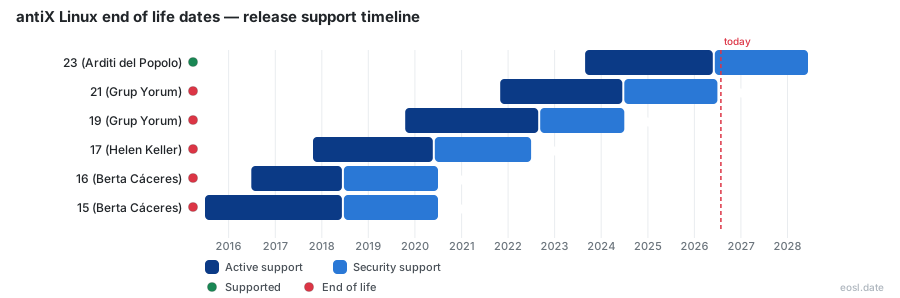
Currently Supported antiX Linux Releases - Active EOS/EOSL Support (2)
antiX Linux End of Life (EOL) Releases - No Longer Supported (5)
| Release | Released | Security Support | Active Support | Latest |
|---|---|---|---|---|
| 21 (Grup Yorum) | (5 years ago) | (2 months ago) | (2 years and 2 months ago) | 22 (4 years ago) |
| 19 (Grup Yorum) | (7 years ago) | (2 years and 4 months ago) | (4 years and 1 month ago) | 19.5 (4 years and 9 months ago) |
| 17 (Helen Keller) | (9 years ago) | (4 years and 4 months ago) | (6 years and 4 months ago) | 17.4.1 (7 years and 7 months ago) |
| 16 (Berta Cáceres) | (10 years and 4 months ago) | (6 years and 4 months ago) | (8 years and 4 months ago) | 16.3 (8 years and 10 months ago) |
| 15 (Berta Cáceres) | (11 years and 4 months ago) | (6 years and 4 months ago) | (8 years and 4 months ago) | 15 (11 years and 4 months ago) |
Running an older computer on a lightweight Linux distribution only stays safe while updates keep arriving, so knowing the antiX Linux End of Life schedule matters before you install or keep using any version. This guide lists when each antiX build stops receiving fixes, explains why those dates follow Debian, and shows what to do when your Linux operating system runs out of support.
antiX Linux End of Life Dates by Release
antiX is a Debian-based Linux distribution, and it follows Debian's rhythm: a new major version roughly every two years, with about two years of active work followed by about two more of security-only fixes. The table below shows the dates tracked by community lifecycle trackers as of late October 2026. Check it against the build you run with cat /etc/os-release in a terminal.
| Release | Released | Active support ends | Security support ends |
|---|---|---|---|
| 26 (Stephen Kapos) | 21 Mar 2026 | 09 Aug 2028 | 30 Jul 2030 |
| 23 (Arditi del Popolo) | 28 Aug 2023 | 11 Jul 2026 | 30 Jun 2028 |
| 21 (Grup Yorum) | 31 Oct 2021 | 14 Aug 2024 | 31 Aug 2026 |
| 19 (Grup Yorum) | 17 Oct 2019 | 10 Sep 2022 | 30 Jun 2024 |
| 17 (Helen Keller) | 24 Oct 2017 | 05 Jun 2020 | 30 Jun 2022 |
Only the newest release, 26, is fully inside its active window today. Version 23 has already left active work, and 21 has now lost security fixes too, so any machine still on 21 or older runs Linux software that no longer gets patches.
Active Support and Security Support Windows
Active support means the project still ships new builds, bug fixes and refreshed images. The narrower stage covers only security patches for a limited set of packages. Once both end, even critical security updates stop, and the version is considered dead. The newest entry in the table, 26, is the latest release and the one to pick for a fresh Linux install on any computer.
The same table shows how a window can shift. Version 23 reached 23.2 in October 2024, which refreshed its images, yet the base still expires with its Debian parent. The supported release you choose therefore decides how many years you get before the next move.
What End of Support Means for antiX Updates
When people ask about end of support, they usually want to know how long their current ISO will keep receiving fixes from the repositories. A forum thread from 2014 asked the same question about version 13.2, and the answer from a longtime user was blunt: as long as the Debian base it tracks is supported. That rule still holds for this Linux distribution. antiX adds its own packages, but nearly everything else comes straight from Debian's repos through apt, the same apt tool you use for every install.
The practical consequences are simple. After the cutoff, the developers stop building new packages for that Linux base, the Debian security team stops patching it, and your kernel and browser stay frozen at known vulnerable versions. Pointing the machine at Debian testing or unstable can keep packages flowing, but you then trade predictability for breakage risk, so it suits tinkerers rather than a machine you rely on.
Debian Stable and Long Term Support Explained
The default setup tracks Debian stable. When a new stable version arrives, the previous one becomes old stable and keeps receiving only security fixes for a while longer. Debian's long term support effort then stretches that window for a limited package set, which is why antiX release dates sit a few years after the Debian release they track. This open source arrangement is run by volunteers, so dates can move slightly.
Choosing an Alternative When Support Ends
You have three realistic paths. First, move within antiX Linux to the newest version, which is free and keeps your files. Second, move to MX Linux, which shares antiX's lineage with MEPIS, the older Debian-based system that antiX once replaced, and is the more polished Linux option for a newer machine. A reviewer comparing the two concluded that antiX is the better pick only for very low-end hardware, because MX Linux ships a full desktop out of the box. Third, test a fresh image from a live USB before you commit; the same MEPIS heritage means the tools feel familiar.
Whichever path you take, back up your home folder first, check that your older computers still meet the minimum for the target image, and run a clean install if the jump spans more than one major version. A package manager upgrade across several versions is possible but far more fragile on old hardware with little free space. Treat it as a planned weekend task rather than something to fix after an exploit.
antiX Support Across Editions and Kernels
Lifecycle dates apply to the whole family, but the four downloads differ in size and purpose, and that affects how you handle antiX support in practice. Every antiX Linux image comes in 32-bit and 64-bit builds of similar size.
- antiX-full is about 1.9 GB and the right download for typical desktop use, with four window managers and two kernels.
- antiX-base is about 1.2 GB, aimed at a computer with less than 1 or 2 GB of memory, and a good starting point for a custom build.
- antiX-core is roughly 640 MB with no graphical interface but with wireless software.
- antiX-net is about 250 MB, also without a graphical interface, and handles wired connections only.
The full edition fits comfortably in a 10 GB partition and leaves room for extra apps, and 2 GB of RAM is plenty for it. Since release 23.2 it carries a Legacy 5.10 kernel for old machines and a Modern 6.1 kernel for newer ones. The legacy build is also what keeps pre-2006 chips usable: antiX supports 32-bit non-PAE processors, so a machine that cannot run a PAE kernel still boots. Check which build matches your processor before you assume a Linux machine is out of date, since the kernel choice changes how long that hardware stays useful.
The desktop is another point of difference. Instead of a heavy desktop environment, antiX pairs a window manager with a file manager: IceWM is the default, with Fluxbox and JWM as lighter choices, and the combination is what the project calls antiX Magic. Linux users add software through the Package Installer and Synaptic, and the live session keeps the image fast on a stick, while IceWM stays responsive on tiny amounts of memory. Switching window manager never changes the support dates, because those depend only on the base.
Lightweight and Systemd-Free Init Choices
This Linux distribution is lightweight and systemd-free by design, a rare combination among any mainstream Linux distribution. Earlier versions offered runit and SysVinit as separate ISO files; release 26 merges them into one image and adds dinit, S6-RC and S6-66, so you pick an init system at boot. elogind is absent from newer builds as well. Because the init choice lives in one ISO now, a single image covers every option, and the support clock is the same for all of them.