Pop!_OS End of Life (EOL) Dates and End of Support (EOS) Dates
Pop!_OS end of life (EOL) and end of support (EOS) dates: 9 Pop!_OS versions have reached EOL, including Pop!_OS 21.10 (EOL date: Jul 24, 2022) — no longer receiving security updates or patches. Pop!_OS 24.04 (LTS) LTS is the current supported release, with support through May 31, 2029 — 2 versions in active support. Also see antiX Linux end of support dates for related end-of-life information.
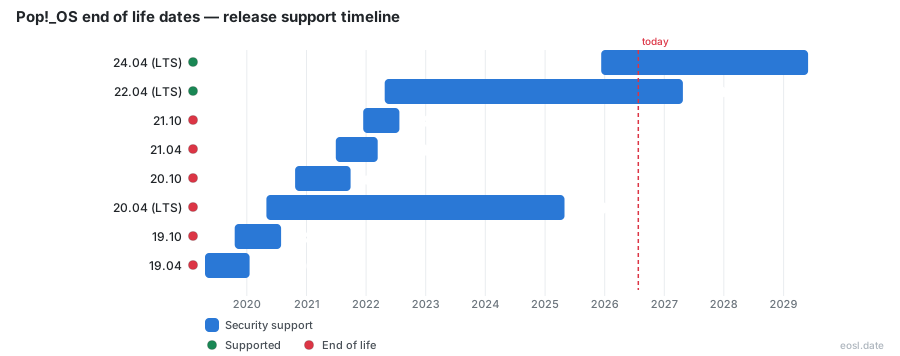
Currently Supported Pop!_OS Releases - Active EOS/EOSL Support (2)
| Release | Released | General Support | LTS |
|---|---|---|---|
| 24.04 (LTS) | (10 months ago) | (in 2 years and 6 months) | LTS |
| 22.04 (LTS) | (4 years and 6 months ago) | (in 5 months) | LTS |
Pop!_OS End of Life (EOL) Releases - No Longer Supported (9)
| Release | Released | General Support | LTS |
|---|---|---|---|
| 21.10 | (4 years and 10 months ago) | (4 years and 3 months ago) | - |
| 21.04 | (5 years and 4 months ago) | (4 years and 7 months ago) | - |
| 20.10 | (6 years ago) | (5 years and 1 month ago) | - |
| 20.04 (LTS) | (6 years and 6 months ago) | (1 year and 6 months ago) | LTS |
| 19.10 | (7 years ago) | (6 years and 3 months ago) | - |
| 19.04 | (7 years and 6 months ago) | (6 years and 9 months ago) | - |
| 18.10 | (8 years ago) | (7 years and 3 months ago) | - |
| 18.04 (LTS) | (8 years and 6 months ago) | (3 years and 6 months ago) | LTS |
| 17.10 | (9 years ago) | (8 years and 3 months ago) | - |
If you run Linux on a System76 laptop or a home-built computer, Pop!_OS end of life dates decide when your patches stop arriving. Pop!_OS is a free, open source Linux distribution built on Ubuntu, the most widely used Linux base, and every Pop!_OS version has a fixed support window. This guide lists the final date for each Pop OS build, explains the policy behind it, and shows how to move to a newer build before support ends.
Pop!_OS End of Life Dates by Release
Pop!_OS follows the Ubuntu lifecycle: a new Linux build, based on the matching Ubuntu release, every six months in April and October, with a long-term support (LTS) edition every two years in April of even-numbered years. Each LTS gets five years of coverage, while an interim Pop!_OS version is supported only until three months after the following one ships. The release schedule in the table shows where each build stands as of October 2026.
| Release | Support model | Released | General support ends |
|---|---|---|---|
| 24.04 | Five-year | 11 Dec 2025 | 31 May 2029 |
| 22.04 | Five-year | 25 Apr 2022 | 25 Apr 2027 |
| 21.10 | Interim | 14 Dec 2021 | 24 Jul 2022 (ended) |
| 21.04 | Interim | 29 Jun 2021 | 13 Mar 2022 (ended) |
| 20.10 | Interim | 23 Oct 2020 | 28 Sep 2021 (ended) |
| 20.04 | Five-year | 30 Apr 2020 | 30 Apr 2025 (ended) |
| 18.04 | Five-year | 30 Apr 2018 | 30 Apr 2023 (ended) |
Because the Pop!_OS lifecycle mirrors the Ubuntu calendar, you can predict the next date yourself: an even-year April starts a new five-year clock, and the Ubuntu base underneath tells you which Linux packages you will receive until then.
Pop!_OS 24.04 LTS Support Schedule
Pop!_OS 24.04 is the current LTS and the one to install today. Its coverage runs until 31 May 2029, and it is the first build where the COSMIC desktop is a standalone project rather than a set of GNOME extensions. System76 maintains the download for most PCs, and the same Linux LTS ships on every System76 computer. Pick it if you want the longest runway without touching your Linux install again.
Pop!_OS 22.04 End of Support Date
This build stops receiving security patches on 25 April 2027. Until then it still gets fixes from the Ubuntu base and from System76, so nothing breaks overnight, but staying put after that date leaves your Linux system without patched packages. Moving early gives you time to test your software and let routine updates keep flowing.
Older Pop!_OS Releases Already Past End-of-Life
Pop OS 20.04 stopped on 30 April 2025, and 18.04 stopped on 30 April 2023. Every non-LTS version, including 21.04 and 21.10, is finished too. An install on one of these builds no longer receives patched software from the Ubuntu repositories, so the advice from System76 and the Linux community is the same: reinstall onto a supported LTS.
Pop!_OS Release Policy and Lifecycle
The Pop!_OS release policy is simple: it tracks Ubuntu. Each Pop!_OS LTS shares its base with the matching Ubuntu LTS, so Ubuntu security notices flow into Pop!_OS, and System76 layers its own repositories on top for drivers, power profiles and Nvidia GPU support. System76, the American Linux computer maker, develops the distribution, hosts the source code on GitHub, and lets any developer read, modify or rebuild it.
The release history has one notable gap. After 22.04, System76 announced it was skipping 22.10 so its engineers could focus on COSMIC, a desktop environment written in Rust. Early Pop!_OS builds shipped the GNOME desktop with custom extensions, but System76 hit limits with GNOME and chose to build its own Wayland-only desktop environment instead. For the Linux kernel and hardware support underneath, Pop!_OS still relies on Ubuntu, which is why the Ubuntu calendar controls the dates above.
- Pop!_OS is maintained primarily by System76, not by the wider Linux community.
- Ubuntu supplies the package base, and Pop!_OS adds its own tuning on top, much like other Ubuntu derivatives in the Linux world.
- Both the Ubuntu and Pop!_OS calendars are published, so any Linux admin can plan a year ahead and watch for new updates.
Upgrade Pop!_OS Before Support Ends
When you apply updates on the older LTS, an upgrade notification appears, and the OS Upgrade and Recovery page offers the new LTS. Both methods below take that system to 24.04 and can run for up to an hour, depending on download speed and hardware. If you would rather stay put for now, the same page lets you dismiss the prompt.
Upgrade Versus Fresh Installation
A fresh installation is recommended for any Pop!_OS release older than 22.04. Complications are likelier when you jump more than one version at a time, run a build that already passed its final date, or depend on many third-party software sources. The move removes your PPAs, so reinstall anything that came from them. Note that the Refresh feature is different: it reinstalls the operating system from the recovery partition and erases user-installed apps, though Flatpak applications can stay.
Create a Backup First
Before you leave the older build ahead of its 25 April 2027 final date, make a backup, even though the move leaves your files in place. Copy documents, projects and configuration to external storage, and confirm that your current install is fully up to date. If you enabled full disk encryption during setup, keep your passphrase handy, because you will need it after the reboot.
Switch Releases with the Pop!_Shop
- Open the Pop!_Shop and install every pending update.
- Go to Settings, then OS Upgrade and Recovery.
- Click Start Upgrade, then choose Restart and Install.
Terminal Upgrade Commands for Pop!_OS
Open a terminal with Super + T and run sudo apt update, then sudo apt full-upgrade. Next, refresh the recovery partition, and start the jump with pop-upgrade release upgrade. Answer Y or press ENTER at each prompt, then reboot when asked.
What Changes in the Pop!_OS COSMIC Desktop
Once support for the older build ends, the way forward is the COSMIC desktop, so it helps to know what changes. The 24.04 LTS move replaces GNOME with the COSMIC desktop, so expect new system applications: COSMIC Files, COSMIC Settings, COSMIC Store, COSMIC Terminal and COSMIC Text Editor. Windows tile with the mouse or keyboard, and you can add applets to the dock or panel from Settings. Pinned dock apps need to be pinned again, and software installed from PPAs or local DEB files has to be reinstalled. Hybrid graphics also improve battery life on a laptop, since apps that request the discrete GPU run on the right chip automatically.
Because COSMIC is built in Rust for memory safety, System76 treats it as the long-term desktop environment for Pop!_OS, which is another reason to leave the older build before its final date.