Proxmox VE End of Life (EOL) Dates and End of Support (EOS) Dates
Proxmox VE end of life (EOL) and end of support (EOS) dates: 8 Proxmox VE versions have reached EOL, including Proxmox VE 8 (EOL date: Aug 31, 2026) — no longer receiving security updates or patches. Proxmox VE 9.2 is the current supported release. Also see FortiOS EOSL dates for related end-of-life information.
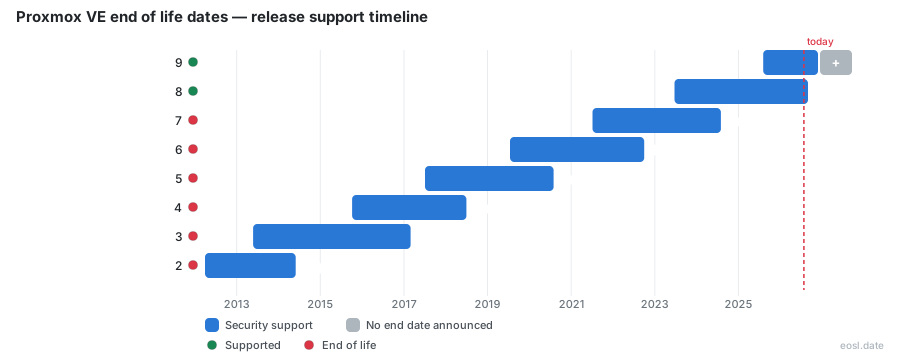
Currently Supported Proxmox VE Releases - Active EOS/EOSL Support (1)
| Release | Released | Security Support | Latest |
|---|---|---|---|
| 9 | (1 year and 2 months ago) | Active | 9.2 (5 months ago) |
Proxmox VE End of Life (EOL) Releases - No Longer Supported (8)
| Release | Released | Security Support | Latest |
|---|---|---|---|
| 8 | (3 years and 4 months ago) | (2 months ago) | 8.4 (1 year and 6 months ago) |
| 7 | (5 years and 3 months ago) | (2 years and 3 months ago) | 7.4 (3 years and 7 months ago) |
| 6 | (7 years and 3 months ago) | (4 years and 1 month ago) | 6.4 (5 years and 6 months ago) |
| 5 | (9 years and 3 months ago) | (6 years and 3 months ago) | 5.4 (7 years and 6 months ago) |
| 4 | (11 years ago) | (8 years and 4 months ago) | 4.4 (9 years and 10 months ago) |
| 3 | (13 years and 5 months ago) | (9 years and 8 months ago) | 3.4 (11 years and 8 months ago) |
| 2 | (14 years and 7 months ago) | (12 years and 5 months ago) | 2.3 (13 years and 7 months ago) |
| 1 | (18 years ago) | (13 years and 9 months ago) | 1.9 (15 years and 1 month ago) |
If a Proxmox VE end of life notice has you wondering how long your hosts are safe, the short answer is that Proxmox VE 9 is supported and Proxmox VE 8 is not. This guide covers the dates for every major release, what stops working once a Proxmox Virtual Environment version loses support, and how to choose your next move.
Proxmox VE end of life dates by release
Each major version of this open-source virtualization platform is paired with a Debian release and stays supported for roughly three years. The table below shows when each version shipped and when its support ends.
| Proxmox VE version | Debian base | First release | Support ends |
|---|---|---|---|
| 9 | Debian 13 (Trixie) | August 2025 | Not announced yet |
| 8 | Debian 12 (Bookworm) | June 2023 | August 2026 |
| 7 | Debian 11 (Bullseye) | July 2021 | July 2024 |
| 6 | Debian 10 (Buster) | July 2019 | September 2022 |
| 5 | Debian 9 (Stretch) | July 2017 | July 2020 |
| 4 | Debian 8 (Jessie) | October 2015 | June 2018 |
Dates are monthly because the project itself publishes them that way. Check the official roadmap and FAQ for any later change.
Proxmox VE 9 lifecycle and support status
Proxmox VE 9 runs on Debian 13 and is the latest stable version line, with 9.2 released in May 2026. No cut-off date has been published yet, so expect Proxmox VE 9 to follow Debian's schedule.
Proxmox VE 8 EOL: already past its date
Security support for Proxmox VE 8 ended in August 2026, shortly after its Debian 12 base lost its own security coverage. The final release in that line was Proxmox VE 8.4, built on Bookworm, so any Proxmox VE 8 node still on it receives no further fixes. Plan a move from Proxmox VE 8 to the Trixie-based line, and treat Bookworm as retired.
Proxmox VE 7 and older are long past EOL
Everything before version 8 ended earlier. Proxmox VE 7 lost support in July 2024 with Debian 11, and the older lines stopped between 2018 and 2022. Proxmox VE 7 hosts, plus Proxmox VE 6 and 5 machines, are the most exposed systems on any network, and Proxmox VE 7 is now two years out.
How the Proxmox support schedule follows Debian
The support schedule is tied to Debian: a Proxmox release is supported at least as long as the Debian Security Team supports the matching Debian version. The project also uses a rolling release model, so using the newest version is always the recommendation.
Debian base for each Proxmox release
A new major release ships with a new Debian base, while a point release such as 8.3 to 8.4 only moves the minor version and installs like any normal update. Read the release notes and documentation first, because even small steps can carry breaking changes.
What end-of-life does to a running hypervisor
When a version reaches end-of-life, your VMs keep running, but the hypervisor stops receiving security updates and security patches. That includes the whole operating system, not just the Proxmox software, so a new Linux vulnerability in OpenSSH or the kernel stays open.
The pve-manager package is locked to its release, so you cannot install a newer one on the old tree, and the host stays stuck at its last build. Each new CVE widens the attack surface, and those vulnerabilities never get a patch from the vendor, so every patch you wanted is simply absent. Backporting patches yourself is a serious risk to the whole security posture, and a missing vendor patch is hard to replace.
Which repositories keep resolving after Proxmox EOL
Your repositories do not disappear. pve-no-subscription, the free community source, and pve-enterprise, which needs a paid subscription, keep resolving, but they hold nothing new; an enterprise subscription does not change that after support ends, because a subscription buys access to a frozen tree. Look at the files under sources.list and its .d directory to see what your server points at.
Why pvetest is not a safety net
The pvetest channel is for testing builds, and pulling it onto an older host can break dependencies rather than add protection. Treat it as a trap, not an enterprise workaround.
How to check your EOL status
Run pveversion -v on the node, or open the web GUI and read the version shown. Then run apt update followed by apt list --upgradable. On a supported release the list shows waiting packages, while an empty list on an aged install suggests the tree is frozen. Compare the major number against the table above to be sure.
Reading the pveversion output
Check the documentation if anything looks odd. The first lines name the pve-manager and kernel builds. If the major number is 8 or lower, plan an update to the current line and an install of the newest version on a spare server. Keep in mind that a quiet apt full-upgrade proves nothing, because it only reports what the frozen source still offers.
Homelab versus production EOL risk
The same unsupported node carries very different danger depending on who can reach it. A cluster with live migration and high availability will keep working, as will LXC containers and QEMU/KVM virtual machines, because the software is already installed. Live migration between nodes, virtual machines, and virtualization features all behave as before; this Linux software simply stops getting security fixes.
Isolated labs can wait a while
A homelab box behind NAT, isolated from the internet and not exposed through remote access, can sit unpatched for a short timebox while you prepare a move. Many people arrived here after Broadcom changed VMware licensing and now run these guests at home.
Production use is a compliance finding
In production, a reachable management interface and customer data make an unpatched hypervisor a compliance failure under frameworks such as SOC 2 or PCI-DSS. Your workloads are only as safe as the host beneath them.
Upgrade paths before the Proxmox lifecycle runs out
You have three realistic options, and the right one depends on your tolerance for downtime.
| Path | Best for | Downtime | Effort |
|---|---|---|---|
| Upgrade in place or reinstall | Most users | Low to moderate | Low to moderate |
| Isolate and timebox the old node | Small labs | None | None |
| Build a supported node in parallel | Critical systems | Low | High |
Upgrade to the current major release
This is the default choice. An upgrade between versions is supported, but you should never start it without a verified backup. If an in-place jump feels risky, a clean reinstall followed by restoring guests works too.
Isolate a Proxmox virtual environment node
For a lab, cut the management port off from the public internet, restrict the firewall, and set a firm date to leave.
Run a supported node in parallel
For production, install a current node, move guests with a staged migration, and retire the old one after the storage and networking checks pass. If you use Ceph, confirm its version compatibility first.
Proxmox VE 8 to 9 upgrade checklist for EOL nodes
- Take a full backup of every guest and the host configuration.
- Update to the last 8.4 build and read the release notes.
- Run the pve8to9 checker and resolve every warning.
- Switch the repositories from Bookworm to Trixie.
- Run the distribution upgrade, reboot, and verify the cluster.
Key takeaways on EOL timing
- Proxmox VE 8 is out of support and Proxmox VE 9 is current.
- Repositories keep working after end-of-life, but no new fixes arrive.
- Small labs can wait briefly, while business servers should upgrade now.