ProFTPD End of Life (EOL) Dates and End of Support (EOS) Dates
ProFTPD end of life (EOL) and end of support (EOS) dates: 3 ProFTPD versions have reached EOL, including ProFTPD 1.3.7 (EOL date: Mar 14, 2025) — no longer receiving security updates or patches. ProFTPD 1.3.9e is the current supported release — 2 versions in active support. Also see Adobe ColdFusion EOSL information for related end-of-life information.
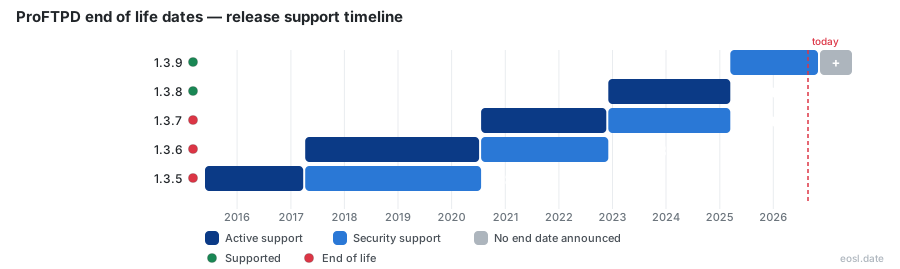
Currently Supported ProFTPD Releases - Active EOS/EOSL Support (2)
ProFTPD End of Life (EOL) Releases - No Longer Supported (3)
| Release | Released | Maintenance Support | Stable Support | Latest |
|---|---|---|---|---|
| 1.3.7 | (6 years and 3 months ago) | (1 year and 7 months ago) | (3 years and 11 months ago) | 1.3.7f (3 years and 11 months ago) |
| 1.3.6 | (9 years and 7 months ago) | (3 years and 11 months ago) | (6 years and 3 months ago) | 1.3.6e (6 years and 3 months ago) |
| 1.3.5 | (11 years and 5 months ago) | (6 years and 3 months ago) | (9 years and 7 months ago) | 1.3.5e (9 years and 7 months ago) |
ProFTPD end of life dates matter because this open-source, GPL-licensed ftp server only keeps its newest branches patched. ProFTPD is a highly configurable ftp daemon for unix-like systems, and the project team ships security fixes to just two release lines at a time. Compare your build with the table below, because only the 1.3.9 stable line still gets full support.
ProFTPD End of Life Status by Version
The table lists each recent release line, when it shipped and when its support stopped. The dates follow the schedule the software project itself has published, so treat them as the maintainers' own timeline.
| Version | Released | Full support until | Maintenance until | Status |
|---|---|---|---|---|
| 1.3.9 | 14 Mar 2025 | Current | Current | Current stable |
| 1.3.8 | 04 Dec 2022 | 14 Mar 2025 | Current | Maintenance only |
| 1.3.7 | 20 Jul 2020 | 04 Dec 2022 | 14 Mar 2025 | Ended |
| 1.3.6 | 09 Apr 2017 | 20 Jul 2020 | 04 Dec 2022 | No longer supported |
| 1.3.5 | 27 May 2015 | 09 Apr 2017 | 20 Jul 2020 | No longer supported |
Treat the stable release as the safe default. If you run 1.3.7 or anything older, your branch has reached the point where support ended, and no patch will arrive for it.
Supported Release Numbers Today
On 14 August 2026 the project published 1.3.9d, the newest build of the 1.3.9 line, and the last 1.3.8 build, 1.3.8d, dates from March 2025. Anyone running a build lower than those letters is missing fixes even inside a supported line, so run the update before you worry about anything else.
Release Policy: Stable Release and Maintenance Mode
The release policy is easy to summarize, and it explains every date above. One cycle is the actively developed stable branch, and the previous cycle stays alive only for fixes. A new release pushes the older line into maintenance mode and ends the one before it.
- The newest release cycle is the actively maintained stable branch.
- The previous cycle receives backported fixes from the stable line, nothing more.
- A new release moves the old stable line to maintenance and retires the one behind it.
- Maintenance happens through tiny versions: a letter attached to the number, as in 1.3.9d.
Release Cycle Rules for the Maintenance Branch
A maintenance branch gets corrections, never new features. The first maintenance update of the current version opens the next cycle, and several candidates appear before any stable line is declared. Each administrator should read the RELEASE_NOTES and NEWS files bundled with each build, since they show changed configuration file directives, altered modules and the fixes included.
Maintenance Release Updates and 1.3.10 Release Candidates
The ProFTPD Project announces every build on its home page, and the community follows those posts closely. Between April and August 2026 the project team issued four release candidates for 1.3.10 alongside the 1.3.9a through 1.3.9d builds. Each maintenance release carries backported fixes, while each release candidate belongs to the development cycle and adds new features, bugfixes and capabilities. A development cycle ends only when the final candidate is promoted. Earlier, 1.3.8 introduced better TLS and SNI support, which shows how the stable line absorbs community feedback. Subscribing to community announcements is the cheapest way to hear about a new release before it affects your server.
Use candidates on test machines and stay on a stable or maintenance build in production. Once 1.3.10 ships as stable, the policy implies that 1.3.9 slips to maintenance only and 1.3.8 loses its remaining coverage. Builds target unix platforms, including Linux, and Windows through Cygwin, so the same schedule applies across them, and every community packager follows it.
What Support Ended Means for Your FTP Server Security
Once a branch is retired, the project stops answering reports about it, and the wider community rarely backports patches to unsupported server software. An unpatched ftp server facing the internet keeps every weakness found since its last update, and attackers scan for old banners. Treat each of these as a real exposure:
- Flaws in encryption and TLS handling stay open on the retired branch.
- Optional sql and ldap authentication modules stop receiving fixes alongside the core.
- Virtual hosts and anonymous access widen the surface that a firewall alone cannot cover.
- Logging and auditing gaps go unreported, because nobody maintains that code any more.
If an upgrade is impossible, compare other daemons such as vsftpd or pure-ftpd, which focus on simplicity and speed. ProFTPD's strength is its Apache-like configuration, so moving away costs time rewriting rules.
Checking Your Version Before the FTP Daemon Falls Behind
Find the installed build, then validate the configuration before you touch anything:
proftpd --version
proftpd -t -d5
The second command is a syntax check, and it prevents a failed restart. After you install a newer build, a HUP signal re-reads the configuration and reopens each log without cutting an existing session. Remember that a standalone daemon needs that signal, while one started through inetd picks up changes on the next connection. Avoid ftpshut as a restart method, since it leaves the server in an administrative shutdown state until the message file disappears. Review every timeout directive in your command-line options and config afterwards, then plan an upgrade before the next release candidate becomes stable.