Kubernetes Node Feature Discovery End of Life (EOL) Dates and End of Support (EOS) Dates
Kubernetes Node Feature Discovery end of life (EOL) and end of support (EOS) dates: 7 Kubernetes Node Feature Discovery versions have reached EOL, including Kubernetes Node Feature Discovery 0.18 (EOL date: Oct 16, 2026) — no longer receiving security updates or patches. Kubernetes Node Feature Discovery 0.20.1 is the current supported release — 2 versions in active support. Also see Adobe ColdFusion EOSL information for related end-of-life information.
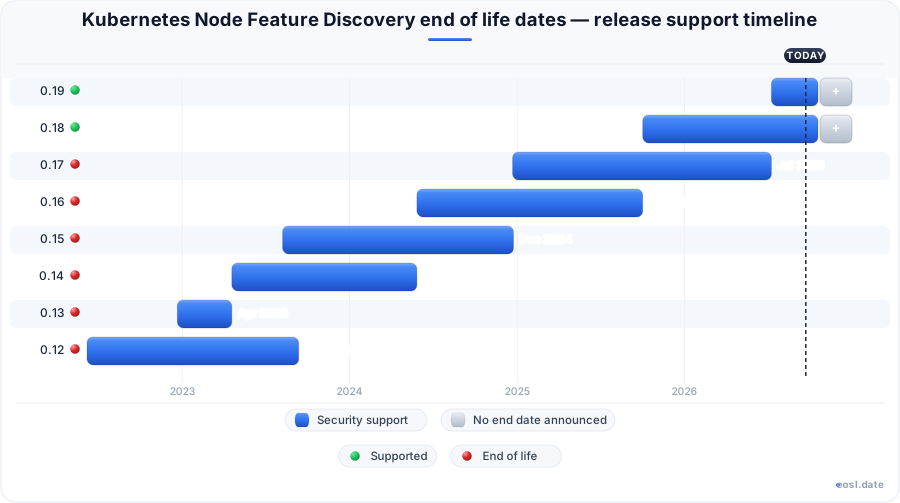
Currently Supported Kubernetes Node Feature Discovery Releases - Active EOS/EOSL Support (2)
Kubernetes Node Feature Discovery End of Life (EOL) Releases - No Longer Supported (7)
| Release | Released | Support | Latest |
|---|---|---|---|
| 0.18 | (1 year and 1 month ago) | (1 month and 6 days ago) | 0.18.3 (1 year ago) |
| 0.17 | (1 year and 11 months ago) | (4 months ago) | 0.17.4 (1 year and 2 months ago) |
| 0.16 | (2 years and 5 months ago) | (1 year and 1 month ago) | 0.16.9 (1 year and 2 months ago) |
| 0.15 | (3 years and 3 months ago) | (1 year and 10 months ago) | 0.15.7 (2 years ago) |
| 0.14 | (3 years and 7 months ago) | (2 years and 5 months ago) | 0.14.6 (2 years and 7 months ago) |
| 0.13 | (3 years and 11 months ago) | (3 years and 7 months ago) | 0.13.6 (3 years ago) |
| 0.12 | (4 years and 5 months ago) | (3 years and 2 months ago) | 0.12.5 (3 years and 4 months ago) |
If your Kubernetes nodes carry GPUs or special CPU features, the Kubernetes Node Feature Discovery end of life schedule tells you how long each version keeps getting fixes. Node feature discovery (NFD) detects hardware features and system configuration on every node and advertises them as node labels, so an unsupported build puts the placement of every pod on your Kubernetes cluster at risk. Below are the dates, the policy behind them and the safest way to move to a current line.
NFD end of life dates and supported release status
NFD ships a new minor version every few months, and the project supports only the two newest. The table lists each line and when its support ended, based on the endoflife.date record updated on 26 July 2026. Anything marked Ended no longer gets security or bug fixes from the maintainers on GitHub, and a node running it falls outside what the Kubernetes SIGs community will debug for any Kubernetes user.
| Minor line | First published | Support | Final patch version |
|---|---|---|---|
| 0.19 | 10 Jul 2026 | Supported | 0.19.0 |
| 0.18 | 2 Oct 2025 | Supported | 0.18.3 (5 Nov 2025) |
| 0.17 | 22 Dec 2024 | Ended 10 Jul 2026 | 0.17.4 |
| 0.16 | 27 May 2024 | Ended 2 Oct 2025 | 0.16.9 |
| 0.15 | 8 Aug 2023 | Ended 24 Dec 2024 | 0.15.7 |
| 0.14 | 19 Apr 2023 | Ended 27 May 2024 | 0.14.6 |
| 0.13 | 21 Dec 2022 | Ended 19 Apr 2023 | 0.13.6 |
| 0.12 | 7 Jun 2022 | Ended 12 Sep 2023 | 0.12.5 |
Minor releases and bug fixes
Only the two most recent minor releases get bug fixes, and a support window closes when the next minor appears. The GitHub quick start already points to 0.20.1, so check the tags before you pin anything. To read the current build on a node, run kubectl exec into the garbage collector deployment and call nfd-gc -version; a second kubectl get on the Kubernetes pods confirms that nfd-master and every other component runs the same build.
Kubernetes Node Feature Discovery end of life and deprecation policy
The deprecation policy is short: NFD supports Kubernetes v1.24 and later, and only the two newest lines are maintained. A cluster on an older Kubernetes version may also fall outside what the SIG-Node subproject tests. The open source project documentation carries a version selector, and older pages show a banner warning that you are reading about an unsupported Kubernetes add-on build. Compatibility therefore runs in both directions: your Kubernetes version must be new enough for NFD, and your NFD must be new enough for the Kubernetes maintainers to help you.
Node labeling for hardware features and system configuration
Node labeling is what NFD adds on top of the kubelet's defaults. It reads the CPU, kernel, memory, network, PCI, storage and USB sources, plus custom feature sources and local hooks, and turns what it finds into labels that start with feature.node.kubernetes.io/. The hardware features it reports include CPU instruction flags, the CPU model and vendor, CPU hyperthreading status and GPU presence, while system configuration covers the operating system and kernel options. The same node can receive annotations, taints and extended resources too. The result is that the Kubernetes scheduler and Kubernetes operators can pick the exact node a workload needs from node labels alone, with no hand-maintained inventory of each node.
Feature labels and custom resources
NFD relies on three custom resources: NodeFeature carries raw detections from each node, NodeFeatureRule defines rule-based feature labels, and NodeResourceTopology describes the zones of a node's CPU and memory.
How the master, worker and garbage collector fit together
NFD runs as separate components on your cluster. The nfd-worker runs as a DaemonSet on each node, detects features and writes them to a NodeFeature object. The nfd-master is a deployment that watches those objects and updates each node's labels through the Kubernetes API server; older versions used gRPC for this step. The nfd-gc removes stale objects once a node leaves the cluster, a check it makes about once an hour. Because every controller depends on the others, a version mismatch between components is a classic failure after a rollout, and the node ends up half labeled.
Why NFD labels matter for GPU and workload scheduling
NVIDIA's GPU operator expects NFD in the cluster, which is why many teams keep it running even when little else uses it. A pod picks its target through a nodeSelector on a label such as an AVX2 CPU flag, so scheduling stays declarative. Kubernetes workloads that train models, pin CPU cores or need a specific network card all use this pattern, and each depends on a labeled node being exactly what the label says. Without a supported build, nobody will fix a wrong CPU label for you.
nfd-topology-updater and NUMA-aware scheduling
The optional nfd-topology-updater reports allocatable CPU and memory per NUMA zone, which lets the Kubernetes topology manager put latency-sensitive pods on a single NUMA node. It ships in the same release line as the rest of NFD, so it loses support on the same date as the table above.
Upgrade the node-feature-discovery Helm chart before support ends
Move the node-feature-discovery chart to a supported line before its window closes. Plan it like any DevOps rollout: test the new node-feature-discovery version in a pre-production Kubernetes cluster first, then step through production one Kubernetes node pool at a time. Leave the feature discovery namespace alone, since the default node-feature-discovery namespace holds the objects that keep existing labels in place. Cloud-managed Kubernetes services follow the same Kubernetes steps, and crossing several minor versions is safer in single hops.
Helm and Kustomize upgrade paths
With Helm, run helm upgrade against the new chart version from the OCI registry. With Kustomize, change the ref in the overlay URL to the new tag and apply it again.
Verify the running version
Run nfd-gc -version inside the pod and confirm that every node reports Running pods, then compare a node's labels before and after.
Risks of an unsupported NFD release
Staying on an ended line is tempting because the labels keep working, until they do not. One published incident report shows what happens in production when a team jumps from a very old NFD to a newer one without testing at scale, and the lessons apply to any Kubernetes node component or Kubernetes controller you run.
Scale issues in large clusters
Each NodeFeature object reportedly took about 140 KB, so a 4,000-node cluster needs roughly 540 MB for node features alone. That strains the kube-apiserver watch cache and etcd, and the informer's list requests time out.
Bugs that remove node labels
In NFD v0.16.0 and earlier, the controller started without a synced cache, saw an empty feature list for each node and removed every label. Moving to a supported Kubernetes add-on build picks up that fix.