Adobe ColdFusion End of Life (EOL) Dates and End of Support (EOS) Dates
Adobe ColdFusion end of life (EOL) and end of support (EOS) dates: 5 Adobe ColdFusion versions have reached EOL, including Adobe ColdFusion 2021 (EOL date: Dec 09, 2025) — no longer receiving security updates or patches. Adobe ColdFusion 2025.0.14.332029 is the current supported release, with support through Apr 08, 2030 — 2 versions in active support. Also see RabbitMQ EOSL information for related end-of-life information.
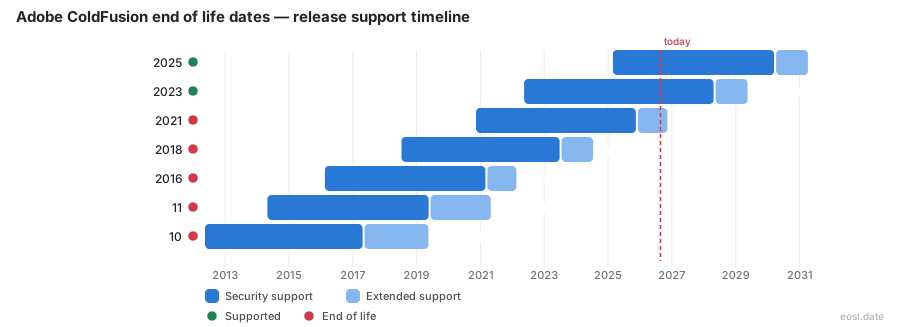
Currently Supported Adobe ColdFusion Releases - Active EOS/EOSL Support (2)
| Release | Released | Core Support | Extended Support | Latest |
|---|---|---|---|---|
| 2025 | (1 year and 8 months ago) | (in 3 years and 4 months) | (in 4 years and 4 months) | 2025.0.14.332029 (1 month and 1 week ago) |
| 2023 | (4 years and 6 months ago) | (in 1 year and 5 months) | (in 2 years and 5 months) | 2023.0.26.331018 (1 month and 1 week ago) |
Adobe ColdFusion End of Life (EOL) Releases - No Longer Supported (5)
| Release | Released | Core Support | Extended Support | Latest |
|---|---|---|---|---|
| 2021 | (6 years ago) | (11 months ago) | (1 week and 5 days ago) | 2021.0.23.330486 (11 months ago) |
| 2018 | (8 years and 4 months ago) | (3 years and 4 months ago) | (2 years and 4 months ago) | 2018.0.19.330149 (3 years and 4 months ago) |
| 2016 | (10 years and 9 months ago) | (5 years and 8 months ago) | (4 years and 9 months ago) | 2016.0.17.325979 (5 years and 8 months ago) |
| 11 | (12 years and 6 months ago) | (7 years and 5 months ago) | (5 years and 6 months ago) | 11.0.19.314546 (7 years and 5 months ago) |
| 10 | (14 years and 6 months ago) | (9 years and 6 months ago) | (7 years and 6 months ago) | 10.0.23.302580 (9 years and 6 months ago) |
Planning around Adobe ColdFusion end of life starts with one date: ColdFusion 2021 reaches the end of its paid support on November 10, 2026. Adobe ColdFusion is a Java-based application server and platform for building a web application, so a version that stops getting fixes puts everything you run on it at risk. Below you'll find the dates for every version, what each support tier covers and how to move before the deadline.
ColdFusion Support Lifecycle Dates and Release Timeline
Adobe follows a fixed lifecycle for every release. Each version gets about five years of core support after general availability, and a new release arrives roughly every two years. You can optionally buy one more year of extended support. The official source is Adobe's EOL matrix, which lists each supported version and every older one.
| Version | General availability | End of core support | End of extended support |
|---|---|---|---|
| ColdFusion 2025 | 02/25/2025 | 02/26/2030 | N/A |
| ColdFusion 2023 | 05/17/2023 | 05/16/2028 | 05/16/2029 |
| ColdFusion 2021 | 11/11/2020 | 11/10/2025 | 11/10/2026 |
| ColdFusion 2018 | 07/12/2018 | 07/13/2023 | 07/13/2024 |
| ColdFusion 2016 | 02/16/2016 | 02/17/2021 | 02/17/2022 |
| ColdFusion 11.x | 04/29/2014 | 04/30/2019 | 04/30/2021 |
| ColdFusion 10.x | 05/15/2012 | 05/16/2017 | 05/16/2019 |
Only versions 2023 and 2025 are still in core support today, which makes them the only supported releases that receive regular updates from Adobe.
ColdFusion 2018 End of Life and Older Versions
Version 2018 ran out of extended support in July 2024, and 2016, 11 and 10 ended years before that. Anyone still on those releases has been without vendor fixes for a long time.
Adobe ColdFusion End of Life: The 2021 Release in November 2026
ColdFusion 2021 became available on November 11, 2020. Its core support ended on November 10, 2025, and the extended support year closes on November 10, 2026. Because that closing date is the true ColdFusion 2021 end of life (also written ColdFusion 2021 end-of-life), no further extension can be purchased, and developers running it have only a few weeks left.
An outdated server is a security problem, not just a paperwork one. The updates Adobe ships often close vulnerabilities in ColdFusion itself, in Tomcat or in bundled libraries. Once a version is unsupported, later patches and updates are not back-ported to it, so your server stops receiving updates entirely. The threat landscape keeps changing, so every month on an old release raises your risk of a known vulnerability being exploited.
End of Core Support vs End of Extended Support
The two tiers are easy to confuse. End of core support is the point where Adobe stops shipping security patches, security fixes, hot fixes and bug fixes for a version. Extended support comes after that and costs extra, yet it is described as best-effort support meant to help you migrate to a version still in core support.
In other words, paying for extended support does not keep your server patched. The end of extended support simply marks when even that assistance stops, so treat the earlier core date as your real support timelines deadline.
ColdFusion Builder EOL and the Visual Studio Code Extension
ColdFusion Builder was the IDE for writing CFML. ColdFusion Builder end of life arrived on July 13, 2024 for the 2018 release, and Adobe no longer sells it or provides downloads. Adobe recommends moving to the ColdFusion extension for Visual Studio Code, which covers many features Builder offered.
Upgrade Paths Before ColdFusion EOL
You have three realistic options: move to a newer Adobe version, switch to another CFML engine or retire the application. Whichever you pick, plan the migration and the transition now, and start migrating early, because testing takes longer than installing. Each new update for a supported release is another reason to move.
Moving to ColdFusion 2023 or ColdFusion 2025
ColdFusion 2023 stays in core support until May 2028, while ColdFusion 2025 runs to February 2030. With version 2025 Adobe moved to a subscription licensing model and stopped selling perpetual licenses, so budget for recurring cost. Adobe has traditionally offered an upgrade discount from the immediately preceding version, and resellers such as FusionReactor sometimes run their own deals.
You can test without paying. The installer offers the free Developer edition or a 30-day free trial, and you can add a license key later. You can also run two versions side by side and point individual sites at each through the IIS or Apache web server connector. Adobe's documentation and community forums, plus consulting from independent experts, help with the cloud or on-premise move.
Switching to Lucee or BoxLang
If you are leaving a ColdFusion version that Adobe no longer supports, Lucee is an open-source CFML engine and BoxLang is a newer platform that aims to run CFML code. Neither claims full compatibility, so test your code first.
Finding Outdated ColdFusion Installations Before EOL
With several versions in circulation, it is hard to know which servers are exposed. An audit of your installations, using an asset-discovery tool or a simple check of each server's product version, shows which ones sit on 2021 or earlier. Fix the oldest first, then schedule the rest before the deadline.