NixOS End of Life (EOL) Dates and End of Support (EOS) Dates
NixOS end of life (EOL) and end of support (EOS) dates: 24 NixOS versions have reached EOL, including NixOS 25.11 Xantusia (EOL date: Jun 30, 2026) — no longer receiving security updates or patches. NixOS 26.05 Yarara is the current supported release, with support through Dec 31, 2026. Also see antiX Linux EOSL dates for related end-of-life information.
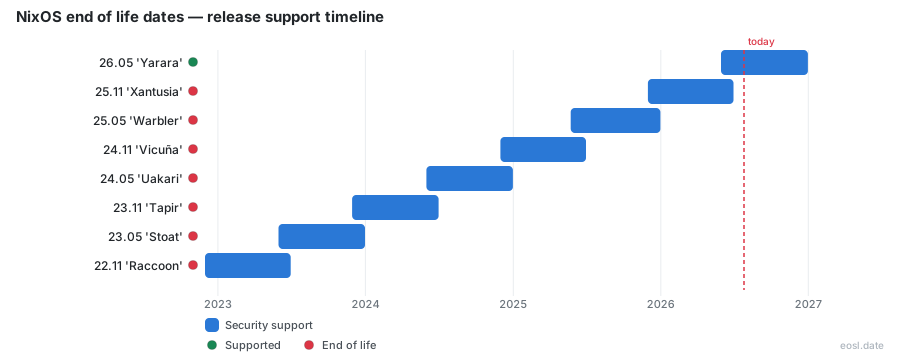
Currently Supported NixOS Releases - Active EOS/EOSL Support (1)
| Release | Released | Security Support |
|---|---|---|
| 26.05 'Yarara' | (5 months ago) | (in 1 month and 4 weeks) |
NixOS End of Life (EOL) Releases - No Longer Supported (24)
| Release | Released | Security Support |
|---|---|---|
| 25.11 'Xantusia' | (11 months ago) | (4 months ago) |
| 25.05 'Warbler' | (1 year and 5 months ago) | (10 months ago) |
| 24.11 'Vicuña' | (1 year and 11 months ago) | (1 year and 4 months ago) |
| 24.05 'Uakari' | (2 years and 5 months ago) | (1 year and 10 months ago) |
| 23.11 'Tapir' | (2 years and 11 months ago) | (2 years and 4 months ago) |
| 23.05 'Stoat' | (3 years and 5 months ago) | (2 years and 10 months ago) |
| 22.11 'Raccoon' | (3 years and 11 months ago) | (3 years and 4 months ago) |
| 22.05 'Quokka' | (4 years and 5 months ago) | (3 years and 10 months ago) |
| 21.11 'Porcupine' | (4 years and 11 months ago) | (4 years and 4 months ago) |
| 21.05 'Okapi' | (5 years and 5 months ago) | (4 years and 10 months ago) |
| 20.09 'Nightingale' | (6 years ago) | (5 years and 4 months ago) |
| 20.03 'Markhor' | (6 years and 6 months ago) | (6 years ago) |
| 19.09 'Loris' | (7 years ago) | (6 years and 6 months ago) |
| 19.03 'Koi' | (7 years and 6 months ago) | (7 years ago) |
| 18.09 'Jellyfish' | (8 years ago) | (7 years and 6 months ago) |
| 18.03 'Impala' | (8 years and 6 months ago) | (8 years ago) |
| 17.09 'Hummingbird' | (9 years and 1 month ago) | (8 years and 6 months ago) |
| 17.03 'Gorilla' | (9 years and 7 months ago) | (9 years ago) |
| 16.09 'Flounder' | (10 years and 1 month ago) | (9 years and 6 months ago) |
| 16.03 'Emu' | (10 years and 7 months ago) | (10 years ago) |
| 15.09 'Dingo' | (11 years and 1 month ago) | (10 years and 6 months ago) |
| 14.12 'Caterpillar' | (11 years and 10 months ago) | (11 years and 1 month ago) |
| 14.04 'Baboon' | (12 years and 6 months ago) | (11 years and 9 months ago) |
| 13.10 'Aardvark' | (13 years ago) | (12 years and 5 months ago) |
Running a release nobody patches is the quickest way to leave a hole in your machine, so the NixOS end of life date for your release is worth knowing before it arrives. This guide lays out when each stable release stops getting fixes, which ones still receive them, and how to move up in time. NixOS is a Linux distribution built on the Nix package manager, and its twice-yearly releases each get a short, fixed window of attention.
NixOS End of Life Dates for Every Release
Every stable release has a day when its fixes stop. The table below covers the most recent NixOS releases using the dates published by endoflife.date, with the newest at the top.
| Release | Released | Security support ends | Status |
|---|---|---|---|
| 26.05 "Yarara" | 30 May 2026 | 31 Dec 2026 | Current |
| 25.11 "Xantusia" | 30 Nov 2025 | 30 Jun 2026 | Ended |
| 25.05 "Warbler" | 23 May 2025 | 31 Dec 2025 | Ended |
| 24.11 "Vicuña" | 30 Nov 2024 | 30 Jun 2025 | Ended |
| 24.05 "Uakari" | 31 May 2024 | 31 Dec 2024 | Ended |
| 23.11 "Tapir" | 29 Nov 2023 | 30 Jun 2024 | Ended |
Releases older than the table are all past their dates, back to 13.10 "Aardvark" from 2013, and each release will reach its end-of-life on a date fixed in advance. If your machine runs one of those, treat it as unpatched and plan an upgrade now.
Seven-Month Security Support Window
Each release announcement states that the release will receive bugfixes and security updates for seven months. Releases land at the end of May and the end of November, so a May release is covered until the end of December and a November release until the end of June. The previous release gets a one-month overlap: it stays alive for about a month after the new one ships, which gives you a short grace period to switch.
How NixOS Releases Follow a Twice-Yearly Cadence
The project ships on a steady release cadence: one version named for the spring and one for the autumn from the same Linux distribution, numbered by year and month, such as 25.05 and 25.11. Release managers, usually two volunteers per cycle, prepare each version, write the announcement and publish the release notes. The NixOS Foundation backs the project and its build infrastructure, and thousands of contributors from the wider community do the rest; the 25.11 announcement credits 2742 contributors with 59430 commits since the previous release, and release managers thank the Nixpkgs staging team for patient build fixes.
That volume of work explains why the support window is short. The same announcement reports that the Nixpkgs repository added 7002 packages, updated 25252 existing packages and removed 6338 outdated packages to keep the package set maintainable and secure. It also added 107 new modules. Keeping several of those sets patched in parallel would need far more people than the project has, so the community schedule favours moving forward over staying put: maintaining several releases in parallel is too costly, and each gets about seven months.
Is NixOS 26.05 Still Supported Today?
Yes. As of late October 2026, NixOS 26.05 "Yarara" is the only stable release that still gets fixes. Its announcement says it will receive bugfixes and security updates up until 2026-12-31, which leaves roughly two months. The release before it, NixOS 25.11, ended on 30 June 2026, so a system on that version already runs without patches.
The next stable release should land around the end of November, following the usual rhythm, and 26.05 then gets about a month of overlap. Read the release notes for that version early, because the date on which 26.05 stops is fixed: 31 December. Systems on NixOS 25.05 and NixOS 24.11 are further behind, and their last patches shipped in December 2025 and June 2025 respectively.
Because the numbers can shift when a release slips, always confirm a date against the release notes of the version you run. If you are choosing a fresh install, download the current ISO image for the graphical installer rather than an old one, so you are not starting on a release that is already close to its last day.
What Happens When Security Updates Stop for a Deprecated Release
A release is marked deprecated as soon as its successor is out. At that point it keeps working, but the announcement warns that it will stop receiving security updates after its date, for example 2025-12-31 for 25.05 in the 25.11 announcement. After that day the channels for the old version are flagged unmaintained, and nobody backports fixes into the release branch.
In practice the package set freezes while the world around it keeps moving. A vulnerability found in a library after that date is patched in newer releases only, and your installed packages stay exposed. The security of the whole system then depends on the oldest component you cannot update. Your machine does not stop booting, so the problem is easy to miss until a security advisory names software you still run.
Builds that pull prebuilt files from the binary cache can still succeed, but a successful build says nothing about whether the release is patched.
EOL Cleanup Steps for Release Managers
What the cutoff means for you is the end of a branch: retiring a release is real work behind the scenes. The project keeps a short procedure on its release wiki, and it explains why the old release is removed about one month after the new one is out. For maintainers who want to see the shape of that work, the main tasks are:
- Mark the old channels as unmaintained in the infra repository and update the search site so it reflects that status.
- Close open pull requests that target the old release branch or the old staging branches.
- Prune the old backport labels.
- Remove the old release from the periodic merge workflows, the pull request template, the issue templates and the auto-labeler.
- Raise the oldest supported release in the Nixpkgs library so the code stops carrying compatibility for it.
- Drop the old image from the LXC and Incus image server, then update the branch protection rules and merge queue rules in the organisation repository.
None of this affects your machine directly, but it tells you what to expect: after the cleanup, there is no branch left in Nixpkgs that a fix could land on. A bug report against an old version will be answered with "please upgrade". Maintainers can only look after what remains in the repository on GitHub, and by this point the old branches are gone, so a patch simply has nowhere to go, whether it comes from Nixpkgs contributors or anyone else.
How to Upgrade Before a Release Reaches End-of-Life
NixOS uses declarative configuration, so an upgrade is mostly a matter of changing which Nixpkgs revision your configuration points at and rebuilding. That design is what allows reliable system upgrades: if the new generation misbehaves, you can boot the previous one from the menu. The basic route looks like this:
- Read the release notes for the target version, paying special attention to the backward incompatibilities section.
- Back up anything outside the Nix store that your services depend on, and commit your configuration to version control.
- Point your system at the new release. With channels, add the new channel and name it
nixos; with flakes, change the Nixpkgs input to the new release branch. - Run
nixos-rebuild switch --upgrade(ornixos-rebuild switch --flake .on a flake setup), and fix any option the new version renamed or removed. - Reboot, check that your services start, and keep the previous generation until you are confident.
If you skipped several versions, step through the release notes of each one you jumped over, because a renamed option is announced once and then quietly disappears.
Upgrade Instructions and Release Notes
Each announcement on the project site links the upgrade instructions together with the NixOS and Nixpkgs release notes. The NixOS notes list highlights, new modules and incompatibilities; the Nixpkgs notes cover the library and package changes. Read both Nixpkgs and NixOS notes, as the second one is where a changed default in a package usually shows up. The documentation for each version also states when that version stops receiving fixes, so keep the manual open while you work through the documentation of your target release.
Unstable Channel Support Compared With a Stable Release
Unlike stable releases, the rolling nixos-unstable channel has no end date, so you never have to migrate. and it receives updates more often than any stable release. That makes it tempting for people who would rather not upgrade twice a year. The trade-off is that it carries no promise of calm: changes land continuously, and a bad update can hit you before testing catches it. A stable release is slower and more predictable, which is why most servers stay on one.
A sensible split is to run the stable channel on machines that must keep working, and the rolling channel on a laptop where you can afford to fix a broken build. Users who need one newer package from Nixpkgs on an otherwise stable system can often pull it from the rolling set rather than switching everything.
Will Nix Warn You When a Release Has Ended?
Not yet, though a proposal exists. A GitHub issue, discussed by the community, titled "Warn when End Of Life" on the Nix repository asks the tool to print a warning when the current time passes the planned date of the release you run. The reasoning is that people sometimes spend a long debugging session on a problem that an update would have solved. Patch releases of Nix could carry a postponed date, so the Nix team discussed the idea in January 2024 and marked it approved, but the issue is still open.
The thread shows the community weighing real concerns. Some warnings would be annoying, so the suggestion is to show one at most once a day, and some users who run fixed, long-lived systems said they would object unless it can be switched off. Maintainers also noted that experimental features such as flakes change faster than the stable core.
Opt-Out Settings Under Discussion
Commenters kept returning to one condition: a configuration option to disable the message entirely, and a way to keep the functional test suite quiet. Until something ships, the warning does not exist and you have to check dates yourself.
Track Support Dates With Feeds and the API
You do not have to remember any of these dates. The endoflife.date page for NixOS offers a JSON API, an RSS feed and an iCalendar feed, so you can subscribe once and get a reminder before the next end date. A calendar entry set for early December gives you most of a month before 26.05 stops, which is enough time to read the release notes and test the upgrade on a spare machine.
Checking Which NixOS Release You Run
Before you plan an upgrade, confirm what you are running and match it against the table above to find your end date. The command nixos-version prints the exact version string, and it works the same on every NixOS release. If you use flakes, also check which revision your lock file pins, since that, not the installed generation alone, decides where updates come from.
Reading the os-release File
The file /etc/os-release reports the same information in a form scripts can parse, and endoflife.date lists its CPE identifiers so inventory tools can match a machine to its end date.