MetalLB End of Life (EOL) Dates and End of Support (EOS) Dates
MetalLB end of life (EOL) and end of support (EOS) dates: 3 MetalLB versions have reached EOL, including MetalLB 0.15 (EOL date: May 20, 2026) — no longer receiving security updates or patches. MetalLB 0.16.2 is the current supported release. Also see Argo Workflows EOSL dates for related end-of-life information.
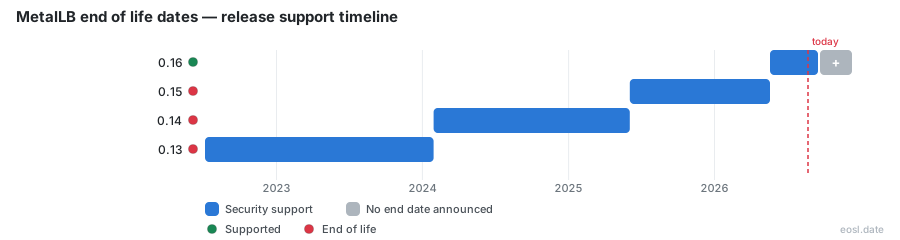
Currently Supported MetalLB Releases - Active EOS/EOSL Support (1)
| Release | Released | Security Support | Latest |
|---|---|---|---|
| 0.16 | (6 months ago) | Active | 0.16.2 (2 weeks and 4 days ago) |
MetalLB End of Life (EOL) Releases - No Longer Supported (3)
Wondering about MetalLB end of life? The short answer is that the project is not retired: its load-balancer for Kubernetes keeps shipping new releases, and what actually ends is support for older version lines. This guide shows which versions are covered today, when previous ones stopped, and how to plan an upgrade before yours falls off the list.
MetalLB End of Life: Is This Load-Balancer Still Supported?
MetalLB is a CNCF project that gives a cluster a working network address for every service of type LoadBalancer. Nothing in the project documentation announces a shutdown, and its GitHub repository describes the work as ongoing, with a warning to consume a stable branch instead of the development branch. For a team running it in production, the practical question is therefore which release line you are on, not whether the community has walked away.
The community channels (a mailing list, a Slack channel and the issue tracker) remain open, and the README says maintainers aim to answer vulnerability reports within 48 hours, which points to a project that is alive.
Project Maturity and Beta Status of the Load-Balancer
Pages on the official site carry a note that, despite the beta status of the project and its API, MetalLB is known to be stable and reliable. A dedicated project maturity page explains what that implies. A beta label describes API stability promises and is not a sign that support is winding down, so do not read it as an end-of-support warning. Treat the label and the support dates below as two separate signals.
Supported Release Table for Every MetalLB Version
The endoflife.date tracker, last updated on 29 May 2026, lists four release lines. Only the newest one receives fixes; the rest have ended.
| Release line | Released | Supported? | Latest patch |
|---|---|---|---|
| 0.16 | 20 May 2026 | Yes | 0.16.1 (27 May 2026) |
| 0.15 | 3 Jun 2025 | Ended 20 May 2026 | 0.15.3 (4 Dec 2025) |
| 0.14 | 29 Jan 2024 | Ended 3 Jun 2025 | 0.14.9 (17 Dec 2024) |
| 0.13 | 6 Jul 2022 | Ended 29 Jan 2024 | 0.13.12 (20 Oct 2023) |
Only the 0.16 line counts as a supported release in that listing. Notice the pattern: each older version line stopped being supported on the same day the next one shipped, so the support window of a line is roughly the time until its successor appears (between about 11 and 19 months for the last three).
Security Support Windows by Release Line
Because support ends the moment a new minor version appears, a cluster on 0.15.3 is already outside the window as soon as 0.16 is out, even though 0.15.3 was the final patch of its line. Treat any vulnerability reports as a reason to move: fixes are made in the supported line, so staying on an ended one means missing them.
Reading a Load-Balancer Version Number Correctly
A number such as 0.16.1 has two parts that matter. The 0.16 is the release line, which is what the support table tracks. The final .1 is the patch level inside that line, and patch versions carry only fixes, so staying on the newest patch of a supported line is the safest move.
Why a Bare Metal Load-Balancer Exists for Kubernetes
Kubernetes does not ship a network load-balancer implementation for bare metal Kubernetes clusters. The built-in ones call out to IaaS platforms such as GCP, AWS or Azure, so on other infrastructure a LoadBalancer service stays in the pending state forever. The alternatives, NodePort and externalIPs, have real downsides in production. MetalLB fills the gap by working with standard routing protocols and ordinary network equipment, which is why a bare-metal cluster can use it as a drop-in answer.
Requirements for Running a Current Load-Balancer
To run a supported version, you need a cluster on Kubernetes 1.13.0 or later with no other network load balancing, a cluster network that coexists with MetalLB, and some IPv4 addresses to hand out. IPv6 advertising is also possible when BGP runs through FRR-K8s, and IPv6 service addresses need a matching pool. Every node that runs a speaker has to be able to reach its peers through memberlist, the library that lets the speakers on different nodes track each other, so check your networking and your Kubernetes service configuration before an upgrade.
- BGP operation needs one or more routers that speak BGP.
- L2 operation needs port 7946 (TCP and UDP) open between nodes for memberlist.
Operating Mode Choices: L2 Mode and BGP
The operating mode decides how traffic reaches a service, and it does not change which release line is supported. In L2 mode one node answers for an address on the local segment; with BGP, each speaker peers with your router and announces routes, which spreads traffic across nodes.
Backward Compatibility for Older Load-Balancer Configs
Before version 0.13.0, MetalLB was set up with a configmap. From 0.13.0 on, configuration happens only through custom resources such as IPAddressPool, L2Advertisement and BGPPeer. A converter, published as the container image quay.io/metallb/configmaptocrs, translates an old configmap into those objects. If you are still on a line from before 0.13, plan that step into your move, because the configuration format changed.
FRR-K8s Mode and the Deprecated FRR Mode in the Load-Balancer
This is the nearest thing to an end-of-life notice inside the project. Starting with 0.16.0, FRR-K8s is the default backend for BGP sessions, and the older FRR mode, which configures FRR directly, is deprecated. A cluster still running FRR mode needs a configuration review, because its FRR mode settings must be moved over to FRR-K8s resources. The maintainers say that keeping both implementations is costly, so new BGP features land in FRR-K8s only. FRR mode keeps working but is planned for removal in a future release, so treat any new FRR mode rollout as a short-lived choice.
FRR-K8s adds features the native implementation lacks, such as pairing BGP sessions with BFD sessions, and it lets you merge extra FRR configuration while sharing sessions with other tools.
Native BGP Stays Available
The native BGP implementation remains for deployments that need a smaller footprint, so a minimal setup does not have to adopt FRR-K8s.
Release Notes: How Each Load-Balancer Version Changed
The release notes page lists every version from 0.8.1 up to 0.16.1, newest first, grouped into new features, documentation and fixes. Reading them before moving between lines tells you what changed in the service behaviour of your cluster, for example that 0.16.0 replaced kube-rbac-proxy with native TLS and RBAC and made the metrics endpoint HTTPS-only.
Bug Fixes and Regressions in Recent Versions
Version 0.16.1 carried bug fixes for Helm chart rendering, corrected the BGPPeer localASN schema type and made the controller health bind address configurable. The notes label such items as bug or regression entries. Patching within a supported line is how you pick up such bug fixes, which an ended line no longer receives.
Features and Documentation Changes
Among the 0.16.0 features were a localASN field for per-peer overrides, a configurable BGP debounce timeout and a ServiceSelector for advertisements, plus matching documentation updates in the project documentation. Staying on an ended line means missing these features.
How the Speaker and Controller Behave During a Load-Balancer Upgrade
Two components do the work. The controller is cluster-wide and assigns IP addresses from your pools. The speaker runs on every node and advertises each assigned address. When you upgrade, the controller can restart without cutting traffic already flowing, but each speaker restart briefly affects that node's announcements, so roll them out one node at a time; because every speaker advertises the services on its own node, a staged rollout keeps the other speakers announcing while one restarts.
Follow the installation guide for your chosen method (the installation steps differ between raw manifests and Helm), whether manifests or a Helm chart, and pick a stable branch rather than the development branch of the repository, since main may contain unstable or incompatible changes. Check the documentation for your target version before you touch a production deployment, and keep your existing configuration saved in files so you can compare it afterward, and keep every speaker and controller container on the same version.
Community, Contributing, and Maintainers of the Load-Balancer
Active community involvement is the best evidence against an end-of-life scenario. MetalLB welcomes contributing in all forms, every pull request on GitHub is reviewed by the maintainers, and a lightweight way to help is to tell them you use the project.
Alternatives to Consider If a Kubernetes Load-Balancer Is Retired
Retirement is not on the table today, but it is fair to keep a fallback. The two built-in routes are NodePort services and externalIPs, both of which the project calls weaker choices for production. Neither route gives a service a managed address, so every Kubernetes service you expose needs its own manual plumbing. In my view, the time to look at other options is if releases stop appearing, not before.
Planning Before a Version Loses Security Support
- Find your current release line and compare it with the table above.
- Read the release notes for every line between yours and the supported one.
- Convert any old configmap and decide between FRR-K8s and native BGP.
- Upgrade the controller first, then one speaker node at a time.
Doing this once per release line is far less work than catching up across several lines at once.
Tracking Load-Balancer Updates With Feeds and Calendars
The endoflife.date page offers a JSON API, an RSS feed and an iCalendar feed for MetalLB, so you can be told when a new line appears and your own ends. Subscribing to one of them keeps the upgrade from becoming a surprise.