Meilisearch End of Life (EOL) Dates and End of Support (EOS) Dates
Meilisearch end of life (EOL) and end of support (EOS) dates: 57 Meilisearch versions have reached EOL, including Meilisearch 1.56 (EOL date: Nov 16, 2026) — no longer receiving security updates or patches. Meilisearch 1.57.0 is the current supported release. Also see BigBlueButton lifecycle dates for related end-of-life information.
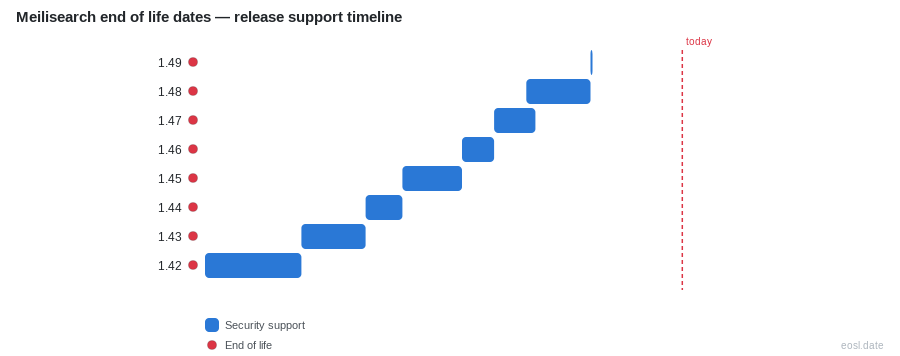
Currently Supported Meilisearch Releases - Active EOS/EOSL Support (1)
| Release | Released | Security Support | Latest |
|---|---|---|---|
| 1.57 | (5 days ago) | Active | 1.57.0 (5 days ago) |
Meilisearch End of Life (EOL) Releases - No Longer Supported (57)
| Release | Released | Security Support | Latest |
|---|---|---|---|
| 1.56 | (3 weeks and 5 days ago) | (5 days ago) | 1.56.2 (1 week and 5 days ago) |
| 1.55 | (1 month and 1 week ago) | (3 weeks and 5 days ago) | 1.55.1 (2 weeks and 5 days ago) |
| 1.54 | (2 months ago) | (1 month and 1 week ago) | 1.54.3 (1 month and 2 weeks ago) |
| 1.53 | (3 months ago) | (2 months ago) | 1.53.3 (1 month and 2 weeks ago) |
| 1.52 | (3 months ago) | (3 months ago) | 1.52.4 (1 month and 2 weeks ago) |
| 1.51 | (3 months ago) | (3 months ago) | 1.51.0 (3 months ago) |
| 1.50 | (4 months ago) | (3 months ago) | 1.50.0 (4 months ago) |
| 1.49 | (4 months ago) | (4 months ago) | 1.49.0 (4 months ago) |
| 1.48 | (4 months ago) | (4 months ago) | 1.48.3 (4 months ago) |
| 1.47 | (5 months ago) | (4 months ago) | 1.47.1 (4 months ago) |
| 1.46 | (5 months ago) | (5 months ago) | 1.46.1 (5 months ago) |
| 1.45 | (5 months ago) | (5 months ago) | 1.45.2 (5 months ago) |
| 1.44 | (6 months ago) | (5 months ago) | 1.44.0 (6 months ago) |
| 1.43 | (6 months ago) | (6 months ago) | 1.43.1 (6 months ago) |
| 1.42 | (7 months ago) | (6 months ago) | 1.42.1 (7 months ago) |
| 1.41 | (7 months ago) | (7 months ago) | 1.41.0 (7 months ago) |
| 1.40 | (7 months ago) | (7 months ago) | 1.40.0 (7 months ago) |
| 1.39 | (8 months ago) | (7 months ago) | 1.39.0 (8 months ago) |
| 1.38 | (8 months ago) | (8 months ago) | 1.38.2 (8 months ago) |
| 1.37 | (8 months ago) | (8 months ago) | 1.37.0 (8 months ago) |
| 1.36 | (8 months ago) | (8 months ago) | 1.36.0 (8 months ago) |
| 1.35 | (9 months ago) | (8 months ago) | 1.35.1 (9 months ago) |
| 1.34 | (9 months ago) | (9 months ago) | 1.34.3 (9 months ago) |
| 1.33 | (10 months ago) | (9 months ago) | 1.33.1 (10 months ago) |
| 1.32 | (10 months ago) | (10 months ago) | 1.32.2 (10 months ago) |
| 1.31 | (10 months ago) | (10 months ago) | 1.31.0 (10 months ago) |
| 1.30 | (11 months ago) | (10 months ago) | 1.30.1 (11 months ago) |
| 1.29 | (11 months ago) | (11 months ago) | 1.29.0 (11 months ago) |
| 1.28 | (11 months ago) | (11 months ago) | 1.28.2 (11 months ago) |
| 1.27 | (11 months ago) | (11 months ago) | 1.27.0 (11 months ago) |
| 1.26 | (1 year ago) | (11 months ago) | 1.26.0 (1 year ago) |
| 1.25 | (1 year ago) | (1 year ago) | 1.25.0 (1 year ago) |
| 1.24 | (1 year and 1 month ago) | (1 year ago) | 1.24.0 (1 year and 1 month ago) |
| 1.23 | (1 year and 1 month ago) | (1 year and 1 month ago) | 1.23.0 (1 year and 1 month ago) |
| 1.22 | (1 year and 1 month ago) | (1 year and 1 month ago) | 1.22.3 (1 year and 1 month ago) |
| 1.21 | (1 year and 2 months ago) | (1 year and 1 month ago) | 1.21.0 (1 year and 2 months ago) |
| 1.20 | (1 year and 2 months ago) | (1 year and 2 months ago) | 1.20.0 (1 year and 2 months ago) |
| 1.19 | (1 year and 2 months ago) | (1 year and 2 months ago) | 1.19.1 (1 year and 2 months ago) |
| 1.18 | (1 year and 3 months ago) | (1 year and 2 months ago) | 1.18.0 (1 year and 3 months ago) |
| 1.17 | (1 year and 3 months ago) | (1 year and 3 months ago) | 1.17.1 (1 year and 3 months ago) |
| 1.16 | (1 year and 3 months ago) | (1 year and 3 months ago) | 1.16.0 (1 year and 3 months ago) |
| 1.15 | (1 year and 5 months ago) | (1 year and 3 months ago) | 1.15.2 (1 year and 5 months ago) |
| 1.14 | (1 year and 7 months ago) | (1 year and 5 months ago) | 1.14.0 (1 year and 7 months ago) |
| 1.13 | (1 year and 9 months ago) | (1 year and 7 months ago) | 1.13.3 (1 year and 8 months ago) |
| 1.12 | (1 year and 10 months ago) | (1 year and 9 months ago) | 1.12.8 (1 year and 9 months ago) |
| 1.11 | (2 years and 1 month ago) | (1 year and 10 months ago) | 1.11.3 (2 years ago) |
| 1.10 | (2 years and 3 months ago) | (2 years and 1 month ago) | 1.10.3 (2 years and 1 month ago) |
| 1.9 | (2 years and 4 months ago) | (2 years and 2 months ago) | 1.9.1 (2 years and 2 months ago) |
| 1.8 | (2 years and 6 months ago) | (2 years and 4 months ago) | 1.8.4 (2 years and 4 months ago) |
| 1.7 | (2 years and 8 months ago) | (2 years and 6 months ago) | 1.7.6 (2 years and 7 months ago) |
| 1.6 | (2 years and 10 months ago) | (2 years and 8 months ago) | 1.6.2 (2 years and 9 months ago) |
| 1.5 | (3 years ago) | (2 years and 10 months ago) | 1.5.1 (2 years and 11 months ago) |
| 1.4 | (3 years and 2 months ago) | (3 years ago) | 1.4.2 (3 years and 1 month ago) |
| 1.3 | (3 years and 3 months ago) | (3 years and 2 months ago) | 1.3.5 (3 years and 2 months ago) |
| 1.2 | (3 years and 5 months ago) | (3 years and 2 months ago) | 1.2.1 (3 years and 2 months ago) |
| 1.1 | (3 years and 7 months ago) | (3 years and 5 months ago) | 1.1.1 (3 years and 7 months ago) |
| 1.0 | (3 years and 9 months ago) | (3 years and 7 months ago) | 1.0.2 (3 years and 8 months ago) |
If you run the Meilisearch end of life question past the official documentation, the answer is blunt: there is no long-term support track, and only the newest release gets patched. This guide shows which releases are covered today, how short the support windows really are, and what to check before your production index falls behind.
Meilisearch End of Life: What the Policy Says
Meilisearch publishes a versioning policy rather than a classic lifecycle calendar. According to its documentation, there are currently no EOL or LTS (long-term support) policies, so an older release never gets a formal retirement date announced in advance. Instead, the latest engine release is the only one that receives high-priority bug fixes and security patches.
In practice, a release reaches end of life the moment the next minor version ships. Third-party trackers record that moment as the date security support ended, which is why the table below lists a short window for almost every version.
Only the latest engine release is supported with high-priority bug and security fixes.
Meilisearch Security Support by Version
The listing last updated on 22 October 2026 shows 1.55 as the only release with security support. Every earlier line has ended. The support window is the number of days between a release and the next minor version replacing it:
\(\text{support window} = \text{date security support ended} - \text{release date}\)
| Release | Released | Security support ended | Support window | Latest patch |
|---|---|---|---|---|
| 1.55 | 12 Oct 2026 | Still supported | 15 days and counting | 1.55.0 |
| 1.54 | 21 Sep 2026 | 12 Oct 2026 | 21 days | 1.54.3 |
| 1.53 | 10 Aug 2026 | 21 Sep 2026 | 42 days | 1.53.3 |
| 1.52 | 3 Aug 2026 | 10 Aug 2026 | 7 days | 1.52.4 |
| 1.51 | 27 Jul 2026 | 3 Aug 2026 | 7 days | 1.51.0 |
| 1.50 | 20 Jul 2026 | 27 Jul 2026 | 7 days | 1.50.0 |
Across the thirteen minor lines from 1.42 to 1.54, the average gap between releases is 14 days. A release you installed two months ago has therefore been outside security support for most of that time.
Security Fixes Only for the Latest Release
Patch releases such as 1.54.3 or 1.52.4 keep arriving for a few weeks after a line loses its status, but they are not a promise. Treat a version as unsupported once a newer minor appears, even if a late patch lands afterwards.
Minor Versions and Semver
The project follows semver, and its documentation says minor versions ship four to six times a year. The 2026 table above shows a much faster rhythm, so rely on the live release list instead of that older statement. The faster cadence means each minor line loses security support sooner than the documented pace suggests.
SDK Version Numbers Are Separate
Engine numbering has no relationship with SDK version numbers. Each client library follows its own release schedule and also handles issues beyond compatibility, so an up-to-date client does not tell you the server-app is still supported. SDKs carry no separate end-of-life policy: the engine version alone decides whether you still receive security fixes.
Meilisearch Support Across Cloud, Enterprise and Self-Hosted Plans
The commercial cloud offering changes the picture. On Meilisearch Cloud, the vendor manages upgrades, monitoring and maintenance, so you are not tracking a version table yourself. The contract terms define what you receive for the length of your subscription term.
Service Level Agreement and Uptime Commitment
The service level agreement applies to customers on an enterprise plan. Its uptime commitment is 99.9% availability in each calendar month, excluding scheduled maintenance announced 24 hours ahead and other carve-outs for downtime the customer causes.
Service Credits and the Support Team
Miss the target and the customer can claim a service credit, calculated as:
$$\text{Service Credit} = X \times Y$$
Here X is the monthly fee for the affected services and Y is the credit percentage tied to actual availability. Response targets from the support team for Enterprise issues run from one hour for an urgent outage to one business day for a feature request. This is the closest Meilisearch gets to a formal support lifecycle, but it covers the hosted service's uptime and responsiveness, not the downloadable engine or its version support.
Open Source Editions and the MIT License
The engine is open source under the MIT license as the Community Edition, a permissive license, which receives fixes only on the latest release, and you can self-host it with docker or a single binary. The Enterprise Edition adds sharding and other advanced features, and needs a commercial agreement for production use. Both run the same engine and expose the same restful api, so moving between them is realistic.
- Free self-managed engine: tied to the latest-release policy above.
- Enterprise Edition: adds scaling features and a contract.
- Cloud: managed upgrades, with a 14-day trial listed in the repository.
If you are migrating to a managed plan to escape constant patching, the repository points to a dedicated migration guide in the product documentation.
Planning Your Upgrade Before Support Ends
With a window as short as seven days, waiting for a warning is a losing strategy. Build the upgrade into your routine instead.
- Check your running version and compare it with the latest release list.
- Read the changelog for each minor you skipped, because breaking changes can sit in any of them.
- Test the new release against a copy of your production data, since indexing behavior can change.
- Rotate or review your api keys and settings before switching traffic.
The repository's quick start shows a fresh instance in three steps, which is handy for a staging check.
Meilisearch Support Gaps for Production Search
A search engine sits between your users and your data, and most developers put it behind websites where an unpatched flaw is exposed to every visitor. As the platform adds AI features and vectors, each unsupported line carries more surface a security fix would have to cover, and an AI assistant querying your search index inherits that risk.
Because no long-term branch exists, three gaps are worth closing before you deploy to production:
- Patch lag: your search data keeps flowing while the engine ages, so schedule an upgrade review at least once a month.
- Integration drift: an open-source client library or plugin may lag behind a new engine line, so pin and test the pairing.
- Backup of search state: keep a recent dump so you can rebuild an index on a newer version rather than patch in place.
The practical rule is simple: if the person who owns your search stack cannot name the version it runs, nobody is watching its status either. Add the version to your monitoring dashboard, next to your other data on system health, and alert when it falls two minor lines behind, because that gap means your search results rest on code the maintainers no longer patch. Treat the license terms as part of that review too, since the Enterprise Edition carries commercial conditions the Community Edition does not, and keep your data and settings backed up before every change.
Search Features Worth Retesting After Each Release
After each upgrade, run a short regression pass over the features your applications depend on: full-text search, typo tolerance, hybrid search, semantic search, vector storage and geosearch. Filtering, sorting and facets deserve a spot check, as does relevancy on your own documents. Keep a fixed list of ten queries with known good answers, run them after every upgrade and compare the search results line by line; a changed ranking is cheaper to catch in staging than in a customer complaint.
Telemetry, Roadmap and Early Warning Signals
The project publishes a roadmap and takes questions through GitHub and Discord, while its optional telemetry feeds product decisions. Watching the search roadmap and those channels in the community is the cheapest early warning for a deprecation that affects your infrastructure.