BigBlueButton End of Life (EOL) Dates and End of Support (EOS) Dates
BigBlueButton end of life (EOL) and end of support (EOS) dates: 3 BigBlueButton versions have reached EOL, including BigBlueButton 2.7 (EOL date: May 31, 2025) — no longer receiving security updates or patches. BigBlueButton 4.0.3 is the current supported release — 2 versions in active support. Also see RabbitMQ EOSL dates for related end-of-life information.
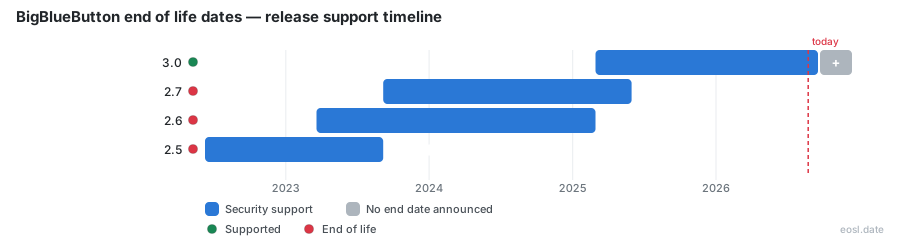
Currently Supported BigBlueButton Releases - Active EOS/EOSL Support (2)
BigBlueButton End of Life (EOL) Releases - No Longer Supported (3)
| Release | Released | Security Support | Latest |
|---|---|---|---|
| 2.7 | (3 years and 2 months ago) | (1 year and 5 months ago) | 2.7.16 (1 year and 11 months ago) |
| 2.6 | (3 years and 8 months ago) | (1 year and 8 months ago) | 2.6.18 (2 years and 6 months ago) |
| 2.5 | (4 years and 5 months ago) | (3 years and 2 months ago) | 2.5.20 (2 years and 6 months ago) |
If your campus or company still runs BigBlueButton, the BigBlueButton end of life dates decide how long your open-source web conferencing setup stays safe to use. Every BBB release line gets patches for a limited window, and once it closes, a server keeps working but stops receiving them. The BigBlueButton community has no hidden schedule, so you plan from the published dates. This guide shows which versions are covered today, what an expired one means for you, and where schools went when the tool disappeared from their classes.
BigBlueButton End of Life: Supported Release Status
BigBlueButton began at Carleton University in 2007 and grew into a free virtual classroom used around the world. Its project does not publish a single formal lifecycle page, so the clearest picture comes from the release tracker at endoflife.date. It treats each minor version as a separate line, with its own release date, cut-off and last patch, and it has the newest supported release at the top. Each release line is easy to place on that calendar.
Security Support Dates by Version
The table below summarizes the tracker, last updated on 3 October 2026. The tracker notes that the two newest lines appear to receive security fixes and bug fixes, although the project never states this outright.
| Version | Released | Coverage | Last patch |
|---|---|---|---|
| 3.0 | 28 Feb 2025 | Active | 3.0.39 (2 Oct 2026) |
| 2.7 | 6 Sep 2023 | Ended 31 May 2025 | 2.7.16 (11 Dec 2024) |
| 2.6 | 20 Mar 2023 | Ended 28 Feb 2025 | 2.6.18 (16 May 2024) |
| 2.5 | 9 Jun 2022 | Ended 6 Sep 2023 | 2.5.20 (11 May 2024) |
In plain terms, BigBlueButton 2.7 lost coverage in May 2025, BigBlueButton 2.6 in February 2025, and BigBlueButton 2.5 back in September 2023. Only BigBlueButton 3.0 and its successors are covered now.
Latest Version and Release Notes
Wikipedia and the project docs both list 4.0 as the current line, with 4.0.0 shipped in October 2026, so the tracker's table may lag behind. Read the release notes on GitHub before choosing a target, because each one explains what changed in the install path. The committers say they ship on quality rather than dates, and they spend months testing each release candidate on a test server to protect stability.
BigBlueButton Deprecation: What an Unsupported Release Means
Running an unsupported line does not switch the software off. Your meetings still start, but nobody writes patches for that code anymore, and the problems pile up slowly rather than all at once. The project is built on many parts, so one stale part can hold the whole server back, and an old server falls behind each time one of those parts passes its own end date. The committers cannot patch what the upstream authors have abandoned, which is why the server image matters as much as the application.
Dependencies Reaching End of Life
BigBlueButton is assembled from NGINX, FreeSWITCH, mediasoup, Redis, Node.js and React.js, among others. GitHub issues show how this bites: one flagged that Node.js 8 had reached end of life back in 2020, and another warned in 2022 that NGINX 1.18 and Tomcat 9 were headed the same way. Older lines also relied on MongoDB, whose license changed in a way the project did not intend, and it was removed entirely by 3.0. Every one of these parts can fall out of maintenance independently, so a planned upgrade matters more than the headline version number.
Security Risks of an Unsupported Server
A meeting server is exposed to the internet by design, so an unpatched component on the server is a direct way in; the committers cannot fix what a server never installs. Admins and developers alike should treat an expired line as a deadline, not a suggestion. The license, the LGPL, lets anyone fork the code, but a fork inherits every unpatched dependency. If you must stay put for a term, keep the server behind a firewall, limit who can create rooms, and plan the move before the next semester.
Big Blue Button Deprecation in Brightspace and Other LMS Platforms
The clearest real-world case is Carleton University, the project's birthplace. As of May 2023, the tool was no longer available in Brightspace there: the integration was removed, and instructors could no longer host new sessions inside their courses. Teaching and Learning Services pointed everyone to Zoom or Microsoft Teams, which were already wired into the learning management system. Your own web conferencing platform may follow a similar path if its vendor stops maintaining the connector.
Moodle and Third-Party Integration Changes
Moodle embedded BigBlueButton in its 4.0 core in 2022, and the list of other integrations is long: Canvas, Chamilo, ILIAS, OpenOLAT, Sakai, WordPress, Nextcloud and more. Integration support is a moving target, though. Docebo appears to have removed its connector by 2024. After the 2020 surge in online education and remote learning, many schools and non-profits adopted the project, so a quiet change in one plugin can strand a whole department. Check which version your plugin expects before upgrading the server.
Recording and Presentation Access After Removal
When BigBlueButton is removed from your platform or your release line ends, export what lives on the old server before you retire it. Each recording, uploaded presentation and shared whiteboard stays on the box, and students lose it the day the machine is wiped. Copy the files that the course still needs and tell people where they went, so no one finds an empty link at the next web conference.
Alternatives to BBB: Zoom, Microsoft Teams and More
Carleton named two replacements, and most campuses already license one of them. Both plug into the course page, so the move is a small transition for teachers rather than a rebuild. If neither fits, a self-hosted newer BigBlueButton remains the closest match in features, and other open tools exist for the same job.
Recurring Meeting Setup in Zoom
To replace a course room, schedule meetings inside the course, or create them outside and import them into it. The frequently asked questions on the Carleton page advise one recurring meeting per course, with or without fixed dates, so students from different classes never land in the wrong room. Office hours are the exception, since one room can serve several courses. Both tools offer video, audio and screen sharing out of the box.
Support Portal and Consultation Options
The university's team opened a support portal request form and offered a one-to-one consultation to anyone leaving it. Ask your own IT group for the same migration help, and read the vendor documentation for the replacement tool before the first class.
Moving Off an Unsupported Release: Requirements and Installation
Staying on BigBlueButton means installing a fresh, covered line on a new machine rather than patching the old one in place. Check the project's current installation guide first, because the required operating system changes between lines: as of version 2.5, for example, the server needed Ubuntu 20.04 64-bit, so match the Ubuntu version the current guide names, installed from packages or by an install script. Plan the configuration, such as hostname, ports and TLS certificates, and copy over any configuration file you edited on the old server before you cut over, and run the old and new systems side by side for a week.
Hardware Requirements for a New Server
Size the server for your busiest class, not your average one. The project's FAQ lists minimum CPU, memory and bandwidth for the server, and notes that shared hosting will not work. A wired connection beats Wi-Fi for the people running the room. Cloud virtual machines work, as long as the network allows the media ports through to the server. Test the server from outside your campus too.
Audio Checks After Upgrade
After you move to a covered BigBlueButton line, audio is where a fresh server most often disappoints, so test it before real users arrive. Run through this list:
- Join a test room and confirm the audio echo test plays your own voice back.
- Ask a second person to confirm they hear your audio clearly and in full, since clipped audio points to a network or codec problem.
- Use headphones, because speakers feeding the microphone cause echo in the audio stream.
- Check that the voice conference connects over the open ports and that audio survives a firewall.
- Leave and rejoin to prove the audio device is remembered.
- Verify that audio from a shared video also reaches the room.
The tutorial videos and the project's knowledge base walk staff through the same checks. Afterwards, tell the whole community of instructors the audio settings have not moved, and spot-check one live class.
Community Support and Help for BBB Questions
If you have questions about which release is covered or when yours expires, the project's community support is the place to ask. It runs through four mailing list groups on Google Groups: setup, users, developers and Greenlight, the front end that gives users a simple room interface. When you apply, include a one-word reason so moderators can tell you from a spam bot. Search the FAQ and the GitHub issue tracker first, since end-of-life questions usually have an existing thread, and never cross-post.
Open-Source Project Contributors
A small core team of committers maintains the code, and the committers also review community patches, with roles such as client, core, integrations, audio and video, and record and playback. Developers are welcome to contribute through GitHub pull requests, and non-developers can help with testing and documentation. The software and its source code stay open under the LGPL, so even a project that retires a release line leaves you free to inspect, fork and audit it.