MediaWiki End of Life (EOL) Dates and End of Support (EOS) Dates
MediaWiki end of life (EOL) and end of support (EOS) dates: 13 MediaWiki versions have reached EOL, including MediaWiki 1.44 (EOL date: Jul 31, 2026) — no longer receiving security updates or patches. MediaWiki 1.45 reaches its End of Support date on Dec 31, 2026 — plan your upgrade path now. MediaWiki 1.46.3 is the current supported release, with support through Jul 31, 2027 — 2 versions in active support. Also see Akeneo PIM lifecycle dates for related end-of-life information.
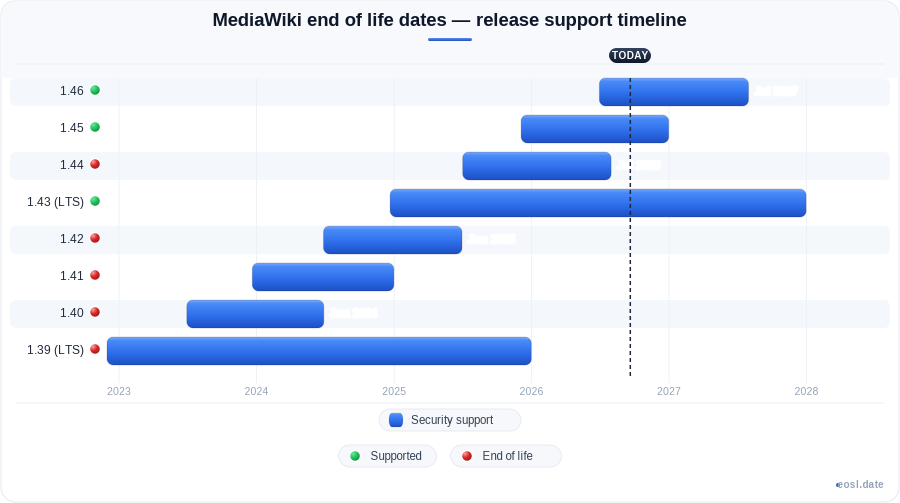
Currently Supported MediaWiki Releases - Active EOS/EOSL Support (2)
MediaWiki Releases Nearing End of Life - Support Ending Soon (1)
| Release | Released | End-of-Life | Latest | LTS |
|---|---|---|---|---|
| 1.45 | (11 months ago) | (in 1 month and 1 week) | 1.45.7 (4 days ago) | - |
MediaWiki End of Life (EOL) Releases - No Longer Supported (13)
| Release | Released | End-of-Life | Latest | LTS |
|---|---|---|---|---|
| 1.44 | (1 year and 4 months ago) | (3 months ago) | 1.44.6 (4 months ago) | - |
| 1.42 | (2 years and 4 months ago) | (1 year and 4 months ago) | 1.42.7 (1 year and 4 months ago) | - |
| 1.41 | (2 years and 11 months ago) | (1 year and 10 months ago) | 1.41.5 (1 year and 11 months ago) | - |
| 1.40 | (3 years and 4 months ago) | (2 years and 4 months ago) | 1.40.4 (2 years and 4 months ago) | - |
| 1.39 (LTS) | (3 years and 11 months ago) | (10 months ago) | 1.39.17 (11 months ago) | LTS |
| 1.38 | (4 years and 5 months ago) | (3 years and 4 months ago) | 1.38.7 (3 years and 4 months ago) | - |
| 1.37 | (5 years ago) | (3 years and 11 months ago) | 1.37.6 (4 years and 1 month ago) | - |
| 1.36 | (5 years and 5 months ago) | (4 years and 5 months ago) | 1.36.4 (4 years and 7 months ago) | - |
| 1.35 (LTS) | (6 years and 1 month ago) | (2 years and 11 months ago) | 1.35.14 (2 years and 11 months ago) | LTS |
| 1.34 | (6 years and 11 months ago) | (5 years and 11 months ago) | 1.34.4 (6 years and 2 months ago) | - |
| 1.33 | (7 years and 4 months ago) | (6 years and 4 months ago) | 1.33.4 (6 years and 5 months ago) | - |
| 1.32 | (7 years and 10 months ago) | (6 years and 10 months ago) | 1.32.6 (6 years and 11 months ago) | - |
| 1.31 (LTS) | (8 years and 5 months ago) | (5 years and 1 month ago) | 1.31.16 (5 years and 1 month ago) | LTS |
If your wiki runs on an old build, MediaWiki end of life is the date after which the Wikimedia developers stop shipping fixes for this open-source wiki software, and you are on your own. This guide lists every release's cutoff, explains how the version lifecycle decides those dates, and shows you how to upgrade before the security updates run out.
MediaWiki End of Life Dates for Every Release
The Wikimedia-appointed MediaWiki release manager publishes one lifecycle table on mediawiki.org, and each row pairs a release date with an end-of-life date. As of October 2026 it looks like this:
| Version | Status | Released | End of life |
|---|---|---|---|
| 1.48 | Future release | May 2027 | May 2028 |
| 1.47 (LTS) | Future release | November 2026 | November 2029 |
| 1.46 | Current stable version | 30 June 2026 | July 2027 |
| 1.45 | Legacy stable version | 4 December 2025 | December 2026 |
| 1.44 | Obsolete | 2 July 2025 | 31 July 2026 |
| 1.43 (LTS) | Legacy long-term support | 21 December 2024 | December 2027 |
| 1.42 | Obsolete | 27 June 2024 | 30 June 2025 |
Read the table from the bottom up: anything marked obsolete, and any version not listed at all, no longer receives a single patch. 1.45 is the next release to fall off, which gives its administrators roughly two months from today.
Current Stable Version Versus Legacy Release
The newest branch is the current stable version, and the one before it is the legacy stable version. Both still get security fixes, and the Wikimedia release team treats them as the safe choices alongside the long-term support branch. Pick whichever matches how often you want to touch your installation, and remember that Wikimedia support for each of them ends on a published date.
Which Releases Are Already Obsolete
Versions 1.44 and 1.42 are obsolete today, along with everything older. Wikimedia marks each obsolete release page as an unsupported version, and it warns that the code may contain critical bugs or lead to data loss. Even if the wiki still loads, no one is releasing security patches for it.
How the MediaWiki Version Lifecycle Works
The version lifecycle follows from how the software is built. MediaWiki uses a continuous integration model, which means changes reach Wikipedia and other Wikimedia sites constantly, and the downloadable release branches are snapshots of that stream. The Wikimedia engineers who run Wikipedia upgrade it far more often than any outside wiki, so the code on Wikipedia is always newer than your download. On paper a new major release arrives every six months, and a branch keeps receiving security updates for up to a year. In practice the volunteer-driven team cannot maintain obsolete code indefinitely, so the release cycle ends each branch on a published timeline.
Major Release and Minor Release Cadence
A major release such as 1.45 may change the database schema, require a configuration review, or break older extensions. A minor release, also called a point release, arrives roughly every quarter and carries only fixes, for example 1.43.4 following 1.43.3. Treat point releases as low risk and apply them promptly.
Maintenance Release Contents
Each maintenance release bundles updated message translation files plus bug fixes, and a security maintenance release adds patches for newly disclosed flaws. New features are never back-ported, so a point release should not change how your wiki behaves.
Long-Term Support Releases and the One-Year Overlap
Every two years one major release is designated a long-term support release, usually shortened to LTS. LTS branches live about three years instead of one, and each new LTS arrives with a one-year overlap so wikis have twelve months to move across. Version 1.43 is the current LTS, and 1.47 is the next. Long-term support suits wikis that cannot upgrade every few months, and the maintenance load stays predictable. Many smaller wikis choose the LTS track for that reason, while a large wiki with an active team can follow the faster stable branch.
Upgrade Paths Between LTS Versions
Since version 1.36, MediaWiki guarantees upgrades from up to two LTS releases back. Anything older takes multiple steps: to reach 1.46 from 1.38, installation administrators first move to 1.39 or 1.43 and then jump again. Sysadmins who skip the stepping stone usually hit database errors. Wikis that fell behind are the ones that pay for it, and a PHP upgrade often has to happen first because each LTS asks for a newer PHP than the last.
What an Unsupported Version Means for Security
Old software collects known vulnerabilities, and attackers read the same release notes you do. Security is the main reason end-of-life dates matter, because a security flaw in a public wiki is an invitation, and security researchers publish details once a fix exists. Once a branch reaches its end date, newly found flaws are fixed only in newer branches, so exploits against your wiki become public while your version stays unpatched.
Security Fixes Stop at End-of-Life Status
Once a branch has reached end-of-life status, no security fixes or backported patches are produced for it. Outdated wikis that stay online carry open security vulnerabilities that anyone can look up, including critical vulnerabilities that were fixed years ago in supported branches.
Risk of Data Loss on Outdated Wikis
The warning on every obsolete release page mentions a risk of data loss or corruption. A bug in an old database layer or a PHP incompatibility can damage pages silently, and the software gives you no warning. Every unfixed bug stays in the code, and a bug that only appears on newer PHP is never patched in an obsolete branch. A fresh Wikipedia-style edit load exposes such a bug quickly. A fresh backup protects you, but it does not protect your readers from a compromised wiki.
Legacy Version Rules for Production Environment Use
The release manager recommends that a production environment run only the current stable version, the legacy version or the long-term support version. A development snapshot or an obsolete tarball belongs on a test machine, not on a public site. Subscribe to the mediawiki-announce list so each new MediaWiki release and each end-of-life notice reaches you by email, and the same announcements are posted to other Wikimedia lists such as the Wikimedia developer list.
Choosing Between Current and Legacy Releases
Developers who write custom extensions often prefer the current branch for new APIs, while a stable intranet wiki is happier on the legacy or LTS branch. Download only from the official release page, and verify the branch label before you install.
Reading MediaWiki Release Notes Before You Upgrade
Every major version has a page of release notes with an upgrade section at the top. Read it before your branch reaches end of life, and before you touch the server: it lists the minimum PHP version, the database changes and any compatibility limits for your hosting environment. Versions 1.43 and 1.44 both track PHP 8.1 through 8.4 support on separate workboards, which tells you which PHP releases to expect on your server. Compatibility with PHP matters twice: a PHP version that is too old blocks the upgrade, and one that is too new may not work with an older MediaWiki. Check PHP compatibility for the core, then for every extension. When PHP itself stops getting security updates, the PHP side of your stack becomes the weak link. Look at the PHP version, the PHP extensions the installer requires, and the PHP memory limit before you download the new archive. The same pages record new features for users, new features for sysadmins and developers, bug fixes and updated languages, so skim the headings and spend your time on the sections that affect your wiki. Release notes remain the primary source for identifying what changed, and the documentation links at the bottom lead to installation guides.
Breaking Changes and Deprecations
The two longest sections in any set of release notes are breaking changes and deprecations. Breaking changes are the items that can stop your wiki working after the upgrade, so read them first. Deprecations tell you what will disappear soon, which is the early warning your extension authors need.
Configuration and Library Changes
Each Wikimedia release lists new, changed and removed configuration settings, plus updated external libraries. Check your LocalSettings.php against that list. Maintenance of configuration is easy to neglect, so pay special attention to bundled extensions and skins, because a removed setting or an incompatible skin is the most common reason a wiki breaks right after an upgrade, and third-party extensions may lag behind the core code.
Building a MediaWiki Upgrade Policy Around End-of-Life Risk
Wiki owners delay upgrades for three reasons: fear of disruption, worry about broken functionality, and contentment with the version they run. A written upgrade policy replaces those instincts with rules, and it should reflect your wiki's size, how critical it is and how heavily it is customized. The policy for a vanilla wiki can be simple: apply every point release and move to each new stable branch. The Wikimedia Foundation maintains core and the officially supported extensions, so a wiki that sticks to those can follow the standard release policy closely. Add a calendar entry six months before each end date, and treat that date as the deadline for your upgrade.
Upgrade Policy for Extension-Heavy Wikis
Unlike the extensions Wikimedia ships and maintains itself, third-party extensions are maintained by volunteers whose commitment varies, so some are abandoned, diverge from core, or are replaced by newer alternatives. If your wiki depends on several, check them against the next supported branch before the current one expires, and tie your maintenance schedule to the slowest extension and test each against a new branch before the old one expires.
Choosing a Distribution Method That Keeps Pace With the Release Cycle
How you obtain the software decides how quickly you can leave a branch whose end date is approaching. Pick a method that lets you move quickly, with support from your host, when a release lands, because a slow method makes it tempting to stay on an obsolete version. The official download page offers the archive, and the same Wikimedia servers host the Git repositories and the Docker images, so every download comes from one trusted place. Whichever download you use, check that your host runs a PHP version the new release accepts, since PHP compatibility is the first thing that fails.
Archives, Git and Docker
- Tarball archives are the simplest download, and one download is enough to rebuild a wiki, but you must merge your extensions and settings by hand each time.
- Git checkouts let you switch release branches with a single command and keep local patches visible.
- Docker images bundle a tested stack, so a new wiki version comes with its matching PHP and web server.
Upgrade Best Practices Before a Release Reaches Obsolete Status
Run through the same short checklist each time, long before the end date. Review the system requirements (especially PHP and database compatibility), watch resource usage, read the release notes, and check that your extensions and skins work with the target version. Then announce the downtime, take a backup and test in a staging copy before you schedule the real run.
Backup and Staging Checks
Back up the database and the uploaded files together, then restore the copy to a staging server and run the updater there. If the staging wiki looks right, the live upgrade is a repeat of a rehearsed task.
Scheduling the Upgrade Window
Finish the upgrade well before the end-of-life date, in the quietest hours for your editors, and leave time to roll back. Routine maintenance windows, announced in advance, keep editors patient, and the support channels stay open if the update script reports an error. Download the new archive beforehand so the window is not spent waiting on a download. Confirm the final steps: run the update script, clear caches, and spot-check a few pages and a recent edit.
Following End-of-Life Announcements on the Mailing List
The mailing list is the most reliable alert channel: each release, including a security maintenance release, is announced there before many users notice it. Pair it with the online documentation and the release notes page, and you will see an end-of-life date coming months ahead.