Concrete CMS End of Life (EOL) Dates and End of Support (EOS) Dates
Concrete CMS end of life (EOL) and end of support (EOS) dates: 3 Concrete CMS versions have reached EOL, including Concrete CMS 8 (EOL date: Aug 05, 2025) — no longer receiving security updates or patches. Concrete CMS 9.5.7 is the current supported release. Also see Akeneo PIM lifecycle dates for related end-of-life information.
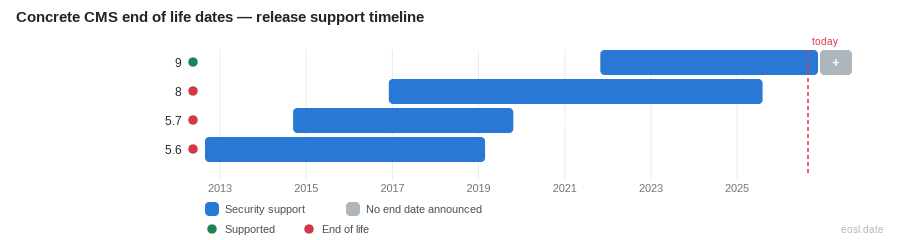
Currently Supported Concrete CMS Releases - Active EOS/EOSL Support (1)
| Release | Released | Support | Latest |
|---|---|---|---|
| 9 | (5 years ago) | Active | 9.5.7 (3 weeks and 2 days ago) |
Concrete CMS End of Life (EOL) Releases - No Longer Supported (3)
Your Concrete CMS end of life date decides how safe your website stays. This guide shows when each release lost maintenance, what unsupported means in practice, and how to move to the new release before vulnerabilities pile up.
Concrete CMS End of Life Dates for Every Version
Concrete5, now called Concrete CMS, is an open source content management system. Each major version gets a fixed window, and the table shows where every release stands.
| Release | Maintenance status | EOL date | Latest version |
|---|---|---|---|
| 9 | Supported | Not announced | 9.5.7 |
| 8 | Ended | 5 Aug 2025 (EOL) | 8.5.21 |
| 5.7 | Ended | 23 Oct 2019 (EOL) | 5.7.5.13 |
| 5.6 | Ended | 26 Feb 2019 (EOL) | 5.6.4.0 |
Only the newest line remains the current major version, and its latest version is the safest one to run on any live website.
Semantic Versioning and the Monthly Releases Cycle
Since version 8, the project follows semantic versioning. A minor version arrives about every six months, while a patch version follows through monthly releases, usually on the first Tuesday.
What Version 8 Support Has Ended Means for Your Website
Official concrete5 announcements went further than the table: since March 2026 the team is no longer providing security patches for Concrete CMS version 8. Your site keeps working, but every new vulnerability stays unfixed, so risk grows each month. Once version 8 support is gone, critical security updates stop as well. Sites on the newest line change nothing and keep security support, including security fixes.
Why Concrete Stopped Backporting Security Patches
Backporting means testing and releasing every fix twice. Each security release needed separate QA for version 8 and 9, and their architectures differ. Ending that work frees the team to improve the current line.
Version 8 End-of-Life Impact on Extensions and the Marketplace
Marketplace sales of version 8 extensions stopped on 15 May 2024. Download any unused licenses and install every add-on fix, because the old marketplace no longer serves those files.
PHP and Server Requirements Under Long Term Support
Check the system requirements in the Concrete documentation before moving anything. Concrete runs on Apache or Nginx as the web server, plus MySQL 5.7 or MariaDB as the database. Install these PHP extensions: PDO MySQL, DOM, SimpleXML, GD, Fileinfo, Mbstring, CURL and ZipArchive. Keep the memory limit at 64 MB or more.
PHP 7.4 and PHP 8 Support by Concrete Version
Version 8.5 runs on PHP 7.3 or 7.4, both retired, while version 9 supports PHP 8 fully.
LTS Versions of PHP for Legacy Hosting
An LTS build backports fixes to retired PHP releases. Concrete SaaS hosting customers receive that long term support automatically.
Upgrade Path From Concrete5 to Version 9
Every concrete5 8.x site has a direct upgrade path. Work through the upgrade in order: update the core, then the theme, then add-ons. Run Composer updates on a staging copy first and keep a backup. If you need migration assistance, ask the forums or a partner. Older legacy concrete5 sites should move in steps, and bug fixes keep arriving only for version 9.
Theme Framework and Custom Code Changes
Version 9 pairs with Bootstrap 5, so a Foundation theme framework needs rework. Review concrete5 custom code and third party packages before upgrade to v9 starts, and update each one.