Matomo End of Life (EOL) Dates and End of Support (EOS) Dates
Matomo end of life (EOL) and end of support (EOS) dates: 4 Matomo versions have reached EOL, including Matomo 4 (EOL date: Dec 19, 2024) — no longer receiving security updates or patches. Matomo 5.14.2 is the current supported release. Also see Cachet lifecycle dates for related end-of-life information.
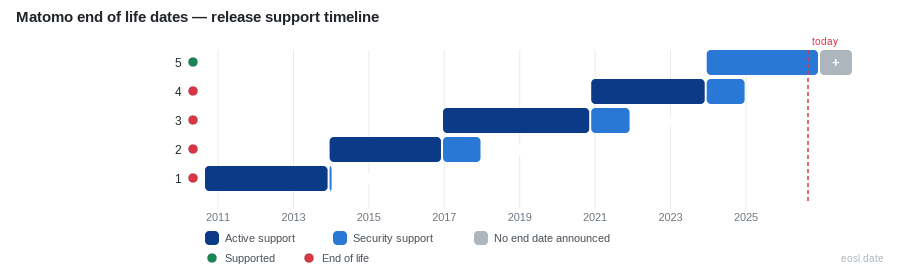
Currently Supported Matomo Releases - Active EOS/EOSL Support (1)
| Release | Released | Long Term Support | Active Support | Latest |
|---|---|---|---|---|
| 5 | (2 years and 10 months ago) | Active | Active | 5.14.2 (3 weeks ago) |
Matomo End of Life (EOL) Releases - No Longer Supported (4)
| Release | Released | Long Term Support | Active Support | Latest |
|---|---|---|---|---|
| 4 | (5 years and 11 months ago) | (1 year and 10 months ago) | (2 years and 10 months ago) | 4.16.2 (11 months ago) |
| 3 | (9 years and 10 months ago) | (4 years and 11 months ago) | (5 years and 11 months ago) | 3.14.1 (6 years and 2 months ago) |
| 2 | (12 years and 10 months ago) | (8 years and 10 months ago) | (9 years and 10 months ago) | 2.18.1 (6 years and 4 months ago) |
| 1 | (16 years and 2 months ago) | (12 years and 10 months ago) | (12 years and 10 months ago) | 1.12 (13 years and 5 months ago) |
Matomo end of life dates tell you when this open-source analytics platform, formerly known as Piwik, stops patching a release. Below you will find each major release's schedule, how long term support works, and what to do before your website's tracking install loses its security updates.
Matomo End of Life Dates by Release
Matomo follows a simple release lifecycle: only the newest line receives active support and new features, and the previous line then moves into LTS for at least 12 months. A release that has left both phases is no longer supported at all.
| Release | Released | Active support ended | LTS ended | Last build |
|---|---|---|---|---|
| 5 | 18 Dec 2023 | Still active | Still supported | 5.14.2 |
| 4 | 24 Nov 2020 | 18 Dec 2023 | 19 Dec 2024 | 4.16.2 |
| 3 | 19 Dec 2016 | 24 Nov 2020 | 1 Dec 2021 | 3.14.1 |
| 2 | 17 Dec 2013 | 19 Dec 2016 | 18 Dec 2017 | 2.18.1 |
| 1 | 28 Aug 2010 | 17 Dec 2013 | 17 Dec 2013 | 1.12 |
As of October 2026, only the latest stable Matomo 5 line is supported.
What Long Term Support Means for Matomo
An LTS branch trades speed for stability. It suits an enterprise team that wants a slower, predictable stable release path rather than a feature-heavy update every few weeks, and it is the long term support version you pick when upgrades need change control.
Critical Bug Fixes and Security Updates
LTS releases receive only critical bug corrections and security patches. Ordinary bug fixes and improvements land in the newest line, so a lagging install stays safe but not polished.
Active Support and the LTS Branch
While a line is in active support it gets everything. Once the next major line ships, it drops to LTS and the clock starts.
How Matomo Support Works After a New Major Version
Support for a branch continues for at least 12 months after the next major release. When Matomo 5.0 arrived in December 2023, Matomo 4 stayed covered until 19 December 2024, receiving builds such as 4.16.1. Every new features request, however, is answered in the newest line of the release cycle, never in the old one.
Setting the Release Channel Across the Lifecycle
You choose how closely your install follows the release channel:
- Sign in as a super user and open Administration.
- Go to System, then General Settings, and scroll to Update Settings.
- Select "Latest stable 5.X (Long Term Support version)" to stay on Matomo 5 even after Matomo 6 appears, or keep the default to follow every update.
- Click Save. Later updates follow that channel.
What to Do When Your Matomo Version Expires
Once your version expires, you stop receiving security fixes, and a self-hosted php stack that is itself out of date, such as PHP 8.1, compounds the risk. Plan the upgrade before the date, take a backup, then update in staging first.
Moving to the Latest Version
Download the newest build or pull the official Docker image, then upgrade to the latest release. The latest version also appears in endoflife.date's API and RSS feed if you want supported alerts.
Support Plans for Older Releases
The analytics platform vendor sells support plans for LTS users. Free help comes from the community forums, and your feedback shapes the roadmap.