Nextcloud End of Life (EOL) Dates and End of Support (EOS) Dates
Nextcloud end of life (EOL) and end of support (EOS) dates: 24 Nextcloud versions have reached EOL, including Nextcloud 32 (EOL date: Sep 30, 2026) — no longer receiving security updates or patches. Nextcloud 33 reaches its End of Support date on Feb 28, 2027 — plan your upgrade path now. Nextcloud 35.0.2 is the current supported release, with support through Sep 30, 2027 — 2 versions in active support. Also see Behat end of support dates for related end-of-life information.
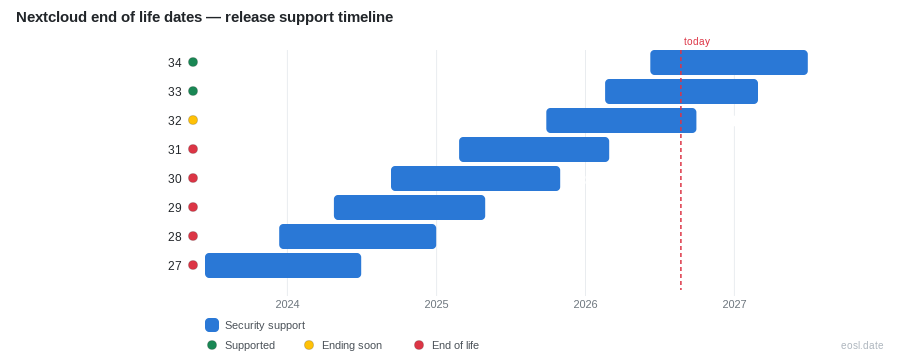
Currently Supported Nextcloud Releases - Active EOS/EOSL Support (2)
Nextcloud Releases Nearing End of Life - Support Ending Soon (1)
| Release | Released | Security Support | Latest |
|---|---|---|---|
| 33 | (8 months ago) | (in 3 months) | 33.0.10 (4 weeks ago) |
Nextcloud End of Life (EOL) Releases - No Longer Supported (24)
| Release | Released | Security Support | Latest |
|---|---|---|---|
| 32 | (1 year and 1 month ago) | (1 month and 1 week ago) | 32.0.15 (2 months ago) |
| 31 | (1 year and 8 months ago) | (8 months ago) | 31.0.14 (9 months ago) |
| 30 | (2 years and 2 months ago) | (1 year ago) | 30.0.17 (1 year ago) |
| 29 | (2 years and 6 months ago) | (1 year and 6 months ago) | 29.0.16 (1 year and 6 months ago) |
| 28 | (2 years and 11 months ago) | (1 year and 10 months ago) | 28.0.14 (1 year and 11 months ago) |
| 27 | (3 years and 4 months ago) | (2 years and 4 months ago) | 27.1.11 (2 years and 4 months ago) |
| 26 | (3 years and 7 months ago) | (2 years and 7 months ago) | 26.0.13 (2 years and 7 months ago) |
| 25 | (4 years ago) | (3 years ago) | 25.0.13 (3 years ago) |
| 24 | (4 years and 6 months ago) | (3 years and 6 months ago) | 24.0.12 (3 years and 6 months ago) |
| 23 | (4 years and 11 months ago) | (3 years and 10 months ago) | 23.0.12 (3 years and 11 months ago) |
| 22 | (5 years and 4 months ago) | (4 years and 3 months ago) | 22.2.10 (4 years and 3 months ago) |
| 21 | (5 years and 8 months ago) | (4 years and 8 months ago) | 21.0.9 (4 years and 8 months ago) |
| 20 | (6 years and 1 month ago) | (4 years and 11 months ago) | 20.0.14 (5 years ago) |
| 19 | (6 years and 5 months ago) | (5 years and 4 months ago) | 19.0.13 (5 years and 4 months ago) |
| 18 | (6 years and 9 months ago) | (5 years and 9 months ago) | 18.0.14 (5 years and 9 months ago) |
| 17 | (7 years and 1 month ago) | (6 years ago) | 17.0.10 (6 years and 1 month ago) |
| 16 | (7 years and 6 months ago) | (6 years and 4 months ago) | 16.0.11 (6 years and 5 months ago) |
| 15 | (7 years and 11 months ago) | (6 years and 10 months ago) | 15.0.14 (6 years and 10 months ago) |
| 14 | (8 years and 2 months ago) | (7 years and 1 month ago) | 14.0.14 (7 years and 2 months ago) |
| 13 | (8 years and 9 months ago) | (7 years and 8 months ago) | 13.0.12 (7 years and 8 months ago) |
| 12 | (9 years and 5 months ago) | (7 years and 11 months ago) | 12.0.13 (7 years and 11 months ago) |
| 11 | (9 years and 10 months ago) | (8 years and 7 months ago) | 11.0.8 (8 years and 7 months ago) |
| 10 | (10 years and 2 months ago) | (9 years and 2 months ago) | 10.0.6 (9 years and 3 months ago) |
| 9 | (10 years and 3 months ago) | (9 years and 2 months ago) | 9.1.3 (9 years and 11 months ago) |
Your Nextcloud end of life date decides how long your file hosting server keeps receiving security fixes. Administrators get one year of support for every major release, so version 32 has already run out while 33, 34 and 35 are still maintained. The dates below are current as of 27 October 2026.
Nextcloud End of Life Dates for Currently Supported Versions
Three currently supported versions receive fixes today. Each one stays supported until about twelve months after launch, so 33 is the next to retire. Nextcloud Hub names every release too, which is why 35 is also called Hub 26 Summer.
| Version | Version name | Release date | Support ends | Next version |
|---|---|---|---|---|
| 35 | Hub 26 Summer | 16 September 2026 | September 2027 | 35.0.3 (12 November 2026) |
| 34 | Hub 26 Spring | 9 June 2026 | June 2027 | 34.0.6 (12 November 2026) |
| 33 | Hub 26 Winter | 18 February 2026 | February 2027 | 33.0.11 (12 November 2026) |
EOL Versions and the Loss of Security Support
Anything older than 33 has reached end-of-life status. Those releases get no fix for newly found security vulnerabilities, and the patches shipped for newer branches show what an old install still contains. Every month you wait raises the risk for your users, so treat security support as the deadline that matters.
| Version | Version name | Released | Support ended | Last version |
|---|---|---|---|---|
| 32 | Hub 25 Autumn | 27 September 2025 | September 2026 | 32.0.15 (10 September 2026) |
| 31 | Hub 10 | 25 February 2025 | February 2026 | 31.0.14 (12 February 2026) |
| 30 | Hub 9 | 11 September 2024 | October 2025 | 30.0.17 (23 October 2025) |
| 29 | Hub 8 | 24 April 2024 | April 2025 | 29.0.16 (17 April 2025) |
If your server still runs 32, plan your upgrades this week, because the window closed on 30 September.
How the Nextcloud Release Schedule Sets Each Support Window
A new major release lands roughly every sixteen weeks, about four months, and each gets one year of backing. The project publishes every end-of-life date in its maintenance and release schedule ahead of time, which makes planning straightforward for any open source deployment. The draft calendar for Nextcloud Hub 27 Winter (version 36) points to a final build on 17 February 2027, with feature freeze at Beta 1 on 12 January and string freeze at RC 1 on 26 January.
Major Releases
A major release such as 35.0.0 brings new features and sometimes changes under the hood. Several major releases are supported at once, and the lowest-numbered of the major releases gives you the most time in the field; the highest offers the newest features. Check that your apps support a new major release before you move, since many are volunteer maintained. Each major release retires twelve months after launch, so the lowest-numbered one goes first.
Maintenance Releases
A maintenance release never adds features or breaking changes. Maintenance releases appear every four weeks for every branch still supported, delivering bug fixes and security updates for critical bugs. Each fix, including ones for critical bugs that hit several branches, is backported to older branches, so maintenance updates are low risk and you should install them at once. They stop when a version retires.
Stable Channel and Beta Release Channels Until Maintenance Ends
Your release channels decide how early you see a new version. The default stable channel uses staged roll-outs: the project waits a week, then widens the roll-out by about 20% of installs per week, so a new major release usually appears for you only after its first maintenance release, and maintenance releases keep flowing to every branch meanwhile.
| Channel | Best for |
|---|---|
| Stable | Production servers that want tested releases |
| Beta | Early testing and bug reports before a final build |
| Daily builds | Developers reproducing bugs on unreleased code |
Pre-release release candidates and beta builds suit a staging copy, never a live deployment. Whichever channel you pick, a version reaches end-of-life on the same date, so waiting on stable shortens your window before the next upgrade.
Upgrade Path Before Your Nextcloud EOL Date
The safest way to upgrade a Nextcloud server is to install the latest maintenance releases first, then take one major version at a time. Skipping major versions is not supported, and neither is downgrading, so a failed jump means restoring from backups.
- Read the release notes and the admin manual for critical changes.
- Confirm the new system requirements, including your
phpversion. - Check app compatibility for every app you rely on.
- Run the updater, or the
occcommand line, on your Nextcloud server, and repeat it on every Nextcloud server in a cluster.
Report anything odd through bug reporting on the project forum, and keep the documentation open for each step. Finish before the end-of-life date, because the server gets no patches afterwards.
Enterprise Support Beyond End-of-Life Status
Extended enterprise support exists for organisations that cannot move on schedule. A subscription from Nextcloud GmbH can cover a release after the community stops, while the community itself helps on the forum. For most enterprise teams the cheaper answer is still to upgrade on time.