Mageia End of Life (EOL) Dates and End of Support (EOS) Dates
Mageia end of life (EOL) and end of support (EOS) dates: 9 Mageia versions have reached EOL, including Mageia 9 (EOL date: Sep 29, 2026) — no longer receiving security updates or patches. Mageia 10 is the current supported release, with support through Mar 31, 2028. Also see AlmaLinux OS EOSL information for related end-of-life information.
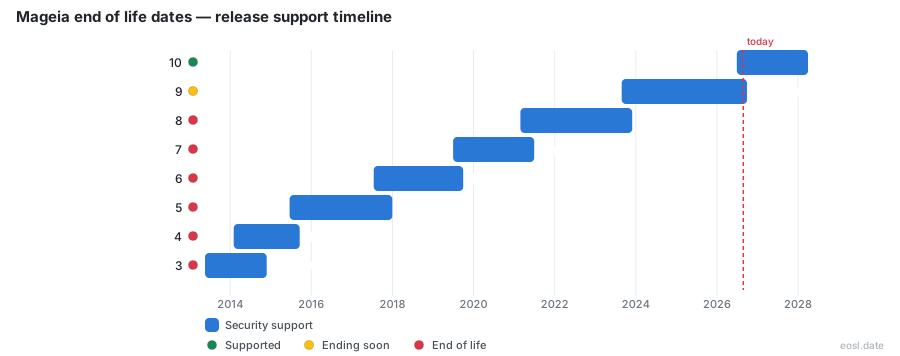
Currently Supported Mageia Releases - Active EOS/EOSL Support (1)
| Release | Released | Supported |
|---|---|---|
| 10 | (4 months ago) | (in 1 year and 4 months) |
Mageia End of Life (EOL) Releases - No Longer Supported (9)
| Release | Released | Supported |
|---|---|---|
| 9 | (3 years and 2 months ago) | (1 month and 1 week ago) |
| 8 | (5 years and 8 months ago) | (2 years and 11 months ago) |
| 7 | (7 years and 4 months ago) | (5 years and 4 months ago) |
| 6 | (9 years and 3 months ago) | (7 years and 1 month ago) |
| 5 | (11 years and 4 months ago) | (8 years and 10 months ago) |
| 4 | (12 years and 9 months ago) | (11 years and 1 month ago) |
| 3 | (13 years and 5 months ago) | (11 years and 11 months ago) |
| 2 | (14 years and 5 months ago) | (12 years and 11 months ago) |
| 1 | (15 years and 5 months ago) | (13 years and 11 months ago) |
If you run a Linux distribution such as Mageia, Mageia End of Life is the date a release stops receiving fixes. The latest notice says Mageia 9 reached its end of support on 30 September 2026, so Mageia 10 is the release to be running. This open-source operating system guide gives you the dates, the risks and the upgrade steps.
Mageia End of Life Dates and the Release Lifecycle
Mageia is a community-run Linux distribution built by former Mandriva staff as a Free Software project, forked from Mandriva Linux in 2010 after Mandriva's parent company went into liquidation, and a nonprofit still backs it. Every one of the Mageia releases follows one lifecycle rule: support lasts at least 18 months, or three months after the next release, whichever is longer. Each end-of-life date therefore depends on when the following version ships, not on a fixed calendar, so Linux users should watch the announcements.
Version History and Supported Until Dates
The table pulls the version history of recent releases together. The Mageia 8 End of Life notice in December 2023 followed the same pattern, and the newest release is supported until 31 March 2028 while running Linux kernel 6.18, whereas its predecessor stayed on kernel 6.4.
| Release | Released | Support ends | Status |
|---|---|---|---|
| 10 | 28 June 2026 | 31 March 2028 | Supported |
| 9 | 27 August 2023 | 30 September 2026 | Unsupported |
| 8 | 26 February 2021 | 30 November 2023 | Unsupported |
| 7 | 1 July 2019 | 30 June 2021 | Ended |
| 6 | 16 July 2017 | 30 September 2019 | Ended |
| 5 | 20 June 2015 | 31 December 2017 | Ended |
Why Mageia 9 Reached End of Support: Security Updates Stop
On 25 September 2026 the project announced that Mageia 9 had reached end-of-life, after three years and 24,008 updates. From then on security updates stop, which means no security patches and no bug fixes for your Linux system. Any newly found vulnerabilities stay unpatched, and that hurts servers most because Linux servers often run for years without a reinstall.
The cutoff is practical. A small team of volunteer packagers cannot maintain every release across the Linux ecosystem forever, so work concentrates on Mageia 10 and the Cauldron development branch. Staying behind means you carry the risk of missing security fixes yourself.
Upgrade to Mageia 10 Using an In-Place Upgrade or Clean Install
To upgrade to Mageia 10, read the release notes first, then choose one of three routes: the graphical major-version update tool, the command line steps for advanced Linux users, or a fresh setup from a DVD image. Make backups before you start.
In-Place Upgrade Through the System Tray
The blue update applet in the tray offers the migration, and the Mageia Control Center lists the same Linux package updates, so you can upgrade in place without reinstalling anything.
Clean Install from Installation Media
Write the installation media to a USB stick or a DVD, or use a netinst image on a slow connection. Live media is only for testing and cannot upgrade an existing Linux system. Keep your files on a separate /home partition, because everything else is erased.
Hardware Requirements and Desktop Environments Before You Leave Mageia 8
Before moving, check that your machine meets the hardware requirements: 512MB of RAM at minimum, 2GB recommended for KDE Plasma or GNOME, and 5GB of storage for a minimal install. A lighter option such as Xfce runs on 1GB, which suits older Linux hardware.
The newest release offers more than 20 desktop environments and window managers on the Linux desktop, including Wayland compositors, and because Mageia is a free download you can try the live images at no cost.
Community Support When a Release Is Unsupported
Mageia.Org does not sell commercial help, but the community does. Ask in the forums, which cover most languages, search the Mageia wiki and follow the Mageia blog for notices. Linux users on any Linux release can also report bugs through Bugzilla.