Longhorn End of Life (EOL) Dates and End of Support (EOS) Dates
Longhorn end of life (EOL) and end of support (EOS) dates: 8 Longhorn versions have reached EOL, including Longhorn 1.8 (EOL date: Jul 22, 2026) — no longer receiving security updates or patches. Longhorn 1.9 reaches its End of Support date on Nov 27, 2026 — plan your upgrade path now. Longhorn 1.13.0 is the current supported release, with support through Nov 29, 2027 — 4 versions in active support. Also see Contour EOSL information for related end-of-life information.
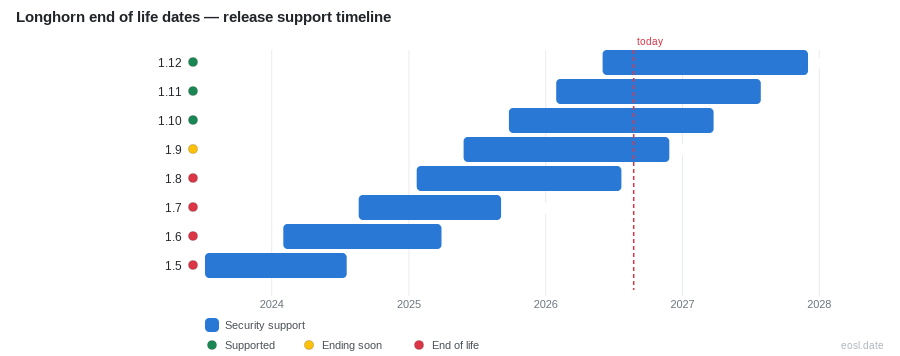
Currently Supported Longhorn Releases - Active EOS/EOSL Support (4)
Longhorn Releases Nearing End of Life - Support Ending Soon (1)
| Release | Released | Support | Latest |
|---|---|---|---|
| 1.9 | (1 year and 5 months ago) | (in 5 days) | 1.9.2 (1 year and 1 month ago) |
Longhorn End of Life (EOL) Releases - No Longer Supported (8)
| Release | Released | Support | Latest |
|---|---|---|---|
| 1.8 | (1 year and 10 months ago) | (4 months ago) | 1.8.2 (1 year and 5 months ago) |
| 1.7 | (2 years and 3 months ago) | (1 year and 2 months ago) | 1.7.3 (1 year and 9 months ago) |
| 1.6 | (2 years and 9 months ago) | (1 year and 7 months ago) | 1.6.4 (1 year and 10 months ago) |
| 1.5 | (3 years and 4 months ago) | (2 years and 4 months ago) | 1.5.5 (2 years and 7 months ago) |
| 1.4 | (3 years and 10 months ago) | (2 years and 8 months ago) | 1.4.4 (3 years ago) |
| 1.3 | (4 years and 5 months ago) | (3 years and 3 months ago) | 1.3.3 (3 years and 7 months ago) |
| 1.2 | (5 years and 2 months ago) | (4 years and 1 month ago) | 1.2.6 (4 years ago) |
| 1.1 | (5 years and 11 months ago) | (4 years and 6 months ago) | 1.1.3 (4 years and 11 months ago) |
If you run Kubernetes storage or maintain Windows machines, Longhorn end of life can mean two very different things. The cloud-native storage software has no single shutdown date; each version simply ages out of the cycle. The old Microsoft code name retired with Windows Vista. This guide separates both so you know what to plan for.
Longhorn End of Life: Release Schedule and Support
The project publishes a roadmap and a release schedule on its GitHub wiki, and that schedule is the source of truth for what is maintained. In general, there are three minor releases per year, landing in January, May and September. The wiki states that the plan is tentative and not a binding commitment, so a feature slipping a cycle is normal. Treat any version that is several cycles behind as a candidate for retirement, and confirm dates against the milestones page rather than a blog post.
Release History and Known Issues
Before moving, read the release history and the known issues for your target version. Every version has a GitHub issue that tracks its test plan, open bugs and community feedback, so you can see which feature shipped, which feature was delayed and which test failed before you commit a cluster to it.
Roadmap Milestones
The plan lists the v1.12 milestone for May 2026, with a V2 Data Engine that decouples initiator and target placement, adds fast cloning and gains IPv6 coverage. The v1.13 plans for September 2026 add live upgrade for the V2 data engine and strict-local volumes. Planned work shows where the engine is heading, which helps you judge how long an older line stays useful.
Minor Releases and the Stable Release Line
Each of the three yearly cuts becomes the current stable release once it settles. Patch builds follow for the maintained lines, while earlier lines receive fewer fixes over time. Stay on a stable build and avoid running a beta version in production.
Version Update Policy and Upgrade Path Enforcement
Under its version update policy, every longhorn-manager in the cluster is only allowed to move from the previous stable release. Upgrading to 1.4.x, for example, is supported from 1.3.x or 1.4.0. The upgrade path matters because skipping versions would stop the maintainers from removing deprecated code. You also gain predictability: an unsupported jump fails safely and leaves your existing setup intact instead of half-migrated.
Downgrade Prevention and Upgrade Enforcement
The project added downgrade prevention and upgrade enforcement in v1.5.0, and the longhorn-manager admission webhook now rejects an unsupported upgrade or any move back to an older version. The design went through a Longhorn enhancement proposal first, and the old compatibility code for much older versions was removed, so backward compatibility is only kept for the previous line and jumping across several versions is not a recovery option.
Rolling Update Strategy for Managers and CSI
A planned improvement, targeted at milestone v1.11.0, tackles outages during an upgrade. The longhorn-manager and the longhorn-csi-plugin run as a DaemonSet, and each CSI sidecar runs as a deployment, and without a maxUnavailable value Kubernetes may take every pod down at once, briefly stopping the control plane. The fix lets the Helm chart configure the rollout for the longhorn-manager, while the CSI components, such as the CSI attacher, provisioner and resizer, default to one unavailable pod. In a large cluster, a rolling update with a small maxUnavailable limits the blast radius.
Deprecation Policy and Backporting Policy
The wiki documents a deprecation policy next to a backporting policy, and together they decide what a retiring line still receives. The team decides whether to backport a fix, and it is usually done only when the issue is severe and the change is low risk, and the team tracks that work with a require/backport label. Features marked deprecated are removed after the upgrade path moves past them, so check the notes before relying on an old setting. Relevant tasks like a replica rebuild, an RWX volume mount, a backup, a restore or a migration between storage classes can all behave differently across lines, so test each one first.
CVE Resolution and Release Flow
Security fixes follow the CVE resolution and dependency update policy pages. The release flow then builds the chart, tags images and publishes the Rancher charts, so security patches reach supported lines first.
How to Uninstall Longhorn Without Getting Stuck
When you retire a cluster, plan the removal as carefully as the install, and remember that a fresh install later needs clean leftovers removed first. If you remove the app from the Rancher UI before changing the deleting-confirmation-flag setting, the release gets stuck uninstalling and a redeploy fails with "has no deployed releases". The documentation issue suggests two ways out:
- Patch the deleting-confirmation-flag to true and retry the uninstall.
- Roll back the Helm uninstall with
helm rollbackto the last good revision, then uninstall again.
If someone also removed the longhorn-crd, you may need to recreate the settings CRD by hand, add the flag object, delete the app and then remove both objects. Back up volumes before every uninstall.
The Windows Longhorn Release That Became Vista
Before the storage project, Longhorn was Microsoft's code name for the next Windows operating system after XP. In August 2004 Microsoft cut the WinFS storage system from the plan so the 2006 target could hold, and it brought the Avalon, Indigo and WinFX pieces to Windows XP and Windows Server 2003 for developers. A first beta version was expected in mid-2005. Microsoft analysts said that Longhorn as such no longer existed, because its three feature sets were no longer tied to it. The product shipped as Windows Vista, whose extended support ended on April 11, 2017. Longhorn Server became Windows Server 2008, whose extended lifecycle ended on January 14, 2020. Enterprise customers still running either one are past their end date.
Longhorn Documentation and Next Steps
Use the official Longhorn documentation and the wiki to confirm dates for your own version, then schedule your upgrade one version at a time.