Flux End of Life (EOL) Dates and End of Support (EOS) Dates
Flux end of life (EOL) and end of support (EOS) dates: 9 Flux versions have reached EOL, including Flux 2.7 (EOL date: Oct 26, 2026) — no longer receiving security updates or patches. Flux 2.10.1 is the current supported release — 3 versions in active support. Also see Contour EOSL dates for related end-of-life information.
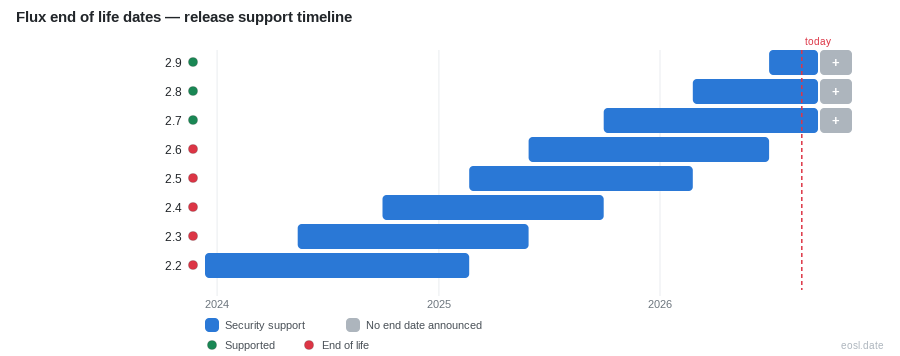
Currently Supported Flux Releases - Active EOS/EOSL Support (3)
Flux End of Life (EOL) Releases - No Longer Supported (9)
| Release | Released | Support | Latest |
|---|---|---|---|
| 2.7 | (1 year and 1 month ago) | (4 weeks and 1 day ago) | 2.7.5 (11 months ago) |
| 2.6 | (1 year and 5 months ago) | (4 months ago) | 2.6.4 (1 year and 4 months ago) |
| 2.5 | (1 year and 9 months ago) | (9 months ago) | 2.5.1 (1 year and 8 months ago) |
| 2.4 | (2 years and 1 month ago) | (1 year and 1 month ago) | 2.4.0 (2 years and 1 month ago) |
| 2.3 | (2 years and 6 months ago) | (1 year and 5 months ago) | 2.3.0 (2 years and 6 months ago) |
| 2.2 | (2 years and 11 months ago) | (1 year and 9 months ago) | 2.2.3 (2 years and 9 months ago) |
| 2.1 | (3 years and 3 months ago) | (2 years and 1 month ago) | 2.1.2 (3 years and 1 month ago) |
| 2.0 | (3 years and 4 months ago) | (2 years and 6 months ago) | 2.0.1 (3 years and 4 months ago) |
| 1.25 | (4 years and 7 months ago) | (4 years ago) | 1.25.4 (4 years and 2 months ago) |
If you are asking about Flux end of life, the answer depends on which Flux you run: Flux v1, the Flux legacy project for Kubernetes GitOps, is finished, while the Flux query language from InfluxDB sits in maintenance mode. This guide sorts out which versions the CNCF project still covers and what to do before yours stops getting fixes.
Is Flux Going to End-of-Life? Maintenance Mode Explained
People searching for Flux going to end-of-life often mean the Flux data scripting language used with InfluxDB, not the Kubernetes tool. InfluxData says that Flux is in maintenance mode: no new features are developed, but security patches and critical defect fixes continue for InfluxDB 1.x and 2.x. InfluxDB 3 is a ground-up rewrite in Rust (the earlier engine was written in Go), so it does not run Flux at all.
The company's advice is to future-proof your queries with InfluxQL or SQL. Because the database focuses on performance, ingestion and compression, existing Flux code keeps working today, but the language has no roadmap beyond maintenance. Whoever runs InfluxDB should plan a gradual move, while the rest of this page covers the GitOps tool.
Flux tasks alternatives for InfluxDB users
If you move to InfluxDB 3, Flux tasks stop working because the language never reaches that engine, so rewrite them in the technology your team prefers. For downsampling, the better storage performance may remove the need for a task.
Flux End of Life for Flux v1: History of Flux Legacy
The old repository was archived by the owner on 1 November 2022 and is now read-only. Flux v1 has reached end of life and is no longer supported; a migration guide points existing users to the successor. Weaveworks started the project and chose to donate it to the CNCF, and as adoption grew, this open source continuous delivery software needed a redesigned codebase.
Why Flux v2 replaced Flux v1
The team rebuilt the tool from specialised controllers and custom resource definitions, known as the GitOps Toolkit. Flux v2 added multi-tenancy, syncing of any number of Git repositories holding your configuration, better observability and a stronger security stance. Vendors now offer a managed Flux service for deployment, built on Flux v2, and the legacy design is gone.
Flux Supported Versions and the Support Window
The project supports the last three minor releases with critical bug fixes and security fixes. Fixes are back-ported as patch releases on a best-effort basis by the community, so the support window is short. The table below shows the status of recent versions at the time of writing.
| Release | Released | Support status |
|---|---|---|
| 2.9 | 30 Jun 2026 | Supported |
| 2.8 | 24 Feb 2026 | Supported |
| 2.7 | 30 Sep 2025 | Supported |
| 2.6 | 29 May 2025 | Ended 30 Jun 2026 |
| 2.5 | 20 Feb 2025 | Ended 24 Feb 2026 |
Anything older than 2.7 is no longer supported by the community, and each new minor release pushes the oldest supported one out.
Kubernetes supported versions
Every Flux release is tested against the latest Kubernetes minor release, and the CNCF project supports the three newest Kubernetes versions. Once a Kubernetes release reaches end-of-life, there are no end-to-end tests for it, so compatibility is not guaranteed. Enterprise support from vendors such as ControlPlane covers older versions.
Controller and CLI compatibility
The controllers are guaranteed to work together within one minor version, and the flux CLI is supported within one minor version of your controllers as well. Keep them close to avoid surprises.
Release Cadence and Release Versioning for Supported Releases
Flux follows Kubernetes: three minor releases a year, each about two weeks after a Kubernetes release, so a minor version arrives at least every four months. Versions follow semver, and the project keeps release branches for the three newest minor versions. The cadence explains why a version ages out within about a year, so a Flux v2 production cluster cannot sit still.
Release candidates, patch releases and minor releases
Release candidates are for staging clusters and testing, not production. Patch releases deliver a CVE or severe vulnerability fix with no user-facing changes, and you should run the latest patch version. Minor releases add backward-compatible features.
Major releases and breaking changes
Major releases mean drastic changes and come with one year of support for the previous major version. Rare breaking changes in minor versions are flagged in the changelog, and some APIs are deprecated before removal.
Supported Upgrades and the Upgrade Procedure for Deprecated APIs
You can upgrade from any v2.x release to any other v2.x release. Moving to a current version is the safest answer to an expiring one, and automation helps: GitHub Actions and Renovatebot can keep your cluster current. Custom resources may need edits after an upgrade, and the upgrade guide describes each step.
- Run
flux migratefirst, so every resource uses stable APIs, because the beta2 APIs reached end of life. - Upgrade the CLI, then the bootstrap manifests, Helm releases and Kustomization objects.
- Check Helm post-render settings, because the default strategy changed in v2.9.
- Review features such as server-side apply, SOPS, OIDC, workload identity and the Flux Operator web UI against your setup.
The controllers update with the CLI. Read the breaking-change notes before every minor jump.
Release Artifacts and Changelog for Versions No Longer Supported
Each release publishes source code, an SBOM, signed checksums, CLI binaries and container images on the GitHub Releases page, signed with Cosign. The changelog lists security fixes, migration instructions and controller notes, so check it to see what an unsupported version is missing in your infrastructure and cluster.
Legacy Support and Where to Ask When a Flux Release Ends
Once your version is out of the support window, ask on the #flux channel on CNCF Slack, join the community dev meetings, or send feedback to InfluxData for the Flux language. Weigh any end of life notice against your own timelines.