Linux Mint End of Life (EOL) Dates and End of Support (EOS) Dates
Linux Mint end of life (EOL) and end of support (EOS) dates: 13 Linux Mint versions have reached EOL, including Linux Mint LMDE 6 Faye (EOL date: Jan 01, 2026) — no longer receiving security updates or patches. Linux Mint 22.3 Zena (LTS) LTS is the current supported release, with support through Apr 30, 2029 — 9 versions in active support. Also see CentOS Stream end of support dates for related end-of-life information.
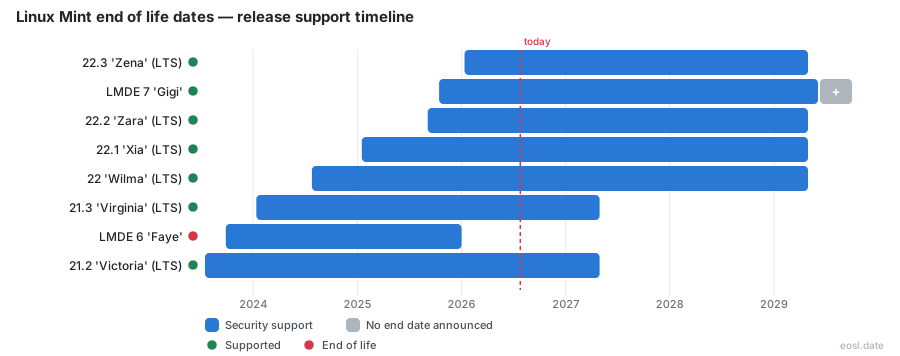
Currently Supported Linux Mint Releases - Active EOS/EOSL Support (9)
| Release | Released | Security Support | LTS |
|---|---|---|---|
| 22.3 'Zena' (LTS) | (9 months ago) | (in 2 years and 5 months) | LTS |
| LMDE 7 'Gigi' | (1 year ago) | Active | - |
| 22.2 'Zara' (LTS) | (1 year and 2 months ago) | (in 2 years and 5 months) | LTS |
| 22.1 'Xia' (LTS) | (1 year and 9 months ago) | (in 2 years and 5 months) | LTS |
| 22 'Wilma' (LTS) | (2 years and 3 months ago) | (in 2 years and 5 months) | LTS |
| 21.3 'Virginia' (LTS) | (2 years and 9 months ago) | (in 5 months) | LTS |
| 21.2 'Victoria' (LTS) | (3 years and 3 months ago) | (in 5 months) | LTS |
| 21.1 'Vera' (LTS) | (3 years and 10 months ago) | (in 5 months) | LTS |
| 21 'Vanessa' (LTS) | (4 years and 3 months ago) | (in 5 months) | LTS |
Linux Mint End of Life (EOL) Releases - No Longer Supported (13)
| Release | Released | Security Support | LTS |
|---|---|---|---|
| LMDE 6 'Faye' | (3 years and 1 month ago) | (10 months ago) | - |
| LMDE 5 'Elsie' | (4 years and 7 months ago) | (2 years and 4 months ago) | - |
| 20.3 'Una' (LTS) | (4 years and 9 months ago) | (1 year and 6 months ago) | LTS |
| 20.2 'Uma' (LTS) | (5 years and 3 months ago) | (1 year and 6 months ago) | LTS |
| 20.1 'Ulyssa' (LTS) | (5 years and 9 months ago) | (1 year and 6 months ago) | LTS |
| 20 'Ulyana' (LTS) | (6 years and 4 months ago) | (1 year and 6 months ago) | LTS |
| LMDE 4 'Debbie' | (6 years and 7 months ago) | (4 years and 3 months ago) | - |
| 19.3 'Tricia' (LTS) | (6 years and 10 months ago) | (3 years and 7 months ago) | LTS |
| 19.2 'Tina' (LTS) | (7 years and 3 months ago) | (3 years and 7 months ago) | LTS |
| 19.1 'Tessa' (LTS) | (7 years and 10 months ago) | (3 years and 7 months ago) | LTS |
| 19 'Tara' (LTS) | (8 years and 4 months ago) | (3 years and 7 months ago) | LTS |
| 18.3 'Sylvia' (LTS) | (8 years and 11 months ago) | (5 years and 6 months ago) | LTS |
| 18.1 'Serena' | (9 years and 9 months ago) | (5 years and 7 months ago) | - |
Wondering how much time your Linux Mint end of life clock has left? Linux Mint is a community-driven Linux distribution, and every release gets a fixed window of support, so you can plan the move to a newer version months ahead instead of finding out that security updates stopped without warning. Below you will find the support lifecycle, the support deadlines for each Linux Mint series, why they fall where they do and the steps to take before your Linux Mint operating system runs out of patches.
Linux Mint End of Life Dates for Every Release
Each main release of Linux Mint is a long term support (LTS) version built on an Ubuntu LTS, and the Linux Mint team supports it until the end of that Ubuntu base. A new LTS series arrives roughly every two years, which gives Linux Mint users about five years of coverage from the first version of a series. This Linux Mint end of life list shows when each series stops receiving updates, together with the Linux Mint release date of its first version in the codenames column.
| Mint series | Codenames | Ubuntu base | Type | Support ends |
|---|---|---|---|---|
| Linux Mint 22.x | Wilma, Xia, Zara, Zena | Ubuntu 24.04 (Noble Numbat) | LTS | April 2029 |
| Linux Mint 21.x | Vanessa, Vera, Victoria, Virginia | Ubuntu 22.04 (Jammy Jellyfish) | LTS | April 2027 |
| Linux Mint 20.x | Ulyana, Ulyssa, Uma, Una | Ubuntu 20.04 (Focal Fossa) | LTS | April 2025 |
| Linux Mint 19.x | Tara, Tessa, Tina, Tricia | Ubuntu 18.04 (Bionic Beaver) | LTS | April 2023 |
| Linux Mint 18.x | Sarah, Serena, Sonya, Sylvia | Ubuntu 16.04 (Xenial Xerus) | LTS | April 2021 |
Read the table by series, not by individual version: Linux Mint 21 and its updates (21.1, 21.2 and 21.3) all stop together in 2027, while Linux Mint 19 and Linux Mint 18 ended in 2023 and 2021. The newest version is 22.3, released in January 2026 after 22.1 in January 2025 and 22.2 in September 2025, and the next major Linux Mint is planned for the end of this year or early the next. When it appears, the table gains a new row and the oldest supported series moves closer to its own deadline.
Linux Mint is open source software and a community-driven Linux distribution, so the dates are public and the team announces each one well in advance. As a Linux distribution it publishes dates early: the Linux Mint 20 series ended in April 2025, the Linux Mint 18 series ended in April 2021, and no Linux Mint series has ever had its date moved later.
Why Linux Mint EOL Follows the Ubuntu Support Cycle
The Mint team does not run a separate schedule. Its releases follow the support cycle of the Ubuntu release they sit on, so when Canonical's standard maintenance ends, the Linux Mint security feed ends with it. Linux Mint keeps its own repositories for the few packages it builds itself, yet it relies on the Ubuntu repositories for most of the package base, including the mirrors that serve it. Packages from the universe repository are maintained by the community and may not receive timely security updates even before a series expires.
That link also explains the long gaps between series. When Linux Mint 20 reaches EOL, as Linux Magazine reported in June 2025, the advice was to move to Linux Mint 22: version 20 launched in June 2020 as an LTS, enjoyed five years of life, and its date had been public for years. The same logic produced the Linux Mint 18.x EOL notice in 2021, when Clem Lefebvre, who leads the project, told users that the 16.04 base was ending and that a fresh install of the newest release was the safest path.
Extended Security Maintenance, Ubuntu Pro and Repositories
Canonical sells extended security maintenance through Ubuntu Pro, and some users enable it for selected Ubuntu packages after the main window closes. The Mint project still treats the series as finished at that point, so Mint's own software receives no further fixes. Treat that paid coverage as a short bridge, not a plan, because the open source Linux Mint project itself will not patch an expired series.
LMDE End of Service Life and Rolling Support
Linux Mint Debian Edition, or LMDE, takes a different path. It is built on Debian instead of Ubuntu, and the project usually stops supporting an LMDE release shortly after the next one appears. That rule can change from one version to the next, so read the announcement for each version. LMDE began as a rolling release, but current editions are fixed versions with their own cutoff dates, and the Linux Mint team describes them as the fallback if Ubuntu ever changes course.
| Edition | Codename | Debian base | Support ended or ends |
|---|---|---|---|
| LMDE 7 | Gigi | Debian 13 (Trixie) | Not announced yet |
| LMDE 6 | Faye | Debian 12 (Bookworm) | 1 January 2026 |
| LMDE 5 | Elsie | Debian 11 (Bullseye) | 1 July 2024 |
| LMDE 4 | Debbie | Debian 10 (Buster) | 1 August 2022 |
These cutoff dates are what inventory tools label EOSL. If you still run LMDE 6, you are already outside support and should move to LMDE 7, released in October 2025, unless you intend to switch to the Ubuntu-based line.
What Changes When a Release Reaches EOL
A series that has reached end of life does not stop booting. Your OS keeps working, so the Linux Mint OS looks normal, but you no longer receive important security updates from the repositories. Any vulnerability found afterwards stays open, so the Linux kernel, the browser and the desktop fall behind, and compliance rules for IT teams may flag the machine. Software vendors also drop older versions of Linux and of the Linux Mint OS, which makes installing new applications harder over time. Nothing breaks on the day the support deadline passes, and that is exactly why people miss it: exposure builds quietly from then on.
- Linux Mint support ends for the base OS and for its own tools, so no more patches arrive.
- An end-of-life Linux Mint series is treated by Linux security scanners as an unsupported OS.
- Linux kernel and driver updates end, which hurts compatibility with new hardware.
- Linux Mint users lose access to new versions of browsers and office software.
- Linux Mint package mirrors may keep serving files, but nobody reviews them for flaws.
The practical risk is greatest for laptops and servers on shared networks, where one unpatched Linux system can expose others. Ask yourself whether the Linux Mint machine handles sensitive files before deciding to delay, because a Linux system that is unpatched since 2025 is a far weaker target than a current one only until someone scans it.
Security Support, 32-bit Systems and KDE Cutoffs
The last Linux Mint release to run on 32-bit processors outside LMDE was 19.3 Tricia, and 32-bit software still works through Ubuntu upstream. KDE ended even earlier, because 18.3 Sylvia was the last KDE edition. Every release from the 20 series onward needs a 64-bit machine, so an old computer that cannot run a 64-bit system has to stay on an unsupported version or be replaced. Owners of that hardware therefore reach the end of support first, with no supported series left to move to.
Cinnamon, MATE and Xfce Editions
The default desktop is Cinnamon, developed by the Mint team, with MATE and Xfce as lighter alternatives. All three editions share one end date per series, so picking a different desktop never buys extra time. A Cinnamon system and an Xfce system installed on the same day expire together.
| Edition | Desktop environment | Status |
|---|---|---|
| Cinnamon | Cinnamon desktop | Default on every supported series |
| MATE | MATE desktop | Optional, same dates as Cinnamon |
| Xfce | Xfce desktop | Lightweight option, same dates as Cinnamon |
| KDE | KDE Plasma | KDE edition dropped after 18.3 |
If your Xfce or MATE edition is on a retired series, the fix is the same as for Cinnamon: install a current Linux Mint ISO of the same edition. KDE fans should know that no KDE edition has been offered since the KDE release of 18.3, so they have to choose another desktop.
Plan Your Upgrade Path Before Support End
Start the move at least a few months before the date in the table. From Linux Mint 20.3, the documented upgrade path is 20.3, then 21, then 21.3, then 22, which means several steps and a restart for each. Open the Update Manager first, install every pending update and take a system snapshot. Because Mint 22 is supported until April 2029, the effort pays off for most people, and it also brings PipeWire audio, better Flatpak handling and a refreshed Cinnamon desktop, yet the safest result usually comes from starting clean. Upgrades between major series also change the kernel, so check your drivers afterwards.
- Back up your files and your list of installed software.
- Check that your hardware meets the 64-bit requirement of current Linux Mint.
- Pick the same desktop edition so your habits carry over.
- Download the ISO only from the official Linux Mint site and verify it.
Fresh Installation or Point Release Upgrade
A point release such as 22.2 to 22.3 arrives through normal updates and needs no reinstall. Once your series has reached end of support, a jump to the newest LTS is where a fresh installation beats an in-place change. Always back up your data to an external disk before you start, then fetch the image from the official download page and write it to a USB stick. A fresh install on the latest LTS gives you the longest remaining support and none of the leftovers from older packages. Once the new series runs, restore your files, reinstall your applications and confirm that updates arrive.