Julia End of Life (EOL) Dates and End of Support (EOS) Dates
Julia end of life (EOL) and end of support (EOS) dates: 4 Julia versions have reached EOL, including Julia 1.12 (EOL date: Sep 10, 2026) — no longer receiving security updates or patches. Julia 1.13.3 is the current supported release — 2 versions in active support. Also see Alibaba Dragonwell lifecycle dates for related end-of-life information.
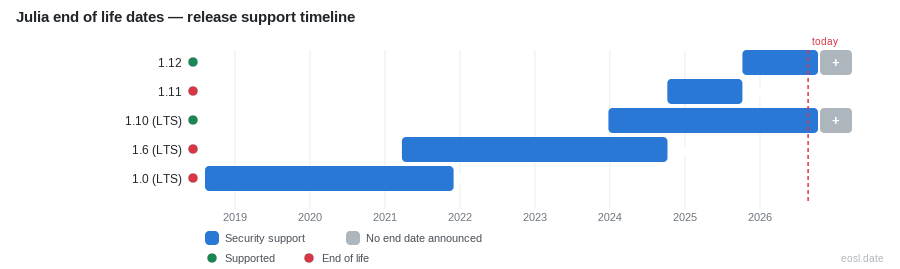
Currently Supported Julia Releases - Active EOS/EOSL Support (2)
Julia End of Life (EOL) Releases - No Longer Supported (4)
| Release | Released | Security Support | Latest | LTS |
|---|---|---|---|---|
| 1.12 | (1 year and 1 month ago) | (2 months ago) | 1.12.7 (2 months ago) | - |
| 1.11 | (2 years and 1 month ago) | (1 year and 1 month ago) | 1.11.9 (9 months ago) | - |
| 1.6 (LTS) | (5 years and 7 months ago) | (2 years and 1 month ago) | 1.6.7 (4 years and 3 months ago) | LTS |
| 1.0 (LTS) | (8 years and 3 months ago) | (4 years and 11 months ago) | 1.0.5 (7 years and 2 months ago) | LTS |
Wondering when your Julia end of life deadline arrives? The Julia language is an open-source programming language for technical computing, and only the newest minor release plus the long-term support line receive fixes. As of 27 October 2026 that means version 1.13 and the 1.10 LTS; everything older has lost support, so check the table below before you ship.
Julia end of life dates for every release line
Each release line is supported until its successor arrives, except LTS lines, which run for an extended period. These are the supported versions and their security support status today:
| Release line | Released | End-of-support date | Status | Last patch |
|---|---|---|---|---|
| 1.13 | 10 Sep 2026 | Not yet announced | Supported (newest line) | 1.13.3 |
| 1.12 | 8 Oct 2025 | 10 Sep 2026 | Ended | 1.12.7 |
| 1.11 | 7 Oct 2024 | 8 Oct 2025 | Ended | 1.11.9 |
| 1.10 (LTS) | 25 Dec 2023 | Not yet announced | Supported | 1.10.12 |
| 1.6 (LTS) | 24 Mar 2021 | 8 Oct 2024 | Ended | 1.6.7 |
| 1.0 (LTS) | 8 Aug 2018 | 1 Dec 2021 | Ended | 1.0.5 |
Julia releases and the support lifecycle
New Julia releases arrive roughly every four to five months, and each one starts its own support lifecycle: it is the supported line until the next minor versions ship, then it is retired.
How minor versions and patch updates work
Between minor releases, patch updates land about monthly. A patch carries bug fixes only, so moving from 1.13.2 to 1.13.3 should never change behaviour you rely on.
Stable release versus preview release
Version 1.13 is the stable version today. A preview release such as 1.14.0-alpha2 is for testing, and the nightly version built from the master branch changes daily, so keep both away from production.
The Julia release process explained
The release process is simple: the team cuts a feature-frozen branch, publishes alphas and release candidates, then tags a final build. The current release is always the newest tag, and the release notes live in a NEWS.md file in each git tag, with older entries in HISTORY.md. Read them on GitHub before every upgrade, because they list removed features that can break your code.
Julia LTS and long-term support
A Julia LTS line is picked occasionally from the minor releases and receives long-term support. An LTS version stays maintained for an extended period after newer releases appear, which suits teams that cannot upgrade every few months.
Critical bug fixes and security updates for LTS
An LTS line gets critical bug fixes and security updates only. It does not get new features or performance work, so it stays steady but falls behind.
Past LTS lines: 1.0 and 1.6
Both earlier LTS lines have ended. Maintenance stopped for 1.0 in December 2021 and for 1.6 in October 2024, which is why 1.10 is the only LTS you should start from today.
What end of support means for your projects
Once end of support passes, the release gets no more patches, even for newly found flaws. Your code keeps running, but every library you depend on will eventually drop that version. If you maintain a library, expect users on dead versions to file issues you cannot reproduce on a supported line, so plan an upgrade early. Developers who delay mostly pay later, in one large migration instead of several small ones.
Picking a safe upgrade window
Upgrade soon after the first patch of a new minor line, once early bugs are fixed. For a line that ends in a few weeks, such as 1.12, move now rather than waiting for the last patch.
Julia language backward compatibility and the stability promise
The programming language has kept a strong backward compatibility guarantee for every 1.x release since 2018. That stability promise covers the documented API, so well-written code from 1.0 should still run on 1.13. Internal functions are outside that promise, though, and compatibility problems usually come from them. In practice, the real deadline for moving on is a release line's retirement date, not a breaking change.
Package support policy for Julia libraries
The package ecosystem decides how long an old release stays practical. A project such as SciML tests its packages on the current Julia release and the LTS, gives packages a minimum version equal to the LTS, and closes bug reports from older versions. This support policy applies to testing as well as to benchmarks and tutorials, which run on the current release. Check the package's GitHub issues for version limits, and pin your project with a Manifest.toml to lock exact package versions.
Reproducibility versus long-term support
These are different problems. Reproducibility means recreating a known analysis, and the manifest file handles it with no special tooling. Long-term support is for large teams that cannot afford constant version updates.
Check your Julia version and upgrade with juliaup
Run julia --version to see which Julia version you have, then compare it with the table above. The recommended installer is juliaup, which installs the latest version and keeps it current. Manual builds are on the downloads page, and the source is on GitHub. Linux distribution packages are not maintained by the project and may be outdated.
Install several versions side by side
The installer can hold more than one release at once, so you can test your code on the LTS and on the newest line, then switch the default when you are ready.
Platform support tiers for Julia
Every platform that runs the Julia language is ranked by how well it is supported. Tier 1 covers 64-bit Linux, Windows 10 and later, and 64-bit macOS including Apple silicon. Tier 2 includes FreeBSD and Arm builds for Windows, and tier 3 includes RISC-V. Lower tiers may break between releases, because this programming language is tested most on tier 1, so check your tier before committing to a version.
Tier 1 platforms get the strongest guarantees
Builds are tested on every change, so performance regressions and failures there are caught quickly.
Julia lang security support and policy
Under the Julia lang security policy for the Julia language, only supported lines get fixes for vulnerabilities. Report a flaw through the private channel in the GitHub repository, and follow GitHub security advisories for new patches. Because of the project's community size, a patched release usually follows quickly, but it only reaches supported versions, which is the main reason not to stay on an ended line.
Technical computing support for Julia and scientific machine learning
Julia is built for numerical work, and groups working on scientific machine learning are among the heaviest users. The language is dynamic and feels interpreted at the prompt, yet code is compiled just in time, which is how it combines scripting convenience with speed. It is also open-source under the MIT license, so anyone can read the code on GitHub, and that programming language is free to use.
Dynamic yet compiled design
That combination is why an upgrade can change timing: newer compilers often improve speed, which is one more reason to stay current.
Where Julia support resources and downloads live
The main GitHub repository for the Julia language holds the source, issues and tags. The official documentation covers every release, and the project homepage links the manual. Use GitHub to read the tagged notes and GitHub issues to see whether a bug was fixed in your line. The language forum and chat channels are good places to ask questions, and GitHub discussions work for design topics.
Stable version or LTS: which support level to choose
Pick the newest line if you want the newest features and fastest code. Pick the LTS if you need fewer changes and can accept older dependencies. Julia is a general programming language, but even then, SciML recommends the current release unless an LTS is specifically required, because version-based branching in packages can switch off performance work.
Planning an upgrade before support ends
Put the end-of-support dates in your calendar, run your test suite on the next release line early, and read its notes. Then upgrade on your schedule. Even a small patch upgrade is worth applying immediately.