Visual COBOL End of Life (EOL) Dates and End of Support (EOS) Dates
Visual COBOL end of life (EOL) and end of support (EOS) dates: 10 Visual COBOL versions have reached EOL, including Visual COBOL 8.0 (EOL date: Jul 31, 2026) — no longer receiving security updates or patches. Visual COBOL 10.0 is the current supported release, with support through Jul 31, 2028 — 2 versions in active support. Also see Alibaba Dragonwell lifecycle dates for related end-of-life information.
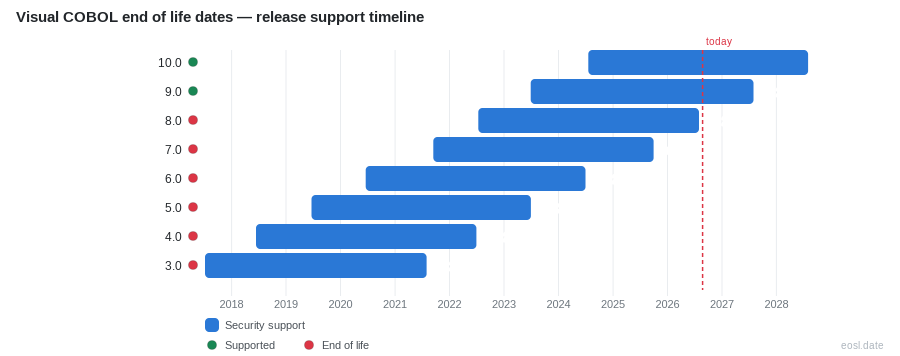
Currently Supported Visual COBOL Releases - Active EOS/EOSL Support (2)
| Release | Released | Support Status |
|---|---|---|
| 10.0 | (2 years and 3 months ago) | (in 1 year and 8 months) |
| 9.0 | (3 years and 4 months ago) | (in 8 months) |
Visual COBOL End of Life (EOL) Releases - No Longer Supported (10)
| Release | Released | Support Status |
|---|---|---|
| 8.0 | (4 years and 4 months ago) | (3 months ago) |
| 7.0 | (5 years and 1 month ago) | (1 year and 1 month ago) |
| 6.0 | (6 years and 4 months ago) | (2 years and 4 months ago) |
| 5.0 | (7 years and 4 months ago) | (3 years and 4 months ago) |
| 4.0 | (8 years and 4 months ago) | (4 years and 4 months ago) |
| 3.0 | (9 years and 4 months ago) | (5 years and 3 months ago) |
| 2.3 | (10 years and 1 month ago) | (7 years and 1 month ago) |
| 2.2 | (11 years and 11 months ago) | (8 years and 3 months ago) |
| 2.1 | (13 years and 7 months ago) | (9 years and 5 months ago) |
| 2.0 | (14 years and 6 months ago) | (11 years and 10 months ago) |
Planning around Visual COBOL end of life starts with one date: the day your installed release stops getting patches from Micro Focus, now part of OpenText. Release 8.0 reached that point on 31 July 2026, and it is the same cut-off that decides when your COBOL applications stop receiving fixes in the software you build them with. This page lays out each version's date, the support stages around it, and what your IT team can do before the date arrives.
Visual COBOL End of Life Dates and Latest Release
The table follows the dates on the Product Support Lifecycle page that OpenText maintains, as mirrored on endoflife.date (last updated 24 September 2026). Each row shows when a release shipped and when its support ends. Visual COBOL 8.0, for example, shipped on 13 July 2022 and ended on 31 July 2026; every release older than that is no longer supported.
| Release | Released | Support ends | Status as of 27 October 2026 |
|---|---|---|---|
| 10.0 | 19 Jul 2024 | 31 Jul 2028 | Supported |
| 9.0 | 29 Jun 2023 | 31 Jul 2027 | Supported, about 9 months left |
| 8.0 | 13 Jul 2022 | 31 Jul 2026 | Ended |
| 7.0 | 14 Sep 2021 | 30 Sep 2025 | Ended |
| 6.0 | 18 Jun 2020 | 30 Jun 2024 | Ended |
The vendor's own lifecycle table adds a status column and an end date per product. The latest release on the vendor's product page is 11.0, which is newer than anything above, so check that page for its date before you plan around 10.0.
Product Support Lifecycle Stages From Current Maintenance
The product support lifecycle moves every release through the same stages. Under the support lifecycle policy, current maintenance is the fullest stage:
- Technical support with unlimited support requests
- Product patches when available, including fixes for critical issues
- New releases according to the product roadmap
- Self help resources on the Customer Service Portal, such as documentation, technical articles and discussion forums
The lifecycle policy then narrows what you receive. Options to extend coverage can carry an additional fee, and your renewal representative is the person to ask for a quote.
Sustaining Maintenance and Limited Extended Support
Sustaining maintenance begins when the first stage ends: you keep new releases but no patches. A paid two-year extension then restores support for critical issues, and limited extended support follows it with self help resources only.
Support Status After an End of Support Date
Once a release's support status reads ended, the software still runs, but nobody fixes it. New operating system updates and security findings land on your platform with no vendor response, and your development team inherits the risk. On mainframe or distributed infrastructure the gap adds technical debt: the longer a build sits on an ended release, the larger the later jump, and the more data access code and business data handling you must retest in one go.
Modernization Options Within Your Lifecycle Plan
Moving off an ended release rarely means a rewrite. Rocket Visual COBOL 11.0 is marketed as a way to modernize COBOL applications with minimal code changes, and these are the routes it covers:
- Replatform by recompiling your COBOL for Windows, Linux, the .NET framework or the JVM, leaving the source as it is
- Run in containers with Docker, orchestrated by Kubernetes on Azure, AWS or Google Cloud
- Expose business logic through APIs your other services can call
- Edit in Visual Studio, Visual Studio Code or Eclipse, which shortens onboarding for developers new to COBOL
- Use Enterprise Suite and Enterprise Developer for mainframe workloads, including WSL-based development
Pick the route that fits your estate. A team with one aging batch application may only need a newer release, while a team that wants cloud deployment gets more from the container path. Whichever you choose, fold the modernization work into the same plan as your other COBOL applications and mainframe estate, so every application moves on one schedule.
Lifecycle Checks for Your COBOL Release Pipeline
Treat the end of support date in the table above as a build requirement. In your DevOps pipeline, add a CI/CD check that fails when the compiler release in use passes its end date. Run unit tests on every application before moving to a newer release, and use static code analysis to find programs that depend on behavior that changed between releases. Release 9.0 has about nine months left, which is shorter than many migrations take, so start now.