jQuery UI End of Life (EOL) Dates and End of Support (EOS) Dates
jQuery UI end of life (EOL) and end of support (EOS) dates: 7 jQuery UI versions have reached EOL, including jQuery UI 1.13 (EOL date: Aug 05, 2024) — no longer receiving security updates or patches. jQuery UI 1.14.2 is the current supported release. Also see AdonisJS lifecycle dates for related end-of-life information.
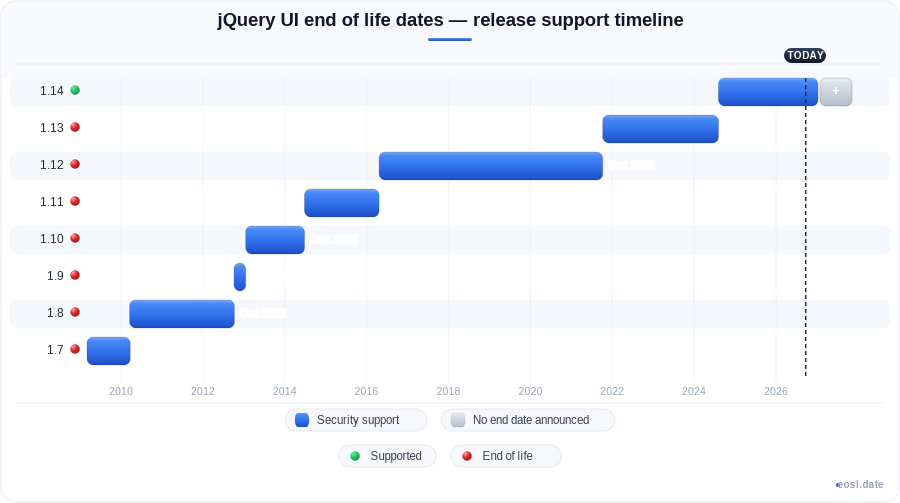
Currently Supported jQuery UI Releases - Active EOS/EOSL Support (1)
| Release | Released | Security Support | Latest |
|---|---|---|---|
| 1.14 | (2 years and 3 months ago) | Active | 1.14.2 (9 months ago) |
jQuery UI End of Life (EOL) Releases - No Longer Supported (7)
| Release | Released | Security Support | Latest |
|---|---|---|---|
| 1.13 | (5 years and 1 month ago) | (2 years and 3 months ago) | 1.13.3 (2 years and 6 months ago) |
| 1.12 | (10 years and 7 months ago) | (5 years and 1 month ago) | 1.12.1 (10 years and 2 months ago) |
| 1.11 | (12 years and 4 months ago) | (10 years and 7 months ago) | 1.11.4 (11 years and 8 months ago) |
| 1.10 | (13 years and 10 months ago) | (12 years and 4 months ago) | 1.10.4 (12 years and 10 months ago) |
| 1.9 | (14 years and 1 month ago) | (13 years and 10 months ago) | 1.9.2 (14 years ago) |
| 1.8 | (16 years and 8 months ago) | (14 years and 1 month ago) | 1.8.24 (14 years and 1 month ago) |
| 1.7 | (17 years and 8 months ago) | (16 years and 8 months ago) | 1.7.3 (16 years and 6 months ago) |
Wondering whether jQuery UI end of life affects your web applications? Only the newest release line still gets fixes, so anything older is unsupported, and the datepicker you shipped years ago may be running known-vulnerable code. This guide covers which releases are covered, which flaws matter, and what you can do next.
Is jQuery UI End of Life? Where jQuery UI Support Stands Today
For every release line except the newest, yes. jQuery UI is a collection of widgets, effects and themes built on jQuery, and it has been maintenance-only since 2021. There is no published calendar of end dates, so the table below follows the practical rule that matters: jQuery UI support covers the newest branch and nothing else.
| Branch | Final release | Status |
|---|---|---|
| 1.14 | 1.14.2, January 2026 | Maintenance mode, fixes still shipped |
| 1.13 | 1.13.3, April 2024 | Ended 5 August 2024 |
| 1.12 | 1.12.1, September 2016 | Ended October 2021 |
| 1.11 | 1.11.4, March 2015 | Ended April 2016 |
| 1.10 and older | 1.10.4, January 2014 | Ended June 2014 |
Anything on the bottom rows has gone years without an upstream fix, so check those older versions first.
jQuery UI 1.14 Is the One Release Still Getting Fixes
Version 1.14 arrived on 5 August 2024 and dropped Internet Explorer and Edge Legacy. The day it shipped, jQuery UI 1.13 lost its coverage, just as jQuery UI 1.12 had when 1.13.0 landed. Treat the latest version as your only supported target.
Why jQuery UI Sits in Maintenance Mode
Upkeep is costly for an open source project run by a few volunteers. Version 1.13 works with jQuery 1.8 and newer, which meant 18 testing variants, and 1 year and 9 months passed between the 1.13.2 and 1.13.3 releases. Since June 2024 the Download Builder only handles 1.12 or newer, though older full builds with built-in themes stay downloadable. If you use a custom ThemeRoller theme, re-export it on a current build. Fixes now go to the most serious issue or regression first, with the occasional patch from the community.
What jQuery UI EOL Means for Your Applications
An abandoned UI component fails differently from a server runtime: the vulnerable code runs on pages your visitors use daily. Every known flaw here is client-side, and each one is a security risk you carry until you act.
Known XSS Vulnerabilities and CVE Fixes
Four cross-site scripting flaws were fixed in the 1.13 line. Three came in 2021: CVE-2021-41182, 41183 and 41184 affect the datepicker's altField and text options and the of option of the position utility that tooltip and autocomplete rely on. All were fixed in 1.13.0. CVE-2022-31160, a checkboxradio flaw, was fixed in 1.13.2. Because the published advisory lists everything below 1.13.2, a scanner will flag even 1.10.4 for it, although that widget only arrived in 1.12.
Why Fixes Are Never Backported
Coverage applies to the newest minor release only. When a flaw appears in a dialog or other widget, it is patched on 1.14 and nowhere else. Teams on frozen versions will read future advisories describing holes that nobody will backport a fix for. Plan around that: security fixes reach you only if you move.
Where Compliance Frameworks and Audit Pressure Bite
If a scan flags jQuery UI 1.12 or older, the framework you answer to decides how painful that is. PCI DSS 4.x expects critical patches within a month of release, and no upstream fix exists for pre-1.14 builds. Under SOC 2, an unsupported component makes vulnerability management harder to defend, and HIPAA's Security Rule asks you to reduce known risk to a reasonable level. Each audit becomes a conversation about compensating controls for the widget code you cannot patch.
How an Unsupported Plugin Keeps Old jQuery in Place
A stale UI plugin pins the core under it. A frontend built on jQuery UI 1.13 may sit on jQuery 1.8 or newer for years, and jQuery itself has narrowed what it supports: only the latest version is covered, the 1.x and 2.x lines are out, and jQuery 3.x is treated as security-only, receiving critical security patches and bug fixes. The core jQuery 3.5.0 release also fixed an exploited XSS flaw, which makes old cores risky to keep.
jQuery 4 and the jQuery 3 Support Timeline
jQuery 4.x is now the current branch. Maintainers have said that once jQuery 4 is final they will backport less to jQuery 3, leaving that line mostly for severe security problems. No end date is fixed, and they promise plenty of notice before announcing one. For jQuery UI, remember that it tests against only the newest of each jQuery major, so a jQuery 4 move should happen alongside your widget upgrade.
What Drupal's Clean-Up Shows
Drupal asked the jQuery team for a jQuery 4 and jQuery 3 timeline because removing the jQuery UI dependency was taking longer than planned. It also noted that when older jQuery lines went security-only, some fixes were not backported, forcing Drupal to mitigate them privately. Maintainers follow semver, so breaking changes wait for majors, which is why a security release can still bring other changes you must test.
Your Upgrade Options for Legacy jQuery UI Installs
You have three realistic paths. The cheapest keeps your components and moves them to a supported build; the most durable removes the dependency; the stopgap buys time.
Upgrade to the Newest Build and Test It
Moving to the 1.14.x release is the best first step, since it carries every fix above. Use the jQuery Migrate plugin and the upgrade guides to surface deprecated calls, and compare the versions your lockfile resolves, keeping the old core until the pages pass. Find where it hides, because it is often pulled in indirectly:
- npm, as the jquery-ui package
- WebJars, for Maven projects
- NuGet, for .NET projects
The UI library is also bundled by hand in many templates, so search your repository too.
Migrate Off the Widgets You Barely Use
A date field and a modal are now native: an input type="date" and the HTML dialog element replace two of the commonest ones with plain JavaScript or none at all. Replace one widget per release and delete jQuery UI once the last is gone.
Buy Time With Extended Support
When neither path fits your schedule, commercial support bridges the gap. The OpenJS Foundation's Ecosystem Sustainability Program frames this market. HeroDevs sells Never Ending Support, and TuxCare offers Endless Lifecycle Support, adding ongoing security support and extended lifecycle coverage for out-of-support jQuery. TuxCare joined the program in 2026. It is a patch, not a plan.
Browser Support and Community Help for a Maintenance-Only Library
Version 1.14 is tested on the latest Chrome, Firefox, Safari and Edge only, and code for older browsers is deleted rather than kept. Pull requests run on the same custom QUnit-style test runner as jQuery Core, and the jQuery.uiBackCompat flag is off by default so accidental compatibility reliance shows up early. For help, use the jQuery Learning Center, the API documentation and StackOverflow, and file bugs on the GitHub tracker.