Internet Explorer End of Life (EOL) Dates and End of Support (EOS) Dates
Internet Explorer end of life (EOL) and end of support (EOS) dates: 5 Internet Explorer versions have reached EOL, including Internet Explorer 11 (EOL date: Jun 14, 2022) — no longer receiving security updates or patches. Internet Explorer 11 Embedded is the current supported release, with support through Oct 14, 2031 — 4 versions in active support. Also see Azure DevOps Server EOSL dates for related end-of-life information.
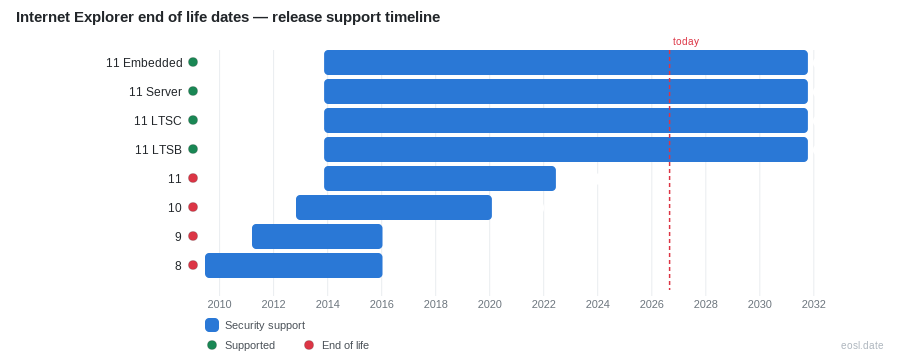
Currently Supported Internet Explorer Releases - Active EOS/EOSL Support (4)
| Release | Released | Security and technical support |
|---|---|---|
| 11 Embedded | (12 years and 11 months ago) | (in 4 years and 11 months) |
| 11 Server | (12 years and 11 months ago) | (in 4 years and 11 months) |
| 11 LTSC | (12 years and 11 months ago) | (in 4 years and 11 months) |
| 11 LTSB | (12 years and 11 months ago) | (in 4 years and 11 months) |
Internet Explorer End of Life (EOL) Releases - No Longer Supported (5)
| Release | Released | Security and technical support |
|---|---|---|
| 11 | (12 years and 11 months ago) | (4 years and 4 months ago) |
| 10 | (14 years ago) | (6 years and 9 months ago) |
| 9 | (15 years and 7 months ago) | (10 years and 10 months ago) |
| 8 | (17 years and 4 months ago) | (10 years and 10 months ago) |
| 7 | (20 years ago) | (3 years and 1 month ago) |
Your questions about Internet Explorer end of life come down to one fact: Microsoft retired the Internet Explorer 11 desktop browser on June 15, 2022, and IE mode in Microsoft Edge is now the supported way to open legacy pages on Windows. Below you will find the support dates, the editions that still receive fixes, and the steps your organization should take next.
Internet Explorer End of Life Dates and the Lifecycle Policy
Internet Explorer is a component of the Windows operating system, so every Internet Explorer 11 install follows the component lifecycle policy of the Windows version it ships with. Microsoft released Internet Explorer 11 in October 2013 with Windows 8.1, and it is the only Internet Explorer version Microsoft still lists, because Microsoft supports just the newest version across all Windows versions and ended the final release of the others long ago. Earlier versions such as Internet Explorer 7, Internet Explorer 8, Internet Explorer 9 and Internet Explorer 10 lost support between 2016 and 2023. IE11 is out of support on most PCs, but the date depends on your edition, as the table shows.
| Windows edition | Internet Explorer 11 status |
|---|---|
| Windows 10 Semi-Annual Channel | Support ended June 15, 2022; app disabled February 14, 2023 |
| Windows 10 LTSC and Windows Server 2022 | Supported as long as the operating system is |
| Windows 10 IoT Enterprise 2021 | Supported until 2032 |
| Windows 7 and Windows 8.1 | Covered only by paid extended coverage |
Windows 10 and Windows 7 Editions
On Home and Pro editions of Windows 10, a Microsoft Edge update turned off the Internet Explorer 11 desktop application for good, and a click on its shortcut now opens Edge. Windows 7 and Windows 8.1 machines receive fixes only if they hold a paid license, so most customers have already moved on. Check the supported operating systems list before assuming a machine is covered, since coverage lapsed on that date for every other edition. Windows 11 never shipped it, and Microsoft treats IE11 there as a legacy compatibility feature, not a product.
Windows Server and LTSC Releases
Windows Server 2012 R2, Windows Server 2016, Windows Server 2019 and Windows Server 2022 keep IE11 while the server version stays supported. The Windows 10 LTSB channel follows the same rule, as do Windows Embedded, Embedded POSReady 7 and Windows Thin PC. That is why some medical equipment controllers and ATMs still run it, with technical support tied to each of those operating systems and devices.
IE Mode in Microsoft Edge After End of Support
When the Internet Explorer 11 desktop browser stopped receiving fixes, Microsoft told every organization to use Edge. Internet Explorer mode lets Microsoft Edge render older sites with the Internet Explorer 11 engine, and Microsoft has committed to supporting it through at least 2029. Because the company promises a one year notice before retiring it, IT administrators will see the cutoff date well ahead of time, though waiting is a poor plan. Microsoft Edge stays your recommended default browser for everything else, and Edge is the only supported web browser from Microsoft today.
Chromium and Trident Compatibility
Microsoft Edge is built on Chromium, the same base as Chrome, while IE mode loads web pages with Trident, the older layout engine. Sites that rely on old plug-ins keep working, and modern pages run in the faster rendering engine. Compared with Chrome or Firefox, you give up nothing for ordinary browsing, and Edge, Chrome and Firefox all share modern web standards.
Extended Security Updates and ESU Licenses
Some products are covered after their normal expiry through Extended Security Updates. Your ESU license is tied to the Windows operating system, not to the browser, so check the Microsoft Lifecycle page for your release or the release notes of each product. Microsoft 365, Teams and Azure DevOps no longer support Internet Explorer 11, which is a good reason to switch.
IE11 Retired: Migration Away From a Legacy Browser
With the browser gone, the practical task is migration. List every line-of-business applications, intranet page and internal web tool that needs the old engine, then update or replace each one before Microsoft announces the retirement of IE mode. Organizations with no IE dependencies need take no action. Software written for Internet Explorer alone can take years to rebuild, and users of web pages built that way will see them break, so start the inventory now.
Removed and Added Features
Internet Explorer 11 added WebGL, HTTP/2 and Full Screen support, and its F12 tools gave you a document mode for testing IE5 through IE10 behavior. It also dropped Quick Tabs and attachEvent. Wikipedia keeps the full feature list for anyone comparing IE 11 against older builds. A 2013 review placed IE11 ahead of Chrome 30 and Firefox 26 on SunSpider, yet it later trailed Chrome and Firefox on newer tests.
Permanently Disabled on the Semi-Annual Channel
By the time support ended, Internet Explorer held under 1 percent of the browser market. Microsoft switched the app off in 2023 and later reversed its plan to remove leftover shortcuts. Anyone who still wants the old window can reach it only by unofficial methods, which is a security risk. For a safe upgrade, use Microsoft Edge and keep it for the few pages that need it. The Internet Explorer 11 story ends there for most Windows users.