Azure DevOps Server End of Life (EOL) Dates and End of Support (EOS) Dates
Azure DevOps Server end of life (EOL) and end of support (EOS) dates: 5 Azure DevOps Server versions have reached EOL, including Azure DevOps Server TFS 2015 (EOL date: Oct 14, 2025) — no longer receiving security updates or patches. Azure DevOps Server Patch 9 is the current supported release — 10 versions in active support. Also see Microsoft Windows Server EOSL dates for related end-of-life information.
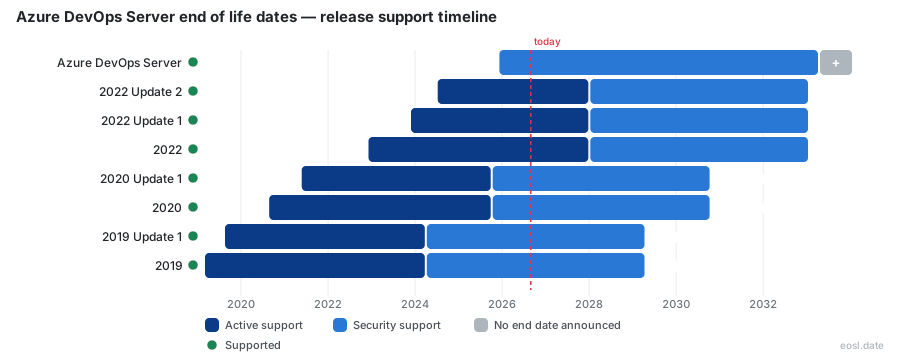
Currently Supported Azure DevOps Server Releases - Active EOS/EOSL Support (10)
| Release | Released | Security Support | Active Support | Latest |
|---|---|---|---|---|
| Azure DevOps Server | (11 months ago) | Active | Active | Patch 9 (1 month ago) |
| 2022 Update 2 | (2 years and 4 months ago) | (in 6 years and 1 month) | (in 1 year and 1 month) | 2022.2patch12 (3 months ago) |
| 2022 Update 1 | (2 years and 11 months ago) | (in 6 years and 1 month) | (in 1 year and 1 month) | 2022.1patch4 (2 years and 5 months ago) |
| 2022 | (3 years and 11 months ago) | (in 6 years and 1 month) | (in 1 year and 1 month) | 2022.0.1patch5 (2 years and 11 months ago) |
| 2020 Update 1 | (5 years and 5 months ago) | (in 3 years and 10 months) | (1 year ago) | 2020.1.2patch19 (5 months ago) |
| 2020 | (6 years and 2 months ago) | (in 3 years and 10 months) | (1 year ago) | 2020.0.2patch6 (2 years and 11 months ago) |
| 2019 Update 1 | (7 years and 2 months ago) | (in 2 years and 4 months) | (2 years and 7 months ago) | 2019.1.2patch13 (5 months ago) |
| 2019 | (7 years and 8 months ago) | (in 2 years and 4 months) | (2 years and 7 months ago) | 2019.0.1patch16 (2 years and 11 months ago) |
| TFS 2018 | (8 years and 11 months ago) | (in 1 year and 1 month) | (3 years and 10 months ago) | 2018.3.2patch20 (1 year and 7 months ago) |
| TFS 2017 | (9 years and 11 months ago) | (in 1 month and 4 weeks) | (4 years and 10 months ago) | 2017.3.1patch15 (4 years and 5 months ago) |
Azure DevOps Server End of Life (EOL) Releases - No Longer Supported (5)
| Release | Released | Security Support | Active Support | Latest |
|---|---|---|---|---|
| TFS 2015 | (11 years and 3 months ago) | (1 year ago) | (6 years and 1 month ago) | 2015.4.2patch8 (4 years and 5 months ago) |
| TFS 2013 | (12 years and 9 months ago) | (2 years and 7 months ago) | (7 years and 7 months ago) | 2013.5 (11 years and 3 months ago) |
| TFS 2012 | (14 years ago) | (3 years and 10 months ago) | (7 years and 10 months ago) | 2012.4 (13 years ago) |
| TFS 2010 | (16 years and 4 months ago) | (6 years and 3 months ago) | (11 years and 3 months ago) | 2010.SP1 (15 years and 8 months ago) |
| TFS 2005 | (20 years and 4 months ago) | (10 years and 4 months ago) | (15 years and 4 months ago) | 2005.SP2 (19 years and 7 months ago) |
Planning around Azure DevOps Server end of life starts with one question: which version do your users run today? Microsoft's self-hosted software product ends support version by version, so an old install can lose security updates while the newest release keeps receiving them. Check your support dates below, then pick an upgrade route before your enterprise runs unpatched.
Azure DevOps Server End of Life: What Is Actually Ending
Only numbered releases reach an end date. The product itself is not going away: Microsoft keeps the on-premises server for organizations that need compliance, data residency or network isolation, and it still ships a new release for it.
On-premises server versus Azure DevOps Services
Azure DevOps Services is the cloud offering, while the server is the self-hosted edition, so one does not replace the other. Forum rumors about a 2032 shutdown are unofficial; rely on the Microsoft lifecycle page instead.
Modern Lifecycle Policy replaces fixed end dates
The December 9, 2025 release dropped the version number and moved to the Modern Lifecycle Policy. You get continuous updates and new features as long as you stay on a supported build, and there is no fixed end date for it.
Azure DevOps Server 2022 Support Dates by Version
Azure DevOps Server 2022 follows the Fixed Lifecycle Policy, with dates listed in Pacific Time on its lifecycle page. Use the table to see where each version stands and which download formats exist among the previous versions.
| Version | Lifecycle status | Packages | Express edition |
|---|---|---|---|
| Latest release | Modern Lifecycle Policy, no fixed end date | EXE, ISO | Express |
| Azure DevOps Server 2022.2 | Fixed Lifecycle Policy | EXE, ISO | Express |
| Azure DevOps Server 2022.1 | Fixed Lifecycle Policy | EXE, ISO | Express |
| Azure DevOps Server 2022 | Fixed Lifecycle Policy | EXE, ISO | Yes |
| Azure DevOps Server 2020.1.2 | Check the lifecycle page | EXE, ISO | Express |
| Azure DevOps Server 2020.0.2 | Check the lifecycle page | EXE, ISO | Yes |
| Azure DevOps Server 2020 | Check the lifecycle page | EXE, ISO | Yes |
| Azure DevOps Server 2019.1.2 | Service life ended April 9, 2024 | EXE, ISO | Yes |
| Team Foundation Server 2018 | Out of support | EXE, ISO | Yes |
| Team Foundation Server 2015 | Extended support ended October 2025 | EXE, ISO | Yes |
Azure DevOps Server 2019 and 2020 status
Version 2019 passed its end of service life on April 9, 2024, so it gets no more fixes. Treat any copy of 2019 or 2020 as a priority for upgrading.
Upgrade Paths from Team Foundation Server
You can move straight to the newest build from Azure DevOps Server 2022, 2020 or 2019, or from Team Foundation Server (TFS) 2015 or newer. Installs on 2019 or TFS are already out of support, so move them now. The release adds SQL Server 2025 support and runs on Windows Server. Your Git repos, boards, pipelines, test plans, artifacts and CI/CD definitions come along with the collection. Rehearse the move on a copy first, using a free trial or Express install.
Who should upgrade first
- Teams still on TFS or any numbered version out of support.
- Regulated industries that cannot use the cloud.
- Admins who must count every user CAL before the move.
Read the release notes before you upgrade
The release notes list system requirements, breaking changes and known issues, so read them before you schedule downtime.
Azure DevOps Server Download, Licensing and Classic Purchasing
Every Azure DevOps Server download carries license terms and system requirements. You can pay month-to-month through Azure, with no 3-year commitment, or buy classic purchasing licenses. A license never extends support for an out-of-support version, so pair it with a current build.
- Visual Studio subscriptions include one server license plus a user CAL.
- A Basic Plan license covers your other users and also entitles you to the cloud service.
- Traditional licenses and CALs come from an authorized reseller under an Open License.
Server license and CAL basics
Each server needs a server license, and each person needs a CAL unless a Visual Studio subscription already includes one. Windows licensing is separate, and neither license keeps a retired version supported.