IDL End of Life (EOL) Dates and End of Support (EOS) Dates
IDL end of life (EOL) and end of support (EOS) dates: 10 IDL versions have reached EOL, including IDL 9.2 (EOL date: Aug 13, 2026) — no longer receiving security updates or patches. IDL 9.3.0 is the current supported release. Also see Bellsoft Liberica JDK end of support dates for related end-of-life information.
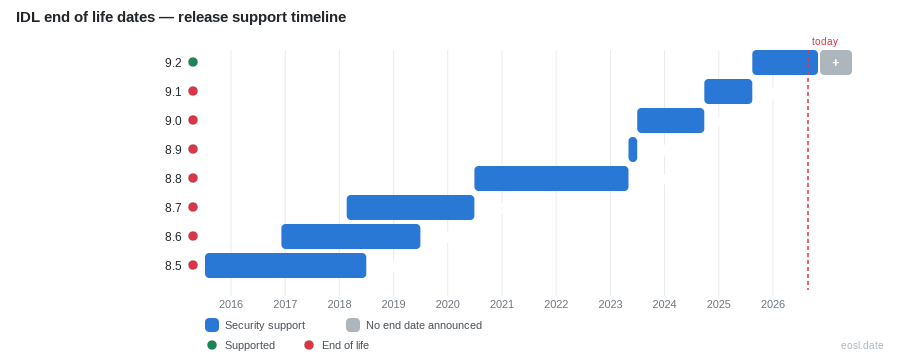
Currently Supported IDL Releases - Active EOS/EOSL Support (1)
| Release | Released | Security Support | Latest |
|---|---|---|---|
| 9.3 | (2 months ago) | Active | 9.3.0 (2 months ago) |
IDL End of Life (EOL) Releases - No Longer Supported (10)
| Release | Released | Security Support | Latest |
|---|---|---|---|
| 9.2 | (1 year and 2 months ago) | (2 months ago) | 9.2.0 (1 year and 2 months ago) |
| 9.1 | (2 years and 1 month ago) | (1 year and 2 months ago) | 9.1.0 (2 years and 4 months ago) |
| 9.0 | (3 years and 4 months ago) | (2 years and 1 month ago) | 9.0.0 (3 years and 4 months ago) |
| 8.9 | (3 years and 6 months ago) | (3 years and 4 months ago) | 8.9.0 (4 years and 4 months ago) |
| 8.8 | (6 years and 4 months ago) | (3 years and 6 months ago) | 8.8.3 (4 years ago) |
| 8.7 | (8 years and 8 months ago) | (6 years and 4 months ago) | 8.7.3 (6 years and 8 months ago) |
| 8.6 | (9 years and 11 months ago) | (7 years and 4 months ago) | 8.6.0 (7 years and 4 months ago) |
| 8.5 | (11 years and 4 months ago) | (8 years and 4 months ago) | 8.5.0 (8 years and 4 months ago) |
| 8.4 | (12 years and 1 month ago) | (9 years and 4 months ago) | 8.4.0 (9 years and 4 months ago) |
| 8.3 | (12 years and 10 months ago) | (10 years and 4 months ago) | 8.3.0 (10 years and 4 months ago) |
Wondering where IDL End of Life stands for your install? IDL, the Interactive Data Language from NV5 Geospatial, is a cross-platform programming language for data analysis and visualization, used in scientific and engineering work from astronomy to medical imaging. This guide shows which versions still get help, and what happens to your older licenses and customers' setups when support stops.
IDL End of Life Explained: What an EOL Policy Covers
Every vendor runs a product lifecycle, from general availability through the end of sale to a final cutoff. When an OEM stops producing or selling a piece of hardware, that is the end of sale; a software vendor does the same with a version it will no longer ship or fix. Third-party lists and database listings track dates for hardware, but for IDL the rules live in NV5's own published policy: one rule about which versions get help, and one about retiring an old licensing technology.
End of Support vs End of Service Life
End of support means a version stops getting help and fixes, while end of service life is the point where the vendor stops servicing it at all. Under an end-of-life notice, both usually follow in sequence, so treat the first warning as your cue to plan, not the last date.
IDL Support Policy and Supported Versions
NV5 Geospatial backs the current version of IDL plus three versions back, as long as your license is current on software maintenance. That covers technical support for installation, licensing and product questions, plus license moves to a new machine. Each version is released with its own support window, so the supported versions list changes whenever a new build ships.
Supported Software Versions in IDL 9.3 and Earlier
The supported software versions rule works like a sliding window: when the latest release arrives, the oldest supported release drops out. With the latest version at the top, the table below shows the current picture.
| IDL release | Support level | What you get |
|---|---|---|
| IDL 9.3 | Current | Fixes, patches and full help |
| 9.2, 9.1, 9.0 | Limited | Help with questions, no new fixes |
| 8.9 and older | Unsupported | No help from technical support |
Limited Support and Release Rules
Only the current release gets service packs, patches and hot fixes. A release in limited support receives none of them, and bug fixes wait for the next release at the earliest. Parts such as the ENVI Classic interface are supplied as is. Once a version has ended its window it is not supported, and a request on an unsupported build such as IDL 8.9 is turned away. Check the version you run against each release before you ask for help, and keep maintenance active so you can move up.
End-of-Life Policy for IDL 8.5 and ENVI Licensing
The sharper cutoff is about licensing technology. The older FlexLM system used in ENVI 5.3 and IDL 8.5 and earlier is retired. Since April 1, 2024, NV5 no longer handles new license requests, and it will not perform rehosts (license rehosts to a new machine), even for customers whose maintenance is current. Your existing license keeps working as long as the machine ID and computer stay untouched. If the hardware dies or the license expired, there is no way back in, so a replacement machine is the real risk.
FlexLM Patch and Next-Gen Licensing Upgrade
You have two routes to the next-gen licensing system, also called next generation licensing. First, update to the newest release, or at minimum IDL 8.9 or ENVI 5.7, from the customer portal. Second, for IDL 8.6 to 8.8, apply a patch that converts the license. Either way, your maintenance must be active.
- Make a backup of your license files and project code first, and read the documentation for the new installer.
- Plan the migration of scripts, since a major release can change behavior.
- Test on one machine before rolling out to the rest of your team.
Why IDL End of Support Matters: Security Support
Old builds lose security support first. Shared code libraries become exposed to vulnerabilities over time, so vendors ship regular fixes, and the burden of cyber security falls on you once those stop. Newer IDL builds also track modern operating system support, and an older version only runs on the systems that matched it at the time. Keeping current avoids the slow squeeze of a missing patch and a stale platform.
Checking Your IDL Version Before Support Ends
Once support has ended for a release, upgrading is the only fix. Run idl -e 'print, !version.release' in a terminal to see which release is installed, then compare it with the table above. If it is outside the window, schedule the upgrade now rather than after a failure.