Icinga End of Life (EOL) Dates and End of Support (EOS) Dates
Icinga end of life (EOL) and end of support (EOS) dates: 16 Icinga versions have reached EOL, including Icinga 2.14 (EOL date: Apr 23, 2026) — no longer receiving security updates or patches. Icinga 2.16.6 is the current supported release — 2 versions in active support. Also see BigBlueButton end of support dates for related end-of-life information.
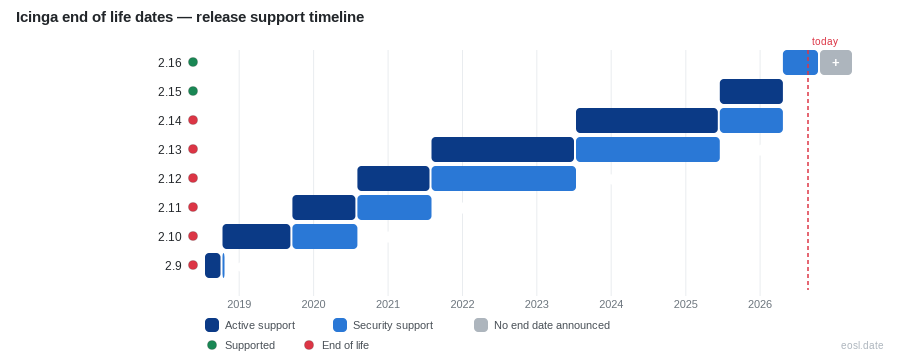
Currently Supported Icinga Releases - Active EOS/EOSL Support (2)
Icinga End of Life (EOL) Releases - No Longer Supported (16)
| Release | Released | Security Support | Active Support | Latest |
|---|---|---|---|---|
| 2.14 | (3 years and 4 months ago) | (6 months ago) | (1 year and 5 months ago) | 2.14.10 (4 months ago) |
| 2.13 | (5 years and 3 months ago) | (1 year and 5 months ago) | (3 years and 4 months ago) | 2.13.14 (9 months ago) |
| 2.12 | (6 years and 3 months ago) | (3 years and 4 months ago) | (5 years and 3 months ago) | 2.12.12 (1 year and 6 months ago) |
| 2.11 | (7 years and 2 months ago) | (5 years and 3 months ago) | (6 years and 3 months ago) | 2.11.12 (2 years ago) |
| 2.10 | (8 years and 1 month ago) | (6 years and 3 months ago) | (7 years and 2 months ago) | 2.12.10 (3 years and 9 months ago) |
| 2.9 | (8 years and 4 months ago) | (8 years and 1 month ago) | (8 years and 1 month ago) | 2.9.3 (7 years and 3 months ago) |
| 2.8 | (9 years ago) | (8 years and 4 months ago) | (8 years and 4 months ago) | 2.8.4 (8 years and 6 months ago) |
| 2.7 | (9 years and 3 months ago) | (9 years ago) | (9 years ago) | 2.7.2 (9 years ago) |
| 2.6 | (9 years and 11 months ago) | (9 years and 3 months ago) | (9 years and 3 months ago) | 2.6.3 (9 years and 7 months ago) |
| 2.5 | (10 years and 3 months ago) | (9 years and 11 months ago) | (9 years and 11 months ago) | 2.5.4 (10 years and 2 months ago) |
| 2.4 | (11 years ago) | (10 years and 3 months ago) | (10 years and 3 months ago) | 2.4.10 (10 years and 6 months ago) |
| 2.3 | (11 years and 8 months ago) | (11 years ago) | (11 years ago) | 2.3.11 (11 years and 1 month ago) |
| 2.2 | (12 years ago) | (11 years and 8 months ago) | (11 years and 8 months ago) | 2.2.4 (11 years and 9 months ago) |
| 2.1 | (12 years and 2 months ago) | (12 years ago) | (12 years ago) | 2.1.1 (12 years and 2 months ago) |
| 2.0 | (12 years and 5 months ago) | (12 years and 2 months ago) | (12 years and 2 months ago) | 2.0.2 (12 years and 3 months ago) |
| 1 | (16 years and 11 months ago) | (7 years and 10 months ago) | (12 years and 5 months ago) | 1.14.2 (8 years and 11 months ago) |
If you run open-source monitoring across your infrastructure, Icinga end of life is a date you should know before it finds you. The short answer: only the two most recent versions of each component get patched, so anything older is already unprotected. Here is which versions are covered today and how to plan the upgrade for the rest.
Icinga End of Life: How the Rolling Release Support Window Works
The project follows a product support lifecycle built around a moving window. The project commits to handling flaws in line with its security policy at least until January 2032, a minimum date it reviews every year. Instead of freezing a long-term branch, it keeps the platform current and supports only recent builds of each part of the stack.
Upgrading on a schedule beats an emergency upgrade after a flaw is published. That model has a simple consequence for you: a version does not retire on a fixed calendar date, it retires when two newer ones exist. Check your own build with icinga2 -V and compare it with the tables below.
Security Updates and Full Updates Explained
The newest line receives full updates: new features, bug fixes and patches. The line before it gets security updates only, so you keep protection but gain nothing new.
Active Support Versus Security Support
Third-party trackers split this into two columns, the end of active support and the end of patching. When both columns read "ended," you are past end of support and no one will fix a flaw you hit.
Icinga 2 Support Schedule and the Latest Release Lines
The table lists the current Icinga 2 lines as tracked on 24 September 2026. The final column shows the last build of that line.
| Icinga 2 line | Released | Feature work ended | Patching ended | Last build |
|---|---|---|---|---|
| 2.16 | 23 Apr 2026 | Still active | Still active | 2.16.5 (14 Aug 2026) |
| 2.15 | 17 Jun 2025 | 23 Apr 2026 | Still active | 2.15.6 (14 Aug 2026) |
| 2.14 | 12 Jul 2023 | 17 Jun 2025 | 23 Apr 2026 | 2.14.10 (30 Jun 2026) |
| 2.13 | 2 Aug 2021 | 12 Jul 2023 | 17 Jun 2025 | 2.13.14 (29 Jan 2026) |
Read it row by row: 2.16 is the latest version and 2.15 is the previous version. Everything from 2.14 downward is out of the window. Another supported version is any line whose security column still says active.
The same rule covers the core components and the optional modules that depend on them. A module such as the Windows integration or reporting add-on has its own numbering, so check each one separately.
Supported Versions of Icinga Web
Icinga Web, the web interface, runs on its own cycle. Its 2.14 line (3 July 2026) gets the newest work, 2.13 is in the supported window for security only, and 2.12 dropped out on 3 July 2026.
Icinga DB and Icinga Director Releases
Current lifecycle tables show Icinga DB 1.4 with 1.3 behind it, and Icinga Director 1.11 with 1.10 behind it. Treat these as the floor, not a goal.
What Deprecated and Supported Mean in Icinga EOL Terms
Four labels cover every stage, and the deprecation label is the easiest to misread:
- Feature updates: new work and fixes.
- Security-only: patches and nothing else.
- Deprecated: a signal not to start new deployments on it.
- No longer maintained: no more patches of any kind.
Running past that last label means exposure to unpatched vulnerabilities, which matters most when the box is reachable from outside your networks. Anything newly found is handled through a coordinated vulnerability disclosure process, not a public issue tracker.
Deprecated Components and Patch Releases
Where technically feasible, fixes ship as separate patch releases so you can apply them without adopting new features. A retired optional piece keeps getting security fixes for at least one year, after which a published migration path usually applies.
Component Lifecycle and End-of-Life Rules for Modules
A new part enters the lifecycle at version 1.0. After that, the component lifecycle follows a rolling window: the newest build is fully supported, the one before it is security-only, and the version two steps back falls out. Core pieces are never retired alone, because the product needs them. If one is ever replaced, the old one keeps getting security fixes for at least a year.
Retiring the whole product would be announced separately, with security patches continuing at least until the published date.
Icinga Version Support for Operating Systems and Dependencies
Your Icinga build can be supported while your host is not. The vendor builds packages only during the support phases in which the OS maker provides standard security support. Paid extended-support tiers such as Ubuntu Pro, and any other extended support add-on, are not built for, since they need a separate subscription. That is the same logic behind long term support branches, where only the LTS phase counts.
- Debian 13 and 12
- Ubuntu 26.04, 24.04 and 22.04
- RHEL 10, 9 and 8 (plus compatible rebuilds), Amazon Linux 2023
- SLES 16.0 and 15.7, Fedora 44 and 43
Operating Systems Supported for Server Components
Central server components (core, web, database layers) are built only for long-lived OS releases. Lightweight agents run on more platforms, including Windows Server 2025 down to 2016. Beyond the OS, your stack needs PHP 8.2 or newer for the web layer and one database: MySQL 8.0 (still the most common pick), MariaDB 10.2.2 or PostgreSQL 9.6. Redis ships in the packages, and OpenSSL comes from your OS vendor. Verify these dependencies before an installation on any host.
Upgrading Before Icinga End of Support Hits
Suppose your virtual machines run 2.14 on Debian 12. That line lost its patching on 23 April 2026, so your plan is to move to 2.16. First, snapshot the database, whether MySQL or PostgreSQL. Second, run the upgrade for Icinga 2 and then the web layer, confirm your checks still run and re-test notifications. When you jump over several lines, read each skipped note, since changes are incremental. Teams on Docker images simply pull a newer tag.
A commercial support subscription is a separate thing: it buys commercial services and guaranteed response times, not extra patch years. For notices, follow the project on GitHub, the API on endoflife.date, or its RSS feed. A cron job calling that API can alert you when a build enters its final months. Comparing with Checkmk or a managed setup is a fair migration question once cost beats effort, but staying current is cheaper than leaving. Keep cloud services in scope too.
Upgrade Path From Icinga 1.x
Icinga 1.x reached the end on 31 December 2018. If any legacy servers still run it, plan the move to its modern successor now; no patch exists for it.
Vulnerabilities and Your Support Commitment
The published support commitment protects only supported versions. For known flaws, the answer is always the same: upgrade to a supported line, then re-run your checks.