Greenlight End of Life (EOL) Dates and End of Support (EOS) Dates
Greenlight end of life (EOL) and end of support (EOS) dates: 2 has reached EOL — EOL date: Sep 11, 2023. This version no longer receives security updates, patches, or support. Greenlight 3.9.2 is the current supported release. Also see Elastic Beats end of life dates for related end-of-life information.
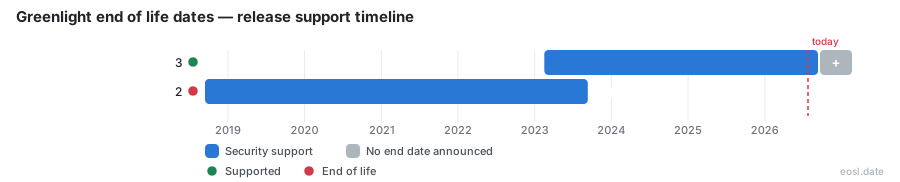
Currently Supported Greenlight Releases - Active EOS/EOSL Support (1)
| Release | Released | Security Support | Latest |
|---|---|---|---|
| 3 | (3 years and 9 months ago) | Active | 3.9.2 (4 days ago) |
Greenlight End of Life (EOL) Releases - No Longer Supported (1)
| Release | Released | Security Support | Latest |
|---|---|---|---|
| 2 | (8 years and 2 months ago) | (3 years and 2 months ago) | 2.14.10 (2 years and 6 months ago) |
Planning your Greenlight end of life timeline starts with knowing that Greenlight is an open-source web conferencing front-end for BigBlueButton, and that only one line still gets fixes. Organizations use it to run meetings and classroom sessions, share sessions and keep their existing BigBlueButton server easy to use.
Greenlight End of Life Dates by Version
The table below shows the security support picture for each line, based on the endoflife.date tracker. Check it against the supported numbers on the project's security page before you plan a migration.
| Release | Released | Security support | Latest version |
|---|---|---|---|
| 3.x series | 16 Feb 2023 | Yes | 3.9.0 (08 Sep 2026) |
| 2.x series | 14 Sep 2018 | Ended 11 Sep 2023 | 2.14.10 (03 May 2024) |
Greenlight v3 Support Status
The newest generation is the current line, built on Ruby on Rails and React, a modern technology stack. It is an LGPL-3.0 license project, and the maintenance team accepts each pull request through a template. Because it is also a reference implementation of the BigBlueButton API, it keeps getting updates.
Greenlight v2 End of Life and Upgrade Path
Security support for the second line ended on 11 September 2023, so stop running it. Plan an upgrade by running the install script again with the options in the sections below.
Greenlight Dashboard: What the Front-End Does
The Greenlight dashboard is a separate frontend and management interface, not part of BigBlueButton itself. BigBlueButton only offers a REST API, and Greenlight uses it to give you an easy interface on top of your infrastructure. Only the supported line keeps receiving fixes for these features, which is why end of life matters here.
User Management and Authentication
An administrator handles user management, roles and access levels in one place. Local authentication works by default, and single sign-on can link Google or LDAP accounts, so your users sign in with an account they already own.
Room Sharing, Meeting Rooms and Recordings
Each meeting room has its own URL, and room sharing works through that link or a moderator access code. Users manage their own recordings, while email notifications tell people when the files are ready for meetings they hosted.
Install Greenlight Alongside BigBlueButton
To install Greenlight on an existing BigBlueButton server, run the installation script with the -g option. The environment runs inside Docker, so the server stays tidy and you avoid managing a second host.
bbb-install Script and Admin Account
- Run the bbb-install script with your chosen options and
-g. - Wait for the success message that shows your URL.
- Create an admin account with the rake task from the Greenlight container.
Greenlight Frontend on a Standalone Server
When you want no BigBlueButton on the same machine, a standalone server needs its own configuration. Supply the hostname and your BigBlueButton credentials, and put a reverse proxy in front if the app lives on a path other than the root.
Script Options and SSL Certificates
- Use
-sfor the hostname and-bfor the BigBlueButton secret. - Add
-efor Let's Encrypt SSL certificates, or-dto supply your own. - Add
-kto install Keycloak when you need hosting for external sign-in.
Optional Greenlight v3 Configuration
Several optional settings follow the main setup: a default locale, email delivery and external authentication. Pick only what you need, and keep to supported versions of every component.
OpenID Connect Setup
OpenID Connect lets Greenlight hand sign-in to another provider, such as Keycloak, instead of its own accounts. You enter the provider's details in the optional .env file, and the same setup keeps working after a move to a supported line.
HCaptcha Setup
Enable HCaptcha to slow down bots that try to register fake accounts. You switch it on through the same optional .env file as the other settings.
Greenlight Management Interface With LMS Integrations
Greenlight and LMS integrations can run side by side on one deployment. A learning management system such as Moodle, Canvas or a WordPress plugin talks to the same BigBlueButton API, which suits schools that already have a classroom workflow. Managed hosting plans commonly include the dashboard, although server upgrades still need someone with admin access.
Support and Community Resources
The project runs a mailing list for setup questions, and developers can try a demo server before deploying. These community support channels are the best place to ask whether your platform needs to move before the next update. For the authoritative list of supported release numbers, rely on the project's GitHub security policy rather than forum answers.