DaoCloud Enterprise End of Life (EOL) Dates and End of Support (EOS) Dates
DaoCloud Enterprise end of life (EOL) and end of support (EOS) dates: 3 DaoCloud Enterprise versions have reached EOL, including DaoCloud Enterprise DCE 5.0 (EOL date: Jun 01, 2026) — no longer receiving security updates or patches. Also see Elastic Beats EOSL dates for related end-of-life information.
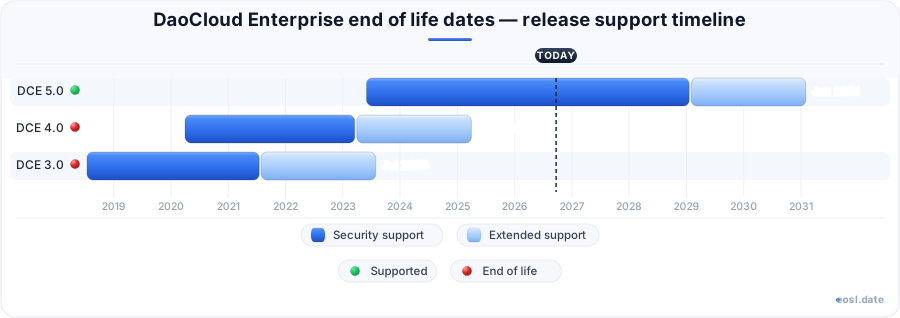
DaoCloud Enterprise End of Life (EOL) Releases - No Longer Supported (3)
| Release | Released | Standard Support | Support Life | Latest |
|---|---|---|---|---|
| DCE 5.0 | (3 years and 5 months ago) | (5 months ago) | (in 1 year and 11 months) | 5.0-20260731 (3 months ago) |
| DCE 4.0 | (6 years and 7 months ago) | (3 years and 7 months ago) | (1 year and 7 months ago) | 2022.12.15.4.0.11 (3 years and 10 months ago) |
| DCE 3.0 | (8 years and 3 months ago) | (5 years and 3 months ago) | (3 years and 3 months ago) | 2021.12.30.3.0.8 (4 years and 10 months ago) |
Running a container platform past its vendor's support window is a risk you can plan for, and DaoCloud Enterprise End of Life planning starts with knowing which milestone your DCE release has reached. This guide explains the EOL and EOS terms in plain language, shows you where to confirm official dates, and walks through a migration plan so your team is never caught off guard.
DaoCloud Enterprise End of Life: What EOL and EOS Mean
Every enterprise product moves through a lifecycle: general availability, active development, a maintenance phase, and finally retirement. For a Kubernetes-based platform such as DaoCloud Enterprise (DCE), the retirement milestones decide whether your IT team still receives fixes, whether new support cases are accepted, and how long you can keep a release in production. Two labels cover most of it: EOL and EOS, and a vendor's own support policy decides exactly what each one stops.
End of Life (EOL) Explained
EOL usually marks the point where the vendor stops standard maintenance for a version or release. Routine bug fixes and security patches end, and the end of maintenance means the branch is frozen even while newer versions keep moving forward.
End of Support (EOS) and Technical Support Explained
EOS means a defined support period or support tier has closed. You may lose technical support, the ability to open cases, or access to mainstream support engineers. Some vendors keep limited support alive through extended support for a fee, which is why the software may still run even though nobody answers your tickets.
EOL vs EOS: Lifecycle Policy Differences for DCE
The two terms get swapped constantly, and vendors do not use them consistently. The practical way to separate them is by asking what still arrives in your inbox: patches, answers, or neither. The table below lines up the milestones that matter for planning, whichever name your lifecycle policy uses. DaoCloud's own labels for these stages may differ, so check them against your DCE agreement.
| Milestone | What changes | Typical label |
|---|---|---|
| End of sale | New licences stop; support and security updates continue | EOS, end of sale |
| End of mainstream support | New features and non-security fixes stop | EOL |
| End of support | Security updates and technical support stop | EOS, last date of support |
| Paid extended security updates | Time-limited fixes for a fee, rarely with support | Extended support |
In short, the end of life vs end of support question is really about which protections you lose first, and the support lifecycles of different vendors disagree on the answer. The end of development milestone often comes even earlier, when engineers stop adding features altogether. Read your agreement carefully, because a lifecycle policy can define EOL as the end of sale, the end of fixes, or both.
End of Sale and the Last Date of Support
End of sale only means the product is withdrawn from the price list. The last date of support is the final day the vendor stands behind it, and between the two sits a phase-out window during which updates continue under existing support agreements. Once that window ends, the release is unsupported.
What Does EOSL Mean for Hardware and Software?
EOSL stands for end of service life, also written end of service in vendor notices. EOSL is the final stage of the hardware and software lifecycle: no sales, no operating-system or firmware updates, and no renewals. A data center owner sees an EOSL notice on switches, storage arrays and devices, while a platform team sees EOSL on the operating system image under their nodes.
For a DCE deployment, EOSL matters most for the servers and the operating system image beneath your nodes, so check each hardware line separately. Servers, network cards and storage controllers underneath your systems can reach EOSL years before the platform does, and an EOSL server cannot be repaired when a part fails. Many organizations track EOSL, EOL and EOS side by side so a failing rack never surprises the operations team. A single EOSL entry on any hardware component can force the whole cluster move earlier than planned, so add EOSL checks to every refresh cycle.
Finding DaoCloud Enterprise EOL Dates and Improving Visibility
Competitor trackers do not list every enterprise platform, so do not assume a public calendar covers your DCE release. The authoritative source is DaoCloud itself. Confirm the EOL dates for your exact version in the official product documentation, the release notes, or with your DaoCloud account contact, and record the answer in writing. No third-party site can promise you a date that the vendor has not published.
- List every DCE version and cluster you run, including test environments.
- Ask DaoCloud for the end of life date and the end of support date for each version.
- Check whether an upgrade policy limits how many releases you may skip.
- Add each date to a shared calendar or ticket queue with reminders at 12, 6 and 3 months.
Good tracking of DCE is mostly visibility: you cannot protect what you cannot see. Public databases expose an API and iCalendar feeds, but they cover only the components under DCE, such as Kubernetes, Linux distributions and databases that sit beneath your enterprise platform; DCE's own dates must still come from DaoCloud. The cloud services and containers you run on top of it each have their own release dates, so track the whole stack and not just one product.
Risks of Running DCE Past End of Support
Ignoring a deadline is rarely dramatic on the day it passes. The risk of running end-of-life software builds quietly: every month without fixes widens the gap between your systems and what attackers know. For unpatched DCE clusters and the container workloads on them, and for organizations that depend on shared infrastructure, the security exposure reaches well beyond one product, and the operational risk reaches the teams who depend on it.
Security Updates Stop and Software Goes Unpatched
Once security updates end, new security vulnerabilities in the codebase stay open. Patch management tooling no longer has anything to apply, and unpatched vulnerabilities accumulate in legacy clusters. A fix released for a current version can even show cyberattacks where to look in older code, and vulnerabilities that were once minor can be chained together.
Compliance Failures and Audit Exposure
Frameworks such as PCI DSS, HIPAA and ISO 27001 expect supported, patched software, and compliance teams ask for proof. Strong compliance depends on supported systems. Running an unsupported platform raises compliance risk and makes it harder to show an audit team that your controls work. Document the exception, the compensating controls, and the migration date before the auditor asks.
Downtime and Missed Innovation
Without vendor help, downtime lasts longer because your own staff carry every fix. Costly maintenance windows, incompatibilities with newer tools and missed features add up as well. A DCE cluster without vendor help also misses Kubernetes upgrades that newer DCE releases ship.
Real-World EOL and EOS Examples from Each Vendor, Applied to DCE
History shows how the same label behaves differently across vendors. Microsoft ended support for Windows 10 on 14 October 2025, then offered paid extended security updates to customers who needed more time. Python 2 reached EOL on 1 January 2020, and CentOS 7 followed on 30 June 2024, so any Linux host still on it needs third-party support or a rebuild. Every Linux distribution publishes its own calendar, and a Linux host on a retired release must be rebuilt or covered. Database engines and other open source projects typically publish a single EOL date, while commercial suppliers publish several.
The lesson for DCE is simple: ask DaoCloud which model applies and what it covers. Your lifecycle planning must cover hardware, systems and software together. Find out which model DaoCloud uses, whether it adds extended coverage after the standard window, and what a replacement path looks like. A written replacement plan turns a deadline into a project instead of an emergency, and the underlying database and OS layers need the same attention.
EOL Migration and Upgrade Planning for IT Teams Running DCE
Treat the move as a lifecycle engineering project with an owner and a date. Migration planning should begin as soon as you learn the EOL schedule, because planning time is the cheapest resource you have.
Migrate or Upgrade to a Supported Version
The cleanest answer is to upgrade to a release that is still under support, following the vendor's documented path. Start now, rehearse in staging, and keep a rollback plan.
Use Containers to Support Migration
Because workloads on DCE already run in containers, you can redeploy them onto a supported DCE or Kubernetes cluster and cut traffic over gradually, which limits risk during the move.
Implement Extended Support or Isolate Systems
If you cannot move yet, buy extended coverage where it exists, or segment the unsupported cluster from sensitive networks, restrict access, and monitor it closely until the migration lands.
DCE EOL Best Practices and Extended Support Options
Keep one inventory of systems, hardware and lifecycle dates, review it every quarter, and assign an owner to each product, and keep your DCE versions and DaoCloud support contacts in the same inventory. Treat EOS as a trigger for action, not a footnote. These best practices keep EOL surprises small, and a documented path to extended support gives your team a safety net.