Microsoft Windows Server End of Life (EOL) Dates and End of Support (EOS) Dates
Microsoft Windows Server end of life (EOL) and end of support (EOS) dates: 16 Microsoft Windows Server versions have reached EOL, including Microsoft Windows Server Windows Server 23H2 AC (EOL date: May 12, 2026) — no longer receiving security updates or patches. Microsoft Windows Server 10.0.26100 LTS is the current supported release, with support through Nov 14, 2034 — 4 versions in active support. Also see Azure DevOps Server end of support for related end-of-life information.
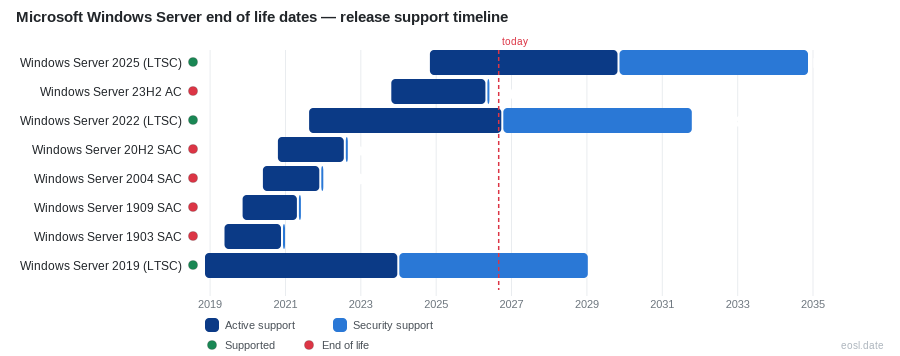
Currently Supported Microsoft Windows Server Releases - Active EOS/EOSL Support (4)
| Release | Released | Security Support | Active Support | Extended Security Updates | Latest | LTS |
|---|---|---|---|---|---|---|
| Windows Server 2025 (LTSC) | (2 years ago) | (in 8 years) | (in 3 years) | Active | 10.0.26100 | LTS |
| Windows Server 2022 (LTSC) | (5 years and 2 months ago) | (in 4 years and 11 months) | (1 month ago) | Active | 10.0.20348 | LTS |
| Windows Server 2019 (LTSC) | (8 years ago) | (in 2 years and 1 month) | (2 years and 10 months ago) | Active | 10.0.17763 | LTS |
| Windows Server 2016 (LTSC) | (10 years ago) | (in 1 month and 4 weeks) | (4 years and 10 months ago) | (in 3 years and 1 month) | 10.0.14393 | LTS |
Microsoft Windows Server End of Life (EOL) Releases - No Longer Supported (16)
| Release | Released | Security Support | Active Support | Extended Security Updates | Latest | LTS |
|---|---|---|---|---|---|---|
| Windows Server 23H2 AC | (3 years ago) | (6 months ago) | (6 months ago) | Active | 10.0.25398 | - |
| Windows Server 20H2 SAC | (6 years ago) | (4 years and 3 months ago) | (4 years and 3 months ago) | Active | 10.0.19042 | - |
| Windows Server 2004 SAC | (6 years and 5 months ago) | (4 years and 10 months ago) | (4 years and 10 months ago) | Active | 10.0.19041 | - |
| Windows Server 1909 SAC | (7 years ago) | (5 years and 6 months ago) | (5 years and 6 months ago) | Active | 10.0.18363 | - |
| Windows Server 1903 SAC | (7 years and 5 months ago) | (5 years and 11 months ago) | (5 years and 11 months ago) | Active | 10.0.18362 | - |
| Windows Server 1809 SAC | (8 years ago) | (6 years ago) | (6 years ago) | Active | 10.0.17763 | - |
| Windows Server 1803 SAC | (8 years and 6 months ago) | (7 years ago) | (7 years ago) | Active | 10.0.17134 | - |
| Windows Server 1709 SAC | (9 years ago) | (7 years and 7 months ago) | (7 years and 7 months ago) | Active | 10.0.16299 | - |
| Windows Server 2012 R2 (LTSC) | (12 years and 11 months ago) | (3 years and 1 month ago) | (8 years and 1 month ago) | (1 month ago) | 6.3.9600 | LTS |
| Windows Server 2012 (LTSC) | (14 years ago) | (3 years and 1 month ago) | (8 years and 1 month ago) | (1 month ago) | 6.2.9200 | LTS |
| Windows Server 2008 R2 SP1 (LTSC) | (15 years and 8 months ago) | (6 years and 9 months ago) | (11 years and 10 months ago) | (3 years and 10 months ago) | 6.1.7601 | LTS |
| Windows Server 2008 SP2 (LTSC) | (17 years and 6 months ago) | (6 years and 9 months ago) | (11 years and 10 months ago) | (3 years and 10 months ago) | 6.0.6003 | LTS |
| Windows Server 2003 SP2 (LTSC) | (19 years and 8 months ago) | (11 years and 3 months ago) | (16 years and 4 months ago) | Active | 5.2.3790 | LTS |
| Windows Server 2003 SP1 | (21 years and 7 months ago) | (17 years and 6 months ago) | (17 years and 6 months ago) | Active | 5.2.3790 | - |
| Windows Server 2003 (LTSC) | (23 years and 6 months ago) | (19 years and 7 months ago) | (19 years and 7 months ago) | Active | 5.2.3790 | LTS |
| Windows Server 2000 (LTSC) | (26 years and 8 months ago) | (16 years and 4 months ago) | (21 years and 4 months ago) | Active | 5.0.2195 | LTS |
Running an older server and wondering how long it stays safe? Microsoft Windows Server end of life is the point when Microsoft stops shipping fixes, and as of today, October 26, 2026, Windows Server 2016 has only 78 days left before its end of extended support. This guide lists every Windows operating system date, so your environment never runs unpatched by surprise.
Windows Server Fixed Lifecycle Policy: Mainstream Support and Extended Support
Every Long-Term Servicing Channel release follows the fixed lifecycle policy: 10 years of coverage, split into 5 years of mainstream support and 5 years of extended support. In the first half, customers get new features, hotfixes, non-security updates and security updates, plus technical support under an active support plan. After the mainstream end date, the second half delivers only critical security updates.
The extended end date is the real end-of-life moment: once it passes, you receive no updates and no help. Annual Channel releases follow the modern lifecycle policy instead, with 18 months of full coverage plus 6 months more, 24 months in total. The modern lifecycle keeps a product serviced only while you stay on a current version.
Windows Server EOL Dates by Version
The table combines Microsoft's release information with the days remaining from October 26, 2026 until each final support date. Dates use the ISO format, year-month-day.
| Version | Servicing option | Availability date | Mainstream end date | Extended end date | Days left |
|---|---|---|---|---|---|
| Windows Server 2025 | LTSC | 2024-11-01 | 2029-11-13 | 2034-11-14 | 2,941 |
| Windows Server 2022 | LTSC | 2021-08-18 | 2026-10-13 (ended) | 2031-10-14 | 1,814 |
| Windows Server 2019 | LTSC | 2018-11-13 | 2024-01-09 (ended) | 2029-01-09 | 806 |
| Windows Server 2016 | LTSB | 2016-08-02 | 2022-01-11 (ended) | 2027-01-12 | 78 |
Each edition, Datacenter and Standard (plus Essentials for 2016), shares these dates. The release history for every LTSC build, including the latest build, sits on Microsoft's release information page, so check it for your update level.
Planning around a support end date is simple. An LTSC version released in 2024 reaches its availability date, then ten years of coverage; Windows Server 2019 customers have until January 2029, which leaves 806 days. Windows Server 2022 moved out of mainstream coverage this month, so its Windows security updates continue but feature work has stopped. A calendar reminder 180 days before each deadline gives your team time to migrate.
Windows Server 2012 R2 and 2008 R2 End of Life
Windows Server 2012 and Windows Server 2012 R2 reached end of life on October 10, 2023, and their paid extension ended on October 13, 2026. Windows Server 2008 and Windows Server 2008 R2 ended on January 14, 2020, with the final legacy update year closing in January 2024. Treat these machines as fully unsupported, and use the support dates above to rank what to retire first.
Windows Server End of Support by Servicing Channel
Microsoft sells two servicing channels today, the LTSC and the Annual Channel, and the Windows Server lifecycle differs for each. An LTSC release suits stable systems, while newer LTSC versions also support hotpatch updates that install without a restart. Microsoft publishes a hotpatch calendar listing each month's hotpatch, but hotpatch coverage ends when a version's support does. Containers and virtualization arrive faster on the Annual Channel.
Long-Term Servicing Channel
A new LTSC version arrives every two to three years. Each LTSC edition keeps receiving security and quality updates, but nothing new in functionality, which suits a stable data center.
Semi-Annual Channel Retirement
The SAC was retired on August 9, 2022, when version 20H2 ended, so no future releases exist. Its successor, version 23H2, was the first Annual Channel build, and it has now ended too. Move those Windows Server installations to Windows Server 2025.
Extended Security Updates for Out of Support Servers
Some releases offer a paid program (ESU) for up to three years past the end of extended support. ESU is a last resort for legacy systems, covering only critical and important fixes, with no new capabilities or design changes, and phone help needs an active plan. Check each version's support dates and end of support first.
- Windows Server 2012 and 2012 R2: the third and final year ended on October 13, 2026.
- Windows Server 2008 R2: coverage ended in January 2023 outside the cloud program.
- Windows Server 2016: paid coverage can stretch protection to January 2030.
Running without patches leaves known vulnerabilities open, which puts compliance and customer data at risk.
Windows Server Lifecycle and Microsoft 365 Apps
The operating system's lifecycle also governs the Office software you host on it. Microsoft 365 Apps works on Windows Server 2022 and 2025 while they remain in mainstream support, though Microsoft keeps shipping security updates for the apps on 2022 until October 10, 2028. Using Microsoft 365 Apps on an unsupported system causes slowdowns over time. Where your server cannot host the apps, Microsoft recommends Azure Virtual Desktop or Windows 365, both hosted in the cloud.
Preparing for Microsoft Windows Server End of Life
Work through these steps before a deadline arrives:
- Run an audit to list every Windows server, its version and its support end date.
- Sort the list by days remaining so the closest deadline comes first.
- Choose to upgrade in place, migrate workloads to Azure, or buy ESU as a temporary bridge.
- Retire the old servers and confirm patching is current on the replacements.
Administrators with the 2016 release get roughly eleven weeks, so begin now.