Cilium End of Life (EOL) Dates and End of Support (EOS) Dates
Cilium end of life (EOL) and end of support (EOS) dates: 5 Cilium versions have reached EOL, including Cilium 1.17 (EOL date: Jul 29, 2026) — no longer receiving security updates or patches. Cilium 1.20.5 is the current supported release — 3 versions in active support. Also see Argo Workflows end of support life for related end-of-life information.
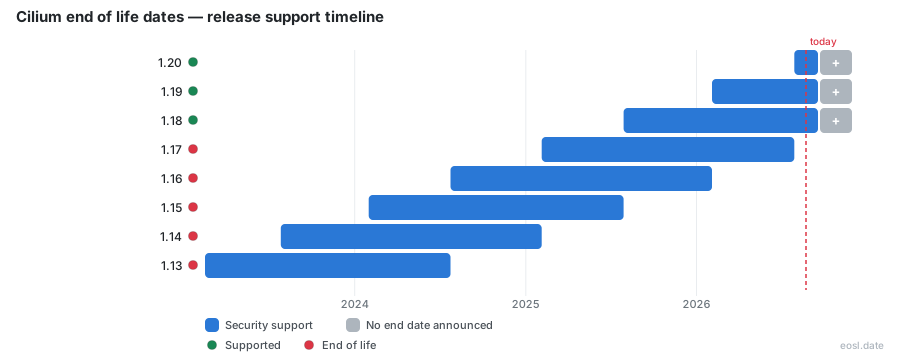
Currently Supported Cilium Releases - Active EOS/EOSL Support (3)
Cilium End of Life (EOL) Releases - No Longer Supported (5)
| Release | Released | Maintenance Support | Latest |
|---|---|---|---|
| 1.17 | (1 year and 9 months ago) | (3 months ago) | 1.17.18 (4 months ago) |
| 1.16 | (2 years and 3 months ago) | (9 months ago) | 1.16.19 (10 months ago) |
| 1.15 | (2 years and 9 months ago) | (1 year and 3 months ago) | 1.15.19 (1 year and 4 months ago) |
| 1.14 | (3 years and 3 months ago) | (1 year and 9 months ago) | 1.14.19 (1 year and 10 months ago) |
| 1.13 | (3 years and 9 months ago) | (2 years and 3 months ago) | 1.13.18 (2 years and 4 months ago) |
Running a Kubernetes cluster on an old build? Cilium end of life is the point where a minor release stops getting bug and security fixes, and the three newest minor releases are the only ones the community maintains. This guide lists every release date, the EOL date for each unsupported line, and what to do if your cluster has already fallen behind.
Cilium End of Life: Does Cilium Publish EOL Dates?
Cilium ships a new minor release roughly every six months, and the project keeps the three most recent minor releases on its supported list. Support is based on community demand and the severity of each problem, so there is no paid long-term support (LTS) track. When a new minor release lands, the oldest of the three supported lines drops off. That is the end-of-life moment for that line: no further patch release, no backport, no security fixes.
Not every tracker reports this the same way. The Cilium project does not publish a fixed calendar in advance, and one release database states that Cilium follows a "latest version" model, treating only the newest line as current. Trackers that follow the three-release policy instead show each EOL date as the day its successor shipped. For planning, the three-release rule is the safer assumption: an unsupported line gets nothing further, whatever the label says.
Cilium Support Windows for Each Minor Release
Each supported release has a support window of about 18 months: six months as the latest version, then roughly a year as one of the older two. Any supported release receives maintenance in the form of patch releases, while an unsupported one receives nothing. Watch the community for when the next minor release is due, because the date it ships is your deadline to upgrade.
Cilium Release Timeline and Version History
The table below summarizes the release timeline for recent minor releases, using the release and EOL dates tracked by the community. Dates for older lines are rounded to the month, since sources differ by a day.
| Cilium version | Release date | End of life date |
|---|---|---|
| 1.13 | February 2023 | July 2024 |
| 1.14 | July 2023 | February 2025 |
| 1.15 | January 2024 | July 2025 |
| 1.16 | July 2024 | February 2026 |
| 1.17 | February 2025 | 29 July 2026 |
| 1.18 | 29 July 2025 | Not yet announced |
| 1.19 | February 2026 | Not yet announced |
| 1.20 | 29 July 2026 | Not yet announced |
These release dates come straight from the community trackers and the project's own release notes. The pattern is easy to read: every line stays supported for about 18 months, and the day a new minor release ships, the oldest supported line ends. The 1.17 line ended on the same day that 1.20 was released. Expect 1.18 to end the same way when the next minor release, 1.21, becomes stable. A new release is the trigger for every EOL date in the table, so the day 1.21 ships is the day your 1.18 clusters lose their maintained status. Tracking sites tell you to run one of the supported release numbers in their rightmost column: 1.20, 1.19 or 1.18 today. As of this writing, 1.21 exists only as a pre-release.
Unsupported Cilium Versions and Their End of Life Date
Every line older than 1.18 is unsupported. An unsupported version still runs, and nothing forces you to remove it, but every vulnerability found after its end of life date stays open. Older lines such as 1.12 and 1.11 are far past their EOL and carry the same risk, and some trackers list hundreds of versions affected by a CVE across the project's history.
Latest Version and Cilium Releases Still Supported
The latest version on the stable track is 1.20, with patch release 1.20.4 published on 23 October. The two older supported lines receive patches on the same schedule: 1.19.10 and 1.18.16. Pre-release builds, such as 1.21.0-pre.3, count as unstable versions and don't belong in production. Pick the latest patch version of a supported line, not a pre-release. Each line keeps its own maintained branch, and the newest patch on that branch is the build that carries every fix released so far.
Backports in Each Patch Release
Fixes land first in the main branch and are then ported to older lines. A backport pull request carries the original fix into each supported branch, so a bug fixed in 1.20 usually appears in 1.19 and 1.18 within days. Release notes list every backport with its upstream pull request, which is how you confirm that a fix reached your line. Once a line is unsupported, no backport reaches it, so a fix you need may exist upstream and still never arrive.
What Cilium Is and Why Support Windows Matter
Cilium is open source software for cloud native networking, observability and security, built on eBPF, a Linux kernel technology. It began as a CNI (Container Network Interface) for Kubernetes and now replaces kube-proxy, handles load balancing, and offers a service mesh and network policy enforcement up to Layer 7. The project is licensed under the Apache License 2.0, with kernel-side eBPF code under GPL or BSD licensing. The 1.20 release added Gateway API ExternalAuth support, made Multi Pool IPAM stable and improved network policy handling, so the Gateway API implementation is now part of what a Cilium upgrade changes. Earlier, 1.18 expanded IPv6 support and added an encrypted overlay, which means transparent encryption between nodes became easier to enable. Because it sits in the data path of every pod, an unpatched Cilium version affects the whole cluster, not one workload.
For support planning, the eBPF dataplane matters because a new minor release can raise the kernel requirement, so check the kernel before the EOL date forces a hop. The eBPF programs are loaded into the kernel by the agent, so eBPF is the reason kernel version matters: a newer eBPF feature, such as socket-based load balancing, needs a kernel that supports it. The eBPF dataplane replaced iptables for service routing, and eBPF maps hold the policy, NAT and load balancing state. Because eBPF code runs in the kernel, a bug in an eBPF program can affect every pod on the node, which is why the project backports eBPF fixes to supported lines. The service mesh features and cluster mesh features are built on the same eBPF foundation, and the CNI role is only the starting point. Isovalent publishes the release blog posts that explain each minor release.
Hubble Observability Support
Hubble shares the Cilium release line, so it reaches end of support on the same day as the agent it ships with.
Hubble ships with the CNI and shows packet flows, policy decisions and service maps. Upgrading Cilium upgrades Hubble, including the hubble-relay image. An unsupported line means unsupported observability tooling too, and Hubble flow data from an old agent may be missing fields that newer Hubble dashboards expect. Hubble Relay aggregates flows from every node, so it should run the same release as the agents it talks to.
Tetragon Security Support
Tetragon adds runtime security enforcement and has its own release and support lifecycle. Run beside an EOL Cilium line, it gets no fixes for the agent it relies on, so check its releases whenever you plan an upgrade. Its security policies depend on kernel features, so match the kernel and Linux distribution to the version you pick. Tetragon stays useful even after you upgrade the CNI, since it runs as its own DaemonSet on each Linux node.
Networking Support in the Dataplane
The eBPF dataplane handles routing, IPv6, BGP and IPAM, and each minor release adds features here. Defaults change between minors, so a line you skip past may need several upgrade hops, and a new line often changes defaults, so read the upgrade notes before moving more than one minor release. Networking depends on the CNI plugin config, so networking changes deserve the closest review. Networking features such as IPv6, BGP control plane and IPAM modes deserve a close look: a change to IPAM can alter how pods receive addresses, and IPv6 dual-stack behaviour can shift between minor releases. Check the IPAM mode for your cloud before you roll out.
Security Patch Release Policy and End-of-Life Risk
Patches for supported lines arrive often, and sometimes out of band. The 1.20.4, 1.19.10 and 1.18.16 builds were published together as a security patch release that upgraded Go to fix a certificate trust problem (CVE-2026-111943) and refreshed dependencies. A vulnerability like this reaches the three supported lines only. If you run an unsupported stable release, you must upgrade to a supported line before you can receive the fix at all, which is why end-of-life status is a security question, not a housekeeping one.
Cilium Adoption Across Clouds and the Supported Release Lines
Cilium graduated in the CNCF in October 2023, after joining as an incubation project in 2021. Major cloud providers use it as their Kubernetes networking layer, including Google Cloud, AWS through EKS Anywhere, and Azure, and companies such as Datadog run it in production. Isovalent documents which lines its enterprise builds track, and Isovalent release posts are the best source for dates. Managed offerings follow their own support calendar, which can differ from the open source schedule, so check your provider's documentation next to the dates above. Within the Cloud Native Computing Foundation, Cilium is among the fastest-moving projects, and a graduated CNCF project is expected to follow a predictable release process. Isovalent, the company behind the project, sells an enterprise distribution with its own support terms, so ask Isovalent or your vendor which Cilium lines they still maintain before relying on the open source EOL dates. Hosted Kubernetes services pin a tested Cilium build and upgrade it for you, while self-managed container platforms leave the choice to your team. On AWS and Azure, the managed CNI integration is tied to the cloud's own Kubernetes upgrade cycle, so a cluster can be on an older Cilium line than the newest stable release without being out of support on that platform.
Checking Your Cilium Version and Planning an Upgrade
Start by finding out which line you run. The command below prints the client and agent versions:
cilium versionCompare the result to the table. If you are on a supported line, move to its newest patch. If you are on an unsupported one, follow this order:
- Read the upgrade notes for the next minor release and note any removed options.
- Upgrade one minor release at a time, because skipping lines is not supported.
- Test the new Helm values in a staging cluster before production.
- Roll the change out, then verify with
cilium status.
Docker, Helm and Operator Images After an Upgrade
The release publishes container images for the agent, the operator in generic, AWS, Azure and Alibaba Cloud variants, hubble-relay and the clustermesh apiserver. The Docker image for each component lives on a public registry, and every Docker image is tagged with the exact patch version. An image from an unsupported line is never rebuilt, so the operator keeps its old dependencies. Pin the image tag in your Helm values to the patch you tested rather than the moving stable tag, and make sure every image in a cluster comes from the same release. A mixed Docker image set, such as a new operator with an old agent, can cause failures that are hard to trace. The operator manages cluster-wide tasks like IPAM allocation and garbage collection, so the operator image you pull must match your cloud: operator-aws for AWS, operator-azure for Azure, operator-alibabacloud for Alibaba Cloud, or operator-generic everywhere else. Release notes list every image digest, and pulling by digest guarantees the container image you tested is the one that runs. Go runtime upgrades are another reason to stay current: the patch releases above rebuilt every image with a fixed Go toolchain, and an operator image from an unsupported line keeps the old Go version.
Checklist for a Cluster on an Unsupported Release
If you discover you are running an unsupported release, treat it as an incident with a deadline. Note the EOL date, list open CVEs for your line, and schedule the first upgrade hop this week. Keep a calendar entry for each minor release, since the next one ends the oldest supported line. Cluster mesh deployments need extra care because every connected cluster must stay within the supported skew, and the clustermesh apiserver image should be upgraded in step with the agents. Run the container runtime and kernel checks for each node pool as well, since a new Cilium line can raise the minimum Linux kernel. Cloud native platforms with many clusters benefit from a short inventory: cluster name, Cilium line, patch, owner and the date that line ends.
- Note the EOL date of your line and how long it has been unsupported.
- List the open CVEs that affect your line and the Docker image tags in use, including the operator image.
- Plan each upgrade hop, and confirm the operator and agent move together.
- Set a calendar reminder for the next minor release, which ends your new line's oldest neighbour.
Which Cluster to Move First
Upgrade the cluster that other clusters depend on last, and the least critical one first. Each hop should be a patch-current release of the next minor, so you land on a build that still receives security fixes, then continue until you reach the latest version.