Google Chrome End of Life (EOL) Dates and End of Support (EOS) Dates
Google Chrome end of life (EOL) and end of support (EOS) dates: 150 Google Chrome versions have reached EOL, including Google Chrome 157 (EOL date: Nov 17, 2026) — no longer receiving security updates or patches. Google Chrome 158 reaches its End of Support date on Dec 01, 2026 — plan your upgrade path now. Also see Android OS EOSL dates for related end-of-life information.
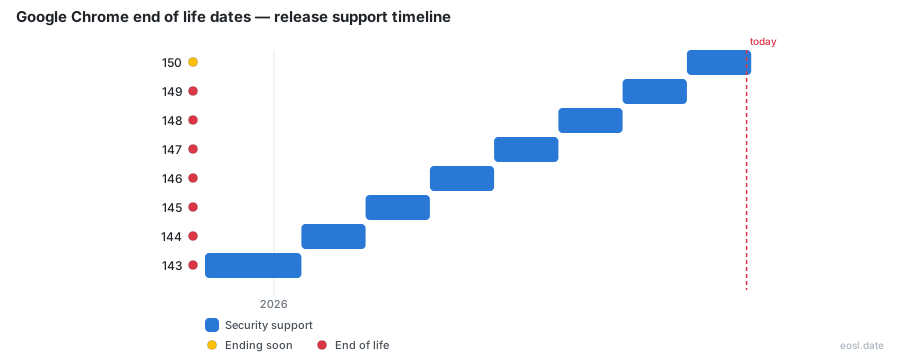
Google Chrome Releases Nearing End of Life - Support Ending Soon (1)
| Release | Released | Security Support |
|---|---|---|
| 158 | (4 days ago) | (in 1 week and 3 days) |
Google Chrome End of Life (EOL) Releases - No Longer Supported (150)
| Release | Released | Security Support |
|---|---|---|
| 157 | (2 weeks and 4 days ago) | (4 days ago) |
| 156 | (1 month and 1 day ago) | (2 weeks and 4 days ago) |
| 155 | (1 month and 2 weeks ago) | (1 month and 1 day ago) |
| 154 | (1 month and 4 weeks ago) | (1 month and 2 weeks ago) |
| 153 | (2 months ago) | (1 month and 4 weeks ago) |
| 152 | (2 months ago) | (2 months ago) |
| 151 | (3 months ago) | (2 months ago) |
| 150 | (4 months ago) | (3 months ago) |
| 149 | (5 months ago) | (4 months ago) |
| 148 | (6 months ago) | (5 months ago) |
| 147 | (7 months ago) | (6 months ago) |
| 146 | (8 months ago) | (7 months ago) |
| 145 | (9 months ago) | (8 months ago) |
| 144 | (10 months ago) | (9 months ago) |
| 143 | (11 months ago) | (10 months ago) |
| 142 | (1 year ago) | (11 months ago) |
| 141 | (1 year and 1 month ago) | (1 year ago) |
| 140 | (1 year and 2 months ago) | (1 year and 1 month ago) |
| 139 | (1 year and 3 months ago) | (1 year and 2 months ago) |
| 138 | (1 year and 4 months ago) | (1 year and 3 months ago) |
| 137 | (1 year and 5 months ago) | (1 year and 4 months ago) |
| 136 | (1 year and 6 months ago) | (1 year and 5 months ago) |
| 135 | (1 year and 7 months ago) | (1 year and 6 months ago) |
| 134 | (1 year and 8 months ago) | (1 year and 7 months ago) |
| 133 | (1 year and 9 months ago) | (1 year and 8 months ago) |
| 132 | (1 year and 10 months ago) | (1 year and 9 months ago) |
| 131 | (2 years ago) | (1 year and 10 months ago) |
| 130 | (2 years and 1 month ago) | (2 years ago) |
| 129 | (2 years and 2 months ago) | (2 years and 1 month ago) |
| 128 | (2 years and 3 months ago) | (2 years and 2 months ago) |
| 127 | (2 years and 3 months ago) | (2 years and 3 months ago) |
| 126 | (2 years and 5 months ago) | (2 years and 3 months ago) |
| 125 | (2 years and 6 months ago) | (2 years and 5 months ago) |
| 124 | (2 years and 7 months ago) | (2 years and 6 months ago) |
| 123 | (2 years and 8 months ago) | (2 years and 7 months ago) |
| 122 | (2 years and 9 months ago) | (2 years and 8 months ago) |
| 121 | (2 years and 9 months ago) | (2 years and 9 months ago) |
| 120 | (2 years and 11 months ago) | (2 years and 9 months ago) |
| 119 | (3 years ago) | (2 years and 11 months ago) |
| 118 | (3 years and 1 month ago) | (3 years ago) |
| 117 | (3 years and 2 months ago) | (3 years and 1 month ago) |
| 116 | (3 years and 3 months ago) | (3 years and 2 months ago) |
| 115 | (3 years and 4 months ago) | (3 years and 3 months ago) |
| 114 | (3 years and 5 months ago) | (3 years and 4 months ago) |
| 113 | (3 years and 6 months ago) | (3 years and 5 months ago) |
| 112 | (3 years and 7 months ago) | (3 years and 6 months ago) |
| 111 | (3 years and 8 months ago) | (3 years and 7 months ago) |
| 110 | (3 years and 9 months ago) | (3 years and 8 months ago) |
| 109 | (3 years and 10 months ago) | (3 years and 9 months ago) |
| 108 | (3 years and 11 months ago) | (3 years and 10 months ago) |
| 107 | (4 years ago) | (3 years and 11 months ago) |
| 106 | (4 years and 1 month ago) | (4 years ago) |
| 105 | (4 years and 2 months ago) | (4 years and 1 month ago) |
| 104 | (4 years and 3 months ago) | (4 years and 2 months ago) |
| 103 | (4 years and 5 months ago) | (4 years and 3 months ago) |
| 102 | (4 years and 5 months ago) | (4 years and 5 months ago) |
| 101 | (4 years and 6 months ago) | (4 years and 5 months ago) |
| 100 | (4 years and 7 months ago) | (4 years and 6 months ago) |
| 99 | (4 years and 8 months ago) | (4 years and 7 months ago) |
| 98 | (4 years and 9 months ago) | (4 years and 8 months ago) |
| 97 | (4 years and 10 months ago) | (4 years and 9 months ago) |
| 96 | (5 years ago) | (4 years and 10 months ago) |
| 95 | (5 years and 1 month ago) | (5 years ago) |
| 94 | (5 years and 2 months ago) | (5 years and 1 month ago) |
| 93 | (5 years and 2 months ago) | (5 years and 2 months ago) |
| 92 | (5 years and 4 months ago) | (5 years and 2 months ago) |
| 91 | (5 years and 5 months ago) | (5 years and 4 months ago) |
| 90 | (5 years and 7 months ago) | (5 years and 5 months ago) |
| 89 | (5 years and 8 months ago) | (5 years and 7 months ago) |
| 88 | (5 years and 10 months ago) | (5 years and 8 months ago) |
| 87 | (6 years ago) | (5 years and 10 months ago) |
| 86 | (6 years and 1 month ago) | (6 years ago) |
| 85 | (6 years and 2 months ago) | (6 years and 1 month ago) |
| 84 | (6 years and 4 months ago) | (6 years and 2 months ago) |
| 83 | (6 years and 6 months ago) | (6 years and 4 months ago) |
| 81 | (6 years and 7 months ago) | (6 years and 6 months ago) |
| 80 | (6 years and 9 months ago) | (6 years and 7 months ago) |
| 79 | (6 years and 11 months ago) | (6 years and 9 months ago) |
| 78 | (7 years ago) | (6 years and 11 months ago) |
| 77 | (7 years and 2 months ago) | (7 years ago) |
| 76 | (7 years and 3 months ago) | (7 years and 2 months ago) |
| 75 | (7 years and 5 months ago) | (7 years and 3 months ago) |
| 74 | (7 years and 6 months ago) | (7 years and 5 months ago) |
| 73 | (7 years and 8 months ago) | (7 years and 6 months ago) |
| 72 | (7 years and 9 months ago) | (7 years and 8 months ago) |
| 71 | (7 years and 11 months ago) | (7 years and 9 months ago) |
| 70 | (8 years and 1 month ago) | (7 years and 11 months ago) |
| 69 | (8 years and 2 months ago) | (8 years and 1 month ago) |
| 68 | (8 years and 3 months ago) | (8 years and 2 months ago) |
| 67 | (8 years and 5 months ago) | (8 years and 3 months ago) |
| 66 | (8 years and 7 months ago) | (8 years and 5 months ago) |
| 65 | (8 years and 8 months ago) | (8 years and 7 months ago) |
| 64 | (8 years and 9 months ago) | (8 years and 8 months ago) |
| 63 | (8 years and 11 months ago) | (8 years and 9 months ago) |
| 62 | (9 years and 1 month ago) | (8 years and 11 months ago) |
| 61 | (9 years and 2 months ago) | (9 years and 1 month ago) |
| 60 | (9 years and 3 months ago) | (9 years and 2 months ago) |
| 59 | (9 years and 5 months ago) | (9 years and 3 months ago) |
| 58 | (9 years and 7 months ago) | (9 years and 5 months ago) |
| 57 | (9 years and 8 months ago) | (9 years and 7 months ago) |
| 56 | (9 years and 9 months ago) | (9 years and 8 months ago) |
| 55 | (9 years and 11 months ago) | (9 years and 9 months ago) |
| 54 | (10 years and 1 month ago) | (9 years and 11 months ago) |
| 53 | (10 years and 2 months ago) | (10 years and 1 month ago) |
| 52 | (10 years and 4 months ago) | (10 years and 2 months ago) |
| 51 | (10 years and 5 months ago) | (10 years and 4 months ago) |
| 50 | (10 years and 7 months ago) | (10 years and 5 months ago) |
| 49 | (10 years and 8 months ago) | (10 years and 7 months ago) |
| 48 | (10 years and 10 months ago) | (10 years and 8 months ago) |
| 47 | (11 years ago) | (10 years and 10 months ago) |
| 46 | (11 years and 1 month ago) | (11 years ago) |
| 45 | (11 years and 2 months ago) | (11 years and 1 month ago) |
| 44 | (11 years and 4 months ago) | (11 years and 2 months ago) |
| 43 | (11 years and 6 months ago) | (11 years and 4 months ago) |
| 42 | (11 years and 7 months ago) | (11 years and 6 months ago) |
| 41 | (11 years and 8 months ago) | (11 years and 7 months ago) |
| 40 | (11 years and 10 months ago) | (11 years and 8 months ago) |
| 39 | (12 years ago) | (11 years and 10 months ago) |
| 38 | (12 years and 1 month ago) | (12 years ago) |
| 37 | (12 years and 3 months ago) | (12 years and 1 month ago) |
| 36 | (12 years and 4 months ago) | (12 years and 3 months ago) |
| 35 | (12 years and 6 months ago) | (12 years and 4 months ago) |
| 34 | (12 years and 7 months ago) | (12 years and 6 months ago) |
| 33 | (12 years and 9 months ago) | (12 years and 7 months ago) |
| 32 | (12 years and 10 months ago) | (12 years and 9 months ago) |
| 31 | (13 years ago) | (12 years and 10 months ago) |
| 30 | (13 years and 1 month ago) | (13 years ago) |
| 29 | (13 years and 3 months ago) | (13 years and 1 month ago) |
| 28 | (13 years and 4 months ago) | (13 years and 3 months ago) |
| 27 | (13 years and 6 months ago) | (13 years and 4 months ago) |
| 26 | (13 years and 7 months ago) | (13 years and 6 months ago) |
| 25 | (13 years and 9 months ago) | (13 years and 7 months ago) |
| 24 | (13 years and 11 months ago) | (13 years and 9 months ago) |
| 23 | (14 years ago) | (13 years and 11 months ago) |
| 22 | (14 years and 2 months ago) | (14 years ago) |
| 21 | (14 years and 3 months ago) | (14 years and 2 months ago) |
| 20 | (14 years and 5 months ago) | (14 years and 3 months ago) |
| 19 | (14 years and 6 months ago) | (14 years and 5 months ago) |
| 18 | (14 years and 8 months ago) | (14 years and 6 months ago) |
| 17 | (14 years and 9 months ago) | (14 years and 8 months ago) |
| 16 | (14 years and 11 months ago) | (14 years and 9 months ago) |
| 15 | (15 years and 1 month ago) | (14 years and 11 months ago) |
| 14 | (15 years and 2 months ago) | (15 years and 1 month ago) |
| 13 | (15 years and 3 months ago) | (15 years and 2 months ago) |
| 12 | (15 years and 5 months ago) | (15 years and 3 months ago) |
| 11 | (15 years and 7 months ago) | (15 years and 5 months ago) |
| 10 | (15 years and 8 months ago) | (15 years and 7 months ago) |
| 9 | (15 years and 9 months ago) | (15 years and 8 months ago) |
| 8 | (15 years and 11 months ago) | (15 years and 9 months ago) |
| 7 | (16 years and 1 month ago) | (15 years and 11 months ago) |
If you are wondering when your browser stops getting fixes, this guide to Google Chrome end of life shows how Google handles Chrome support, which operating systems it has already dropped, and what you should do before your copy of Chrome falls behind. Chrome is the web browser most people rely on every day, and Google keeps it moving fast, so knowing the date a version, an app or a system loses support is worth a few minutes of your time.
Google Chrome End of Life: How Chrome Support Works
Unlike a boxed product, Google Chrome does not have one single retirement date. Google ships a new stable release on a fixed cadence, and each Chrome version receives security support only until the next major version arrives. Once a newer build ships, the older one stops receiving patches, and every user is expected to move forward through the browser's auto update mechanism. You can see the current state on endoflife.date: Chrome 156 was released on 20 October 2026, and its protection ends on 03 November 2026, the date Chrome 157 takes over. Chrome 155, released on 06 October 2026, already lost its fixes on 20 October 2026.
That makes the rule simple enough to write as a formula:
$$\text{Support end date}_{N} = \text{Release date}_{N+1}$$
In other words, a build is current only until its successor appears. Google also publishes an Extended Support Release of Google Chrome for administrators who cannot update every few weeks, and the ESR build today is 156.0.8078.48, matching the regular Windows and Mac release. Every Google Chrome user, from a student on a laptop to an IT team running thousands of Windows PCs, depends on Google Update and Chrome's background updater to stay on a build that Google still patches.
Current Chrome Release Dates and Support Windows
The easiest way to see the formula at work is to look at the four newest Chrome version numbers on endoflife.date. Each row below shows when Google released the build and when Google stopped patching it, so you can match your own copy of Chrome against the list. Google publishes the same dates in its Chrome release notes, and Google Chrome users can read them without signing in to a Google account.
| Version | Released | Patches end |
|---|---|---|
| Google Chrome 156 | 20 October 2026 | 03 November 2026 |
| Chrome 155 | 06 October 2026 | 20 October 2026 (ended) |
| Chrome 154 | 22 September 2026 | 06 October 2026 (ended) |
| Chrome 153 | 08 September 2026 | 22 September 2026 (ended) |
Every row follows the same pattern: Google gives each major version exactly the length of the gap before the next one, which is currently fourteen days. If you see Chrome 154 or older in the About page, your browser has missed at least two updates and you should restart Chrome so it can finish installing the newest build.
Release Cycle and Stable Release Schedule
The pace of the release cycle has changed several times. Chrome originally shipped a new stable version roughly every quarter, then Google moved it to six weeks in 2010. In March 2021 Google announced that, starting with Chrome 94, stable releases would arrive every four weeks, alongside an eight weeks channel for system administrators and browser embedders. More recently, Chrome joined Firefox on a two-week development rhythm beginning with Chrome 153 on 8 September 2026, which is why versions 153 through 156 landed only two weeks apart. The shorter gap means a version stays supported for a much shorter window than it did a few years ago, so users who postpone a browser update fall out of coverage quickly.
Google distributes Chrome through several release channels, but only the stable channel carries the support guarantee described above, and the others make no end-date commitment:
- Canary: the Chrome Canary build is produced daily from the most stable of the latest revisions, and it breaks most often.
- Dev: the Dev build gets a few updates a week, mostly for the Chromium developer who wants to see a change early.
- Beta: the Beta channel arrives roughly a month ahead of the stable channel, and Beta users see features that are almost final.
- Stable channel: the build most Google Chrome users run, updated through Google Update on Windows and through Google Play on Android.
- Beta on mobile: Google offers Chrome Beta on Android and iOS as well, and a Beta install lets you test the next Chrome release before it reaches the stable channel.
Chrome version numbers use four parts, major.minor.build.patch, and only the major number tells you whether Google still patches a build. The Blink engine and the open-source Chromium project underneath Chrome follow the same rhythm, which is why other Chromium browsers such as Edge and Brave track the same version numbers.
Security Support and Extended Support Release
Because security vulnerabilities are found constantly, and Google, outside researchers and Google Chrome users all report them, running a build past its last update is the real danger of an expired version. An enterprise that pins Chrome through Group Policy should treat the ESR calendar, not the consumer one, as its policy baseline, and read the Chrome Enterprise release notes support page each cycle. Google issues a security patch for the current stable build and stops there; Google does not backport fixes to older Google Chrome builds. The last release of any superseded major version therefore marks the real finish line for that branch.
Chrome End of Support by Operating System
A platform reaches end of support when Chrome's minimum system requirements move past it. The web browser then keeps running on the last compatible build, but it receives no further fixes, and many sites eventually refuse to load. Today Chrome needs Windows 10 or later (or Windows Server 2016), macOS Ventura or later, Android 10 or later, and iOS or iPadOS 18 or later. Older hardware and devices that cannot run those OS versions are stuck on a frozen build. Most Chromium developers follow the same cutoff, so a locked-out device usually loses access to Chromium-based alternatives too.
| Platform | What Google dropped from Chrome | Last Google Chrome build that works |
|---|---|---|
| Windows XP and Vista | Google ended support in April 2016 | Chrome 49 |
| Windows 7, 8 and 8.1 | Google ended support on 15 January 2023 | Chrome 109 |
| macOS El Capitan and Sierra | Google ended support in August 2022 | Chrome 103 |
| macOS High Sierra and Mojave | Google ended support in September 2023 | Chrome 116 |
| Android 8.0 and 9.0 | Google sunset Chrome for Android, announced in 2025 | See the Google Chrome notice |
Windows 7 and Windows 8.1 Support Ended
Google planned to drop support for Windows 7 in July 2021, delayed it to January 2022 because of the pandemic, and finally ended it on 15 January 2023 because enterprises needed more time to reach Windows 10 or 11. Windows 8.1 went at the same moment, and Chrome 109 became the last version for both. Earlier, Windows XP and Vista lost Chrome after version 49 in April 2016. Windows users who stay on an old release can still run an old copy of Chrome, but Windows no longer gets fixes from Google and the browser cannot protect the PC.
macOS Versions Chrome No Longer Runs On
On a Mac, macOS releases fall away roughly one a year. Chrome 88 ended OS X Yosemite in January 2021, Chrome 104 ended OS X El Capitan and Sierra in August 2022, and Chrome 117 ended High Sierra and Mojave in September 2023. Google also stopped publishing 32-bit Google Chrome builds for macOS with Chrome 39 in November 2014, and only 64-bit stable builds exist for macOS and Linux today. Google has announced through its Chrome Status page that macOS 11 is the next release to be removed, so an older Mac may soon sit on a frozen build too.
Android and iOS Mobile Browsers
Mobile follows the same pattern. Android 10 is the floor today after Google sunset Android 8.0 and 9.0, and Chrome had already dropped Android Nougat earlier. Android is also where Google ships Chrome as the default browser, so an Android phone that cannot take a newer system release eventually stops seeing a new Chrome update in Google Play, and Android users with older hardware have to switch browsers. On iOS and iPadOS, Chrome on iOS needs version 18 and runs on Apple's WebKit rather than Google's own engine, so an iPhone or iPad user, whether on iOS or iPadOS, follows Apple's own timing for engine fixes. If your phone cannot take the newer system, the store simply stops offering Chrome releases.
Chrome on Android Phones and Tablets
Android deserves its own look because it is where most Google Chrome users live. Chrome is the default browser on Android devices, and it is dominant on smartphones with around 67 percent market share, according to StatCounter figures quoted by Wikipedia. Google, which also develops Android, bundles Android and Chrome together, so every Android release that drops out of the support matrix takes millions of devices with it. The Android version you run decides which Chrome you can install: Android 10 and later receive the current Chrome, and anything older is stuck on the last build Google Play offered. Android tablets follow the same rule, and Chrome holds an estimated 48 percent of the tablet market. Before you buy a used Android phone, check that its Android version can still run Chrome, because a device on an older release can no longer get a security update for the browser.
Linux Distribution Requirements
Desktop Linux builds require a modern distribution such as Ubuntu 18.04 or later, Debian 10, openSUSE 15.5 or Fedora 39. Older systems with outdated libraries are treated as unsupported, and Linux users on those distributions end up on a frozen Chrome. Google also removed the old NPAPI plugin interface from Linux in Chrome 35, an earlier case of Google ending support for a feature rather than a system.
Chrome Apps and Extensions Sunsetting
Besides browser versions, Google has phased out whole features. The most visible case is the old Chrome apps platform, which is separate from Chrome extensions. Extensions keep working in Chrome, and Chrome continues to support a tool for ad blocking or tab management, but packaged apps were being wound down from 2020 onward. Google's schedule for them, relayed by Berkeley Lab's IT group, is below, and the same extension rules still matter for anyone who loads a browser extension from the Chrome Web Store. Plug-ins went first: Chrome 42 disabled the NPAPI interface by default in April 2015, and PPAPI Flash Player was the only workaround Linux users had.
Chrome Apps Support Timeline
| Date | What Google changed for Chrome apps |
|---|---|
| March 2020 | The Chrome Web Store from Google stopped accepting new public Chrome apps. |
| June 2021 | Google ended general support for apps on Windows, Mac and Linux; an admin setting could extend it to June 2022. |
| June 2022 | Google ended Chrome apps everywhere, including ChromeOS, along with NaCl, PNaCl and PPAPI. |
A developer who still ships a packaged app had to migrate it to the web, because Google deprecated the model and then closed it. Google's Chrome Web Store kept accepting updates for existing apps only until June 2022, and each developer who needed longer had to rely on that extended window. The feature is discontinued for everyone now. Plain extensions, including your favorite ad blocker and every other Chrome extensions listing, were unaffected by this change, but the migration pushed every developer to rebuild around the modern extensions API.
Manifest V3 and the Chrome Web Store
The extension platform itself changed too. Google announced Manifest V3 in October 2018, paused the transition in December 2022, then resumed it in November 2023. Manifest V2 extensions were removed from non-stable builds beginning in June 2024, and the Chrome Web Store removed them from its listings in June 2025. Some extensions, such as uBlock Origin, are no longer available there because of the change. The rule for each extension developer is the same: ship a Manifest V3 build, publish it to the Chrome Web Store, and tell users which version to install. Google cited performance and security when it set those dates, and any Chromium browser that uses the Chrome Web Store inherits the same deadline.
ChromeOS Phase-Out and the Aluminium Transition
The biggest expiration date in the news is for ChromeOS, not the browser. Documents from Google's search antitrust case surfaced this year, and the legal filings point to Google officially phasing out ChromeOS by 2034. That date is tied to the promise of ten years of automatic updates for every Chromebook: the legacy stack must run until the last supported device reaches its own end-of-life.
Its replacement is an Android-based system known as Aluminium. Testers may get it in late 2026, while a full release for education and business customers might not arrive until 2028, a figure that comes from a trial where Google had reason to call the move slow and messy. Google's own support page for devices still lists some Chromebooks receiving updates into 2035, so the real ChromeOS finish line is likely to depend on the last device sold.
What the Court Documents Say About ChromeOS
For support purposes the key point is that Google must keep updating older Chromebooks until their own update dates pass. The filings also suggest ChromeOS helped Google keep the Chrome browser, because it argued that selling Chrome would make it hard to maintain software for millions of students and businesses. Google says newer hardware such as Chromebook Plus models is promised a migration path to the new stack. If you bought one recently, Google has not put you in immediate danger; the transition is described as a ten-year bridge between the web-centric ChromeOS of today and an Android-powered desktop.
Chromium Browsers When a Chrome Build Expires
Chrome is built from Chromium, the open-source project Google started its browser from. Chromium itself is free software, but Google adds proprietary pieces on top for Google Chrome, which is why Chrome is licensed as proprietary freeware. Google did not keep Chromium to itself, and many other browsers use Chromium as their base, including Microsoft Edge and Brave, and they share the Blink rendering engine with Chrome. When Google ends support for a Chrome release or an OS, Edge and Brave inherit the same OS floor and Manifest V3 changes through Chromium. That shared code matters when a build ends, because a fix in Chromium usually reaches those browsers in the same few days.
Here is what changes for Chromium users when Google moves on:
- Engine fixes: a Chromium browser takes Blink and V8 patches from upstream, so its security depends on how quickly its own developer ships the update.
- OS floor: Chromium developers who follow Chrome's lead also drop old Windows, macOS and Android releases, so a device Chrome abandons often loses its Chromium alternatives soon after.
- Extensions: browsers that rely on the Chrome Web Store inherit its Manifest V3 rules, while Firefox kept a separate approach.
- Beta and Canary builds: a Chromium-based beta or canary build previews coming changes, including the next removal of an old API.
The practical lesson: a different Chromium browser does not exempt you from the browser upgrade cycle. A Chromium build that is months behind carries the same engine flaws as an outdated Chrome. Treat Chromium, Chrome and the browsers that embed them as one family with one support clock, and update the whole set together.
Enterprise Chrome End-of-Life Planning
Large organizations manage browser users in bulk, and Google Chrome Enterprise exists for that, so the expiry date for a version is a deadline for a whole fleet. Chrome's market share is huge: Wikipedia reports about 71 percent across all platforms in December 2025 and roughly 3.62 billion users, which also makes outdated copies an attractive target. A fleet pinned to a build past its last patch stays exposed, so plan a browser upgrade wave, test internal sites and extension dependencies on the next stable build, and keep Chromium-based alternatives in mind for kiosks. IT teams should also track the release notes for the ESR, as well as the Chrome beta channel, so a broken extension or a removed API is found weeks before the users who rely on it.
What to Do When Your Browser Version Is Retired
Checking Your Build and the Auto-Update Setting
- Open chrome://settings/help to see your Google Chrome build and let Google's updater install the newest one.
- Check your operating system against the minimum requirements Google lists above.
- If your device cannot update, move to a supported web browser or upgrade the machine.
- Back up bookmarks and passwords to your Google account before changing devices, so Google Chrome restores them on the new one.
Alternatives When Your Device Is Stuck
If the operating system cannot run the current Chrome, you still have options. Update the OS if the hardware allows it, since Windows 10 or later, macOS Ventura or later and Android 10 or later cover the current Chrome. Linux users can move to a newer distribution that Google still supports. Otherwise choose another web browser that still ships patches (Google keeps Chrome safe only where it still supports the system) for your system, keep sensitive accounts such as banking on a device Google supports, and do not browse untrusted sites on an unsupported build. Tablet and phone users should favor a handset that is still receiving Android updates, because an Android phone without them leaves the whole device exposed and not only Chrome. Administrators with an unsupported fleet should plan an upgrade rather than rely on Google Chrome's auto-update.
Where Google Publishes Official Dates
Google revises these dates, so treat this article as a snapshot and confirm against the sources Google itself maintains:
- Chrome Releases blog: Google posts every stable, beta and early stable update here, including each Google Chrome build number for Android and desktop.
- Chrome Enterprise release notes: Google lists the calendar, the ESR build and setting changes that matter to administrators.
- Chrome Platform Status: Google tracks planned removals, such as the macOS 11 change, and which Chrome release ships each one.
- Auto Update Policy page: Google lists the final update month for every Chromebook, which is the best web browser reference for ChromeOS dates.
- Google Chrome Help: Google explains system requirements for each OS and how Google Update installs a new build.
- endoflife.date: an independent tracker that mirrors the Google Chrome release table above and shows how long Google still patches each build.