Android OS End of Life (EOL) Dates and End of Support (EOS) Dates
Android OS end of life (EOL) and end of support (EOS) dates: 30 Android OS versions have reached EOL, including Android OS 13 Tiramisu (EOL date: Mar 02, 2026) — no longer receiving security updates or patches. Android OS 17 Cinnamon Bun is the current supported release — 4 versions in active support. Also see Google Chrome end of life dates for related end-of-life information.
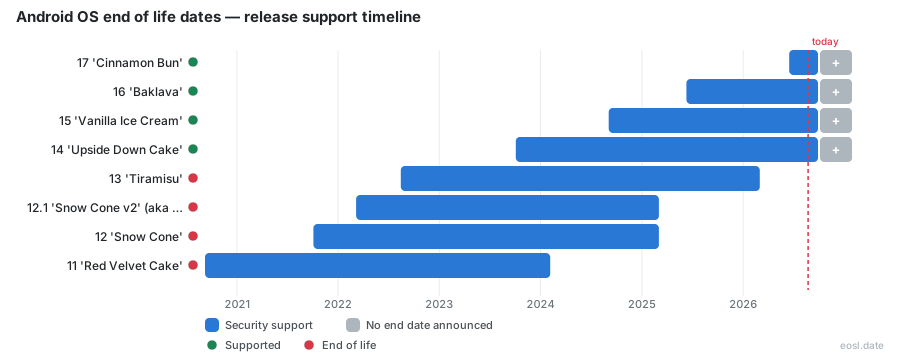
Currently Supported Android OS Releases - Active EOS/EOSL Support (4)
| Release | API Version | Released | Security Support |
|---|---|---|---|
| 17 'Cinnamon Bun' | 37 | (5 months ago) | Active |
| 16 'Baklava' | 36 | (1 year and 5 months ago) | Active |
| 15 'Vanilla Ice Cream' | 35 | (2 years and 2 months ago) | Active |
| 14 'Upside Down Cake' | 34 | (3 years and 1 month ago) | Active |
Android OS End of Life (EOL) Releases - No Longer Supported (30)
| Release | API Version | Released | Security Support |
|---|---|---|---|
| 13 'Tiramisu' | 33 | (4 years and 3 months ago) | (8 months ago) |
| 12.1 'Snow Cone v2' (aka 12L) | 32 | (4 years and 8 months ago) | (1 year and 8 months ago) |
| 12 'Snow Cone' | 31 | (5 years and 1 month ago) | (1 year and 8 months ago) |
| 11 'Red Velvet Cake' | 30 | (6 years and 2 months ago) | (2 years and 9 months ago) |
| 10 'Queen Cake' | 29 | (7 years and 2 months ago) | (3 years and 8 months ago) |
| 9 'Pie' | 28 | (8 years and 3 months ago) | (4 years and 10 months ago) |
| 8.1 'Oreo' | 27 | (8 years and 11 months ago) | (5 years and 10 months ago) |
| 8.0 'Oreo' | 26 | (9 years and 3 months ago) | (5 years and 10 months ago) |
| 7.1 'Nougat' | 25 | (9 years and 11 months ago) | (7 years and 1 month ago) |
| 7.0 'Nougat' | 24 | (10 years and 2 months ago) | (7 years and 1 month ago) |
| 6.0 'Marshmallow' | 23 | (11 years and 1 month ago) | (8 years and 3 months ago) |
| 5.1 'Lollipop' | 22 | (11 years and 8 months ago) | (8 years and 8 months ago) |
| 5.0 'Lollipop' | 21 | (12 years ago) | (8 years and 8 months ago) |
| 4.4W | 20 | (12 years and 7 months ago) | (9 years and 1 month ago) |
| 4.4 'KitKat' | 19 | (13 years ago) | (9 years and 1 month ago) |
| 4.3 'Jelly Bean' | 18 | (13 years and 3 months ago) | — |
| 4.2 'Jelly Bean' | 17 | (14 years ago) | — |
| 4.1 'Jelly Bean' | 16 | (14 years and 4 months ago) | — |
| 4.0 'Ice Cream Sandwich' | 14-15 | (15 years and 1 month ago) | — |
| 3.2 'Honeycomb' | 13 | (15 years and 4 months ago) | — |
| 3.1 'Honeycomb' | 12 | (15 years and 6 months ago) | — |
| 3.0 'Honeycomb' | 11 | (15 years and 8 months ago) | — |
| 2.3 'Gingerbread' | 9-10 | (15 years and 11 months ago) | — |
| 2.2 'Froyo' | 8 | (16 years and 6 months ago) | — |
| 2.1 'Eclair' | 7 | (16 years and 10 months ago) | — |
| 2.0 'Eclair' | 5-6 | (17 years ago) | — |
| 1.6 'Donut' | 4 | (17 years and 2 months ago) | — |
| 1.5 'Cupcake' | 3 | (17 years and 6 months ago) | — |
| 1.1 'Petit Four' | 2 | (17 years and 9 months ago) | — |
| 1.0 | 1 | (18 years and 1 month ago) | — |
Your phone's Android OS end of life date is the day Google or your handset maker stops sending security fixes for that release, and it decides how safely you can keep using the device. As of October 2026, Android 17 is the latest version, the newest releases still receive security updates, and many older Android versions do not. This guide lists the support status of every release of this mobile operating system, explains what a cutoff means for your Android phone, your devices and your apps, and shows you how to find your own date.
Android OS End of Life Dates by Version
Google publishes no formal support policy for the platform. A release counts as finished once it drops out of the monthly Android Security Bulletins, and trackers such as endoflife.date record the resulting dates. The table below applies that rule to every release from Android 17 back to Android 9, using data current to late October 2026. Each version is a point in the operating system's history, and each has a dessert name, an API number and a security cutoff.
| Android version | Dessert name | API | Release date | Security support ends | Status |
|---|---|---|---|---|---|
| Android 17 | Cinnamon Bun | 37 | June 16, 2026 | Ongoing | Supported |
| Android 16 | Baklava | 36 | June 10, 2025 | Ongoing | Supported |
| Android 15 | Vanilla Ice Cream | 35 | September 3, 2024 | Ongoing | Supported |
| Android 14 | Upside Down Cake | 34 | October 4, 2023 | Ongoing | Supported |
| Android 13 | Tiramisu | 33 | August 15, 2022 | March 2, 2026 | Unsupported |
| Android 12L | Snow Cone v2 | 32 | March 7, 2022 | March 3, 2025 | Unsupported |
| Android 12 | Snow Cone | 31 | October 4, 2021 | March 3, 2025 | Unsupported |
| Android 11 | Red Velvet Cake | 30 | September 8, 2020 | February 5, 2024 | Unsupported |
| Android 10 | None (numbers only) | 29 | September 3, 2019 | March 6, 2023 | Unsupported |
| Android 9 | Pie | 28 | August 6, 2018 | January 1, 2022 | Unsupported |
Under the hood, Android is built on a modified Linux kernel, and the Linux kernel base is one reason patches reach some devices slowly. Cheaper phones often run Android (Go edition), also called Android Go, which follows its own release track and EOL schedule, while Wear OS watches use a separate branch. Every cycle starts with a beta, then the SDK and finally a stable version for the public.
Reading the table takes seconds. Find your Android version in the first column, then compare today's date with the cutoff beside it. Google released the platform's source code for free, so Google, the chip vendors and every phone brand share the work. Google opens each Android release as a beta, and Pixel devices are usually first in line for that beta, which is released months before the stable build. Developers build against the SDK for a given API, and the SDK tools, SDK platform images and emulators all follow the same numbering. The API number in each row is the level that Google Play checks when it decides which apps Android devices may install. Google Play asks developers to target a recent API within a year of each release, so old Android devices slowly lose access to new apps, and support for them shrinks with every cycle.
Supported Releases: Android 14 to Android 17
Four releases are fully supported today. Android 17, released on June 16, 2026, carries the freshest patches, while Android 16 and Android 15 still get monthly fixes. Android 14 is the oldest of the group and the next to lose coverage. Since 2025, Google ships a major release each spring and a minor release in the fourth quarter that adds new APIs without breaking changes. Flagships from Google and Samsung usually receive each upgrade first, and every major release raises the API level developers must target, which is why the Play Store eventually asks you to update apps. A cautious owner plans an upgrade before the final patch lands, not after. Google Pixel owners get each new Android release the day Google ships it, while Samsung and other Android brands follow weeks or months later because each maker tests the build on its own devices. A Pixel is therefore the easiest phone to keep current, and Google's own Pixel support page tells you how long each model will be supported.
Older Releases With Ended Security Support
Android 13, released in August 2022, is the newest release to lose coverage: its patches ended on March 2, 2026. Android 12 and its tablet-focused variant Android 12L ended a year earlier, on March 3, 2025, and Android 11 ended on February 5, 2024. Android 10 stopped on March 6, 2023 and Android 9 Pie on January 1, 2022. The release date alone never tells you the cutoff: Android 12 was released in October 2021 yet kept receiving patches until March 2025, a little over three years later. If you still run any of them, the Android phone works, but each new flaw stays open. Treat these as unsupported software.
Android Versions Matrix: Codename, API Level and Release Date
Older releases matter for legacy tablets, kiosks and hardware that never got replaced. The matrix below runs from Android 8.1 down to the first release. Grouped rows show a range of API numbers when Google shipped several point releases under one name. A release that never appeared in a security bulletin shows "None listed" in the last column.
| Android version | Codename | API level | Release date | Last security support |
|---|---|---|---|---|
| Android 8.1 Oreo | Oreo | 27 | December 5, 2017 | January 10, 2021 |
| Android 8.0 Oreo | Oreo | 26 | August 21, 2017 | January 1, 2021 |
| Android 7.1 Nougat | Nougat | 25 | December 1, 2016 | October 1, 2019 |
| Android 7.0 Nougat | Nougat | 24 | August 22, 2016 | October 1, 2019 |
| Android 6.0 Marshmallow | Marshmallow | 23 | October 5, 2015 | August 1, 2018 |
| Android 5.1 Lollipop | Lollipop | 22 | March 1, 2015 | March 1, 2018 |
| Android 5.0 Lollipop | Lollipop | 21 | November 12, 2014 | March 1, 2018 |
| Android 4.4 KitKat | KitKat | 19 | October 31, 2013 | October 1, 2017 |
| Android 4.1 to 4.3 Jelly Bean | Jelly Bean | 16 to 18 | July 9, 2012 | None listed |
| Android 4.0 Ice Cream Sandwich | Ice Cream Sandwich | 14 to 15 | October 18, 2011 | None listed |
| Android 3.0 to 3.2 Honeycomb | Honeycomb | 11 to 13 | February 22, 2011 | None listed |
| Android 2.3 Gingerbread | Gingerbread | 9 to 10 | December 6, 2010 | None listed |
| Android 2.2 Froyo | Froyo | 8 | May 20, 2010 | None listed |
| Android 2.0 to 2.1 Eclair | Eclair | 5 to 7 | October 2009 | None listed |
| Android 1.6 Donut | Donut | 4 | September 15, 2009 | None listed |
| Android 1.5 Cupcake | Cupcake | 3 | April 27, 2009 | None listed |
| Android 1.1 Petit Four | Petit Four | 2 | February 9, 2009 | None listed |
| Android 1.0 | None | 1 | September 23, 2008 | None listed |
The confectionery names began with Cupcake in 2009 and ended in August 2019, when Google moved to plain numbers. Eclair, Froyo, Gingerbread and Honeycomb belong to the era of the first smartphones and tablets, and Jelly Bean, KitKat and Lollipop were the versions that put Android into most pockets. Nougat, Marshmallow and Oreo followed. Because the API number rises with every release, the API level is the quickest way to tell whether an app can run on an old build. Jelly Bean, Ice Cream Sandwich and KitKat are all long unsupported. KitKat was the last of those releases to see a security fix, and after KitKat, Jelly Bean and Ice Cream Sandwich no mainstream phone gets patches. Google released each of them before mobile security became a daily concern, and Google support for them ended long ago.
Hardware Requirements for Newer Releases
Newer releases also ask more of the hardware. Google sets minimum RAM, camera and processor architecture rules, and the chipset vendor has to support the build, which is why an Android phone with healthy battery life and a sharp screen can still be stranded on an old version. When the chip maker stops shipping drivers, the manufacturer cannot port a new release, so the phone gets no further version upgrades, its security patches stop, and it becomes unsupported long before the hardware fails; performance and compatibility fixes end at the same cutoff. Newer Android chipsets need current drivers for good performance, so a stalled driver stream caps performance as well as security, and weak performance is often the first sign a phone is near its cutoff.
What Android EOL Means for Your Security
An Android EOL date does not switch your Android phone off. The device keeps calling, messaging and running its apps, but Google and the manufacturer no longer close newly found vulnerabilities. Over time the gap widens, and attackers know exactly which flaws remain open. This is why security guidance treats the cutoff as a deadline for your data and privacy rather than a convenience matter. Unlike Apple, which builds both the iPhone and its software, Google writes the Android code while dozens of manufacturers build the mobile phones. That split is why no single rulebook exists, and why unpatched Android devices stay exposed to attackers when a maker stops caring. Exposed data includes photos, passwords, contacts and payment details, and the privacy damage from stolen data is hard to undo.
Security Patches Versus Android Version Updates
Your phone actually runs two clocks. The first covers Android version updates, the big releases that add features and new settings. Losing that clock breaks little, since apps, Google Pay and the Play Store keep working for years. The second clock covers security patches, the monthly fixes for flaws in the system and in the manufacturer's firmware, and it matters far more. A single monthly patch can fix dozens of problems, some rated critical, including holes that let a thief bypass the lock screen or let someone run code remotely. When the second clock stops, every later flaw stays open.
Risks of Running an Unsupported Phone
An unsupported phone becomes an easy target for bad actors. Malware that targets old APIs, phishing links inside apps and exploits against the browser all get more dangerous when the system underneath is never patched. The longer a handset goes without a fix, the worse the exposure, and the risk reaches data, banking apps and any work account signed in on the device. Do not use an unsupported phone for payments or sensitive logins, and replace it as soon as budget allows. A thief who steals the Android phone can chain a known flaw to bypass the lock screen, and an old lock screen bug exposes everything on it. Once a phone passes its EOL date, none of this gets fixed. Even a careful user cannot fix any of this from the settings menu.
How Google Play Protect and Play Services Still Help
Android security is modular, so an old Android phone is not defenseless. Google Play services and Play system updates deliver fixes to common attack surfaces, including the system web view, independently of the operating system release. Google Play Protect scans installed apps every day and removes malware, and it works regardless of the Android version. These layers reduce the danger, yet they cannot patch the kernel or firmware, so they are a bridge to your next device rather than a long-term answer. Google also tests Android devices against its compatibility rules, and Google support for an old Android build can end while Google Play services keep working. Stay on a supported Android release whenever your devices allow it, because Google can only patch what Google still supports.
How to Check Your Phone's Expiry Date
Finding your own expiry date takes a couple of minutes. On most phones, open Settings, scroll to About phone and tap Software information. Some phones place the same screen under Settings, then System, then Software update, and the Settings search box finds it if you type "security update". Start with what the Android phone reports, then confirm it against a source published by the manufacturer, since the maker, not Google, sets the schedule for each model.
Check the Android Security Patch Level
Open Settings, choose About phone, then Software information, and read the Android security patch level. If the date is about a year old, the Android phone has probably passed its cutoff and no longer receives a monthly security patch. Note the Android version on the same screen and compare it with the table above.
Look Up Your Manufacturer's Update Schedule
The most reliable answer comes from the manufacturer. Google lists the update schedule for each Pixel on its support page, Samsung publishes its own on its mobile security site, Motorola keeps a software update tracker and OnePlus posts its commitments. Search for your full model name, which appears under About phone, on those pages or on endoflife.date. Compare the release date of your build with the date on the maker's page. Rarely a maker pushes a fix after the cutoff, but treat that as luck, not a plan, and check the software support period before you buy.
Android 10 and 11 Are Unsupported: Enterprise Steps
For companies, Android 10 and 11 end of life arrived in 2023 and 2024. Rugged scanners, kiosks, tablets and frontline devices often run old builds, and the lapse brings compliance exposure and operational disruption on top of security risk. The sensible step is to move each endpoint to a current release, since an operating system update delivers protection and stability that standalone patches cannot. Plan an upgrade window now, and use the Android Enterprise Recommended program to pick hardware with a documented commitment to security updates. Google says manufacturers now offer up to seven years of security updates on many devices, which lets IT teams plan predictable refresh cycles. Inventory every Android device, record its release date and its cutoff, and retire any device whose support has ended. Google and its partners publish guidance for rugged devices, kiosks and warehouse scanners, and the same support rules apply to those devices as to phones. Block or quarantine any unsupported Android 10 or 11 device until it is replaced.
Plan Endpoint Modernization With Zero-Trust Controls
Use the cutoff to start a wider endpoint modernization effort, and let policy block devices past their update cutoff. A zero-trust model never treats a device as permanently trusted, so a proactive refresh keeps hardware current and lets IT verify its state. Device Trust tools from Android Enterprise report a handset's security posture in real time, and policy can restrict access whenever a device falls below the threshold. Build refresh cycles around the vendor's promised years of support so replacements are predictable rather than a scramble.
Android Version History, Update Cutoff Rules and Support Policy
The update cutoff is set by the maker, not Google alone. The version history began with Android 1.0 in 2008, and Google now ships on a yearly schedule, and the official release notes in the developer documentation list each release. The update cutoff is where things get messy: because the platform is an open ecosystem, the maker of your Android phone decides how long fixes continue, and an end-of-life date can differ by brand even for the same release. An end-of-life date therefore describes a specific model, not just an operating system build, and your own cutoff can fall earlier than the table suggests.
Years of Updates by Brand: Pixel, Samsung and OnePlus
Update promises have improved. Google Pixel and Samsung now promise seven years of updates on recent flagships, and OnePlus offers six years of patches on its top models. Most Motorola phones, including pricier ones, still stop after three major upgrades, and some HMD handsets promise only a couple of upgrades plus extra years of patches. Check these numbers before you buy, because the length of software support is now as important as the camera or battery. Google and Samsung released their seven-year promises only recently, so most phones released before 2023 get far less, and manufacturers that skip the promise tend to ship the latest Android release late or never. A release date on the box tells you nothing about support, so read the update pledge on the maker's site. The best Android brands now promise seven years of updates for flagships.
Android users can act in three ways. Keep your Android phone on the newest Android release it can run, replace any Android device whose Android security fixes have stopped, and move work Android devices to a supported Android release before the cutoff. Android makers differ, so every Android brand needs its own check. When in doubt, treat the date on the maker's page as final, and treat Android 14 as the oldest Android release worth buying today, since Android phones sold with it have years of Android updates ahead.