Angular End of Life (EOL) Dates and End of Support (EOS) Dates
Angular end of life (EOL) and end of support (EOS) dates: 11 Angular versions have reached EOL, including Angular 19 (EOL date: May 19, 2026) — no longer receiving security updates or patches. Angular 20 reaches its End of Support date on Nov 28, 2026 — plan your upgrade path now. Angular 22.3.0 is the current supported release, with support through Jun 30, 2028 — 2 versions in active support. Also see Android OS EOSL dates for related end-of-life information.
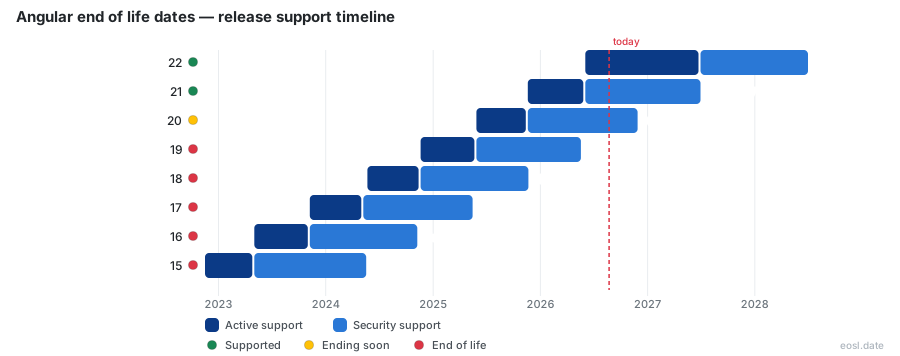
Currently Supported Angular Releases - Active EOS/EOSL Support (2)
Angular Releases Nearing End of Life - Support Ending Soon (1)
| Release | Released | Security Support | Active Support | Commercial Support | Latest |
|---|---|---|---|---|---|
| 20 | (1 year and 5 months ago) | (in 1 week) | (1 year ago) | Active | 20.3.35 (2 weeks and 5 days ago) |
Angular End of Life (EOL) Releases - No Longer Supported (11)
| Release | Released | Security Support | Active Support | Commercial Support | Latest |
|---|---|---|---|---|---|
| 19 | (2 years ago) | (6 months ago) | (1 year and 5 months ago) | Active | 19.2.25 (5 months ago) |
| 18 | (2 years and 5 months ago) | (1 year ago) | (2 years ago) | Active | 18.2.14 (1 year and 2 months ago) |
| 17 | (3 years ago) | (1 year and 6 months ago) | (2 years and 6 months ago) | Active | 17.3.12 (2 years and 4 months ago) |
| 16 | (3 years and 6 months ago) | (2 years ago) | (3 years ago) | Active | 16.2.12 (3 years ago) |
| 15 | (4 years ago) | (2 years and 6 months ago) | (3 years and 6 months ago) | Active | 15.2.10 (3 years and 1 month ago) |
| 14 | (4 years and 5 months ago) | (3 years ago) | (4 years ago) | Active | 14.3.0 (3 years and 8 months ago) |
| 13 | (5 years ago) | (3 years and 6 months ago) | (4 years and 5 months ago) | Active | 13.4.0 (3 years and 7 months ago) |
| 12 | (5 years and 6 months ago) | (4 years ago) | (5 years ago) | Active | 12.2.17 (3 years and 11 months ago) |
| 11 | (6 years ago) | (4 years and 6 months ago) | (5 years and 6 months ago) | Active | 11.2.14 (5 years and 6 months ago) |
| 10 | (6 years and 4 months ago) | (4 years and 10 months ago) | (5 years and 10 months ago) | Active | 10.2.5 (5 years and 7 months ago) |
| 9 | (6 years and 9 months ago) | (5 years and 3 months ago) | (6 years and 3 months ago) | Active | 9.1.13 (5 years and 11 months ago) |
If you run a production app, Angular end of life is the date after which Google stops shipping fixes for your version of the open-source framework. Angular 20 reaches that point on November 28, 2026, and AngularJS already passed it on December 31, 2021. This guide lists every supported version, explains each stage of support, and shows what to do when a release loses its security fixes, whether your code is modern Angular or an aging AngularJS app.
Angular Support Policy: EOL Dates and the Support Window
Google's support policy gives every major release two stages. During active support, the team ships regular updates, bug fixes and new features. During long-term support, only critical fixes and security patches arrive. When both stages finish, the support window closes and the version is unsupported. Angular 22, released on June 3, 2026, gets 24 months of coverage in total.
Active Support and LTS Stages
Releases up to Angular 21 followed a shorter support timing: 6 months of active support, then a 12 months maintenance stage, which adds up to 18 months. Angular 22 gives you 12 months of each. The status of a release moves from current to maintenance to out of support, and only the first two stages are covered. Maintenance during LTS is deliberately narrow: critical fixes and security fixes, nothing else, which is why stability-minded teams treat that stage as a countdown rather than a safe harbor.
Release Schedule and Release Cycle
The release schedule follows a predictable release cycle. Until Angular 22, a new major release arrived every six months. From Angular 22 on, the plan is one a year, with four to six minor builds in between and a patch almost every week. Angular 23 is penciled in for about June 2027, and the dates are general guidance that can change.
Angular Versions Still Under Long-Term Support
Not every one of the Angular versions you might be running is covered. As of October 2026, only Angular 20, 21 and 22 receive fixes, and the official versioning page states that versions 2 to 19 are no longer supported. Those three are the actively supported versions today. The Angular 19 EOL fell on May 19, 2026, so even its security patches have stopped, and anyone still on it should treat the Angular 19 EOL as already past. The table shows the dates to plan around.
| Version | Released | Feature work ends | Final fixes end | Status |
|---|---|---|---|---|
| 22 | Jun 3, 2026 | Jun 2027 | Jun 2028 | Current |
| 21 | Nov 19, 2025 | Jun 3, 2026 | Jun 2027 | Maintenance |
| 20 | May 28, 2025 | Nov 19, 2025 | Nov 28, 2026 | Maintenance |
| 19 | Nov 19, 2024 | May 28, 2025 | May 19, 2026 | Ended |
| 18 | May 22, 2024 | Nov 19, 2024 | Nov 21, 2025 | Ended |
| 17 | Nov 8, 2023 | May 8, 2024 | May 15, 2025 | Ended |
| 16 | May 3, 2023 | Nov 8, 2023 | Nov 8, 2024 | Ended |
Older lines are long gone. Angular 17 EOL arrived in May 2025, and Angular 16 reached the same point in November 2024. Many production stacks still run them, which is why a plain Angular EOL check belongs in every dependency review.
LTS Fixes and Security Patches
An LTS fix is not a free-for-all. A fix is considered only when it resolves a newly identified vulnerability or a regression caused by a third-party change, such as a new browser version. Those security patches are exactly what you lose when the final date passes. Teams that need them afterward can buy commercial support, covered below.
Angular End of Life: Versioning and Deprecation Policy
The deprecation policy explains how features leave the framework before a release is cut off: an API is marked deprecated first and removed only in a later major release. A separate compatibility policy covers browsers, Node.js and TypeScript. The Developer Preview and Experimental labels sit outside those promises, so APIs carrying them can change faster than the rest of the framework. The whole policy exists to protect the ecosystem of libraries, tutorials and tools built around Angular.
Semantic Versioning and Preview Releases
Angular uses semantic versioning, so 21.2.25 means major 21, minor 2, patch 25. A minor release adds smaller, backward-compatible features, while a patch release is a low-risk bug fix. Before each version, the team publishes preview releases: a next build under active testing and a release candidate that is feature complete. Since version 7, the major versions of the CLI and core stay aligned, and minor versions only widen the supported peer dependencies you install through npm.
Breaking Changes and the Update Guide
Breaking changes such as removed APIs are sometimes necessary to keep up with the web platform. The team promises to keep them rare and to ship migration tools and update scripts where it can. Read the official update guide before every major jump, because it lists the exact steps for each step up in version.
AngularJS EOL: What Ended in December 2021
AngularJS, also called Angular 1, is the original JavaScript framework Google built for single-page applications. Active development continued until June 30, 2018, and AngularJS then entered an extended maintenance phase through December 31, 2021. As of January 1, 2022, Google no longer updates AngularJS for security, browser compatibility or jQuery issues, and the framework is discontinued. Its Wikipedia entry lists 1.8.3, from April 2022, as the final stable release of AngularJS.
AngularJS was built around an MVC pattern, two-way data binding and custom HTML directives, which is why every web application written with AngularJS is tightly coupled to it. Modern Angular is a ground-up rewrite, not a newer AngularJS, so moving off AngularJS is a rebuild instead of an upgrade. Many legacy systems still depend on AngularJS, and every one of them is now unsupported.
The Angular team calls a move to current Angular the best path forward and offers an official guide for upgrading from AngularJS. Even so, the AngularJS sunset left thousands of internal tools and business apps stranded, and AngularJS is still used in plenty of them years later. Its directives, such as ng-model and ng-repeat, are plain JavaScript attributes that modern Angular templates replaced with a different syntax, so none of that markup carries over. Because AngularJS versions are all 1.x, the 1.8.3 label tells you at a glance that an app is stuck on the final AngularJS build.
Security Vulnerabilities in an Unsupported Release
A release can keep running long after it stops getting fixes, and that is the trap. Vulnerabilities keep being found, but nobody patches them upstream. Attackers know which versions are past EOL, so unsupported code becomes an attractive target. AngularJS has seen new CVEs disclosed since its end, including Regular Expression denial of service flaws and XSS issues in AngularJS templating that will never be fixed officially. These open vulnerabilities make AngularJS a standing target for scanners.
Modern Angular shows the same pattern. Three high-severity flaws in late 2025 hit Angular 19: a stored XSS (CVE-2025-66412, CVSS 8.5) in the template compiler caused by weak sanitization of SVG attributes, a server-side rendering race condition that could leak request data between users (7.1), and an XSRF token leak in the HTTP client (7.7). All were patched while support lasted, and the next flaw of that kind after May 19, 2026 will not be.
Dependency Tree Risk
Your framework is not the only piece of code that ages. The dependency tree includes RxJS, zone.js and the other dependencies you pull from npm, and each one carries its own risk once the version they were tested against is gone. An EOL framework slows updates to all of them, so one stale dependency can block a clean audit even when your own code is fine. Vulnerabilities in those dependencies get less attention once the parent framework is out of support, and your build inherits the exposure.
Why Teams Delay Migration Past the Sunset Date
If an unsupported release is so risky, why do companies stay put? The honest answer is that the app still works, and migration competes with revenue work. A full rewrite of an AngularJS app can take months or years, so engineering leaders postpone it until an incident forces the decision.
Migration Costs and Developer Resources
High migration costs come from deep coupling between an app and its framework. Add a shortage of developer resources with AngularJS skills and even a small fix to an AngularJS app becomes a project. For a modern Angular app the jump is smaller, but each skipped major version adds work.
Technical Debt Pressure
Technical debt grows quietly: every month on an unsupported release makes the eventual upgrade larger. Waiting is rarely free, because the cost of the eventual move rises while the security exposure of an AngularJS app compounds year over year.
Compliance and Regulatory Risks
Finance, healthcare and government teams face extra regulatory risks. Running unsupported software can conflict with SOC 2, PCI DSS, HIPAA and GDPR expectations, and PCI DSS expects critical flaws to be patched within 30 days of disclosure. An unsupported version leaves auditors asking pointed questions.
Your Options When an Angular Release Is Discontinued
You have three realistic choices once a release loses support: move up, switch, or pay for extended help. Ignoring the problem is the fourth, and it is the one that gets worse every month.
Upgrade to a Supported Angular Release
Moving to Angular 20, 21 or 22 is the safest long-term fix, because it restores official coverage. Go one major version at a time, run the update scripts, and fix deprecated APIs as you go. A rushed move creates instability of its own, so plan the work around your roadmap instead of the EOL date.
Move to Another Framework
React or Vue are valid targets if you are already rewriting an AngularJS app, since AngularJS code cannot be moved in place anyway. Weigh the full cost of retraining your developers before you commit.
Extended Support From Third Parties
If you cannot migrate yet, extended support buys time. HeroDevs sells Never-Ending Support for AngularJS and other deprecated versions, listed as the commercial option on the endoflife.date page. TuxCare offers similar extended lifecycle coverage for Angular 19, and TuxCare frames it as a way to avoid an emergency rewrite. These services backport fixes and compatibility updates, so your app stays protected while you move on your own timeline. Ask any vendor, including TuxCare, which AngularJS and Angular releases it covers and how fast it ships fixes.