Google Container-Optimized OS (COS) End of Life (EOL) Dates and End of Support (EOS) Dates
Google Container-Optimized OS (COS) end of life (EOL) and end of support (EOS) dates: 13 Google Container-Optimized OS (COS) versions have reached EOL, including Google Container-Optimized OS (COS) 117 (LTS) (EOL date: Sep 01, 2026) — no longer receiving security updates or patches. Google Container-Optimized OS (COS) 121 (LTS) reaches its End of Support date on Mar 01, 2027 — plan your upgrade path now. Google Container-Optimized OS (COS) cos-133-19999-44-250 LTS is the current supported release, with support through Nov 01, 2028 — 3 versions in active support. Also see Google Chrome end of support dates for related end-of-life information.
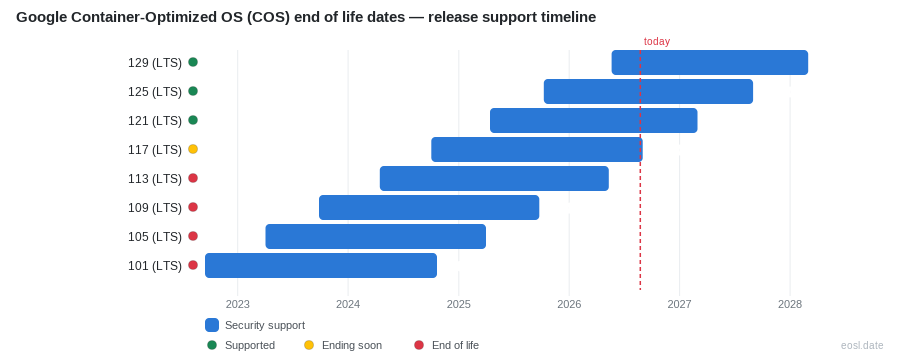
Currently Supported Google Container-Optimized OS (COS) Releases - Active EOS/EOSL Support (3)
| Release | Released | Support Status | Latest | LTS |
|---|---|---|---|---|
| 133 (LTS) | (1 month and 3 weeks ago) | (in 1 year and 11 months) | cos-133-19999-44-250 (6 days ago) | LTS |
| 129 (LTS) | (6 months ago) | (in 1 year and 7 months) | cos-129-19506-625-45 (1 week ago) | LTS |
| 125 (LTS) | (1 year and 1 month ago) | (in 1 year and 2 months) | cos-125-19216-801-52 (1 week ago) | LTS |
Google Container-Optimized OS (COS) Releases Nearing End of Life - Support Ending Soon (1)
| Release | Released | Support Status | Latest | LTS |
|---|---|---|---|---|
| 121 (LTS) | (1 year and 7 months ago) | (in 3 months) | cos-121-18867-652-66 (1 week ago) | LTS |
Google Container-Optimized OS (COS) End of Life (EOL) Releases - No Longer Supported (13)
| Release | Released | Support Status | Latest | LTS |
|---|---|---|---|---|
| 117 (LTS) | (2 years and 1 month ago) | (2 months ago) | cos-117-18613-767-2 (1 month and 3 weeks ago) | LTS |
| 113 (LTS) | (2 years and 7 months ago) | (8 months ago) | cos-113-18244-582-104 (6 months ago) | LTS |
| 109 (LTS) | (3 years and 1 month ago) | (1 year and 2 months ago) | cos-109-17800-570-50 (1 year and 1 month ago) | LTS |
| 105 (LTS) | (3 years and 7 months ago) | (1 year and 8 months ago) | cos-105-17412-535-98 (1 year and 7 months ago) | LTS |
| 101 (LTS) | (4 years and 2 months ago) | (2 years and 1 month ago) | cos-101-17162-528-64 (2 years and 1 month ago) | LTS |
| 97 (LTS) | (4 years and 7 months ago) | (2 years and 7 months ago) | cos-97-16919-450-41 (2 years and 7 months ago) | LTS |
| 93 (LTS) | (5 years and 1 month ago) | (3 years and 1 month ago) | cos-93-16623-461-42 (3 years ago) | LTS |
| 89 (LTS) | (5 years and 7 months ago) | (3 years and 8 months ago) | cos-89-16108-798-22 (3 years and 7 months ago) | LTS |
| 85 (LTS) | (6 years and 1 month ago) | (4 years and 2 months ago) | cos-85-13310-1498-13 (4 years and 3 months ago) | LTS |
| 81 (LTS) | (6 years and 7 months ago) | (4 years and 10 months ago) | cos-81-12871-1317-8 (4 years and 10 months ago) | LTS |
| 77 (LTS) | (7 years and 1 month ago) | (5 years and 7 months ago) | cos-77-12371-1109-0 (5 years and 10 months ago) | LTS |
| 73 (LTS) | (7 years and 7 months ago) | (6 years and 5 months ago) | cos-73-11647-656-0 (6 years and 2 months ago) | LTS |
| 69 (LTS) | (8 years and 2 months ago) | (6 years and 11 months ago) | cos-69-10895-385-0 (7 years and 1 month ago) | LTS |
Wondering how long your virtual machines can stay on their current image? This guide explains Google Container-Optimized OS (COS) End of Life timing for the operating system that runs Docker containers on Google Cloud and Compute Engine, so you know which long-term supported (LTS) releases still receive fixes. You also get the exact EOL dates, what deprecation changes, and how to move before support stops.
Google Container-Optimized OS (COS) End of Life Dates by LTS Milestone
Google ships COS as a long-lived image family, and every release has a fixed support status that ends on a published date. The table lists the milestones that matter today, measured against 27 October 2026. Check it before you create or renew any instance, because the latest patch of a retired line is no longer a safe pick.
| LTS milestone | Released | Support ends | Status on 27 Oct 2026 |
|---|---|---|---|
| 133 | 28 Sep 2026 | 1 Nov 2028 | Supported, 736 days left |
| 129 | 21 May 2026 | 1 Jul 2028 | Supported, 613 days left |
| 125 | 9 Oct 2025 | 1 Feb 2028 | Supported, 462 days left |
| 121 | 14 Apr 2025 | 1 Mar 2027 | Supported, 125 days left |
| 117 | 2 Oct 2024 | 1 Sep 2026 | Ended 56 days ago |
| 113 | 15 Apr 2024 | 1 Mar 2026 | Ended 240 days ago |
| 109 | 27 Sep 2023 | 1 Sep 2025 | Ended 421 days ago |
Milestones Reaching EOL Next
Milestone 121 is first in line: its deadline falls on 1 March 2027, only 125 days away. Milestones 125, 129 and 133 follow in 2028. If any of your fleet runs 121, treat the timeline as a project with an owner and a date, and begin planning the upgrade now instead of in February.
Milestones Already Past End of Life
Milestones 117, 113 and 109 are unsupported. Anything older is in the same state, so a host still on one of them gets no further security fixes. Once a line reaches end of life, the software on it is frozen in time while the threat landscape keeps moving. That is a security risk you can remove with a rebuild, not something to monitor passively.
Support Policy for LTS Image Families
The support policy applies only to the long-term support track. COS is a minimal Linux build of the open source Chromium OS project, distributed through the cos-cloud project, where each image family is tested and qualified for container workloads. Google actively patches those images for CVEs and bug fixes, which is the support commitment you rely on when you run Docker on a host in the cloud. Anything outside those families, such as a development release, carries no such promise. Keep production infrastructure on the long-term track, and apply security updates as soon as they ship.
Support Window, Support Duration and Patch Cadence
Across the lifecycle of the product, roughly twice each year, the team adds a new LTS milestone, and each one gets a support duration of two years. During that support period the image is actively patched:
- Critical bugs and newly found vulnerabilities are handled on-demand, with a new release as soon as the fix is ready.
- Medium and low-priority bug and security fixes ship every 3 months.
- No breaking features are introduced, so a minor update stays safe to apply.
Every change lands in the release notes, which is where you confirm that a given patch includes the CVE you care about. Those patches arrive as new image versions in the same family, and the security updates inside them are the main reason to stay current. The two-year clock is the support window, and the day it closes is the EOL date for that line.
Deprecation: What Happens at EOL
When the window closes, Google sets the DEPRECATED flag on the images in that milestone, and they stop appearing in the active list. Calls to the Image Family API for the retired family return errors, which can break any pipeline that creates VMs from it. Deprecated images remain usable by name, but nothing guarantees a fix, and an upgrade to a newer milestone is the only route to one. Plan to migrate every template that still references a retired family, and treat end of maintenance as the point where the end of life for its images becomes final. Never use the family reference to create production instances after that date, because the lifecycle rules no longer protect you.
Is It Safe to Run Deprecated Images After End of Support?
Short answer: no, not for anything exposed or regulated. After end of support, new vulnerabilities in the kernel, container runtime or open source packages stay unpatched, and attackers move quickly once a flaw is public. Each unpatched vulnerability widens the exposure, and unsupported hosts also complicate any security review. EOS also means no fixes for software you depend on inside the image. Running a sandbox or test machine on a deprecated image is a calculated risk you can accept; running customer traffic on one is not. Once you are past end of support, the decision to stay is yours alone, and it should be documented.
EOL vs EOS: What Each Term Means
Vendors use both labels, and neither has a universal industry definition. In broad terms, EOL marks the point where the vendor stops selling or standard maintenance ends, while EOS is when technical support and fixes stop; end of support is the plain-English name for it. Some projects only publish a single date, and the lifecycle policy of each vendor decides what the label covers. For COS, Google publishes one date per milestone, so for you EOL and EOS coincide, and the vendor treats that day as the end of life for the image.
Software Development Stops vs Support Ends
Development usually stops first: the team ships newer releases while an older version is still maintained. Support ends later, once the line no longer gets any fix at all. With Google's image, a new LTS milestone ships while older ones keep receiving patches until their own EOL date, which is why people confuse the two milestones.
End of Sale and EOSL Explained
You may also see end of sale, the day a product leaves the price list, and EOSL, short for end of service life. Both are common for hardware; this image has no sale date, so only its support end date matters.
Why EOL and EOS Visibility Matters for Container Hosts
A container host sits under every workload you run, so a lapsed EOL date becomes an operational problem for all of them at once. Visibility into those dates keeps your infrastructure predictable, and it turns a surprise into a scheduled maintenance task. The cost of ignoring them shows up in three places, security, compliance and operations, and each one gets worse the longer a host stays unsupported.
Security Vulnerabilities and CVEs
Security teams watch CVE feeds, and attackers watch them too. Once a milestone is retired, its security vulnerabilities stay open for good, and exploitation can begin within days of disclosure. Every new vulnerability on a retired line is one you must fix yourself, because Google no longer ships patches for it.
Compliance and Audit Exposure
Frameworks such as PCI DSS expect supported, patched software. An auditor who finds a deprecated image or a host past EOS can flag a compliance gap and a security finding, and proving otherwise is difficult. Compliance reviews are far easier when your records show every host on a supported line.
Downtime After EOS and Missed Innovation
Rushed migrations cause downtime, and old images miss runtime improvements that newer releases include. An unplanned cutover after EOS costs more than a scheduled one, and rebuilding instance groups in a hurry puts the operational burden on whoever is on call.
How Vendors Define EOL and EOS Differently
Comparing policies shows why you should read the one that governs your images. Microsoft moves a Windows release from mainstream support to extended support, then offers paid Extended Security Updates for some products. Microsoft also ships a new major .NET version every November, with a fixed support length for each, and Microsoft's Windows 10 end of support showed how many organizations still run software past its final date. Ubuntu publishes standard support windows for each LTS release, and Python reaches EOL once its branch is frozen and receives no further changes. Hardware vendors split the stages again, with end of sale first and a last date of support years later. Every vendor shares similar vocabulary, yet each vendor's dates mean something slightly different, so read the policy rather than assuming. Google keeps COS simpler than Microsoft does: one milestone, one date, no paid tier, so the single date in the table above is the one that counts for your software.
How to Track EOL Dates and Release Notes
Do not rely on memory. Keep one source of truth for your dates and subscribe to changes:
- List every milestone running in your projects, using an API query or an instance inventory.
- Compare each against the published EOL date, and calendar a reminder six months ahead.
- Follow the release notes so you notice when a new LTS milestone arrives.
The endoflife.date site offers a JSON feed, an RSS feed and an iCalendar feed, which make an easy automated timeline for any tool you use. Add every milestone you run to the same inventory as your Microsoft products, since vendors such as Microsoft publish their own lifecycle pages. Check that inventory against it, and also watch for updates to the support dates themselves.
Upgrade Options When a Milestone Reaches EOS
When a deadline nears, you have three practical paths. Pick the one that matches how much downtime and effort your workload tolerates. Whichever you choose, patches and updates only reach hosts that are on a supported line, and any migration of this kind should start with the oldest EOS hosts.
Upgrade to a Supported Version
Rebuild or roll your instance groups onto a supported version. Because containers carry their own dependencies, moving the host rarely touches the application itself, and a host already at EOS should be first in the queue.
Extended Support or Isolation for Unsupported Systems
Google offers no paid extended support for COS, so isolation is the fallback: put unsupported Linux hosts on a restricted network, remove public access and limit what they can reach.
Start Migration Planning Now
Set a migration deadline well before the vendor date, test the new milestone in staging, and schedule the cutover. The longer you wait, the less room you have.
EOL and EOS Best Practices for Lifecycle Management
Good lifecycle habits are cheap compared with an emergency rebuild. Follow these best practices:
- Standardize on the newest LTS milestone for every new project.
- Track EOL and EOS dates per environment, and review them each quarter.
- Track compliance requirements alongside the dates so a risk is never hidden.
- Plan upgrades at least six months before support ends.
Treat the support status of your host image as seriously as the code you ship on it.