Checkmk End of Life (EOL) Dates and End of Support (EOS) Dates
Checkmk end of life (EOL) and end of support (EOS) dates: 4 Checkmk versions have reached EOL, including Checkmk 2.3 (EOL date: Oct 29, 2026) — no longer receiving security updates or patches. Checkmk 2.5 is the current supported release, with support through Apr 28, 2028 — 2 versions in active support. Also see Adobe ColdFusion lifecycle dates for related end-of-life information.
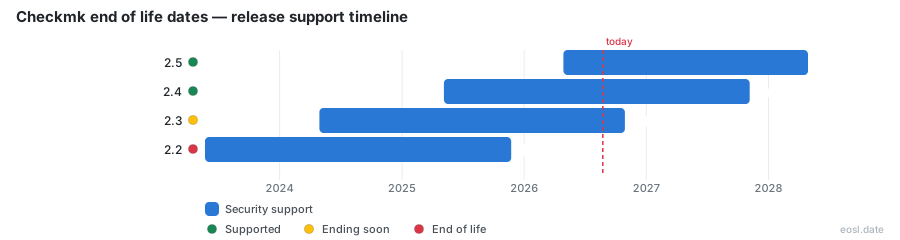
Currently Supported Checkmk Releases - Active EOS/EOSL Support (2)
Checkmk End of Life (EOL) Releases - No Longer Supported (4)
| Release | Released | Security Support | Latest |
|---|---|---|---|
| 2.3 | (2 years and 6 months ago) | (2 weeks and 5 days ago) | 2.3 (2 years and 6 months ago) |
| 2.2 | (3 years and 5 months ago) | (11 months ago) | 2.2 (3 years and 5 months ago) |
| 2.1 | (4 years and 5 months ago) | (1 year and 11 months ago) | 2.1 (4 years and 5 months ago) |
| 2.0 | (5 years and 8 months ago) | (3 years and 2 months ago) | 2.0 (5 years and 8 months ago) |
Checkmk end of life dates tell you how long each release keeps getting fixes from the vendor, so you can plan your upgrade before support stops. As of 26 October 2026, three releases are still covered: 2.5, 2.4 and 2.3. Below you'll find every release date, the maintenance schedule and what it means for your monitoring infrastructure.
Checkmk End of Life Dates by Version
The table combines the vendor's lifecycle page with data from endoflife.date, current on 26 October 2026. After the last date in a row, no security fixes or security updates are issued, even for a newly reported CVE.
| Version | Release date | Active maintenance ends | Security support ends |
|---|---|---|---|
| 2.5 | 28 Apr 2026 | 6 months after 3.0.0 ships | 28 Apr 2028 |
| 2.4 | 6 May 2025 | 28 Oct 2026 | 6 Nov 2027 |
| 2.3 | 29 Apr 2024 | 6 Nov 2025 | 29 Oct 2026 |
| 2.2 | 23 May 2023 | Ended | 23 Nov 2025 |
The 2.5 schedule is open-ended for now, because the planned release date of 3.0.0 hasn't been set. Versions 2.1 and 2.0 ended in 2024 and 2023. Their packages remain in the download archive, but the dates apply to all editions, so nothing older than 2.3 is a sound choice.
Latest Version and Supported Release Status
The latest version on each branch is 2.5.0p17, 2.4.0p38 and 2.3.0p51. A supported release only receives fixes in its newest patch, so keep your production monitoring on the final patch of their branch. Release 2.3 reaches its end on 29 October 2026, three days from now: begin upgrading today rather than after the deadline.
Checkmk Versions and the Monitoring Product Lifecycle
Every one of the Checkmk versions above follows one product lifecycle. Checkmk GmbH, the vendor, ships a new release every twelve to eighteen months, and the whole release cycle is visible in Git. Version 2.5 adds OpenTelemetry for application observability and faster Azure checks, but new features never extend the dates of older releases.
Development Cycle and Daily Builds
The development cycle begins right after a release, on the main branch. Each night the daily builds create a rolling snapshot of that work. They can't be patched, only replaced by a newer build, so don't run them in production.
Beta and Stable Version Releases
Nine to twelve months in, a new branch splits off and beta builds such as 2.5.0b1 arrive every two weeks. The stable version, also called a major version, follows. Each patch version (2.5.0p1, 2.5.0p2) bundles bug fixes; these patch releases come weekly at first and every few months later.
End of Active Maintenance and End of Passive Maintenance
A major version gets error and security corrections for at least 24 months, split in two. The end of active maintenance comes first, and the end of passive maintenance closes the window.
Active Maintenance
During active maintenance, the vendor ships regular patches that keep your monitoring secure. Since version 1.6.0 this ends six months after the next version arrives, so two versions run in parallel: the stable release and the oldstable one.
Passive Maintenance
Afterwards passive maintenance lasts around another year. Fixes now mostly follow customer tickets under a support contract, and deprecated features rarely get any. The patches that result still help users without one.
End of Support for the Checkmk Agent
The Checkmk agent collects the data your monitoring depends on and follows the dates of its release, so an agent from an unsupported branch stops receiving fixes. Versio.io lists Checkmk Agent 2.5, 2.4 and 2.3 as supported; older agents have hit end of support. There is no long-term support track either: the LTS flag is "No" for all eleven releases.
To see which agent runs on a host, use check_mk_agent | grep -m1 Version. On the server, the omd version command prints the version number plus an edition suffix, one of the product identifiers .community, .pro or .ultimate. They separate Checkmk Community from Checkmk Pro, Checkmk Ultimate and Checkmk Cloud, and let two editions sit side by side during a migration. The code is GPL licensed. A Docker container, the appliance and every remote site follow the version they run, so upgrade each agent together with its site.
Maintenance Phase Planning for Linux Distribution Support
Each release adds and drops Linux versions, so you may need to upgrade your Linux distribution before you update Checkmk. The support policy backs enterprise distributions for up to ten years after release and community ones for up to five, or until the distributor stops, whichever is earlier. The aim is to cover each distribution for a release's whole maintenance phase, which keeps your infrastructure predictable.
Compatibility Matrix and Update Matrix
The compatibility matrix plots which distribution versions each release supports, and the update matrix guides the order of steps. You can't skip a major version, you must reach its newest patch first, and you move line by line, never diagonally.
Debian and Ubuntu
Debian and Ubuntu releases count for up to five years, and for Ubuntu only LTS versions. Moving from Debian 11 with 2.4.0p1 to 2.5.0p17 means updating to 2.4.0p38, then upgrading Debian 12 and 13, then updating Checkmk.
Red Hat Enterprise Linux and SUSE Linux Enterprise Server
These families get the longest windows. CentOS support stops at 8.5.2111 because of its rolling CentOS Stream model, so use a virtual machine or the appliance there.
Monitoring Server Upgrades
Patch the current major version first, then the operating system, then jump to the next major version. Upgrade the central monitoring server and each remote site in that order, and keep one tested backup before you start.