Amazon RDS for MariaDB End of Life (EOL) Dates and End of Support (EOS) Dates
Amazon RDS for MariaDB end of life (EOL) and end of support (EOS) dates: 3 Amazon RDS for MariaDB versions have reached EOL, including Amazon RDS for MariaDB 10.5 (EOL date: Aug 31, 2026) — no longer receiving security updates or patches. Amazon RDS for MariaDB 10.6 reaches its End of Support date on Dec 31, 2026 — plan your upgrade path now. Amazon RDS for MariaDB 12.3.3 is the current supported release, with support through Jun 30, 2029 — 4 versions in active support. Also see Amazon DocumentDB EOSL information for related end-of-life information.
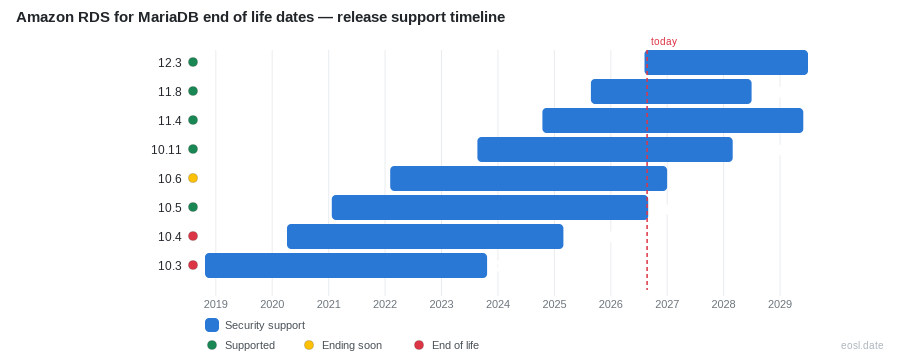
Currently Supported Amazon RDS for MariaDB Releases - Active EOS/EOSL Support (4)
| Release | Released | Security Support | Latest |
|---|---|---|---|
| 12.3 | (3 months ago) | (in 2 years and 7 months) | 12.3.3 (2 months ago) |
| 11.8 | (1 year and 2 months ago) | (in 1 year and 7 months) | 11.8.9 (2 months ago) |
| 11.4 | (2 years and 1 month ago) | (in 2 years and 6 months) | 11.4.13 (2 months ago) |
| 10.11 | (3 years and 3 months ago) | (in 1 year and 3 months) | 10.11.19 (2 months ago) |
Amazon RDS for MariaDB Releases Nearing End of Life - Support Ending Soon (1)
| Release | Released | Security Support | Latest |
|---|---|---|---|
| 10.6 | (4 years and 9 months ago) | (in 1 month and 1 week) | 10.6.28 (2 months ago) |
Amazon RDS for MariaDB End of Life (EOL) Releases - No Longer Supported (3)
| Release | Released | Security Support | Latest |
|---|---|---|---|
| 10.5 | (5 years and 10 months ago) | (2 months ago) | 10.5.29 (1 year and 6 months ago) |
| 10.4 | (6 years and 7 months ago) | (1 year and 8 months ago) | 10.4.34 (2 years and 5 months ago) |
| 10.3 | (8 years and 1 month ago) | (3 years and 1 month ago) | 10.3.39 (3 years and 5 months ago) |
Running a production database past its support window is a risk you can avoid, and this guide walks you through the Amazon RDS for MariaDB end of life schedule for every release so you know how long each MariaDB version stays covered on Amazon RDS and AWS. Once a version reaches end of standard support, RDS stops treating it as a version you can safely run, and the clock for an upgrade starts.
Amazon RDS for MariaDB End of Life Dates by Release
MariaDB is an open source relational database, and each major version of it arrives on Amazon RDS after upstream ships it, then stays supported until the community retires it, with a floor of three years on RDS. The table below lists every MariaDB release that matters today. A community release is the upstream launch; the RDS columns show when you could run it on RDS and when support stops. The end of support date for each line is what your upgrade plan should be built around.
| Release | Upstream release | RDS release | RDS support ends |
|---|---|---|---|
| MariaDB 12.3 | 28 May 2026 | 7 August 2026 | June 2029 |
| MariaDB 11.8 | 6 August 2025 | 25 August 2025 | June 2028 |
| MariaDB 11.4 | 8 August 2024 | 15 October 2024 | May 2029 |
| MariaDB 10.11 | 16 February 2023 | 21 August 2023 | February 2028 |
| MariaDB 10.6 | 6 July 2021 | 3 February 2022 | 31 December 2026 |
| MariaDB 10.5 | 24 June 2020 | 21 January 2021 | 31 August 2026 |
Two rows deserve attention. Release 10.5 is already past its cutoff, so any Amazon RDS for MariaDB instance still on it is exposed to forced handling. Release 10.6 reaches its RDS cutoff on 31 December 2026, later than its upstream retirement on 6 July 2026, because Amazon RDS keeps a longer runway for it. If your RDS for MariaDB fleet runs 10.6, you have about two months left.
Release date versus end date
The release date on Amazon RDS trails upstream by a few weeks or months, and the cutoff follows the MariaDB project schedule. Plan from the end column, not the release column, when you decide how long a version can stay in service.
Support Lifecycle and Policy for Major and Minor Versions
The support lifecycle follows a simple rule set. RDS treats a change in the first two numbers, the release level, such as 10.6 to 10.11, as a major change, while a change in the last number, such as 11.4.12 to 11.4.13, is a minor one. Major versions are supported until upstream retires them, and a minor version is supported for at least a year after it lands on Amazon RDS. New majors appear within three months of the first patch version, and new minors within 30 days of the community release.
The deprecation policy adds a grace period: roughly three months to move off a deprecated minor and six months for a major. The community also changed its own cadence. Yearly long-term releases, shown as LTS, now receive three years of fixes, down from the five years that applied up to 11.4. That kind of release is the safest base for a database you want to leave alone, and the release calendar in the AWS documentation is where you confirm each cutoff for MariaDB.
Support, in practice, means security support and security fixes plus bug fixes backported to the engine. Optional enterprise support from MariaDB extends windows for servers you host yourself, but it does not extend what Amazon RDS offers, so an RDS instance follows the RDS dates. Treat patching as continuous, because the risk grows every month a version sits unpatched.
Maintenance window behavior
When a version passes its RDS cutoff, forced upgrades run inside the window you set. A scheduled maintenance window is where forced work lands once a deadline passes, so pick one your team is awake for, since a managed service will act on schedule whether or not you are ready.
Minor Version Deprecation Dates
Minor releases retire faster than majors, so check the engine version on every DB instance you run in each Region. The newest build of each line currently closes in September 2027, while older builds close sooner. Amazon RDS publishes these per-build dates alongside its MariaDB release notes.
| Build | RDS release | Support ends |
|---|---|---|
| 12.3.3 | 4 September 2026 | September 2027 |
| 11.8.9 | 4 September 2026 | September 2027 |
| 11.4.13 | 4 September 2026 | September 2027 |
| 10.11.19 | 4 September 2026 | September 2027 |
| 10.6.28 | 4 September 2026 | 31 December 2026 |
| 11.4.9 | 18 November 2025 | 31 October 2026 |
| 10.5.29 | 20 May 2025 | August 2026 |
Notice the 31 October 2026 entries: several builds from 2025, including 11.8.3 and 11.8.5, close at that point. If your production Amazon RDS for MariaDB instances run one of those builds, a minor bump this week removes the risk. Supported-version and deprecated-version lists both live in the AWS documentation for MariaDB, so check them against the cloud console before any change.
End-of-Life Timeline: What the 10.2 Precedent Shows
The retirement of release 10.2 is the clearest example of how an end-of-life event unfolds on Amazon RDS, and the same pattern applies to every later MariaDB version. The sequence had four stages:
- Three months before the cutoff, the console and CLI stop creating new 10.2 instances, though restores and replicas still work.
- At the cutoff on 15 October 2022, RDS will automatically upgrade instances to the next version during the first available slot.
- After that, restoring a 10.2 snapshot triggers a move to a supported release.
- Three months later, any remaining instance is upgraded whether or not a window is open.
That last stage is the one that surprises teams: a forced move happens on AWS's schedule, with the AWS Management Console showing little warning beyond notice emails. A planned EOL path always beats an automatic one, because you choose the target, the test plan and the hour. Keep a tested restore procedure and a verified read replica for fallback, and treat every EOL notice for Amazon RDS as a deadline for the whole database team.
Automatic upgrade stages
An automatic upgrade after a retirement date goes to the nearest supported release, not necessarily the best one for your application, so choose your own target before the cutoff. The same applies to snapshots restored after it.
Choosing an Engine Version for a Major Version Upgrade Before End of Standard Support
A major version upgrade is never automatic until a deadline forces it, so the decision is yours. Start with the target version: 11.4 and 11.8 are durable choices, 10.11 is fine as a short bridge, and 12.3 is the newest. Check them with the AWS CLI before committing, using the describe-db-engine-versions command to list valid targets from your current release. Since 10.6, Amazon RDS for MariaDB lets you jump from any supported older release in one step, which removes the old rule of climbing one major version at a time.
An upgrade changes behavior, so test compatibility first. A minor bump is backward-compatible, but a major step can alter defaults, drop features and change query plans. Run your real application workload against a copy, compare performance, and review any code that assumed behavior from MySQL, since the two engines diverge more with each release. The upgrade path you pick should also fit the end date of the target, not just today's needs in your MariaDB database.
Downtime considerations
Budget the outage before your version's RDS cutoff, because you should expect downtime during a major step, because the engine converts system tables before accepting connections. A Multi-AZ setup does not remove it, so size storage headroom, confirm replication lag is near zero and review any schema objects that might block the conversion on your MariaDB instance.
Beating the End of Support Deadline with Blue/Green Deployments
Blue/Green Deployments give you a safer route than an in-place upgrade. Amazon RDS clones your production environment into a staging copy, you upgrade the copy, and a switchover promotes it once the two are in sync. Writes pause briefly while that happens, and a guardrail times the operation out if your tolerated outage, which you can set as low as 30 seconds, would be exceeded.
The old environment is not deleted after the switch, so you can inspect it or roll back by switching again, but standard billing continues until you remove it. You pay roughly double while both exist, so schedule the work, validate quickly and delete the old side. These Blue/Green Deployments are supported by RDS for MariaDB on release 10.4 and newer, which covers every version still in service on Amazon RDS.
Best practices before the switchover
Before your MariaDB version loses RDS support, following best practices makes the difference: take a manual snapshot, test on the green side with real traffic patterns, confirm parameter groups match, and name a rollback owner. Finish before the deadline rather than on it, and note the new MariaDB cutoff in your calendar.
MariaDB Release Calendar and Rolling Releases
Upstream, rolling releases arrive quarterly and are supported only until the next one, so they are not suited to long-lived instances. They are retired as soon as the next one ships, while the LTS lines keep the longer RDS windows listed above. Starting with 12.3, the third release of every series is the LTS one. For planning, treat the lines 10.11, 11.4, 11.8 and 12.3 as your menu on Amazon RDS, and keep the support dates in a team calendar so no MariaDB deadline arrives unnoticed.