Amazon ElastiCache for Redis OSS End of Life (EOL) Dates and End of Support (EOS) Dates
Amazon ElastiCache for Redis OSS end of life (EOL) and end of support (EOS) dates: 2 Amazon ElastiCache for Redis OSS versions have reached EOL, including Amazon ElastiCache for Redis OSS 5 (EOL date: Jan 31, 2026) — no longer receiving security updates or patches. Amazon ElastiCache for Redis OSS 7 is the current supported release — 2 versions in active support. Also see Amazon DocumentDB end of life dates for related end-of-life information.
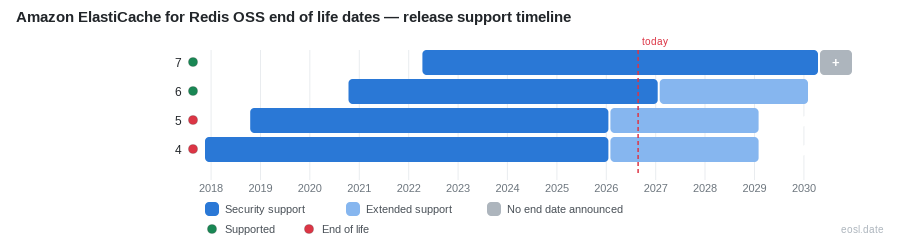
Currently Supported Amazon ElastiCache for Redis OSS Releases - Active EOS/EOSL Support (2)
| Release | Released | Standard Support | Extended Support |
|---|---|---|---|
| 7 | (4 years and 7 months ago) | Active | Active |
| 6 | (6 years and 1 month ago) | (in 2 months) | (in 3 years and 2 months) |
Amazon ElastiCache for Redis OSS End of Life (EOL) Releases - No Longer Supported (2)
| Release | Released | Standard Support | Extended Support |
|---|---|---|---|
| 5 | (8 years and 1 month ago) | (9 months ago) | (in 2 years and 2 months) |
| 4 | (9 years ago) | (9 months ago) | (in 2 years and 2 months) |
The Amazon ElastiCache for Redis OSS end of life schedule decides how long your clusters keep receiving security patches, and versions 4 and 5 lost regular coverage on January 31, 2026. This guide lists every date, explains what AWS does after the cutoff, and shows how to move to ElastiCache for Valkey or a newer engine version with little downtime.
Amazon ElastiCache for Redis OSS End of Life Dates
The Redis community ended support for Redis OSS 4 in 2020 and for Redis OSS 5 in 2022, so upstream ships no new bug fixes or security patches for either. ElastiCache keeps its own calendar, and each major version moves through the same stages: the regular-coverage cutoff, three years of extended support, then retirement of the version.
| Engine version | Last day of regular coverage | Premium year 1 starts | Premium year 2 starts | Premium year 3 starts | Version retired |
|---|---|---|---|---|---|
| Redis OSS 4 | January 31, 2026 | February 1, 2026 | February 1, 2027 | February 1, 2028 | January 31, 2029 |
| Redis OSS 5 | January 31, 2026 | February 1, 2026 | February 1, 2027 | February 1, 2028 | January 31, 2029 |
| Redis OSS 6 | January 31, 2027 | February 1, 2027 | February 1, 2028 | February 1, 2029 | January 31, 2030 |
These dates come from the Amazon ElastiCache User Guide. Newer releases such as ElastiCache for Redis OSS 7.1, generally available since November 2023, sit later in the calendar, and Redis OSS 7.2.4 is the release Valkey forked from. Treat the cutoff as a deadline for your own planning, because an unsupported version leaves your data open to known CVEs.
What Extended Support Means for Your Clusters
Before the premium stage begins, AWS moves any Redis OSS 4 cluster that is behind on patches to version 4.0.10, and any Redis OSS 5 cluster to version 5.0.6, so every enrolled cache starts from the latest patch level. After that, Amazon supplies security patches and bug fixes for up to three years, or until you stop running the engine, whichever comes first. You do not need to take any action for this automatic step, but you should plan your real move off the old version.
Your Patching Responsibilities at Redis Retirement
These duties are what turn each retirement date in the table above into a deadline for your team. The customer applies every patch and fix that AWS releases. If a patch addresses a security or critical stability problem, AWS can apply it for you or require you to install it. You must also upgrade the engine before the final date, roughly three years after the cutoff. Miss it and AWS attempts an automatic move to a supported version; if that fails, it can delete the cache after preserving your data.
Why ElastiCache Redis Versions Reach End of Life
Redis OSS moved from the BSD 3-clause license to a dual-license model (RSALv2 and SSPLv1) in March 2024. That change prompted Valkey, an open source fork of Redis OSS 7.2.4 stewarded by the Linux Foundation and backed by companies including AWS, Google and Oracle. Amazon ElastiCache is a fully managed, in-memory caching service that now runs Valkey, Memcached and Redis OSS, so the engine you pick determines the support window you get.
Valkey is a drop-in replacement for Redis OSS and a drop-in alternative for most self-managed Redis deployments, with the same data types, Lua scripting and commands. It works as a key-value database in the cloud, where every key sits in memory for fast caching and where performance stays steady under load. ElastiCache Serverless also supports it, and ElastiCache Serverless scales capacity automatically, which removes cluster sizing from your to-do list. Applications built for ElastiCache for Redis usually connect to the same endpoint afterwards with no code changes, and you keep sub-millisecond latency for session lookups. Memcached remains available for plain caching if you do not need persistence or replication, though it follows its own lifecycle and is not covered here.
Migration Paths from Redis to ElastiCache for Valkey
ElastiCache for Valkey offers three migration routes, each with a different downtime profile. Valkey 8 also trims per-key memory overhead; that memory efficiency can bring real cost savings on large datasets, plus steadier performance and throughput under load. Pick the route that matches how much interruption your customer-facing workload tolerates, and remember that every cloud migration benefits from a rehearsal first. A typical customer rehearses on a copy, then repeats the same steps in production.
In-Place Upgrade for Redis OSS Clusters
The in-place upgrade is the fastest path and keeps your live data. Follow these steps:
- Create a parameter group with the same values as your Redis OSS group, but in the Valkey family.
- In the ElastiCache console, select the cluster and choose Modify.
- Select Valkey as the engine, attach the new parameter group and apply the change immediately.
- Watch the status move to Modifying, then confirm the cluster appears under Valkey caches.
- Check connectivity through the existing endpoint.
Global clusters need a separate parameter group in each region. A cluster on a release older than 5.0.6 can see 30 to 60 seconds of failover downtime while DNS updates. Afterwards, watch CloudWatch metrics such as CacheHits and CPUUtilization.
Snapshot-Based Migration
This route restores a backup into a new ElastiCache for Valkey cluster, and it suits smaller datasets where a pause is acceptable. Downtime runs from minutes to hours depending on data size.
You can run both steps from the AWS CLI:
aws elasticache create-snapshot --snapshot-name my-snapshot --cache-cluster-id my-redis-cluster
aws elasticache create-cache-cluster --cache-cluster-id my-valkey-cluster --engine valkey --snapshot-name my-snapshot
Pick the node type and decide on cluster mode before restoring, then point your application at the new endpoint.
Online Migration from Amazon EC2
If you self-manage Redis OSS on Amazon EC2, online migration replicates data into an ElastiCache for Valkey target with minimal interruption. Match the shard counts, switch off encryption in transit during the copy, and start replication with the StartMigration API. When ReplicationLag reaches zero, call CompleteMigration to promote the target and repoint your clients.
Best Practices to Finish Before End of Standard Support
Finish the move before the end of standard support for your engine version, not after the first security notice. A short checklist keeps the work predictable:
- Inventory your engines. List every cache and its engine version, including ones a team forgot about.
- Test compatibility. Run the application against a staging copy of the new engine before touching production.
- Plan rollback. Take backups first so you can restore quickly, and use a blue/green cutover when your application allows it.
- Compare cost. Node-based pricing and ElastiCache Serverless pricing differ, so model both before you commit, and compare ElastiCache Serverless latency and performance against your current cluster.
- Measure performance. Capture a baseline of hit rate and performance before the cutover, then compare it after, since every customer workload behaves differently.
Also read the ElastiCache SLA, because it shapes how a customer should design the new environment. A Multi-AZ configuration for Valkey or Redis OSS earns a service credit of 10 percent when monthly uptime drops below 99.99 percent but stays at or above 99.0 percent, 25 percent below 99.0 percent, and 100 percent below 95.0 percent. The Multi-AZ promise is the strongest of the five SLA commitments, so a production Multi-AZ replication group is the safest target for the migration, while a Single-AZ setup carries a lower threshold. Serverless caches get the same credit table as Multi-AZ, and Cross-AZ Memcached has its own. Every customer claims a service credit by opening a case with AWS Support before the end of the second billing cycle after the incident, and credits apply only to future payments. Each customer should therefore record uptime during the cutover, since a failed Multi-AZ failover is the main reason claims arise.