Amazon Linux End of Life (EOL) Dates and End of Support (EOS) Dates
Amazon Linux end of life (EOL) and end of support (EOS) dates: 16 Amazon Linux versions have reached EOL, including Amazon Linux 2 (EOL date: Jun 30, 2026) — no longer receiving security updates or patches. Amazon Linux 2023.12.20261117.0 is the current supported release, with support through Jun 30, 2029. Also see Amazon DocumentDB EOSL dates for related end-of-life information.
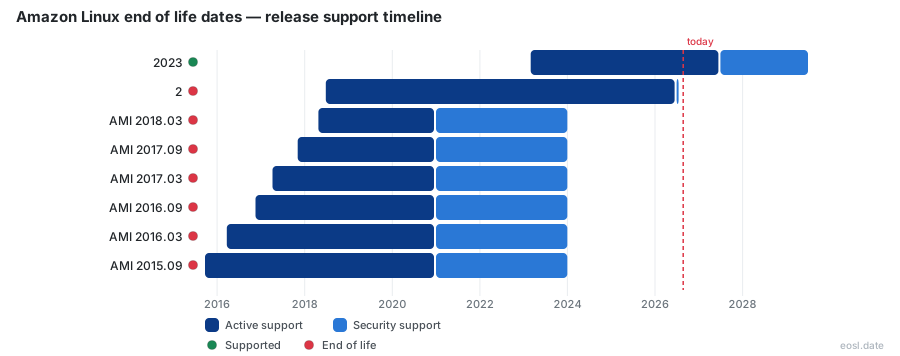
Currently Supported Amazon Linux Releases - Active EOS/EOSL Support (1)
| Release | Released | Security Support | Standard Support | Latest |
|---|---|---|---|---|
| 2023 | (3 years and 8 months ago) | (in 2 years and 7 months) | (in 7 months) | 2023.12.20261117.0 (3 days ago) |
Amazon Linux End of Life (EOL) Releases - No Longer Supported (16)
| Release | Released | Security Support | Standard Support | Latest |
|---|---|---|---|---|
| 2 | (8 years and 4 months ago) | (4 months ago) | (4 months ago) | 2.0.20261117.0 (3 days ago) |
| AMI 2018.03 | (8 years and 6 months ago) | (2 years and 10 months ago) | (5 years and 10 months ago) | 2018.03.0.20231218.0 (5 months ago) |
| AMI 2017.09 | (9 years ago) | (2 years and 10 months ago) | (5 years and 10 months ago) | 2017.09.1.20180409 (8 years and 7 months ago) |
| AMI 2017.03 | (9 years and 7 months ago) | (2 years and 10 months ago) | (5 years and 10 months ago) | 2017.03.1.20170812 (9 years ago) |
| AMI 2016.09 | (10 years ago) | (2 years and 10 months ago) | (5 years and 10 months ago) | 2016.09.1.20161221 (9 years ago) |
| AMI 2016.03 | (10 years and 7 months ago) | (2 years and 10 months ago) | (5 years and 10 months ago) | 2016.03 |
| AMI 2015.09 | (11 years and 1 month ago) | (2 years and 10 months ago) | (5 years and 10 months ago) | 2015.09 |
| AMI 2015.03 | (11 years and 7 months ago) | (2 years and 10 months ago) | (5 years and 10 months ago) | 2015.03 |
| AMI 2014.09 | (12 years and 1 month ago) | (2 years and 10 months ago) | (5 years and 10 months ago) | 2014.09 |
| AMI 2014.03 | (12 years and 7 months ago) | (2 years and 10 months ago) | (5 years and 10 months ago) | 2014.03 |
| AMI 2013.09 | (13 years and 1 month ago) | (2 years and 10 months ago) | (5 years and 10 months ago) | 2013.09 |
| AMI 2013.03 | (13 years and 7 months ago) | (2 years and 10 months ago) | (5 years and 10 months ago) | 2013.03 |
| AMI 2012.09 | (14 years and 1 month ago) | (2 years and 10 months ago) | (5 years and 10 months ago) | 2012.09 |
| AMI 2012.03 | (14 years and 7 months ago) | (2 years and 10 months ago) | (5 years and 10 months ago) | 2012.03 |
| AMI 2011.09 | (15 years and 1 month ago) | (2 years and 10 months ago) | (5 years and 10 months ago) | 2011.09 |
| AMI 2010.11 | (15 years and 11 months ago) | (2 years and 10 months ago) | (5 years and 10 months ago) | 2010.11 |
If you run a server on AWS, Amazon Linux end of life dates decide when your machines stop getting fixes. Amazon Linux 2 reached its end of support on June 30, 2026, so any Amazon Machine Image built on it will no longer receive security updates. Here is every date, the risk of staying put, and the path to Amazon Linux 2023.
Amazon Linux Lifecycle: Release Dates and Support Phases
The Amazon Linux lifecycle runs in stages: a period of regular updates, then a maintenance phase where AWS ships only the patches that matter. Every support phase has a fixed end date. AWS has not set a steady release cadence for new major version launches, and each one is built on an upstream Fedora base, so the newest version is the successor to Amazon Linux 2. Inside a major version, quarterly minor releases bundle bug fixes and new packages without breaking backward-compatibility. It is the Linux distribution AWS builds for its cloud. Minor releases never extend an end date, so only the schedule of the whole line matters.
Standard Support, Maintenance Support and Long Term Support
Long-term support (LTS) covers a defined set of base packages for the whole window, while anything outside that set is supported only as far as its source project goes. Once maintenance support starts, AWS patches only critical and important issues, and an extended window does not guarantee new EC2 features. Any package outside the supported lists is unsupported, so check each one. This long term support model is why dates matter more than version numbers.
Amazon Linux End of Life: Where Each Version Stands
Three versions matter today, and each has its own deadline. Find your version in the first column, then read the last column for the day security fixes stop. That single Amazon Linux end of life date is the one your patching plan needs.
| Version | Launched | Standard support | Final end date |
|---|---|---|---|
| Amazon Linux AMI | September 2010 | Ended Dec 31, 2020 | Dec 31, 2023 |
| Amazon Linux 2 | June 2018 | Ended June 30, 2026 | June 30, 2026 |
| Amazon Linux 2023 | March 2023 | Ends June 30, 2027 | June 30, 2029 |
AWS publishes security advisories for each version through the Amazon Linux Security Center, and the endoflife.date tracker follows the same dates, so you can subscribe to a feed instead of checking by hand.
Amazon Linux 2 End of Life on June 30, 2026
Amazon Linux 2 reached its final day on June 30, 2026, after AWS pushed back its end-of-life date several times from the original June 2023, which is why so many teams still run it. The AL2 EOL has passed, and glibc plus the other core components AWS covered under LTS no longer get patches. Its tuned kernel, systemd, the yum package manager, the extras channel and the Python 2 default all stop receiving fixes with it.
Amazon Linux AMI and the Original Amazon Linux 1
The Amazon Linux AMI, also called Amazon Linux 1, launched in September 2010. After its standard period ended, a maintenance period ran through December 31, 2023, with AWS shipping bug fixes and security updates for a reduced set of packages. Amazon Linux 2 replaced it as the recommended choice years ago, and no new AWS features were guaranteed for the older image.
Risks of Running Amazon Linux 2 After End of Support
Staying on Amazon Linux 2 carries rising risk. New vulnerabilities keep appearing in the kernel and common packages, and AWS no longer issues patches for them. Your security team will flag an unpatched operating system quickly, and compliance scans on regulated infrastructure will fail first, especially where FIPS rules apply. Kernel live patching, which let you fix a running kernel without a reboot, follows the same schedule, so no vendor support remains if you stay.
Security Updates Stop for Core Packages
While LTS ran, AWS patched the core packages that form the base system. That coverage is gone, so check which of these you depend on:
- The Linux kernel (kernel 5.10 on current builds) and kernel live patching: no more security patches arrive, so a reboot-free fix is off the table.
- Base components such as systemd and OpenSSL: security updates and other fixes stop.
- Packages from the extras channel: these were never covered by LTS, and their fixes depend on each source project.
- The yum repositories: they stay reachable, but they offer nothing new for Amazon Linux 2.
Treat the Linux kernel gap as the urgent one, since kernel live patching was the stopgap many teams used to delay reboots.
On-Premises Virtual Machine Images
Amazon Linux 2 also shipped as a virtual machine image for KVM, VirtualBox, Hyper-V and VMware, so on-premises development copies lose patches on the same day. A docker container image built from it inherits the same stale packages. In the cloud, an Amazon EC2 instance launched from an old Amazon Machine Image keeps booting normally but gets no fixes, and other instances in your fleet may share the problem. Move your workloads, not just the production hosts.
Migrate to Amazon Linux 2023 Before Its Own Deadline
Because Amazon Linux 2 passed its end date on June 30, 2026, AWS advises you to migrate from it now rather than wait for a later version. It reached general availability in March 2023 and is supported until June 2029. There is no in-place upgrade between the two, so plan on launching fresh instances, testing your applications on them and moving traffic across. This newer version has its own clock running, with its end date in June 2029, so treat this as a planned cycle, not a one-time rescue.
What Changes in AL2023: DNF, Fedora and FIPS
It swaps yum for the new package manager and uses a faster-moving upstream, so scripts that call yum on Amazon Linux 2 or the old extras channel need updates. It adds FIPS certification, newer packages and a newer kernel. Core pieces such as glibc, OpenSSL and OpenSSH stay supported for the life of the major line; run dnf supportinfo to check any other package. Python 2 is no longer the assumption it was on Amazon Linux 2, so test your scripts under Python 3.
Migration Guide: Audit, Test and Cut Over
Follow this migration guide in order, so no host stays past the June 30, 2026 end date:
- Audit. Run an audit report to find every host still on Amazon Linux 2. Lansweeper's OS report lists each machine with its version and days remaining.
- Test. Launch an AL2023 host, check that your kernel modules load, replace yum commands, review extras and confirm FIPS mode if compliance needs it, then rerun your applications.
- Cut over. Shift traffic, then retire the old hosts. Workloads that must stay behind need compensating controls such as network isolation.