Amazon DocumentDB End of Life (EOL) Dates and End of Support (EOS) Dates
Amazon DocumentDB end of life (EOL) and end of support (EOS) dates: 3.6 has reached EOL — EOL date: Mar 30, 2026. This version no longer receives security updates, patches, or support. Amazon DocumentDB 8.0 is the current supported release — 3 versions in active support. Also see Amazon Kindle end of life dates for related end-of-life information.
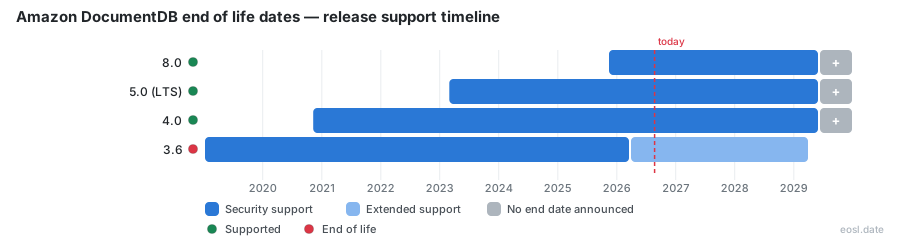
Currently Supported Amazon DocumentDB Releases - Active EOS/EOSL Support (3)
| Release | Released | Standard Support | Extended Support | LTS |
|---|---|---|---|---|
| 8.0 | (1 year ago) | Active | Active | - |
| 5.0 (LTS) | (3 years and 8 months ago) | Active | Active | LTS |
| 4.0 | (6 years ago) | Active | Active | - |
Amazon DocumentDB End of Life (EOL) Releases - No Longer Supported (1)
| Release | Released | Standard Support | Extended Support | LTS |
|---|---|---|---|---|
| 3.6 | (7 years and 10 months ago) | (7 months ago) | (in 2 years and 4 months) | - |
If you run workloads on Amazon DocumentDB, the Amazon DocumentDB end of life schedule decides when you must move, and version 3.6 has already passed its regular support window. This guide gives you the exact dates for every engine release, explains what AWS does next, and shows how to upgrade Amazon DocumentDB with little interruption.
Amazon DocumentDB End of Life Dates for Engine Version 3.6, 4.0 and 5.0
AWS publishes lifecycle dates for each major release of Amazon DocumentDB (with MongoDB compatibility), the fully managed database from Amazon. Only one release has a published cutoff today: 3.6. The dates below come from the Amazon DocumentDB documentation, and they show every lifecycle status your Amazon DocumentDB cluster can be in.
| Release | Launch | Regular support ends | Paid window ends |
|---|---|---|---|
| 3.6 | January 9, 2019 | March 30, 2026 | March 30, 2029 |
| 4.0 | November 9, 2020 | Not announced | Not announced |
| 5.0 | March 1, 2023 | Not announced | Not announced |
| 8.0 | November 14, 2025 | Not announced | Not announced |
Version 3.6 end of standard support
Amazon DocumentDB 3.6 ran for about 7.2 years before its cutoff on March 30, 2026. As of October 27, 2026, a 3.6 cluster has spent 210 days past that date, so it already sits in the paid window described next.
Versions 4.0 and 5.0 have no end date yet
AWS lists no cutoff for 4.0, 5.0 or 8.0, so treat those support dates as open until the calendar changes. Check the Amazon DocumentDB documentation before each quarterly review.
Extended Support and Pricing After End of Standard Support
When regular coverage stops, extended support keeps an Amazon DocumentDB 3.6 cluster running for a fee. The rate steps up in stages: the first year starts on March 31, 2026, and the third-year rate starts on March 31, 2028. The last day is March 30, 2029, which leaves 885 days from October 27, 2026.
- Year one: starts March 31, 2026 for every 3.6 cluster.
- Year three: starts March 31, 2028, 521 days from today.
- Final cutoff: March 30, 2029, when Amazon DocumentDB 3.6 stops being an option.
Budget for the higher pricing now, because staying put costs more every year while an upgrade is a one-time effort. Amazon RDS and Aurora follow a similar pattern, so finance teams can reuse one approval process for all three.
What Happens After End of Support
Once the final date passes, a release stays frozen: no new patching, no fixes for security findings, and no assurance for compliance auditors. The post-support behavior matters because Amazon DocumentDB clusters hold production data, and an unsupported engine is a security gap that can fail an audit. In the AWS lifecycle data, what happens after support ends is recorded for each milestone, so read the note attached to every date.
Plan the move early. An Amazon DocumentDB cluster still running on a cutoff day can be handled by AWS in ways you did not choose, and security teams dislike surprises.
Upgrade Planning Before End-of-Life
Good upgrade planning begins with an inventory. List every Amazon DocumentDB cluster, its release, and which applications connect to it. Then confirm that your MongoDB drivers work against the target, because operators and behaviors change between releases. The Amazon DocumentDB release notes list removed operators and new indexes you should test, so check each index definition against the target too.
Before you start, run your application against a test copy and compare query results and latency. A long test run in a lower environment catches most surprises before you touch production data. Switching an address still causes a short interruption, so schedule it outside peak traffic.
Major Version Upgrade Options for Deprecated Versions
Three routes exist for a major version upgrade of Amazon DocumentDB from 3.6 or 4.0, and they differ in cost and effort. On August 31, 2026, AWS added a direct jump from 3.6 and 4.0 to 8.0 in every region that supports those releases.
Dump and restore with mongodump, mongorestore and AWS DMS
With mongodump and mongorestore you copy data into a new Amazon DocumentDB cluster and take the source offline, so it suits workloads that tolerate an outage. AWS DMS migrates data and indexes instead, but adds I/O and migration charges.
In-place major version upgrade
An in-place major version upgrade keeps the same address and needs no data copy. How long it takes depends on how many databases, collections and indexes the Amazon DocumentDB cluster holds.
Near-Zero Downtime Steps Before End-of-Support
AWS describes a hybrid path with near-zero downtime from 3.6 to 5.0. You combine an in-place upgrade on a copy with change data capture (CDC), so the source stays live while the new Amazon DocumentDB cluster catches up. The sequence has six steps:
- Create an EC2 instance with Python, git and a mongo shell, open to port 27017.
- Turn on change streams on the 3.6 cluster.
- Capture the cluster-wide change stream token with the MVU CDC migrator tool.
- Clone the cluster and upgrade the clone in place.
- Replicate CDC from the token until the new cluster catches up.
- Switch the application to the new address and clean up.
Enable change streams and capture the token
The default retention for the change stream log is 3 hours, and you can set any value from 1 hour to 7 days in the cluster parameter group. Set it to at least 24 hours with the AWS CLI so no write is lost while the Amazon DocumentDB copy runs.
Volume Cloning and Cutover Off a Deprecated Version
Volume cloning creates a copy of the Amazon DocumentDB source quickly, because the clone shares underlying storage until data diverges. That keeps I/O costs low compared with moving every document. After you upgrade the clone to 5.0, start replication so the new cluster applies every change made since the token.
Replicate changes, then switch the endpoint
Watch replication lag in CloudWatch monitoring. When lag reaches zero, point the application at the new cluster, then delete the old one and the helper EC2 instance. During the whole process, the 3.6 source keeps serving traffic.
What Newer Versions Add Beyond Lifecycle Fixes
Leaving old releases behind is also an upgrade in capability. Amazon DocumentDB 4.0 added ACID transactions across documents and collections, cluster-level change streams, and retention of up to 7 days. Amazon DocumentDB 5.0 brought vector search, I/O-optimized storage, document compression, text search and partial indexes. It also unlocked Amazon DocumentDB serverless, which scales capacity in fine-grained steps and claims up to 90% cost savings against provisioning for peak load. The serverless option suits teams whose transactions swing hard between day and night.
Other gains include Global Clusters that replicate across up to 10 regions, plus integrations with IAM, AWS Backup and OpenSearch. The JSON data model stays the same, so your JSON documents do not change, and the same security controls and backups carry over.
A fully managed document database with MongoDB API support
Amazon DocumentDB is a fully managed document database that accepts the MongoDB API, so most applications move without code changes. Because MongoDB compatibility is the point of the service, drivers keep working after the move. Compatibility with newer MongoDB drivers is one more reason to upgrade.
Tracking Lifecycle Status Across Your AWS Fleet
Amazon DocumentDB is rarely your only engine on a cutoff clock. A community dataset from AWS Labs, the aws-service-eol-data repository, publishes machine-readable dates for Amazon RDS, Aurora, EKS, Lambda, ElastiCache, OpenSearch and Amazon DocumentDB. It is not an official API, so confirm each date in the Amazon documentation before a critical decision.
Each JSON entry carries a status such as standard, extended or ended, plus a source link and a confidence level. For example, an Aurora PostgreSQL 15 entry carries two dates, just as the Amazon DocumentDB 3.6 entry does: March 30, 2026 for regular support and March 30, 2029 for the paid window. Join the dataset to your inventory of RDS, Aurora and Amazon DocumentDB versions to power dashboards, alerting and audits across the fleet.
Automating End-of-Support Checks in CI/CD
Because the dataset is JSON, a short script can flag any Amazon DocumentDB cluster still on engine version 3.6 as March 30, 2029 approaches, and warn once it falls within 90 days. The same lookup can block a pipeline step when a Lambda runtime, an RDS engine version or an EKS version in the cloud has already ended. Wire it into a ticketing workflow so the owner of each Amazon DocumentDB or Lambda workload hears about changes before the date, not after.
End-of-Life Summary for Amazon DocumentDB Teams
Amazon DocumentDB 3.6 is the release with a deadline: it left regular coverage on March 30, 2026 and ends on March 30, 2029. Versions 4.0 and 5.0 have no published date, so keep watching the calendar and pick an upgrade path before costs step up. For anything with real traffic, the cloned, near-zero downtime route protects you best.