Amazon Neptune End of Life (EOL) Dates and End of Support (EOS) Dates
Amazon Neptune end of life (EOL) and end of support (EOS) dates: 10 Amazon Neptune versions have reached EOL, including Amazon Neptune 1.1.0.0 (EOL date: Mar 15, 2025) — no longer receiving security updates or patches. Amazon Neptune 1.1.1.0 reaches its End of Support date on Dec 04, 2026 — plan your upgrade path now. Amazon Neptune 1.5.0.0 is the current supported release — 22 versions in active support. Also see Amazon Corretto end of support life for related end-of-life information.
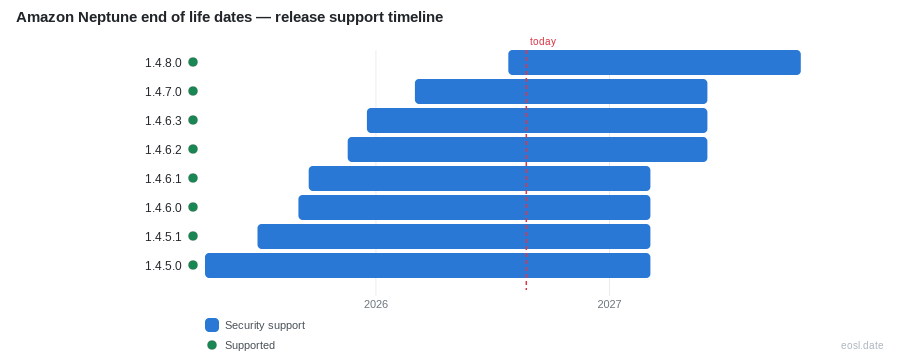
Currently Supported Amazon Neptune Releases - Active EOS/EOSL Support (22)
| Release | Upgrade Version | Released | Security Support | Latest |
|---|---|---|---|---|
| 1.5.0.0 | 1.5.0.1 | (1 month and 1 week ago) | Active | 1.5.0.0 (1 month and 1 week ago) |
| 1.4.8.1 | 1.5.0.0 | (1 month and 3 weeks ago) | (in 11 months) | 1.4.8.1 (1 month and 2 weeks ago) |
| 1.4.7.1 | 1.4.8.0 | (2 months ago) | (in 6 months) | 1.4.7.1 (2 months ago) |
| 1.4.8.0 | 1.4.8.1 | (3 months ago) | (in 11 months) | 1.4.8.0 (3 months ago) |
| 1.4.7.0 | 1.4.7.1 | (8 months ago) | (in 6 months) | 1.4.7.0 (8 months ago) |
| 1.4.6.3 | 1.4.7.0 | (11 months ago) | (in 6 months) | 1.4.6.3 (11 months ago) |
| 1.4.6.2 | 1.4.7.0 | (1 year ago) | (in 6 months) | 1.4.6.2 (1 year ago) |
| 1.4.6.1 | 1.4.6.2 | (1 year and 2 months ago) | (in 3 months) | 1.4.6.1 (1 year and 2 months ago) |
| 1.4.6.0 | 1.4.6.1 | (1 year and 2 months ago) | (in 3 months) | 1.4.6.0 (1 year and 2 months ago) |
| 1.4.5.1 | 1.4.6.0 | (1 year and 4 months ago) | (in 3 months) | 1.4.5.1 (1 year and 4 months ago) |
| 1.4.5.0 | 1.4.5.1 | (1 year and 7 months ago) | (in 3 months) | 1.4.5.0 (1 year and 7 months ago) |
| 1.4.4.0 | 1.4.5.0 | (1 year and 8 months ago) | (in 3 months) | 1.4.4.0 (1 year and 8 months ago) |
| 1.4.3.0 | 1.4.4.0 | (1 year and 10 months ago) | (in 3 months) | 1.4.3.0 (1 year and 10 months ago) |
| 1.4.2.0 | 1.4.3.0 | (1 year and 11 months ago) | (in 3 months) | 1.4.2.0 (1 year and 11 months ago) |
| 1.4.1.0 | 1.4.2.0 | (2 years ago) | (in 3 months) | 1.4.1.0 (2 years ago) |
| 1.4.0.0 | 1.4.1.0 | (2 years ago) | (in 3 months) | 1.4.0.0 (2 years ago) |
| 1.3.4.0 | 1.4.0.0 | (2 years and 1 month ago) | (in 3 months) | 1.3.4.0 (2 years and 1 month ago) |
| 1.3.3.0 | 1.3.4.0 | (2 years and 3 months ago) | (in 3 months) | 1.3.3.0 (2 years and 3 months ago) |
| 1.3.2.1 | 1.3.3.0 | (2 years and 5 months ago) | (in 3 months) | 1.3.2.1 (2 years and 5 months ago) |
| 1.3.2.0 | 1.3.2.1 | (2 years and 5 months ago) | (in 3 months) | 1.3.2.0 (2 years and 5 months ago) |
| 1.3.1.0 | 1.3.2.1 | (2 years and 8 months ago) | (in 3 months) | 1.3.1.0 (2 years and 8 months ago) |
| 1.3.0.0 | 1.3.2.1 | (3 years ago) | (in 3 months) | 1.3.0.0 (3 years ago) |
Amazon Neptune Releases Nearing End of Life - Support Ending Soon (7)
| Release | Upgrade Version | Released | Security Support | Latest |
|---|---|---|---|---|
| 1.1.1.0 | 1.2.1.0 | (4 years and 7 months ago) | (in 1 week and 5 days) | 1.1.1.0.R7 (3 years and 9 months ago) |
| 1.2.0.0 | 1.3.0.0 | (4 years and 4 months ago) | (in 1 week and 5 days) | 1.2.0.0.R4 (3 years and 1 month ago) |
| 1.2.0.1 | 1.3.0.0 | (4 years ago) | (in 1 week and 5 days) | 1.2.0.1.R3 (3 years and 1 month ago) |
| 1.2.0.2 | 1.3.0.0 | (4 years ago) | (in 1 week and 5 days) | 1.2.0.2.R6 (3 years and 2 months ago) |
| 1.2.1.0 | 1.3.0.0 | (3 years and 8 months ago) | (in 1 week and 5 days) | 1.2.1.0.R7 (3 years and 1 month ago) |
| 1.2.1.1 | 1.3.0.0 | (2 years and 8 months ago) | (in 1 week and 5 days) | 1.2.1.1 (2 years and 8 months ago) |
| 1.2.1.2 | 1.3.0.0 | (2 years and 3 months ago) | (in 1 week and 5 days) | 1.2.1.2 (2 years and 3 months ago) |
Amazon Neptune End of Life (EOL) Releases - No Longer Supported (10)
| Release | Upgrade Version | Released | Security Support | Latest |
|---|---|---|---|---|
| 1.1.0.0 | 1.1.1.0 | (5 years ago) | (1 year and 8 months ago) | 1.1.0.0.R3 (3 years and 10 months ago) |
| 1.0.5.1 | 1.1.0.0 | (5 years and 1 month ago) | (3 years and 9 months ago) | 1.0.5.1.R4 (4 years and 6 months ago) |
| 1.0.5.0 | 1.1.0.0 | (5 years and 3 months ago) | (3 years and 9 months ago) | 1.0.5.0.R5 (4 years and 6 months ago) |
| 1.0.4.2 | 1.1.0.0 | (5 years and 5 months ago) | (3 years and 9 months ago) | 1.0.4.2.R5 (5 years and 3 months ago) |
| 1.0.4.1 | 1.1.0.0 | (5 years and 11 months ago) | (3 years and 9 months ago) | 1.0.4.1.R1.1 (5 years and 8 months ago) |
| 1.0.4.0 | 1.1.0.0 | (6 years and 1 month ago) | (3 years and 9 months ago) | 1.0.4.0.R2 (5 years and 8 months ago) |
| 1.0.3.0 | 1.1.0.0 | (6 years and 3 months ago) | (3 years and 9 months ago) | 1.0.3.0.R3 (5 years and 9 months ago) |
| 1.0.2.2 | 1.0.3.0 | (6 years and 8 months ago) | (4 years and 3 months ago) | 1.0.2.2.R6 (5 years and 9 months ago) |
| 1.0.2.1 | 1.0.3.0 | (7 years ago) | (4 years and 3 months ago) | 1.0.2.1.R6 (6 years and 7 months ago) |
| 1.0.2.0 | 1.0.3.0 | (7 years ago) | (6 years and 6 months ago) | 1.0.2.0.R3 (6 years and 6 months ago) |
Running a fully managed graph database does not mean you can ignore versions: Amazon Neptune End of Life dates decide when AWS stops supporting the release your cluster runs. Whether your Amazon Neptune database powers fraud detection, knowledge graphs or recommendation engines through Gremlin, openCypher, SPARQL or Apache TinkerPop, this guide shows which dates matter and what to do before they arrive.
Amazon Neptune End of Life Policy and Lifespan Windows
AWS retires each Neptune engine version on a predictable schedule. An engine version almost always reaches its end of life at the end of a calendar quarter, with exceptions only when an important security or availability problem forces an earlier date. Once a version is retired, you must upgrade your database to a newer one.
How long a release stays available depends on its type:
- Minor engine versions remain available for at least 6 months after they are released.
- Major engine versions remain available for at least 12 months after they are released, and in practice a major release usually lives about two years.
Because every release carries its own date, the engine versions you run today may retire at different times, even inside the same account.
Major, Minor and Patch Engine Versions Explained
A Neptune version number has four parts, such as 1.4.8.1: product, major, minor and patch. Knowing which part changed tells you how risky the upgrade is and how soon you must act.
Major version updates
A major version introduces important new features and often breaking changes, so you should test your queries before moving. Its support lifetime is usually around two years.
Minor version updates
A minor version adds features, improvements and bug fixes without breaking changes. You choose whether AWS applies it automatically in the next maintenance window, and you can ask to be notified whenever one is released. The minor number is the one used for AutoMinorVersionUpgrade processing.
Patch version updates
A patch version ships only urgent bug fixes or critical security updates, seldom contains breaking changes, and is applied automatically during the next maintenance window. The product version, currently 1, changes only after sweeping changes to the interface.
End-of-Life Dates for Every Release
The table below lists a representative release from each retirement group, taken from the official engine release list. Releases between those rows share the same end date as their group, so find your version number first, then read across to the date and the recommended upgrade.
| Version | Released | End of life | Upgrade to |
|---|---|---|---|
| 1.2.1.0 | 2023-03-08 | 2026-12-04 | 1.3.0.0 |
| 1.3.0.0 | 2023-11-15 | 2027-03-06 | 1.3.2.1 |
| 1.4.6.3 | 2025-12-18 | 2027-06-03 | 1.4.7.0 |
| 1.4.8.0 | 2026-07-27 | 2027-10-27 | 1.4.8.1 |
| 1.4.8.1 | 2026-10-06 | TBD | 1.5.0.0 |
| 1.5.0.0 | 2026-10-13 | TBD | N/A |
Take a cluster still on 1.2.1.0 as an example. Its end date is 2026-12-04, so the notice was due at least 3 months earlier, and a check on 2026-10-27 leaves only 38 days to plan the move to 1.3.0.0 or later.
Engine Version Notices, Automatic Upgrades and the Maintenance Window
At least 3 months before an engine version retires, AWS sends an automated email notification to the address on your AWS account and posts the same message to the AWS Health Dashboard. The notification names the version you would be upgraded to, the impact on your DB clusters and the actions AWS recommends.
Once the date passes, three things change:
- You can no longer create new clusters or instances on that version, so scripts that create new clusters from an old version string start failing.
- Autoscaling cannot add read replicas on it either.
- Any cluster still running it is upgraded automatically during a maintenance window.
Customers who would rather control the timing should upgrade earlier, in a window of their own choosing, instead of waiting for the forced change.
Risks of Running a Legacy Engine
An engine past its deprecation date is a legacy engine. It is no longer Generally Available, AWS gives no support for it, and databases on it fall outside the Service Level Agreement. You are responsible for keeping versions current, because an outdated engine raises the odds of security, privacy and availability problems, including downtime.
How to Check Your Neptune Engine and Plan an Upgrade
You can read the installed release from the Neptune console or the instance-status API. From the CLI, list each cluster and its engine version:
aws neptune describe-db-clusters --db-cluster-identifier your-cluster-id --filters Name=engine,Values=neptuneCompare the result with the table above, then follow new releases through the Changes and Updates page or its RSS feed so the latest version never surprises you. A new release takes several days to reach every region, so confirm it appears in yours before scheduling the upgrade.