Amazon MQ for ActiveMQ End of Life (EOL) Dates and End of Support (EOS) Dates
Amazon MQ for ActiveMQ end of life (EOL) and end of support (EOS) dates: 3 Amazon MQ for ActiveMQ versions have reached EOL, including Amazon MQ for ActiveMQ 5.17 (EOL date: Jun 16, 2025) — no longer receiving security updates or patches. Amazon MQ for ActiveMQ 5.19 is the current supported release — 2 versions in active support. Also see Amazon Corretto end of support dates for related end-of-life information.
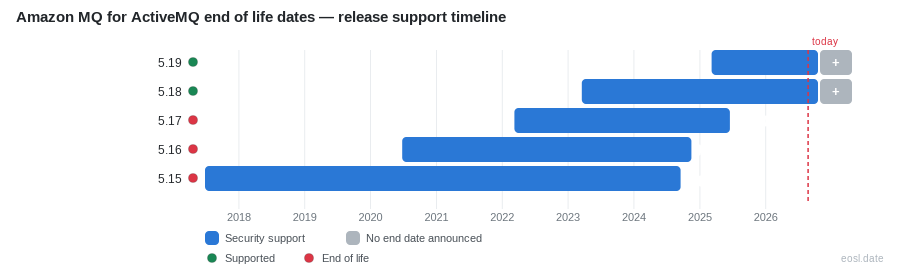
Currently Supported Amazon MQ for ActiveMQ Releases - Active EOS/EOSL Support (2)
| Release | Released | Security Support |
|---|---|---|
| 5.19 | (1 year and 8 months ago) | Active |
| 5.18 | (3 years and 8 months ago) | Active |
Amazon MQ for ActiveMQ End of Life (EOL) Releases - No Longer Supported (3)
| Release | Released | Security Support |
|---|---|---|
| 5.17 | (4 years and 8 months ago) | (1 year and 5 months ago) |
| 5.16 | (6 years and 4 months ago) | (2 years ago) |
| 5.15 | (9 years and 4 months ago) | (2 years and 2 months ago) |
If a broker in your estate runs on an old release, Amazon MQ for ActiveMQ end of life is the date that decides how long you can leave it alone. This guide shows which release lines the managed messaging service still covers, how much notice you get, and what happens when time runs out, so you can plan an upgrade before the automatic upgrade plans it for you.
Amazon MQ for ActiveMQ End of Life Explained
People use "EOL" for three different things: the end of a whole project, the end of support for one release, and the end of active investment in a codebase. Apache ActiveMQ is not at the end of the first. That holds for Apache ActiveMQ Classic, the Java-based 5.x broker that Amazon MQ runs, and for the newer 6.x line. The open source project still ships releases, and its community keeps publishing point releases. What matters to you is the second meaning, because a message broker that keeps starting without errors gives no warning when its release stops getting fixes.
On Amazon MQ the second meaning is written down. Amazon publishes a calendar, and each release line has a cut-off date after which AWS stops running it. Until that day the release is supported, patched and offered on the console. After it, the release is gone from the service, and your broker is moved to a newer one. The project's own release schedule, covered later, is a separate matter and does not decide your dates.
Version Support Dates for Every Release
The AWS developer guide lists each ActiveMQ version next to its end of support on Amazon MQ. The table below shows the dates published there, with the 5.19 line marked as the recommended choice. The newest lines have no cut-off date listed yet, which means no countdown has started, not that they last forever.
| ActiveMQ release | End of support on Amazon MQ | Status |
|---|---|---|
| 5.19 | Not announced | Recommended |
| 5.18 | Not announced | Supported |
| 5.17 | June 16, 2025 | Past its date |
| 5.16 | November 15, 2024 | Past its date |
| 5.15 | September 16, 2024 | Past its date |
Treat the table as a snapshot. The calendar in the AWS documentation is the source of truth, so check it before you commit to a schedule. If you are still on 5.17 or older, your broker has already been moved, or will be during its next maintenance window.
Major, Minor and Patch Version Numbers
Apache ActiveMQ numbers releases as X.Y.Z, and Amazon MQ reads the digits the same way. A change in X is a major version change, such as 5.17 to 6.0. A change in Y or Z is a minor version change, such as 5.18 to 5.19, and a new patch version within a line belongs in the same group. This split matters because the service handles the two kinds of change differently, as the next sections explain.
How the Support Calendar Notice Periods Work
The support calendar comes with three time limits, and together they define your safety margin:
- 90 days: Amazon MQ gives at least this much notice before a release reaches its cut-off, so the date should never surprise you.
- 30 days: inside this window you cannot create new brokers on the release, even though the existing ones keep running.
- 45 days: after the end of support date, AWS upgrades each remaining broker to the next supported release during its scheduled maintenance window, within this many days.
There is one exception to know about. Amazon can end support for a specific release without prior notice if it fails the service's quality, performance or security bar. In that case it blocks new brokers on that release and upgrades the existing ones to the next release that meets the bar, so a 90-day warning is a default, not a guarantee.
Upgrade Before Your Broker Hits End-of-Support
AWS recommends upgrading before the date rather than waiting for the automatic move, because you pick the time and can test your clients first. You can upgrade a broker manually at any time to the next supported version, whether a major or minor release, using the AWS Management Console, the CLI or the API. A version upgrade restarts the broker, so schedule it for a quiet period and confirm your clients reconnect cleanly.
When you create a broker without naming a release, Amazon MQ picks the latest version it offers as the default version. Naming a release explicitly, for example in a template, is safer, because a broker created from an old template can land on a release that is close to its cut-off.
Automatic Minor Version Upgrade in the Maintenance Window
The setting autoMinorVersionUpgrade controls routine patching. When it is on, Amazon MQ moves your broker to the newest available patch during the weekly maintenance window you configure, which delivers security updates without a manual step. It does not move you across a major boundary, and it will not rescue a broker whose release has already reached its end of support, since that one is replaced by the calendar rule above.
Listing Supported Engine Versions
To see which engine version choices exist in your Region right now, ask the service directly:
aws mq describe-broker-instance-options --engine-type ACTIVEMQThe output lists every supported minor and major release for each instance type, which is a quick way to confirm that the release you plan to move to is actually offered.
Where Upstream Apache ActiveMQ Stands on EOL
Apache ActiveMQ has no formally documented support policy of its own. In practice only the most recent releases receive fixes, and the project is best described as in maintenance mode: stable and patched, while the large architectural work now happens in Apache Artemis. In November 2025 the Artemis codebase became a separate top-level Apache project, which gave each broker its own community, but did not retire either one.
| Upstream release line | Community support status (mid-2026) |
|---|---|
| 6.2.x (November 2025) | Supported, current stream |
| 5.19.x (March 2025) | Supported, last maintained 5.x line |
| 6.1.x (March 2024) | Receiving fixes |
| 6.0.x (November 2023) | No longer supported |
| 5.18.x and older | Unmaintained upstream |
The 5.19 line was released in March 2025, and 6.2 followed in November. Read this table next to the Amazon MQ one. A release can still be offered by the managed service after the open source community has stopped patching it, so the vendor calendar protects your service dates while the upstream status tells you how soon a fix for a new CVE will arrive.
What Community Supported Means
Community support is not an SLA. Volunteers may fix a bug in the latest release, with no guaranteed response time and no promise to backport a critical fix to your specific build. Fine for a hobby project, but a gap for a payment or healthcare integration bus that must be covered with in-house skill or a commercial vendor. On Amazon MQ the AWS calendar, not upstream goodwill, is what guarantees your dates.
Risks of an Unsupported Broker Version
Inertia is the default with messaging: the broker works, so nobody touches it. The risk of an unsupported version grows quietly, and it shows up in three places.
Security Exposure
Brokers sit in the middle of your data flows and often hold credentials for downstream systems. Apache ActiveMQ has had serious, actively exploited vulnerabilities, including remote code execution. A supported release gets security patches for each new CVE, while an old one gets a public advisory that tells attackers where to look.
Compliance and Audit Findings
Frameworks such as PCI-DSS, SOC 2 and HIPAA expect software that still receives updates, so an old broker is close to an automatic audit finding.
Operational Risk
As a release ages, the engineers who remember its quirks leave and community answers dry up, which adds operational overhead to every incident.
Migration to Apache Artemis From an ActiveMQ Version Past Support
When an enterprise thinks beyond the next upgrade, the long-term direction is Apache Artemis. Its asynchronous journal, replication-based high availability and protocol-native design carry the roadmap, and it covers OpenWire, STOMP, AMQP, MQTT and JMS clients, so most applications connect without code changes. The honest question is feature parity, and the answer is mostly yes. The catch is that Artemis has no direct equivalent for several ActiveMQ features, and these surface late in a project if you do not check first.
| ActiveMQ feature | In Artemis | What you must do |
|---|---|---|
| Mirrored queues | No direct equivalent | Rework with diverts |
| Multi-KahaDB persistence | Not available | Redesign the storage layout |
| Proxy connector | Not available | Change the network topology |
| Pluggable storage lockers | Not available | Change the HA locking strategy |
Plan the move in stages. Inventory which features each broker really uses, map them to Artemis equivalents, run both brokers side by side, and cut clients over one application at a time. Note that the Amazon MQ FAQ describes the service as managed ActiveMQ and RabbitMQ, so a move to Artemis usually means running the broker yourself on EC2 or elsewhere in the cloud, and you take on the patching you used to hand to AWS.
A Support Policy Decision Framework
You do not have to choose between a panic migration and doing nothing. A simple decision framework maps your starting point to one of three paths:
| Your situation | Path |
|---|---|
| On 5.17 or older | Upgrade now to the recommended 5.19 line |
| On a supported release with a stable workload | Stay, and review the calendar every quarter |
| Need a new architecture or scale | Plan an Apache Artemis migration alongside the redesign |
| Rely on Apache ActiveMQ-only features | Stay current, and add commercial support if needed |
Whichever path you pick, the first step is the same: find out which release every broker runs. Most teams find one forgotten broker during an audit, and a quick inventory by Region costs far less than discovering it after an incident. RabbitMQ is a further option on the same service for teams that can use AMQP 0.9.1 or 1.0 instead of JMS, though that is an application change, not an upgrade.
Managed or Self-Managed: Who Owns the End of Support Date
With Amazon MQ, AWS runs a managed message broker: it provisions the infrastructure, patches the software, detects faults and recovers failed nodes, which removes most of the operational overhead, including moving brokers off a release at its cut-off. You can ask for a multi-AZ deployment to get high availability, and broker storage comes in two types: durability-optimized on Amazon EFS and throughput-optimized on EBS. Data is protected with encryption, and pricing is per broker instance hour plus storage, with no separate software license. None of these features changes the calendar: they all apply to whichever supported release your broker is on.
Self-managing Apache ActiveMQ on EC2 gives more control, including custom plugins, but then the end of support date is yours to track, and nobody moves your broker for you. The service's other engine, RabbitMQ, keeps its own version calendar, so a mixed estate needs two checks. If you want to hand that duty to AWS, stay on the service and watch the calendar; if you need features it does not offer, accept the patching work as the price.