Amazon MQ for RabbitMQ End of Life (EOL) Dates and End of Support (EOS) Dates
Amazon MQ for RabbitMQ end of life (EOL) and end of support (EOS) dates: 3.12 has reached EOL — EOL date: Mar 17, 2025. This version no longer receives security updates, patches, or support. Amazon MQ for RabbitMQ 4.3 is the current supported release — 3 versions in active support. Also see Amazon DocumentDB end of support life for related end-of-life information.
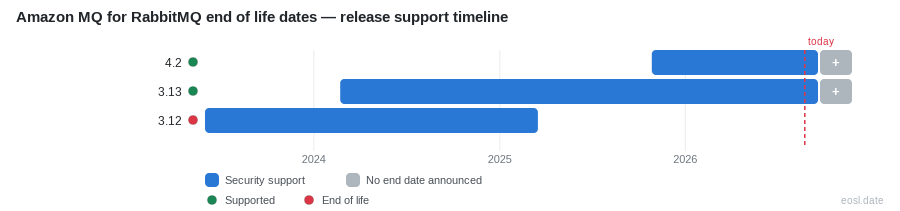
Currently Supported Amazon MQ for RabbitMQ Releases - Active EOS/EOSL Support (3)
| Release | Released | Security Support |
|---|---|---|
| 4.3 | (2 months ago) | Active |
| 4.2 | (1 year ago) | Active |
| 3.13 | (2 years and 4 months ago) | Active |
Amazon MQ for RabbitMQ End of Life (EOL) Releases - No Longer Supported (1)
| Release | Released | Security Support |
|---|---|---|
| 3.12 | (3 years and 6 months ago) | (1 year and 8 months ago) |
If you run brokers on Amazon MQ for RabbitMQ, the Amazon MQ for RabbitMQ end of life schedule decides when your engine version stops getting end of support coverage and when AWS moves your managed broker forward for you. Here is where each version stands today and how the lifecycle rules work, so you can plan an upgrade on your terms instead of AWS's.
Version support for RabbitMQ 4 and RabbitMQ 3 brokers
The version support calendar, also called the support calendar, lists every engine version and the date it leaves support. Amazon MQ currently offers two release series: RabbitMQ 4 (versions 4.3 and 4.2) and RabbitMQ 3 (version 3.13). Version 4.3, released on Amazon MQ on September 9, 2026, is the recommended broker engine version. Version 3.12 is already out: its end of support date passed on March 17, 2025, and it no longer receives security fixes or bugfixes on the platform.
| RabbitMQ version | Available on Amazon MQ since | Status |
|---|---|---|
| 4.3 | September 9, 2026 | Supported, recommended |
| 4.2 | November 20, 2025 | Supported |
| 3.13 | July 2, 2024 | Supported |
| 3.12 | May 9, 2023 | Ended March 17, 2025 |
RabbitMQ numbers follow semantic versioning as X.Y.Z. A change in X is a major version change, such as 3.13 to 4.0, while a change in Y or Z is a minor or patch change. When you create a broker you only pick the major and minor numbers, and leaving the field empty selects the latest engine version.
How the end-of-support date and maintenance window affect your broker
Every end-of-support date follows the same lifecycle rules, and they are worth memorising because they decide how much time you have:
- Amazon MQ gives at least a 90 day notice before a version reaches the end of support.
- Once that date passes, Amazon MQ automatically upgrades every broker on the version to the next supported one.
- The upgrade happens during your scheduled maintenance window, within 45 days after the end-of-support date.
- You cannot create new brokers on a version within 30 days of its end of support.
So an unplanned maintenance window upgrade is the real cost of waiting. A forced move can change client behaviour and cause downtime, which is why AWS recommends upgrading your broker before the date rather than waiting for the automatic step.
Engine version limits by instance type: mq.m7g, mq.t3 and mq.m5
Your instance type limits which versions you can run. RabbitMQ 4.3 and 4.2 run only on the mq.m7g family, across all its sizes. RabbitMQ 3.13 runs on mq.t3, mq.m5 and mq.m7g. If your brokers sit on mq.t3 or mq.m5, a move to RabbitMQ 4 therefore means changing the instance too, so budget for that in your upgrade plan.
To see exactly what a given instance supports, list the options with the AWS CLI:
aws mq describe-broker-instance-options --engine-type RABBITMQ --host-instance-type mq.m7g.largeUpstream community support and commercial support timeline
Amazon MQ sets its own end of support dates, but the open source project keeps a separate support timeline. Community support covers free security support, patching and bugfixes from the RabbitMQ community. Commercial support is available to license holders during that window, and extended support or long term support continues after community coverage ends. Official commercial dates are published through Broadcom, and the table below is indicative only.
| Release | End of community support | End of commercial support |
|---|---|---|
| 4.3 | 31 Jan 2027 | 30 Apr 2028 |
| 4.2 | 31 Jul 2026 | 30 Jun 2030 |
| 4.1 | 31 Jan 2026 | 30 Apr 2027 |
| 4.0 | 30 Apr 2025 | 30 Sept 2026 |
| 3.13 | 30 Sept 2024 | 31 Dec 2029 |
| 3.12 | 29 Feb 2024 | 30 Jun 2025 |
The two calendars differ, so a version can lose upstream community support while Amazon MQ still runs it. Treat the AWS date as the one that moves your broker, and the upstream one as a signal for how long fixes keep flowing.
Amazon MQ for RabbitMQ end of life: planning your upgrade with release notes
Good upgrade planning starts with the release notes. Read the open source release notes for the target series, then the Amazon MQ release notes, because the managed service adds its own limits. Version 4.3 brings quorum queue strict priority ordering with up to 32 levels, delayed retry with configurable backoff, and finishes removing features deprecated in 4.x. Those removals are exactly what the release notes flag as breaking, so the release notes for 4.3 deserve a careful read before you touch production.
Since May 2026 Amazon MQ also supports an in-place major upgrade from 3.13 to RabbitMQ 4, so a broker on 3.13 can jump straight across without a rebuild. Work through the release notes in this order:
- Read the release notes for each version between yours and the target.
- Test client libraries and queue types against a copy of your broker.
- Confirm the instance type, moving to mq.m7g where needed.
- Upgrade in a window you pick, well before the 90 day notice runs out.
- Re-check the release notes after each patch release, since they list newly fixed issues.
Brokers that finish this before the end-of-support date never see the forced upgrade, and the lifecycle stays a planned task rather than an incident.