Amazon Aurora MySQL End of Life (EOL) Dates and End of Support (EOS) Dates
Amazon Aurora MySQL end of life (EOL) and end of support (EOS) dates: 2 Amazon Aurora MySQL versions have reached EOL, including Amazon Aurora MySQL 2 (MySQL 5.7) (EOL date: Oct 31, 2024) — no longer receiving security updates or patches. Amazon Aurora MySQL 8.4.12 is the current supported release, with support through Apr 30, 2032 — 2 versions in active support. Also see Amazon CDK lifecycle dates for related end-of-life information.
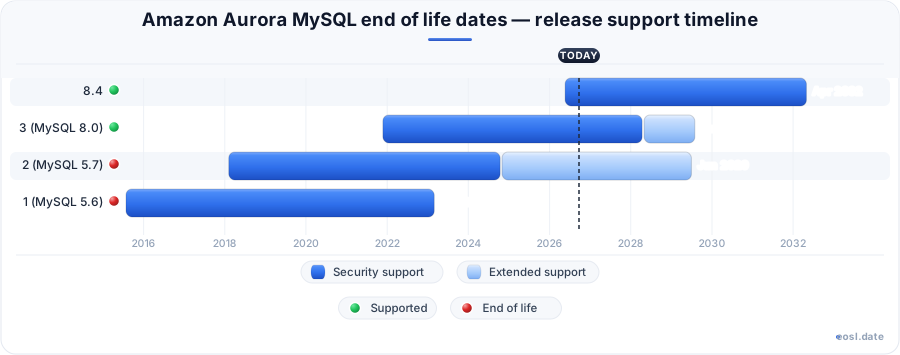
Currently Supported Amazon Aurora MySQL Releases - Active EOS/EOSL Support (2)
| Release | Released | Security Support | Extended Support | Latest |
|---|---|---|---|---|
| 8.4 | (6 months ago) | (in 5 years and 5 months) | Active | 8.4.12 (2 days ago) |
| 3 (MySQL 8.0) | (4 years and 11 months ago) | (in 1 year and 5 months) | (in 2 years and 8 months) | 3.14 (3 weeks and 6 days ago) |
Amazon Aurora MySQL End of Life (EOL) Releases - No Longer Supported (2)
| Release | Released | Security Support | Extended Support | Latest |
|---|---|---|---|---|
| 2 (MySQL 5.7) | (8 years and 9 months ago) | (2 years ago) | (in 2 years and 7 months) | 2.12 (3 years and 3 months ago) |
| 1 (MySQL 5.6) | (11 years and 3 months ago) | (3 years and 8 months ago) | — | 1.23.4 (4 years and 3 months ago) |
If you run a production database on AWS, Amazon Aurora MySQL end of life dates decide when your cluster stops getting security patches and when a forced upgrade can land on you. This guide explains the end of standard support milestones for Aurora MySQL 8.4, MySQL 5.7 and MySQL 8.0, and how Amazon RDS for MySQL compares. The dates come from AWS and endoflife.date, so you can plan your upgrade early. It also tells you where Aurora MySQL 8.4 sits against the support dates for older engines.
Aurora MySQL 8.4 Versioning Model and Community MySQL LTS
Aurora MySQL 8.4 is the first major version whose number matches community MySQL: it is named 8.4, not 4.x. Aurora major versions now follow the community MySQL Long Term Support (LTS) releases, so the major version you run is the community MySQL version your application is compatible with. Aurora MySQL 8.4 is compatible with community MySQL 8.4.7, which Oracle publishes as the first LTS, and the new versioning model removes the old translation between Aurora and MySQL numbers.
A version such as 8.4.7 has two parts: 8.4 is the major version and 7 is the Aurora minor version. The minor version is the unit you pick when you create a cluster or schedule an upgrade. Each patch inside an Aurora MySQL 8.4 minor is managed by AWS, which launches you on the latest patch automatically, and new instances in a cluster reuse the writer's patch so behavior stays consistent.
Because community LTS releases receive only bug fixes and security patches, you can expect stable behavior and compatibility across minor versions inside 8.4. That LTS model also gives each major a longer, predictable window before end of standard support. Aurora still adds features through Aurora MySQL 8.4 minor versions, keeps its high availability design, and that long-term support window is what lets you certify an application once. The community MySQL 8.4 changes also bring stronger security defaults, current authentication standards and refreshed InnoDB defaults.
Amazon Aurora MySQL End of Life Dates for MySQL 5.7 and MySQL 8.0
Each major engine has a date when the engine is deprecated and AWS stops standard patching. The dates below come from the public AWS sources and endoflife.date, so treat them as a snapshot of the support dates and confirm them for your own cluster. The oldest case is MySQL 5.7: the Aurora version compatible with it, 2.11.2, reached its end on October 31, 2024. For MySQL 8.0, community and RDS standard support ended on July 31, 2026.
| Engine and version | Standard support ends | Extended support ends |
|---|---|---|
| Aurora MySQL 2.11.2 (MySQL 5.7) | October 31, 2024 | Extended support applies after this date |
| RDS for MySQL 5.7 | February 29, 2024 | June 30, 2029 |
| RDS for MySQL 8.0 | July 31, 2026 | July 31, 2029 |
| RDS for MySQL 8.4 (LTS) | July 31, 2029 | July 31, 2032 |
Amazon RDS and Aurora use different calendars, and Aurora does not force a major version upgrade until the engine version is deprecated, which is the moment the choice is made for you. A community thread also cites October 2026 for Aurora MySQL 3.04.0, so check your minor version in the console rather than assuming a major version date covers it.
Extended Support When Standard Support Ends
When standard support ends, Amazon RDS Extended Support keeps critical security updates flowing, so customers who cannot finish a migration in time are not left exposed. RDS enrolls your databases automatically, and it is a paid offering available for up to three years past the end of standard support for a major engine version. It buys schedule, not a destination: you still have to land on a supported major version.
To check the end date for your own cluster, query the LifecycleSupportEndDate parameter, which lists the end date for either Aurora standard support or extended support. This is more reliable than a blog post because it reflects the engine in your own Region and account, not just the headline version.
Release Calendar and Version Currency for End of Standard Support
AWS now publishes version currency timelines, which state how soon a new community release reaches Aurora and RDS. The release calendar linked from each engine lists the target dates, so you can estimate when the next major version will arrive and plan around the release cycle.
| Engine | Minor versions | Major versions | Aurora LTS |
|---|---|---|---|
| RDS for MySQL | Within 30 days | Within 6 months of the community .1 release | Not applicable |
| Aurora MySQL | Within 3 months | Within 12 months of the community .1 release | Within 12 months of Aurora major GA |
Compare the timeline with Amazon RDS: Aurora validates storage, Global Database and serverless behavior on every version, so a new major arrives later, and the older major keeps its standard support until then. PostgreSQL and MariaDB follow their own calendars (Aurora PostgreSQL has a different major version window), so never read another engine's date as Aurora MySQL's. The LTS release for a major version gives you multi-year stability on one minor version, a good fit if you prefer fewer changes over new features.
Read the release notes for every minor you run: the notes announce each deprecation date, so you catch an upcoming end of life, and they record the compatible community version, the bug fixes included and any deprecated behavior. Aurora also surfaces recommendations in the RDS console when a new patch is available for your minor version.
Upgrade Planning, Maintenance Window and Blue/Green Deployments Before Deprecation
Good upgrade planning starts well before a deprecation notice. Work through this checklist:
- Review the MySQL 8.0 and 8.4 release notes and run upgrade prechecks to find incompatible queries, scripts and settings.
- Take a tested backup or snapshot, because rolling back from MySQL 8.0 to 5.7 is difficult.
- Run a database health check so lingering issues do not block the upgrade to the target version.
- Pick an upgrade method: an in-place upgrade, or restoring a snapshot into a new cluster.
- Enable automatic minor version upgrade so patches arrive without a manual forced upgrade.
For a major jump, the in-place upgrade is simplest, while a snapshot restore lets you test the new version beside production. Blue/Green Deployments go further: you build a staged copy on the target version, validate it, and switch traffic with minimal downtime. The AWS Database Migration Service, an Amazon RDS companion service, can also help check compatibility and reduce migration downtime.
Book the work in a maintenance window before the deprecation date, and allow for more than one of the maintenance windows, since unplanned downtime costs more than a delayed start. Before cutover, use the RDS Database Preview to test an application against a new major version in a non-production environment. If a deadline is close, extended support gives you breathing room to finish the upgrade safely, in your own Region and on your own cluster, with a rollback plan ready.
Finish the move to Aurora MySQL 8.4 before the end-of-life date for your current version and use extended support only as a fallback. Aurora Serverless clusters and Global Database setups face the same deadline, so upgrade secondary Regions with the primary and recheck authentication and storage settings afterward.