Amazon Kindle End of Life (EOL) Dates and End of Support (EOS) Dates
Amazon Kindle end of life (EOL) and end of support (EOS) dates: 15 Amazon Kindle versions have reached EOL, including Amazon Kindle Kindle Oasis (9th Generation) (EOL date: Jun 01, 2024) — no longer receiving security updates or patches. Amazon Kindle 5.19.6 is the current supported release, with support through Dec 31, 2030 — 12 versions in active support. Also see Amazon CDK end of life dates for related end-of-life information.
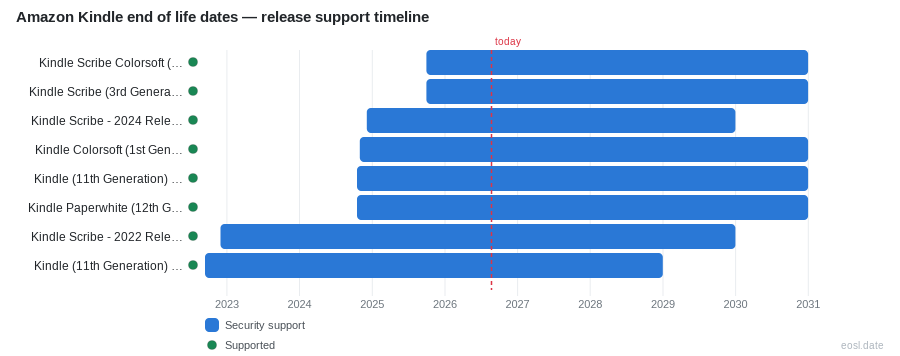
Currently Supported Amazon Kindle Releases - Active EOS/EOSL Support (12)
| Release | Released | Security Support | Latest |
|---|---|---|---|
| Kindle Scribe Colorsoft (1st Generation) | (1 year and 1 month ago) | (in 4 years and 1 month) | 5.19.6 (4 months ago) |
| Kindle Scribe (3rd Generation) | (1 year and 1 month ago) | (in 4 years and 1 month) | 5.19.6 (4 months ago) |
| Kindle Scribe - 2024 Release | (1 year and 11 months ago) | (in 3 years and 1 month) | 5.19.6 (4 months ago) |
| Kindle Colorsoft (1st Generation) | (2 years ago) | (in 4 years and 1 month) | 5.19.6 (4 months ago) |
| Kindle (11th Generation) - 2024 Release | (2 years and 1 month ago) | (in 4 years and 1 month) | 5.19.2.0.1 (7 months ago) |
| Kindle Paperwhite (12th Generation) - 2024 Release | (2 years and 1 month ago) | (in 4 years and 1 month) | 5.19.6 (4 months ago) |
| Kindle Scribe - 2022 Release | (3 years and 11 months ago) | (in 3 years and 1 month) | 5.19.6 (4 months ago) |
| Kindle (11th Generation) - 2022 Release | (4 years and 2 months ago) | (in 2 years and 1 month) | 5.19.2.0.1 (7 months ago) |
| Kindle Paperwhite (11th Generation) | (5 years ago) | (in 2 years and 1 month) | 5.19.2 (9 months ago) |
| Kindle Oasis (10th Generation) | (7 years and 3 months ago) | (in 2 years and 1 month) | 5.18.2 (1 year and 7 months ago) |
| Kindle (10th Generation) | (7 years and 7 months ago) | (in 1 month and 1 week) | 5.18.1 (1 year and 8 months ago) |
| Kindle Paperwhite (10th Generation) | (8 years ago) | (in 1 month and 1 week) | 5.18.1 (1 year and 8 months ago) |
Amazon Kindle End of Life (EOL) Releases - No Longer Supported (15)
| Release | Released | Security Support | Latest |
|---|---|---|---|
| Kindle Oasis (9th Generation) | (9 years ago) | (2 years and 5 months ago) | 5.16.2.1.1 (3 years and 5 months ago) |
| Kindle (8th Generation) | (10 years and 5 months ago) | (2 years and 5 months ago) | 5.16.2.1.1 (3 years and 5 months ago) |
| Kindle Oasis (8th Generation) | (10 years and 6 months ago) | (2 years and 5 months ago) | 5.16.2.1.1 (3 years and 5 months ago) |
| Kindle Paperwhite (7th Generation) | (11 years and 4 months ago) | (2 years and 5 months ago) | 5.16.2.1.1 (3 years and 5 months ago) |
| Kindle Voyage (7th Generation) | (12 years ago) | (5 years and 7 months ago) | 5.13.6 (5 years and 7 months ago) |
| Kindle (7th Generation) | (12 years and 1 month ago) | (7 years and 1 month ago) | 5.12.2.2 |
| Kindle Paperwhite (6th Generation) | (13 years and 1 month ago) | (7 years and 1 month ago) | 5.12.2.2 |
| Kindle Paperwhite (5th Generation) | (14 years and 1 month ago) | (11 years and 4 months ago) | 5.6.1.1 (11 years and 4 months ago) |
| Kindle (5th Generation) | (14 years and 2 months ago) | — | 4.1.4 |
| Kindle Touch (4th Generation) | (15 years and 1 month ago) | — | 5.3.7.3 |
| Kindle (4th Generation) | (15 years and 1 month ago) | — | 4.1.4 |
| Kindle Keyboard (3rd Generation) | (16 years and 2 months ago) | — | 3.4.3 |
| Kindle DX (2nd Generation) | (17 years and 5 months ago) | — | 2.5.8 |
| Kindle (2nd Generation) | (17 years and 9 months ago) | — | 2.5.8 |
| Kindle (1st Generation) | (19 years ago) | — | 1.2.1 |
Your Amazon Kindle end of life date arrived on May 20, 2026, when Amazon stopped serving the oldest e-reader models. You can still read what is on the device, but you can no longer buy or download new content to it. Here is how to check yours and what to do next.
Which Kindle Fire and Kindle models are discontinued
Amazon told customers that every Kindle and Kindle Fire released in 2012 or earlier is now discontinued. The company says the affected Kindle models were supported for at least 14 years, and some for 18. These are the devices on the end of support list:
- Kindle 1st Generation (2007), Kindle 2nd Generation and Kindle DX (2009)
- Kindle DX Graphite and Kindle Keyboard (2010)
- Kindle 4 and Kindle Touch (2011), Kindle 5 (2012)
- Kindle Paperwhite 1st Generation (2012)
- Fire tablets: Kindle Fire 1st Generation (2011), Kindle Fire 2nd Generation, Kindle Fire HD 7 and Kindle Fire HD 8.9 (all 2012)
Models from 2013 onward keep working, though their own clock is running. Support dates published by endoflife.date show the following:
| Kindle family | Released | Security support ends |
|---|---|---|
| Kindle (10th Generation) | 2019 | 31 Dec 2026 |
| Kindle Paperwhite (10th Generation) | 2018 | 31 Dec 2026 |
| Kindle Oasis (10th Generation) | 2019 | 31 Dec 2028 |
| Kindle Paperwhite (11th Generation) | 2021 | 31 Dec 2028 |
| Kindle Scribe (2024) | 2024 | 31 Dec 2029 |
Why Amazon Kindle end of life now covers older Kindles
Amazon says its decision to end support for older Kindles touches only about 3% of Kindle customers, but that still means up to two million devices. The company has not given a detailed reason. Security experts point to maintenance costs: hardware built years ago may carry security vulnerabilities that software cannot patch, and every supported device adds engineering work.
The risk to you is modest, since a Kindle has a small attack surface. Still, once security support stops, nothing fixes new problems, and an obsolete device is a poor fit for a sunset date that keeps moving. As the technology moves on, Amazon ends support for hardware it no longer wants to maintain. Analysts call the move understandable, yet critics call it obsolescence by email.
How to find your Kindle model and serial number on an old Kindle
Open Settings, then Device options, then device info to see which Kindle model you own. If only a serial number appears, search it online. Not sure how to read the results? The old Kindle rules are simple:
Kindle Touch and the touchscreen rule
A device with no touchscreen is on the list. The only touchscreen unit with a single button below the display is the Kindle Touch, released in 2011, so it is covered as well.
Kindle Paperwhite 1 serial prefixes
The first Kindle Paperwhite looks like its successors, so check the software version: it topped out at 5.6.1.1, and anything higher is newer. Otherwise read the serial number, which begins with B024, B01B, B020, B01C, B01D or B01F. Amazon posts release notes for newer builds.
No longer supported: what your Kindle library can still do
A device that is no longer supported still opens everything stored on it. Your Kindle library stays available in the Amazon account and the desktop app, but you cannot download new books from the Kindle Store, and borrowing, Send to Kindle, Libby and OverDrive stop with it. Reading offline works as long as the battery holds a charge.
- You can still read downloaded ebooks and e-books from before the cutoff.
- A deregistered Kindle can still be used for transfers.
- Avoid a factory reset: the device cannot register again and loses access to its library for good.
The experience becomes limited, a fully offline tool for reading on a basic display.
Sideloading, jailbreak and Calibre options for an obsolete Kindle
Sideloading is the easiest way to keep going. Buy DRM-free files from stores such as Smashwords, or grab public-domain titles from Project Gutenberg or Standard Ebooks. Connect the Kindle by USB and use Calibre to convert and sideload ebooks. DRM is the lock that stops purchased files moving between devices, so you cannot use those downloads this way.
Advanced owners can jailbreak the device and install KOreader, an open-source reader with better PDF handling and wireless syncing. Expect risk: a bricked device and a voided warranty, plus a security trade-off for your privacy.
E-waste, trade-in and recycling for sunset Kindles
Campaigners warn that cutting support is soft-bricking working devices and feeding electronic waste, a point the right to repair movement keeps making. Amazon runs a trade-in program, though a Kindle Keyboard fetches about $5, and it offers recycling for devices that cannot be resold. Both options matter after this cutoff, because a device that loses its store access is only worth keeping if you still read on it. You can also trade in an old model for a gift card, donate it to a library, or keep it as a memento.
Choosing a new Kindle or Kobo ereader
If you decide to upgrade, Amazon offers a 20% discount and a $20 e-book credit on a new Kindle. The basic 2024 Kindle suits most readers, and the Kobo Clara BW is the best alternative outside Amazon, with library books through borrowing. Any newer e-reader or ereader beats an unsupported one, and the discount and credit help soften the cost.